
 Worksheets
BSAB1C FQuiz2
Total questions: 24
Worksheet time: 28mins
What does the SUMIF function do in Excel?
Counts non-empty cells based on a condition
Sums cells based on a condition
Finds the average of cells based on a condition
Converts numbers to Roman numerals
Which function would you use to count cells that contain text or numbers?
COUNT
COUNTA
COUNTBLANK
ROMAN
What is the result of the formula =COUNT(A1:A5) if the range contains the values: 10, "Apple", 20, 30, and an empty cell?
5
4
3
2
Which function would you use to convert the text "excel" to "EXCEL"?
LOWER
PROPER
UPPER
COUNT
What does the COUNTIF function require as its main parameters?
A range and a condition
A range and a sum range
A string and a format
A number and a conversion type
If you want to convert the number 44 into a Roman numeral, which formula would you use?
=ROMAN(44)
=UPPER(44)
=COUNT(44)
=PROPER(44)
What is the output of =LOWER("HELLO WORLD")?
Hello world
hello world
HELLO WORLD
Hello World
Which function will return the number of blank cells in the range A1?
COUNT
COUNTA
COUNTBLANK
COUNTIF
What is the output of the function =PROPER("excel functions")?
EXCEL FUNCTIONS
excel functions
Excel Functions
Excel functions
What is the main purpose of conditional formatting in Excel?
To sort data
To filter data
To visualize data and make worksheets easier to understand
To calculate totals
Which of the following is an example of a conditional formatting rule?
Sum a range of cells
Change the font style of the entire sheet
Merge two cells
Highlight cells greater than $2000 in red
What must you do first to create a conditional formatting rule?
Open a new workbook
Select the desired cells
Insert a chart
Apply filters
If you want to highlight cells with a value higher than $4000 using conditional formatting, which type of formatting style would you select?
Data Bars
Icon Sets
Color Scales
Green Fill with Dark Green Text
What are Data Bars in conditional formatting?
Horizontal bars added to each cell, similar to a bar graph
Vertical lines that separate data columns
Icons that change based on the cell's value
A color gradient applied to cells
How can you remove all conditional formatting from a worksheet?
Select all cells and press Delete
Use the Undo command
Close and reopen the workbook
Go to Conditional Formatting, hover over Clear Rules, and select Clear Rules from Entire Sheet
Which of these options is not a type of preset conditional formatting?
Data Bars
Filters
Color Scales
Icon Sets
What command should you use to edit or delete individual conditional formatting rules?
Sort
Manage Rules
Format Painter
Insert
How many type of conditions are available in conditional formatting on Excel?
3
4
5
6

Which conditional formatting is applied on the data?
Color Scale
Data bars
Highlight Cells
Icon Sets
What is the correct syntax for the VLOOKUP function?
=VLOOKUP(lookup_value, table_array, col_index_num, [range_lookup])
=VLOOKUP(table_array, lookup_value, col_index_num, range_lookup)
=VLOOKUP(lookup_value, range, [range_lookup], col_index_num)
=VLOOKUP(col_index_num, lookup_value, table_array, range_lookup)
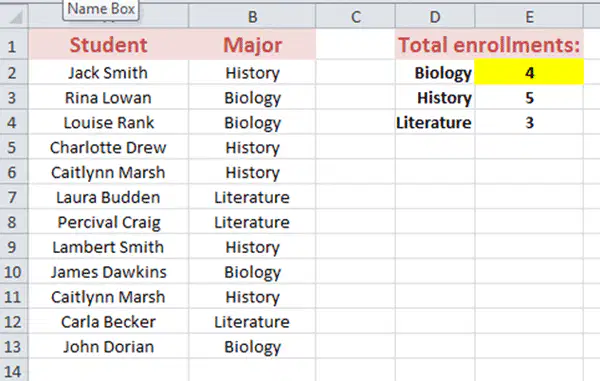
Study the screenshot. Which of the following options represent a formula or function that is entered in the highlighted cells (E2 to E4) to count the total enrollments for each module?
=IF(B2:B13="Biology","yes","no")
=COUNTIF(B2:B13="Biology")
=COUNTIF($B$2:$B$13,D2)
None of the options listed above are correct.
Which of the following is the correct formula syntax for using the COUNTIF function?
=COUNTIF(criteria, range)
=COUNTIF(criteria, range, [count_range])
=COUNT(IF(range, criteria)
=COUNTIF(range, criteria)
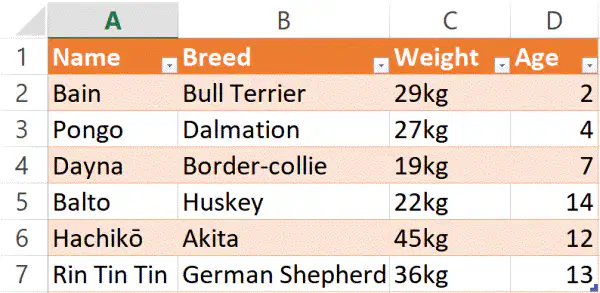
Terrence is writing a test. In a question asking him to find the weight of the Dalmation, his answer was: =VLOOKUP("Dalmation", B2:D7, 3, FALSE) What would be the result of his suggested formula be?
4
27kg
Pongo
Border-collie

Suppose you have a list where column B lists items you've purchased, and column C lists their costs. You want to find out how much you spent specifically on fruits. What formula you will use?
(a)

