
 Worksheets
Y9 Assessment 2 - Spreadsheets
Total questions: 35
Worksheet time: 18mins
What is the most popular spreadsheet program?
LibreOffice Calc
Microsoft Office Excel
OpenOffice Calc
Google Docs
What is a spreadsheet file made up of?
Only one workbook
Only one worksheet
Multiple workbooks and one worksheet
One workbook and multiple worksheets
What does a unique cell reference consist of?
A symbol and a number
A letter and a number
A number and a symbol
A letter and a symbol

What does this mouse pointer represent?
Selecting a cell
Adding a cell
The Fill Handle
Moving cells
What are the three types of data you can enter into a cell?
Numbers, text, and symbols
Data, labels, and formulas
Images, charts, and graphs
Headers, footers, and comments
What does the A-Z feature do?
Orders data in ascending or descending order
Duplicates data
Deletes data
Formats data
What is the function of the fill handle?
Deletes a cell’s contents
Highlights a cell
Duplicates a cell’s contents or fills a series
Formats a cell
Where can data be typed directly into?
The status bar
The toolbar
A cell or the formula bar
The menu bar
What does the name box show?
The selected cell
The worksheet name
The workbook name
The formula used
What happens when referenced data in a formula changes?
The formula updates automatically
The formula needs to be re-entered
The formula deletes
The formula becomes inactive
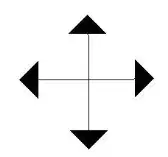
What does this mouse pointer represent?
Selecting a cell
Adding a cell
The Fill Handle
Moving cells
What is the purpose of labels in a spreadsheet?
To store numerical data
To make the spreadsheet easier to understand
To perform calculations
To create charts
What does ascending order mean?
Arranging by color
Arranging randomly
Starting at the top and going down
Starting at the bottom and going up
What is the purpose of formulas in a spreadsheet?
To duplicate data
To sort data
To format cells
To perform calculations that update automatically
What is the shortcut key for copying selected data in a spreadsheet?
Ctrl + Z
Ctrl + V
Ctrl + C
Ctrl + X

What does this mouse pointer represent?
Selecting a cell
Adding a cell
The Fill Handle
Moving cells
Which formula would calculate an average?
AVG (A1 : A9)
=AVERAGE(A1:A9)
=AVG(A1:A9)
AVERAGE(A1:A9)
What is the default file extension for a spreadsheet created in Microsoft Excel?
.xls
.xlsx
.txt
.csv
Which function is used to add a range of cells in a spreadsheet?
MAX
COUNT
SUM
AVERAGE
Which of the following is a type of chart commonly used in spreadsheets?
Pie Chart
Line Chart
Bar Chart
All of the above
What is the function of the SUM formula in a spreadsheet?
To add numbers
To subtract numbers
To multiply numbers
To divide numbers
Which of the following is used to create a chart in a spreadsheet?
Insert tab
View tab
Data tab
Review tab

What type of chart is this?
A Pie Chart
A Bar Chart
A Stacked Column chart
A combo Chart
Which of the following is used to sort data in descending order in a spreadsheet?
The Z-A feature
The SUM formula
The Insert tab
The Fill Handle
What is the main purpose of using charts in a spreadsheet?
To sort data
To perform calculations
To visually represent data
To format cells
Which of the following is a valid way to reference cell B5 in a formula?
5B
B5
B_5
CellB5
Which of the following is used to quickly copy a formula to adjacent cells in a spreadsheet?
Chart Wizard
Sort Tool
Format Painter
Fill Handle
What does the formula bar in a spreadsheet display?
The contents or formula of the selected cell
The worksheet name
The cell address
The chart type
What is the purpose of the AutoSum feature in Excel?
To automatically add a range of numbers
To sort data alphabetically
To format cells
To create charts
Which function is used to add up a range of numbers in a spreadsheet?
AVERAGE
SUM
COUNT
MAX
What is the intersection of a row and a column called in a spreadsheet?
Cell
Chart
Label
Range
Which tab would you use to format the appearance of cells in a spreadsheet?
Insert tab
Review tab
Home tab
Data tab
Which function would you use to find the highest value in a range of cells?
SUM
COUNT
MAX
MIN
Which Function can be used to get the smallest number in a group of cells
=LOW(A1:A10)
=LOWEST(A1:A10)
=MIN(A1:A10)
=MINIMUM(A1:A10)

What formula is in the yellow cell
C7=A7+B7
=A7*B7
C7=B7*A7
=B7/A7

