
NEW
Font size
 Worksheets
Representing bitmap images
Total questions: 28
Worksheet time: 14mins
A text file is created and encoded using 8-bit ASCII. The file contains 142 characters including spaces. What is the file size (in bytes) of the text file?
142 bytes
284 bytes
71 bytes
256 bytes
The file contains 142 characters including spaces. The file is encoded using 16-bit Unicode. What is the file size (in bytes) of the text file?
142 bytes
284 bytes
71 bytes
256 bytes

What is the smallest element in an image called?
Byte
Pixel
Bit
Resolution
What happens when you magnify an image?
It becomes blurry
It shows more colors
It reveals tiny elements called pixels
It changes shape

What is the size of the enlarged area mentioned in the document?
8 × 4 pixels
10 × 5 pixels
6 × 3 pixels
12 × 6 pixels
What is the term used for a way of representing an image as mentioned in the document?
Vector
Bitmap
Raster
Grid
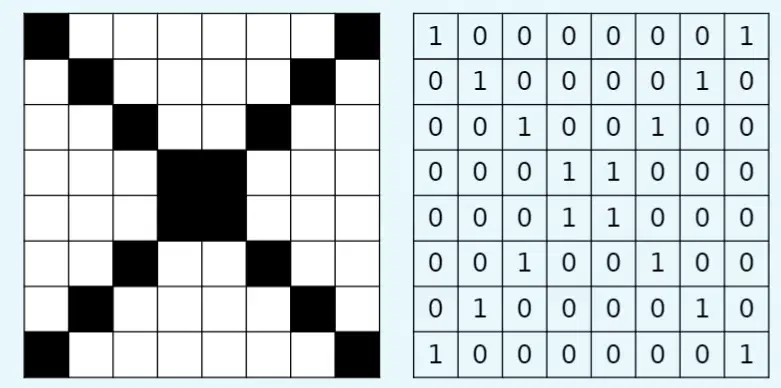
What does the number 1 represent in the pixel image?
White
Black
Gray
Red
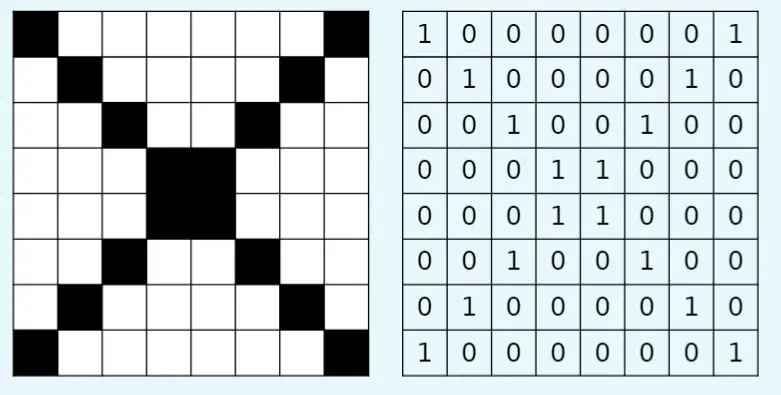
What does the number 0 represent in the pixel image?
Black
Red
White
Blue
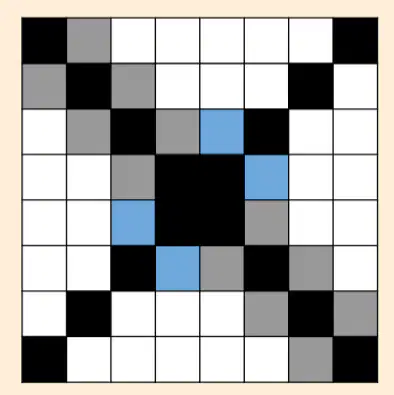
What is needed to have more colors in your images?
More pixels
More bits
More brightness
More contrast
What does having 2 bits per pixel allow you to do in an image?
Use 2 colors
Use 4 colors
Use 8 colors
Use 16 colors
How many bit patterns can be created with 2 bits?
2
3
4
5
What is the term used to describe the number of bits per pixel in an image?
Pixel density
Colour depth
Resolution
Bit rate
What is the formula to calculate the number of possible combinations of 1s and 0s for n bits?
n^2
2^n
n!
n/2
What formula is used to determine the number of colors based on color depth?
n^2
2^n
n + 2
n/2
What is the maximum number of colors that can be represented using a 3-bit color depth?
4 colors
6 colors
8 colors
7 colors
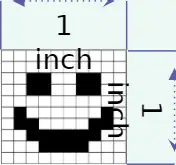
What does a 1-bit colour depth mean for an image?
The image has only black and white pixels.
The image has 256 shades of grey.
The image is in full color.
The image has 16 million colors.
How does colour depth affect an image?
It impacts the quality of the image.
It changes the size of the image.
It determines the speed of the image.
It affects the shape of the image.
How many colours are used in a 4-bit colour depth image?
8 colours
16 colours
32 colours
15 colours
What does an 8-bit colour depth image mean in terms of tones of grey?
128 tones of grey
256 tones of grey
255 tones of grey
127 tones of grey
What type of image uses 256 tones of grey to represent it?
RGB image
CMYK image
Greyscale image
Sepia image
What is the colour depth of an image that uses 256 colours?
4-bit
8-bit
16-bit
24-bit
For what type of images is an 8-bit colour depth generally acceptable?
High-quality print photographs
Web-based images
Black and white images
3D images
What are the typical colour depths for high-quality print photographs?
8, 16, or 24 bits
4, 8, or 16 bits
16, 24, or 32 bits
24, 32, or 48 bits
What is the print size of the image? 1000 pixels X 200 pixels and the image has a resolution of 200ppi.
0.5 inch x 0.1 inch
5 inch x 1 inch
10 inches x 2 inches
3 inches x 3 inches
What happens to the print size if you double the pixels per inch from 10 to 20?
The print size will double.
The print size will halve.
The print size will remain the same.
The print size will triple.
Why does the print size halve when the pixels per inch are doubled?
Because the image size increases.
Because the image size decreases.
Because the pixels per inch have increased.
Because the pixels per inch have decreased.
What is the typical image resolution used in publishing to ensure high quality when printed?
72 pixels per inch
150 pixels per inch
300 pixels per inch
600 pixels per inch
What is the typical resolution used for images created for the web?
96 pixels per inch
72 pixels per inch
300 pixels per inch
150 pixels per inch

