
 Worksheets
TSDE Final Exam Review
Total questions: 79
Worksheet time: 1hrs 1mins
The HOME tab is used to change document margins.
True
False
The Layout tab in the Page Setup dialog box is used to change the orientation of pages in a document.
True
False
what is the keyboard shortcut for saving a document?
[Ctrl][X]
[Ctrl][S]
[Ctrl][C]
[Ctrl][A]
What is the keyboard shortcut for pasting text?
[Ctrl][C]
[Ctrl][P]
[Ctrl][X]
[Ctrl][V]
What is the keyboard shortcut for cutting text?
[Ctrl][X]
[Ctrl][C]
[Ctrl][Q]
[Ctrl][A]
Which feature can you use to find and insert a synonym for an overused word?
AutoCorrect
Spelling and Grammar
Find and Replace
Thesaurus
Page setup and orientation options are found on the ________ tab on the ribbon.
File
Tab
Layout
Paragraph Mark
The ___________ button increases the size of text to the next established size.
Font Size
Font
Increase Font Size
Decrease Font Size
The _____________ option allows one to increase or decrease the indentation of items in a bulleted or numbered list.
Change List Level
List level Change
Numbered List
Picture ___________ are just picture shapes and borders.
Format
Styles
Shapes
Animations can be set for the _________________ and other animations that can be used when objects appear, leave, and are emphasized.
Entrance, Exit, Emphasis
Slide
Picture
shape
The __________ option will apply a transition to every slide in the presentation.
Normal View
Alt Text
Apply to All
Apply to None
Save Icon


Highlighter Icon


Dialog Box Launcher Icon
What is a page break?
The space around the paragraph.
The distance between the lines in a paragraph.
The location in a document where one page ends and another begins.
The location in a document that contains the title page
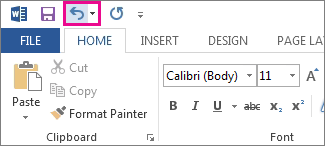
If you make a mistake, you can
press CTRL U
Click the undo button at the top of the page
delete your work and start over
TRUE or FALSE. You cannot change the color of words in Microsoft Word.
True
False
How do you capitalize a letter?
double click the letter
It isn't possible.
Hold down the shift key and the letter

Bold
Body
Font

Font size
Bold
Size

We can insert a page number at
Header
Footer
Both A and B
None
Color and pattern used to fill a closed shape is called:
Fill style
WordArt
Shape
Fill Back
The default alignment for paragraphs is:
Right-aligned
Left-aligned
Centered
Justified
What does a red underline on a word indicate?
Grammar mistake
Synonym
Spelling mistake
Word has been entered multiples times
Which of the following software programs is used to create a collection of slides that may contain text, charts, pictures, sound, movies, or multimedia, and is often called a presentation graphics program?
Office
PowerPoint
Word
WordPad
Which term refers to the boxes that hold text or objects on a slide?
Text Area
Entry Box
Field
Placeholder
What type of software is MS-PowerPoint considered to be?
Word Processing
Spreadsheet
Database
Presentation
A predesigned set of colors, fonts, effects and layouts that can be applied to a presentation
Font
Slide
Menu Bar
Theme
A box with dotted borders that holds a place for content on a slide.
Clipboard
Placeholder (Textbox)
Margin
Presentation
I _________ keep my thumbs near the spacebar when I type.
SHOULD
SHOULD NOT
I _________ look anywhere I want when I type.
SHOULD
SHOULD NOT
I _________ use both hands and all my fingers while typing.
SHOULD
SHOULD NOT
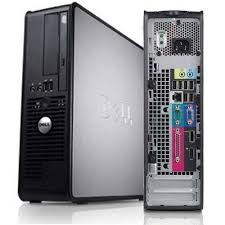
The basic benefit of a desktop computer is portability.
True
False
I _________ rage or bang on my keyboard when I type.
SHOULD
SHOULD NOT
Which of these DO NOT do when writing an email or memo?
Proper Spelling
Proper Grammar
Write your Name
Write it like a text message
When typing an E-Mail, type the letter in:
All Caps
Complete Sentences
All Lowercase

Look at the blue circle on the image. Which finger is selected?
right middle
left index
right thumb
left middle
The keyboard shortcut for UNDO is Ctrl + Z.
True
False
Battery power is considered a basic part of a laptop computer.
True
False





Hint: They feel different when you touch them.


The home row on the numeric keypad is _____.
123
456
789
None of the above

Which one is the Bold icon?
icon A
icon B
icon C
icon D

Which one is the Spell check icon?
icon A
icon B
icon C
icon D

Which one is the Underline icon?
icon A
icon B
icon C
icon D
The typist should place his/her feet:
flat on the floor for balance
crossed at the ankles
stretched out for comfort
None of the above
Which of the following are the home keys?
asdf jkl:
qwerty
asdf jkl;
asdfg hjkl;
Which finger do you use to strike the ENTER key?
left little finger
right little finger
right thumb
left thumb
When typing numbers on the top row, you should _____________
stretch your fingers
press ctrl+F
wrist should be flat on the keyboard
move both hands to the top row
To remove a character that is to the left of (or behind ) the cursor, press _______________
backspace
delete
CAPS lock
Shift
To type in all CAPITAL letters, press _____________
backspace
delete
CAPS lock
page up
To make an exclamation mark, press the shift key and then press _____ at the same time
9
1
5
7
What is an e-mail?
electronic mail
evolution mail
instant messenger
Which tab is used to input text and graphic in Microsoft Word?
design
input
view
insert
Kimberly is typing a business letter. Which Microsoft Office product would she use?
Microsoft Word
Microsoft Excel
Microsoft PowerPoint
Microsoft Access


