
NEW
Font size
 Worksheets
Year 4 MidTerm Exam Sem 2 2025 reviewer
Total questions: 30
Worksheet time: 15mins
_____________ allows you to create posters, birthday cards and book.
Ms Word
Desktop Publisher
Ms Excel
Database
Which of these is an example of Desktop Publisher?
Ms Access
Ms PowerPoint
Scribus
Blogger
Scribus is a/an __________ application that can be downloaded from the internet.
free
expensive
hacker
useless
What is the official site of where you can download Scribus?
www.google.com
www.lycos.net
www.youtube.com
www.scribus.net
Where is Scribus located after installing it on your computer?
Accessories
control panel
system 32
All programs
The software Scribus was created by _____.
Teachers
Doctors
volunteers
astronaut
The __________ shows you the position and size of objects in the document.
ruler
toolbar
document area
zoom tools
Which application is Scribus similar to?
Ms Excel
Ms Paint
Ms Word
Ms Access
The __________ displays icons for the tools commonly used in Scribus.
windows controls
rulers
toolbar
bleed area
The _________ displays the current number and allows you to move between pages in document.
rulers
toolbar
document name
page number
In the Scribus toolbar, which tool creates a new Scribus document?
New
Open
Save
Close
In the Scribus toolbar, which tool allows you to cut, copy and paste?
undo and redo
cut, copy and paste
select item
Save as PDF
What is the shortcut key for closing a document?
Ctrl + N
Ctrl + O
Ctrl + Q
Ctrl +F4
What is the shortcut key for printing a document?
Ctrl + N
Ctrl + P
Ctrl + Q
Ctril +F4
You can draw shapes in Scribus by going to the insert menu and clicking on ‘_______’.
Insert shapes
Insert pictures
Insert text
Insert Frame
_________ allows you to undo or redo changes that were made to the document.
Open and close
Cut, copy and paste
Select item
Undo and Redo
Use these to minimise, maximise and close the current window.
window controls
rulers
toolbar
bleed area
You can also open Scribus by clicking on the shortcut icon on the _____________.
recycle bin
temp folder
desktop
control panel
Ctrl + X is the shortcut key for____.
delete
copy
cut
paste
Another way of doing Undo is by pressing _________ keys.
Ctrl + N
Ctrl + Z
Ctrl + Q
Ctril +F4
A _______________________________ is a software that is used for laying out artwork and typesetting for making printed or digital documents.
Desktop publisher
Microsoft Office Word
box
easily
shortcut
You can also open Scribus by clicking on the _____________ icon on the desktop.
Desktop publisher
box
larger
easily
shortcut
To change the size of the shapes, click and drag the corners of the bounding ___________.
Desktop publisher
box
larger
easily
shortcut
If you are creating a poster, you will need a _________ document size.
Desktop publisher
box
larger
easily
shortcut
The main difference between Ms Word and Scribus is that the text and images can be laid out more _____________ in Scribus.
Desktop publisher
box
larger
easily
shortcut
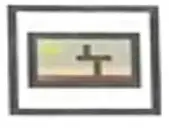
What tool is this?
Insert line
Insert Polygon
Insert Shape
Insert Table
Insert Image frame
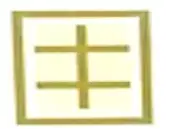
What tool is this?
Insert line
Insert Polygon
Insert Shape
Insert Table
Insert Image frame

What tool is this?
Insert line
Insert Polygon
Insert Shape
Insert Table
Insert Image frame

What tool is this?
Insert line
Insert Polygon
Insert Shape
Insert Table
Insert Image frame
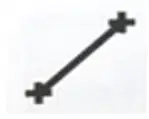
What tool is this?
Insert line
Insert Polygon
Insert Shape
Insert Table
Insert Image frame

