
 Worksheets
Coding Club - PKF Test
Total questions: 60
Worksheet time: 59mins
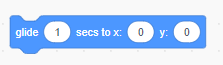
Which group of blocks include the "Glide" block?
Motion
Looks
Control

What does this color means?
Motion
Sound
Sensing


What will happen when you run this code?
Change color
Grow and shrink
Spin
Bounce

What will happen when you run this code?
Bounce everywhere
Add background music
Change scene
Play a beat
Say something
What is coding?
Choosing different backgrounds for your animation.
A list of commands put together to make your animation work.

Where to find these codes?


What makes a program start
Motion Blocks
Event Blocks
Pen Blocks
Makey-Makey Blocks
Sensing blocks are used to tell the sprite what to do when touching something on the stage.
True
False
When you make a mistake in your code it is called...
Script
Bug
Animation
Code


What happens when we click this?
Change the Sprite
Program Starts
Program Stops


Which colour blocks are for motion?
Orange
Green
Blue
Purple

When I run my program using this code, it doesn't work. Why?
Because the sprite or character is not selected so it won't play.
Because there is no 'when flag clicked' block.
Because there is no yellow event block in the coding script.

This script is correct. But it could have included a certain block to make it easier or shorter to read. Which is it?
Forever block.
Repeat block.
Move 30 steps.

What does this image show?
X and Y coordinates
Where the move blocks need to go to.
Where a sprite is positioned on the screen.
The volume for the sounds in Scratch.

What are these type of blocks called?
Motion
Control
Variables
Event

Where in the menu would I go if I want to ask a question?
Looks
Say
Sound
Sensing
Which script would make a sprite glide in different directions forever?


Which sensing block would help your computer trackpad/mouse glide over to a sprite?


What would you do with this part of the Scratch menu?
Create variables to help with own script.
Create your own custom Scratch blocks.
Find extra menu items (like music and drawing).

What happens when the green flag symbol is clicked in a Scratch Program?
The program is DELETED
The program STARTS
The program STOPS
The program is SAVED TO FAVORITES

Look at this code: What will happen if the green flag is clicked?
A new Sprite will be added
The Sprite will spin forever
The Sprite will move right 15 steps
Nothing.

Which of the following is NOT TRUE about this code?
The theoretical probability of guessing the right number is 1/5.
The code will automatically reset after giving you the output.
You can also create this code using multiple conditional statements.

What is the theoretical probability of picking an odd number in this code?
1/5
1/2
3/10
6/10

What will the cat say when this script is run?
Have a nice day. (only)
Here's some fruit. (only)
Here's some fruit. Have a nice day.
You can't have any. Have a nice day.
To add a new sprite to your code, you click on:


When is this used?
With the point in direction block.
With the move block.
When I want the game to end.
When I want to change costume

What is the output of the program?


What is the output of the program?


What is the output of program?

WHAT IS THE OUTPUT OF THE PROGRAM?


WHAT IS THE OUTPUT OF THE PROGRAM?


TO START THE ALGORITHM WE USE ......


TO DRAW IN SCRATCH WE USE:


WHICH ONE OF THE FOLLOWING BLOCKS IS NOT A REPETITION LOOP.


what are the two axis in scratch
x and y
n and t
j and w
k and somethig
If your sprite is at the coordinate 0,0 where on the screen is it?
Dead center
Bottom Left Corner
Top Left Corner
Top Right Corner
If the "W" key moves the character up, which of the following is TRUE...
The code stack for W should include "Change y by -10"
The code stack for W should include "Change x by 10"
The code stack for W should include "Change y by 10"
The code stack for W should include "Change x by -10"
Coordinates (x,y)
determine the position of the Sprite on stage.
are near the end of the alphabet.
are a great way to organize your clothes.
The x coordinate is
diagonal (from lowest left to highest right).
vertical (up and down).
horizontal (side to side).

What does this block do?
It writes notes for you
It plays a musical note
It beats the drum

What does this code do?
It clicks the sprite forever
It allows you to draw shapes
It generates sprites forever

What does this color means?
Events
Control
Pen
What does this color means?
Motion
Sound
Sensing


If this script is given to a sprite, what will the sprite say?
5
6
30
11

If this script is given to a sprite, what will the sprite say?
7
9
5
8

What will the sprite say after reading this script?
141
142
131
174



