
 Worksheets
სერთიფიცირება ფოტოშოპი
Total questions: 51
Worksheet time: 36mins

you must select black colored star with one click using specific tool and then expand the selection you made by 20px and fill the selection with the same black color.
Choose the correct answer.
Select star by using Quick Selection tool > Go to Select menu > Modify > Expand > Fill selection with black color
Select star by Magic wand tool > Go to Select menu > Modify > Expand > Fill selection with black color
Select star by Polygonal Marquee tool > Go to Object menu > Edit Selection > Expand > Fill selection with black color
Select star by Magic wand tool > Go to Select menu > Transform Selection > Expand > Fill selection with black color
Type your Answer, what is this?
Copies exact pixels from one
part of the image to another
(a)
You must change grid properties
Choose the correct action:
Preferences > Guides, Grids & Slices
File > File info > Guides, Grids & Slices
Edit > Guides, Grids & Slices
which types of editing are Non-destructive (choose 3)
Masking
Making Adjustments Using Image > Adjustments Menu
Using Adjustment Layers
Use the Clone Stamp tool
Transforming Smart Objects
What is Tracking?
A Smart Object can have a linked external file, or a linked instance inside Photoshop.
Yes
No
A smart Filter cannot be hidden without hiding the entire layer.
Yes
No
You can make changes to a Smart Filter after you've dded it to a layer.
Yes
No
What is Kerning?
is edited with the painting or selection tools.
(a)
is created with the pen or shape tools.
(a)
Linked Smart Objects enable the ability to perform non-destructive transforms without losing original image quality.
Yes
No
Layer Below Shapes Other Layer that is on top
(a)
Type your Answer, what is this?
Paints with sampled pixels from
an image, sample spot required
What is Leading?
help organize your content through establishing visual hierarchy by nesting layers.
Linking
Grouping
Merging
Grids can be unlocked and moved around.
Yes
No
you must create guide without using help of the ruler
Choose the correct action:
Object > Guide > Create a new guide
View > Guides > New Guide
Edit > Guides > Create a guide
Guides are nonprinting lines that can be placed to help align objects.
Yes
No
Under which Photoshop menu is the option for adjusting the color mode of a project?
Image
View
File
Type
Which panel gives users the option to utilize a text tool, as well as adjust typeface?
Info
Character
Brushes
Tools
Which of the following can be accessed in the File > File Info selection of Photoshop? (Choose 2)
Current version of Photoshop
File creation date
Adobe Creative Cloud account
Copyright status
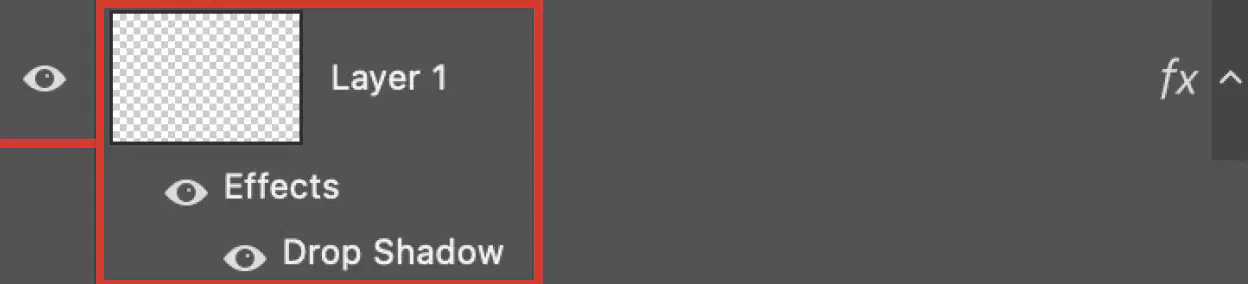
what type of layer is this?
Text Layer
Clipping Mask
Layer style
Shape layer

What type of Creative Commons License it this?
Attribution (BY): You may use the work only
if you give the author credit.
Share-alike (SA): You may distribute derivative
works only under a license identical to
(not more restrictive than) the license that
governs the original work.
Non-Commercial (NC): You may use the work
only for non-commercial purposes.
No Derivative Works (ND): You may only use
exact copies of the work, not derivative works
and remixes based on it.
The rulers must be visible in order to add grids or guides.
Yes
No
Type your Answer, what is this?
Paints with sampled pixels from
an image, sample spot not required
Which panel is used to insert superscript and subscript characters,
currency symbols, and specialized characters?
Glyphs
Custom Shape
Swatches
Properties
you must update the metadata of the file
Choose the correct action:
Edit > File info
File > File Info
Preferences > File Info
Layer > File Info

What type of Creative Commons License it this?
Attribution (BY): You may use the work only
if you give the author credit.
Share-alike (SA): You may distribute derivative
works only under a license identical to
(not more restrictive than) the license that
governs the original work.
Non-Commercial (NC): You may use the work
only for non-commercial purposes.
No Derivative Works (ND): You may only use
exact copies of the work, not derivative works
and remixes based on it.
Type your Answer, what is this?
Lightens areas of an image

What type of Creative Commons License it this?
Attribution (BY): You may use the work only
if you give the author credit.
Share-alike (SA): You may distribute derivative
works only under a license identical to
(not more restrictive than) the license that
governs the original work.
Non-Commercial (NC): You may use the work
only for non-commercial purposes.
No Derivative Works (ND): You may only use
exact copies of the work, not derivative works
and remixes based on it.
The option in the Crop tool options bar allows you to preserve or remove pixels
when you crop an image
Content Aware
Delete Cropped Pixels
Enable Crop Shield
Use Classic Mode
When using a brush, which key can be pressed to pull up the eyedropper?
Alt
Ctrl
Shift
F1
You are editing a photo, and one of the trees in the landscape would balance the composition better if it were farther to the right side of the frame. Which of the following features would be the most effective to move the tree to the right side of the image?
Spot Healing Brush
Content-Aware Move
Clone Stamp
Magic Wand
Subtractive Color Mode.
Type your answer below.
(a)
You must change the document color mode to CMYK so it can be printed
Choose the correct action
Image > Mode > CYMK
Edit > Mode > CYMK
File > Mode > CYMK
File > Color Mode > CMYK
Which is the keyboard shortcut for setting up rulers in a Photoshop project
Ctrl + R
Ctrl + G
Shift + R
Ctrl + Shift + R

What type of Creative Commons License it this?
Attribution (BY): You may use the work only
if you give the author credit.
Share-alike (SA): You may distribute derivative
works only under a license identical to
(not more restrictive than) the license that
governs the original work.
Non-Commercial (NC): You may use the work
only for non-commercial purposes.
No Derivative Works (ND): You may only use
exact copies of the work, not derivative works
and remixes based on it.
Which is a legal term which indicates an idea, process, or physical creation that comes from
the work of the mind?
Valued work
Derivative works
Ethical project
Intellectual property
Which are measurement options for the ruler in Photoshop? (Choose 3)
Parallels
Points
Picas
Places
Pixels
Which Photoshop tool allows users to select an area of an image using a specific color, or color range?
Polygonal Lasso tool
Marquee tool
Magic Wand tool
Lasso tool
A document has a Shape layer with a Drop Shadow applied to it. You need to make the shape transparent
and change the transparency of the shadow to 50%. what should you do?
Change the Opacity value to 50%.
Click the Eye icon next to the layer.
Change the fill value to 0% Opacity value to 50%.
Click the layer thumbnail.
Which are types of gradients to choose from when working in Photoshop? (Choose 3)
Angle
Rounded
Linear
Diamond
Symmetrical
Additive Color Mode.
Type your answer below.
(a)
Photoshop must be configured to ensure all exported images include the copyright and contact information.
select the correct action:
Preferences > File Management > Status > Copyrighted
Preferences > Export > Quick Export Metadata > Copyright and contact info
Edit > Export As > Select mode: Copyright and contact info
File > File Info > Copyright Status > Copyright and contact info
You have opened a PSD document with multiple layers in it; you need to export only one layer. How will you do it?
File > Export As > Choose Layer > Export
File > Export > Quick Export a layer as png
Layer > Export as > Export
Object > Export > Quick Export a png
You must apply Moss Style Preset to a layer named "Button".
Choose the correct action
Windows > Styles > Find the moss style > apply
Object > Styles > Find the moss style > apply
You must change Photoshop Properties to automatically save recovery information of the file
Preferences > File Handling > automatically save recovery information Every
Edit > File Handling > automatically save recovery information Every
File > File Handling > automatically save recovery information Every
I have a file with Creative Commons license, I can't do any changes to the file and can not use it commercially.
Choose the correct License type combination.
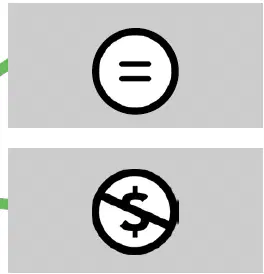
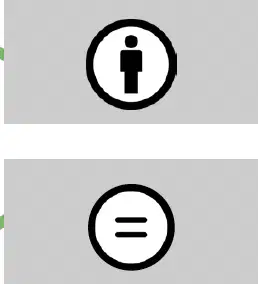
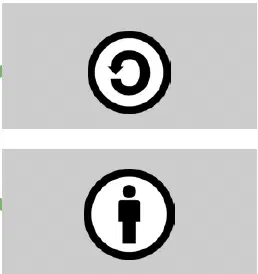
You need to export every layer in you psd file separately, even the hidden layers, how you will do it?
Choose the correct answer.
File > Export > Export as
File > Export > Quick export as a png
File > Export > Layer to files
File > Export > Individual layers
you must change the metadata of the file.
Choose the correct location of the properties for changing files meta information.
File > File Info
File > Metadata
Edit > Metadata
Edit > File Info

