
 Worksheets
Quiz 6: Shapes, Clipping Masks, Brushes and Paths
Total questions: 20
Worksheet time: 10mins
Name
Class
Date
1.
Which of the following DOES NOT create a new layer?
a)
Drawing a triangle shape with the Pen tool
b)
Drawing a custom shape
c)
Placing an image
d)
Using a brush
2.
To add a Drop Shadow or Emboss effect to a shape, use the Layer Styles button located on this panel:
a)
Navigation
b)
Swatches
c)
Layers
d)
Properties
3.
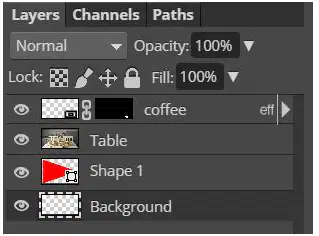
To put the picture of the table inside the triangle shape, apply a clipping mask to WHICH layer?
a)
Table
b)
Shape
c)
Background
d)
Create a group first and then apply to the group
4.
Shape layers can be resized to be bigger or smaller without losing quality because they are ____________ objects.
a)
vague
b)
vector
c)
variant
d)
smart
5.
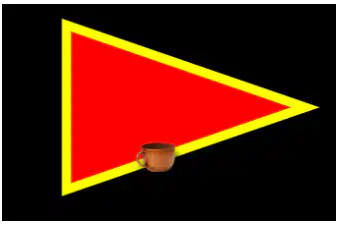
Examine the image below. What is the STROKE color?
a)
Black
b)
Red
c)
Yellow
d)
Brown
6.
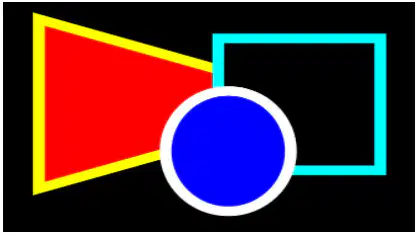
You are trying to create a stack of shapes and want a circle on top. However, you can't quite get it to be perfectly round. What button should be pressed while drawing to accomplish a perfect circle?
a)
Choose the perfect circle tool instead of the ellipse
b)
Hold shift while drawing
c)
Hold spacebar while drawing
d)
Press Control+P after drawing
7.

What tool would be used to change a star custom shape into the shapes shown below.
a)
Move tool
b)
Transform tool
c)
Direct Selection tool
d)
Clipping Mask
8.
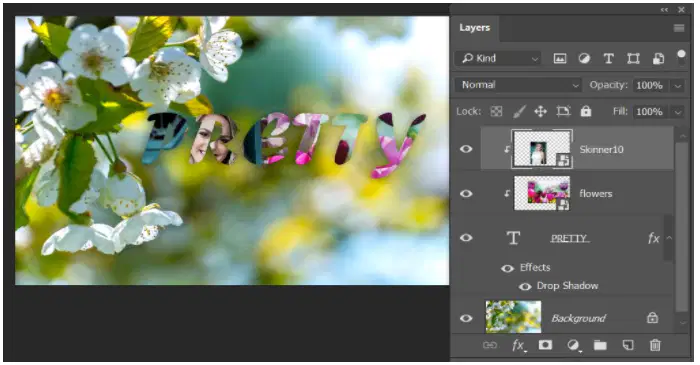
Sierra is trying to create a composite that includes a picture of her at the left and the words PRETTY with flowers inside. However, when she drags in her photo, it is "stuck" in the words. How can she fix this?
a)
She needs to move her picture down to a lower layer
b)
She needs to release the clipping mask on her picture
c)
She needs to release the clipping mask on the flowers
d)
The picture needs a different shape
9.
Joe wants to load custom shape files in Photoshop. He would need to find what type of file?
a)
AVIF
b)
PNG
c)
CSH
d)
JPG
10.
To make a perfect square, you would select the ____ shape tool and hold the _____ key.
a)
rectangle; alt
b)
rectangle; shift
c)
custom; alt
d)
custom; shift
11.
Select TWO ways you can add a mask clipping.
a)
Click on the layer mask button on the layers panel
b)
Right click on the layer you wish to clip and choose Create clipping mask
c)
Hold the shift key in the layers panel, and click between the layers you wish to clip
d)
Hold the alt key in the layers panel, and click between the layers you wish to clip
12.

The arrow on the sky layer indicates...
a)
a layer mask was added
b)
a drop shadow was added
c)
a clipping mask was added
d)
the layer is merged with the snowflake layer
13.
Which shape tool would you use to create a star?
a)
rectangle
b)
ellipse
c)
polygon
d)
custom shape
14.
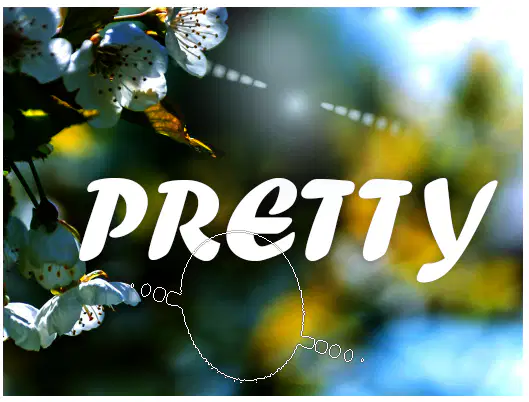
Rachel used a brush to paint on this interesting flare effect with one click in light blue (top middle). She wants to create another, but the brush needs to be turned a different direction to look realistic--you can see the brush outline in the middle at the bottom. Which is the best solution?
a)
Press transform and then rotate it
b)
Use the Brushes panel and modify the Angle
c)
Use the Brushes panel and modify the Jitter
d)
Add a layer style
15.
To select all of the text in a text box to change the font or color, press this keystroke:
a)
T
b)
Control+S
c)
Control+A
d)
Spacebar
16.

Examine the brush samples below. Which likely has a 25% hardness value?
a)
1
b)
2
c)
3
d)
4
17.
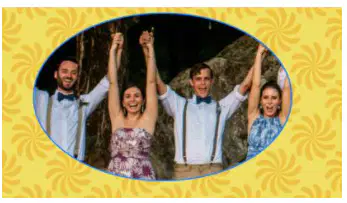
Annie wants to add a Bevel effect to this clipped image. What layer should the layer style be added to?
a)
The photo layer
b)
The oval shape layer
c)
The background layer (pattern layer)
d)
On a new layer
18.
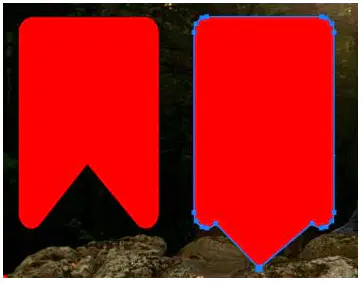
What tool would be used to make the custom shape at left and turn it into the shape at the right?
a)
Move tool
b)
Transform tool
c)
Direct Selection Tool
d)
Hold shift and click the point
19.

When creating a clipping mask using the text FUN and a photo of confetti inside the letters, what is the proper order of the layers for this clipping mask to work properly--which layer must go ON TOP?
a)
The Type layer
b)
The image of the confetti
c)
You must create a separate shape
d)
None of these will work
20.
The keyboard shortcut to create a clipping mask from a layer requires holding the ______ key while clicking the line between the layer
a)
Shift
b)
Alt
c)
Control
d)
Spacebar
100 %

