wayground logo

Free Printable Worksheets

NEW

Font size

S
M
L
XL
Worksheets

term 2 practice grade 7

Total questions: 35

Worksheet time: 19mins

Name
Class
Date
1.

How do you start a new project in the app?

a)

Click New Project from My Projects page

b)

Go to My Projects menu and choose New Project

c)

Both of the above

2.

What should you name the project?

a)

DigitalDoodle

b)

My Drawing App

c)

Any name you choose

3.

What component do you need to add for drawing?

a)

Canvas

b)

Button

c)

Image

4.

What should you do to the Height and Width of the Canvas?

a)

Set them to Fill Parent

b)

Set them to fixed values

c)

Leave them as default

5.

What event block do you need to get for drawing?

a)

Canvas.Dragged

b)

Canvas.DrawLine

c)

Canvas.Clicked

6.

What should you do to test the app?

a)

Drag your finger around the screen

b)

Click the test button

c)

Check the code

7.

What is one idea for extending the app?

a)

Change the color of the ink

b)

Add a new project

c)

Remove the canvas

8.

What kind of arrangement is this

a)

Horizontal arrangement

b)

vertical arrangement

c)

diagonal arrangement

9.

Which menu option allows you to create a new app?

a)

Projects

b)

Connect

c)

Build

d)

Help

10.

Which section of the Designer page displays how your app appears to the user?

a)

Pallette

b)

Viewer

c)

Components

d)

Properties

11.

On the Palette, under which selection will you find a Button?

a)

User Interface

b)

Layout

c)

Media

d)

Sensors

12.

All App Inventor Components have _______?

a)

Labels

b)

Images

c)

Buttons

d)

Properties

13.

Label, Sound, or Button are all?

a)

loops

b)

blocks

c)

design variables

d)

components

14.

what is MIT app inventor ?

a)

Its a Software

b)

Used to create mobile apps

c)

Mobile software

d)

Web application

15.

what will detect the shaking and movements in Mobile?

a)

sensor

b)

IC

c)

OS

d)

Accelerometer Sensor

16.

what kind of coding we are using in MIT app inventor?

a)

Notepad typing

b)

Using software IDE

c)

Block coding

d)

Copy and Past

17.

What is the purpose of MIT App Inventor?

a)

a. To create mobile applications

b)

b. To design websites

c)

c. To develop computer software

d)

d. To create desktop applications

18.

Which sensor component is used to detect shaking in this application?

a)
Accelerometer sensor
b)
Temperature sensor
c)
Gyroscope sensor
d)
Magnetometer sensor
19.

What happens when the accelerometer detects shaking?

a)

The app closes

b)

A new line is drawn

c)

The canvas is cleared

d)

The screen rotates

20.

What does IDE stand for?

a)

Integrated Development Environment

b)

In Deep Environment

c)

Internal Deep Escape

d)

IDE

21.
Before your program “code” can be sent to the board, it needs to be converted into instructions that the board understands. This process is called...
a)
Stop
b)
Compile
c)
Create Sketch
d)
Serial Monitor
22.
A function is a series of programming statements that can be called by name. Which command is called once when the program starts:
a)
loop()
b)
setup()
c)
(output)
d)
(input)
23.
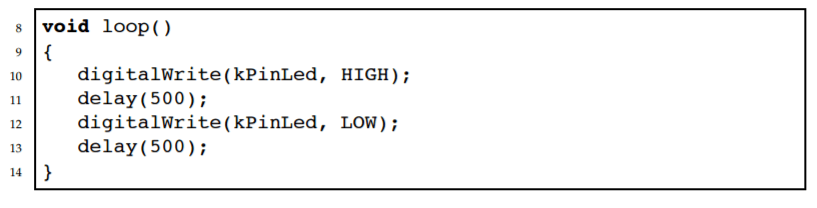
A function is a series of programming statements that can be called by name. Which command is called repetitively over and over again as long as the Arduino has power.
a)
loop()
b)
setup()
c)
(output)
d)
(input)
24.
A function is a series of programming statements that can be called by name. Which command delays the LED by a number of milliseconds is.
a)
loop()
b)
setup()
c)
delay()
d)
stop()
25.
If we start by writing HIGH out on the pin connected to the LED. What will it make the LED do? (HIGH means putting 5V out on the pin)
a)
Turn the LED on
b)
Turn the LED off
26.
If we start by writing LOW out on the pin connected to the LED. What will it make the LED do? (LOW means putting 0V out on the pin)
a)
Turn the LED on
b)
Turn the LED off
27.

Explain the role of resistor in Arduino blinking LED circuit.

a)
The resistor limits current to protect the LED from damage.
b)
The resistor stores energy for the LED to use later.
c)
The resistor acts as a switch to turn the LED on and off.
d)
The resistor increases the voltage to the LED.
28.

On the palette of MIT APP, under which item will you find the canvas?

a)
User Interface
b)
Components
c)
Layout
d)
Graphics
29.

Why is iteration important?

a)
Iteration slows down progress and hinders innovation.
b)
Iteration is only necessary for large projects.
c)

It allows code to be simplified by removing duplicated steps into a block that

can be executed many times.

d)
Iteration is irrelevant in creative processes.
30.

What is the primary language used for programming in Arduino?

a)
C/C++
b)
Python
c)
Java
d)
JavaScript
31.

Arduino IDE consists of 2 functions. What are they?

a)
begin() and run()
b)
start() and finish()
c)
initialize() and execute()
d)
setup() and loop()
32.

Square brackets will create which type of data structure in python?

(S=[ ] )

a)
set
b)
list
c)
dictionary
d)
tuple
33.

How many times does the following program print the word ‘computer’:

word= "class"

for num in range(1,6):

print(word)

a)

5

b)
2
c)
3
d)
4
34.

What does the continue keyword do in a Python loop?

a)
The 'continue' keyword pauses the loop for a specified time.
b)
The 'continue' keyword restarts the loop from the beginning.
c)
The 'continue' keyword skips the current iteration in a loop.
d)
The 'continue' keyword ends the loop immediately.
35.

What does the break keyword do in Python?

a)

none of these

b)
The break keyword continues to the next loop in Python.
c)
The break keyword skips the current iteration of a loop in Python.
d)
The break keyword pauses a loop in Python.