
 Worksheets
Year 2, Unit 5.4,5.5,5.6
Total questions: 10
Worksheet time: 8mins
To MOVE an IMAGE in WORD, which PICTURE you will click FROM THE FOLLOWING?


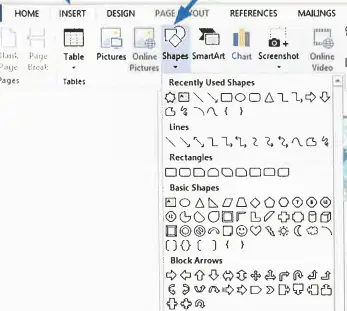
TO ADD SHAPE, you will need to go to ______ , shape and choose a shape.
INSERT
REFERENCE
LAYOUT
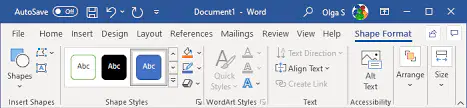
To change the DESIGN OF THE SHAPE, you will need to go to _____ ______.
VIEW
SHAPE FORMAT
REFERENCE
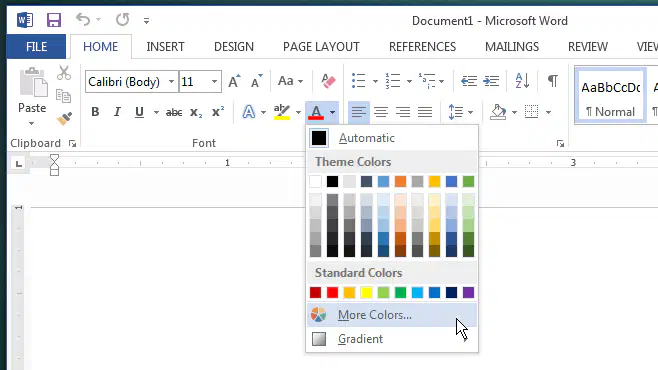
If you want to change the COLOR OF YOUR TEXT, you will change in ___
MAILINGS TAB
PAGE LAYOUT TAB
HOME TAB

If you want to change the COLOR OF THE SHAPE, you will go to _____ ____ from Shape Format Tab.
PAGE LAYOUT
SHAPE FILL
REFERENCE

If you want to change THE OUTLINE OF THE SHAPE, you will go to SHAPE OUTLINE from _____ ______ ___.
Page Layout Tab
Shape Format Tab
Reference Tab

If you want to change THE PAGE COLOR IN WORD, you will go to ______ ___.
Design Tab
File Tab
View Tab

If you want to add the PAGE BORDER in Word, you will go to ____ ______ from Design Tab.
SHAPE FILL
PAGE BORDER
SHAPE OUTLINE
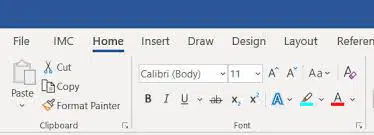
If you want to change the FONT STYLE, FONT SIZE, you will go to and choose the font sytle or font size.
HOME TAB
DRAW TAB
FILE TAB
If you want to SHUT DOWN your device, you will click on WINDOW ICON and do the following steps.
POWER, LOCK
POWER, SHUT DOWN
POWER, SLEEP

