
 Worksheets
Translation Quiz Instructions
Total questions: 15
Worksheet time: 10mins
The task described in the Translation Quiz instructions is to:
Translate a given text into another language to make a quiz.
Identify grammatical errors in a text.
Summarize a given passage.
Answer comprehension questions.
List the key steps involved in creating the Scratch program for the translation quiz.
Design the user interface, Add translation logic, Test the program
Write the code, Compile the program, Debug the errors
Create a database, Connect to the server, Deploy the application
Plan the project, Gather resources, Launch the program
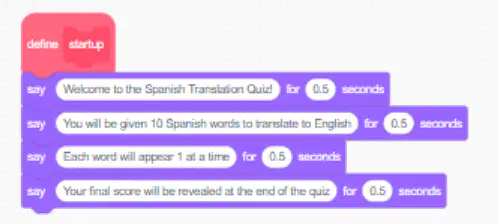
What should the 'startup' subroutine do according to Task 1 and 2?
Start the quiz by speaking to the user.
Perform a system check and diagnostics
Load user preferences and settings
Start all necessary background tasks.
The purpose of the 'quiz' subroutine in Task 3 is:
To create variables for the quiz.
To handle user input
To process data for the quiz.
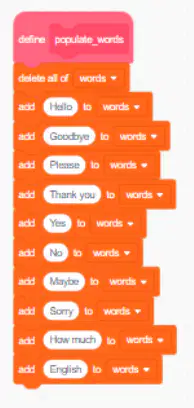
Add words to the quiz for the user to translate.
How many words should be added to the 'words' list for the quiz?
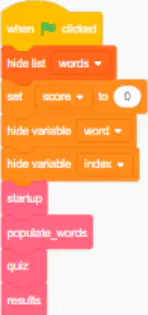
What should your program include for startup instructions and quiz code?
Startup instructions and quiz code blocks to run.
The word list to run.
All quiz code should be run all at once.
Neither startup instructions nor quiz code
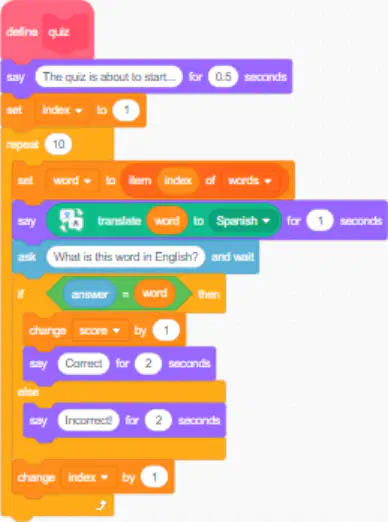
In the 'quiz' subroutine, what variable should be set to locate the first word in the 'words' list?
The variable that should be set to locate the first word in the 'words' list is typically an index variable, often named 'i' or 'index'.
The variable that should be set to locate the first word in the 'words' list is typically a string variable, often named 'word'.
The variable that should be set to locate the first word in the 'words' list is typically a boolean variable, often named 'found'.
The variable that should be set to locate the first word in the 'words' list is typically a float variable, often named 'position'.
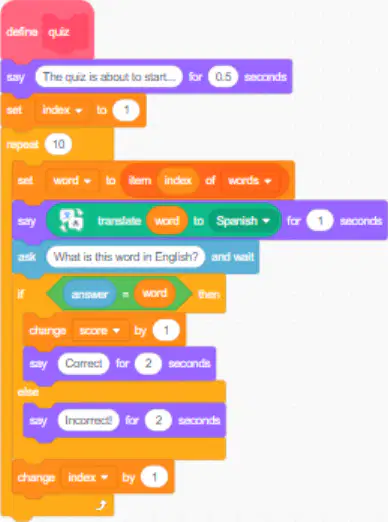
What block is used to display the word in the chosen language using the Translate Extension?
Display Block
Translate Block
Language Block
Word Block
What should you do to prevent cheating in the quiz?
Implement strict supervision during the quiz, stop students using the internet to cheat.
Allow open book quizzes, so that students can access their work.
Ignore cheating incidents
Encourage collaboration among students, so that they can share answers.

What is the first step to use the Translate Extension in Scratch?
Click on the green flag.
Click on the Translate Extension that you can find in the add extension section.
Drag the Translate block to the coding area.
Test the Translate block with a phrase.
The purpose of the 'score' variable in the translation quiz is to:
track the number of correct answers
store the user's name
record the time taken for each question
provide hints for questions
Which block should be used to display the word using the Translate Extension?
Display Block
Translate Block
Word Block
Show Block
What should be done after the quiz to display the score out of ten?
Calculate the total score and display it.
Review the answers and provide feedback.
Send the results to the teacher.
Store the results for future reference.
In the translation quiz, what should be done to the 'word' and 'index' variables during the quiz?
The 'word' variable should be translated and the 'index' variable should be incremented by +1.
The 'word' variable should be deleted and the 'index' variable should be reset.
Both 'word' and 'index' variables should remain unchanged.
The 'word' variable should be stored and the 'index' variable should be decremented.
What is the first step in creating a background for your quiz?
Clicking on the backgrounds in Scratch?
Clicking on Sprites in Scratch.
Clicking on Code in Scratch?
Clicking on the scene viewer in Scratch.

