
 Worksheets
VEX Driver Control Quiz
Total questions: 10
Worksheet time: 10mins
Which icon on the Brain should be selected to open the Driver Control program?
The ‘Drive’ icon
The ‘Devices’ icon
The ‘Settings’ icon
The icon for Project Slot 1
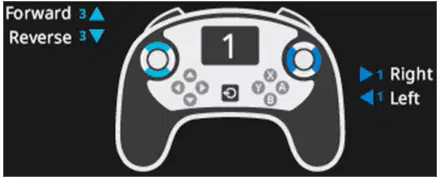
Which of the following driver control configurations are being shown in the image?
Dual
Left
Right
Split
Which of the following driver control configurations would drive the robot forward, reverse, left, and right all using the right joystick?
Dual
Left
Right
Split
Which of the following driver control configurations would drive the left motor of the robot using the left joystick, and the right motor of the robot using the right joystick?
Dual
Left
Right
Split
Which of the following is a common use of the Bumper Switch?
To sense the distance of an object
To trigger a robot action when pressed or released
To determine the direction your robot is facing
To detect an object's color
Which of these devices can be used to display a color?
Brain screen
Controller
Bumper Switch
Sensor
What happens after you configure a sensor in VEXcode V5?
Your project is automatically downloaded to the Brain.
The project is named after the sensor.
Blocks related to that sensor appear in the Toolbox.
An alert pops up telling you which port on the Brain your sensor is connected to.
Which of the following explains the steps you would take to configure a Bumper Switch?
Open Devices Window, select the Distance Sensor Icon, check and select the correct Port.
Open the Devices Window, select ‘add a Device’, select 3-Wire, select Bumper, select a Port, and select Done.
Select the Bumper Switch icon, Download the program to the Brain, Select the correct Port.
Select a Controller Configuration and Select the Bumper Switch Icon.

This code snippet would result in which of the following on the Brain Screen?


What happens if your opponent triggers your Bumper Switch?
You are out of the game
Your opponent gets one point and your controller is disabled for three seconds
You get one point and have to move back to the starting position
Your opponent gets five points

