
Font size
 Worksheets
Photoshop Interface Scavenger Hunt
Total questions: 10
Worksheet time: 36mins
Match the adjustment to its description.
Adjusts the number of tones in an image, turning it into black and white.
Threshold
Enhances the colors without over-saturating the skin tones.
Vibrance
Increases or decreases the intensity of all colors.
Saturation
Label the parts of the character panel with their functions.
Click on the menu that allows you to access the FLIP HORIZONTAL transformation.
Click on the menu that allows you to access and adjust the COPYRIGHT STATUS.
Which of the following are hidden tools in Photoshop? (Hint: Use Photoshop to explore the tools)
Object Selection
Ruler Tool
Note Tool
Count Tool
Quick Selection
Perspective Crop Tool
Slice Tool
Slice Select Tool
Ellipse Tool
Triangle Tool
Polygon Tool
Line Tool
Custom Shape Tool

Put these steps in the correct order to apply a drop shadow to a text layer.
Right click the layer thumbnail
Click blending options
Select "Drop Shadow" from the list of styles
Adjust the settings for angle and distance
Click "OK" to apply
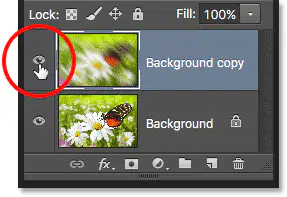
What does the eye icon in the layers panel do?
Hides the layer
Locks the layer
Selects the layer
Makes the layer visible
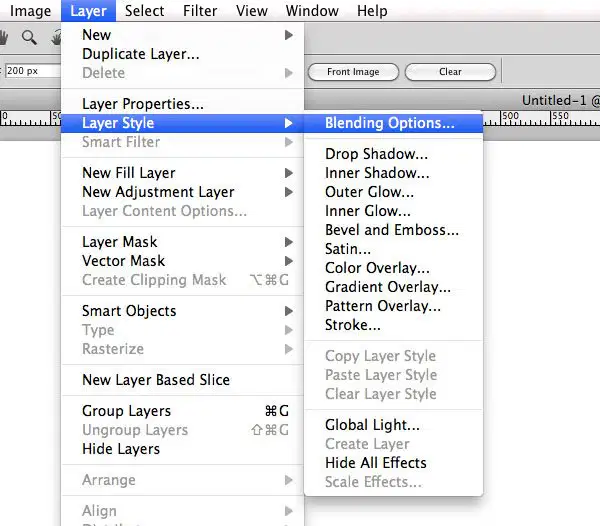
Match the style to its description in the Styles panel.
Drop Shadow
Creates a shadow behind the layer object
Bevel and Emboss
Adds a 3D effect to the layer's edges.
Gradient Overlay
Applies a gradient fill over the layer.
From the Tools Panel, the tool used for selecting a rectangular area is . (a) tool.
marquee
lasso
move

