
 Worksheets
Year 4 ICT lent term assessment
Total questions: 30
Worksheet time: 52mins
Which of these links can we use to access Scratch on the internet?
scratch.edu.org
scratch.mit.edu
scratch.co.uk
scratch.com
What are the characters in Scratch called?
Icons
Sprites
Robots
Avatars
Which block starts an animation in Scratch?
Say “Hello!”
Move 10 steps
When green flag clicked
If (condition)
Where do you go to change a backdrop in Scratch?
The Sprites tab
The Backdrops tab
The Sounds tab
The Code tab
What does the ‘switch backdrop to’ block do?
Changes the sprite’s costume
Changes the background to a new scene
Moves the sprite
Adds sound to the animation
Which of these is NOT a common block in Scratch?
Move 10 steps
Say "Hello!" for 2 seconds
Jump over 3 objects
Repeat 10
How can you make a backdrop change at different times?
Use a ‘wait’ block
Click on the backdrop
Turn off the computer
Add more sprites
Where can you use Scratch?
On the Scratch website
On the Scratch app
In a notebook
On the playground.
Which block makes a sprite talk?
Say “Hello!” for 2 seconds
Repeat 10
Switch backdrop to
If (condition)
What happens when you use the ‘repeat’ block in Scratch?
The animation starts over
The sprite moves randomly
An action happens multiple times
The backdrop changes
Scratch is a programming language designed for beginners.
True
False
A backdrop is the character in an animation.
True
False
You cannot change the background in Scratch.
True
False
The ‘if’ block helps check a condition before doing an action.
True
False
The ‘move 10 steps’ block makes the sprite move forward.
True
False
In Scratch, we need to add some characters before adding our coding blocks. These characters are called _____________________
The ‘switch backdrop to’ block is found in the ______________ block.
To change the background in Scratch, you need to go to the __________ tab.
The block that starts an animation when clicked is located in the __________ block.
The block that repeats an action multiple times is called the __________ block.
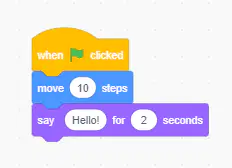
What will happen when this code runs?
The sprite moves 10 steps and then says "Hello!" for 2 seconds.
The sprite will stay in place and say "Hello!" forever.
The sprite will only say "Hello!" but not move.
The sprite will move 10 steps and stop without saying anything.
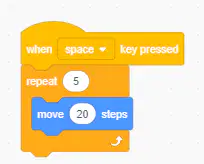
What will this code do?
The sprite moves 5 steps one time.
The sprite moves 20 steps and then stops.
The sprite moves 20 steps five times.
The sprite moves forever.
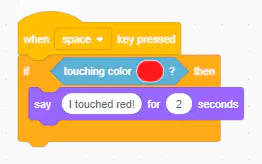
What does this block do?
When "space" is pressed, the program will start running. The sprite will always say "I touched red!" even if it doesn't touch red.
When "space" is pressed, the program will start running. If the sprite touches the color red, it will say "I touched red!"
When "green flag" is pressed, the program will start running. The sprite will turn blue when it touches any color.
When "green flag" is pressed, the program will start running. The sprite will move when it touches red.
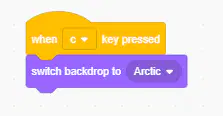
What will this block of code do?
The backdrop will change automatically without pressing any key.
The sprite will disappear when the "c" key is pressed.
The sprite will move when the "c" key is pressed.
The backdrop will change to "Arctic" when the "c" key is pressed.

What happens when this code runs?
When the sprite is clicked, it says "Welcome!" for 3 seconds and then waits 2 seconds.
When the sprite is clicked, it waits 2 seconds and says "Welcome!" for 3 seconds.
The sprite waits for 2 seconds, then says "Welcome!" for 3 seconds.
The sprite immediately says "Welcome!" for 2 seconds.

What does this block do?
The sprite only moves when the edge is touched.
The sprite moves continuously and bounces on the edges.
The sprite moves 5 steps and stops.
The sprite moves in circles forever.
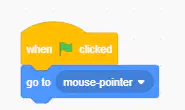
What does this code do?
The sprite moves 10 steps repeatedly.
The sprite moves forever.
The sprite moves and stops immediately.
The sprite follows the mouse pointer.
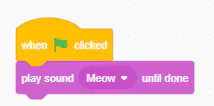
What does this code do?
a) The sprite will make a "Meow" sound when green flag is clicked.
b) The sprite will say "Meow" in a speech bubble.
The sprite will move 10 steps when clicked.
The sprite will stop moving when clicked.

What does this code do?
When green flag is clicked, the sprite moves randomly on the screen. after 1 second
When green flag is clicked, the sprite disappears after 1 seconds.
When green flag is clicked, the sprite appears on the mouse pointer after 1 second.
When green flag is clicked, the sprite moves smoothly to mouse pointer in 1 second.
Tick the Block Palettes found in Scratch
Sound Block
Looks Block
Let Block
Sensing Block
All of the above.

