
 Worksheets
Midterm Examination In ICT BSME 2A-2F
Total questions: 50
Worksheet time: 2hrs 47mins

How important is ICT for education?
Convenient to search for information and presentations.
You can listen to music in class.
You can play game in everyday.
Cause in a good test score.

What icon is this
Volume
Bluetooth
WiFi
All of the above


Select the CPU


Which of the following is considered T568-A cable standard?


Which of the following is considered T568-B cable standard?
Which of the following tools would be used to verify that a UTP cable is working properly?


Mason is setting up a new network in his classroom and needs to know how many wires are in a Cat5e/6 twisted-pair cable.
9
7
6
8
During a group project, Emma needs to calculate the total number of hours her team worked. If she has the hours recorded in cells A1 to A5, which formula should she use to find the total?
=SUM(A1:A5)
=SUM(A1+A5)
=TOTAL(A1:A5)
=ADD(A1:A5)
In a spreadsheet, when Liam wants to find the highest score from a list of test scores in cells B1 to B10, which function should he use?
SUM(B1:B10)
AVERAGE(B1:B10)
MIN(B1:B10)
MAX(B1:B10)
When Maya wants to create a formula that multiplies the values in cells B1 and C1, which of the following formulas should she use?
=B1*C1
=B1+C1
=B1-C1
=B1/C1
Avery is learning about the different types of charts in a spreadsheet application. Which of the following is NOT a type of chart available in most spreadsheet programs?
Pie Chart
Line Chart
Bar Chart
Text Chart

Nora is working on her spreadsheet for a school project. The cell address of the highlighted cell is
C
4
A4
C4
6. Grace is trying to calculate the temperature in Celsius after converting it from Fahrenheit using the formula =(82-32)/5+8*2. What value would Excel return for this formula?
a. 36
b. 26
c. 7.69
d. 91.6
During math class, Aria was trying to remember the order of operations and asked her teacher what the ( E ) in PEMDAS means. Her teacher explained that it stands for something important in calculations. What does the ( E ) in PEMDAS mean?
experience
exponents
examples
evidence

In a recent class project, Maya created a graphic representation of the data collected from her classmates about their favorite fruits. She used a circle divided into sectors to show the percentage of each fruit preference among the whole class.
Line Chart
Pie Chart
Bar Chart
Graphs
What is the formula sign for multiply?
/
*
=
-
If you see a series of "######" in a cell, that means the following:
Row height is too high
Column width is not wide enough
What icon is Right Alignment?


Which is the default alignment in word?
Left
Right
Centre
Justify

The results given by a computer
input
output
processing
storage
A group of 2 more computer systems linked together.
Network
Bandwidth
Bitrate
Latency


In Excel, rows are labeled by
Letters
Numbers
Letters and numbers
In Excel, columns are labeled by
Letters
Numbers
Letters and numbers
Excel refers to files as
Databases
Workbook
Document
Where rows and columns meet are referred to as
Cells
Blocks
Boxes
When inserting a formula, always start with
-
*
+
=
In solving a problem with series of operations, what operation you should perform first?
Division
Addition
Multiplication
Operation inside the parenthesis
What is the value of this expression?
54−30+(2×5)= ___________
50
40
30
20
7+(5×3÷3) −6= _________
15
12
8
6
In Microsoft Word, what would you see while spell checking the phratese "My Father is right".
There is grammar error
A red wavvy line underneat the word right "right" denotes a error in grammar
In the statement, "is" should be replaced with "was" to complete the sentence.
No errors.
Scenario:
You are tasked with repairing a desktop PC brought to your school's computer laboratory. The owner explains that the PC has no power—it does not turn on, and there are no lights or sounds when the power button is pressed. The user assures you that the PC was working fine just a few days ago.
Your task is to analyze the problem and propose a step-by-step approach to troubleshoot and potentially repair the issue.
Questions for students to answer:
1. What is the first step you would take to diagnose the problem?
2. What specific components of the PC and its external setup would you inspect, and why?
3. If the power supply unit (PSU) is suspected to be faulty, how would you test it?
4. How would you determine whether the motherboard is functioning properly?
5. What safety precautions would you keep in mind during the repair process?
Scenario:
You are examining a desktop PC that does not power on or boot up. During your inspection, you find that the CPU is missing from the motherboard.
Question:
1.What specific symptoms would a PC exhibit if it lacked a CPU, and why?
2. How would you troubleshoot and confirm that the absence of the CPU is causing the issue?
3. If the CPU is replaced, what additional steps would you take to ensure the system functions properly after installation?
Scenario:
You are called to troubleshoot a desktop computer that powers on, as indicated by the fans spinning and the power LED lighting up, but there is no display on the monitor. The monitor stays blank, even after confirming that it is powered on and connected to the PC.
Task: Identify the potential causes and describe the step-by-step troubleshooting process to resolve the issue.
When installing the CPU to the motherboard. What is best approach to prevent the CPU from overheating?
Install a cpu cooler
Place the system unit near the electric fan
Open the side cover of the system unit so that air can flow-in freely
Place the system near the ice bucket.
Scenario: You are working as an intern at a company and need to send an email to your supervisor to request a meeting about a project you are struggling with. You want to ensure that your email is polite, professional, and follows proper email etiquette. Additionally, you need a response from your supervisor by the end of the day.
Questions for Students:
1. What would be an appropriate subject line for this email?
2. How would you begin the email to greet your supervisor politely?
3. What tone should you use to explain your request for a meeting? Provide an example sentence.
4. Why is it important to proofread your email before sending it, and what specific elements should you check?
5. How should you close the email to leave a positive and professional impression?
6. If your supervisor doesn't respond by the end of the day, how should you follow up appropriately?
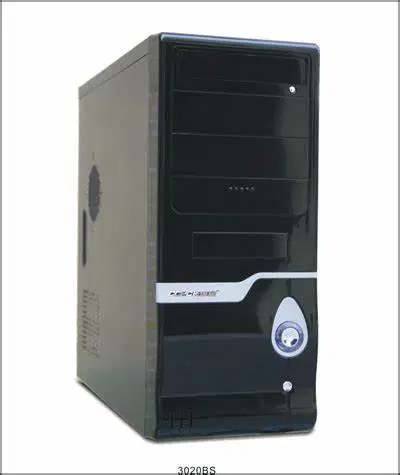
Identify the component as shown and briefly explain its main function in a computer system.

Identify the component as shown and briefly explain its main function in a computer system.

Identify the component as shown and briefly explain its main function in a computer system.

Identify the component as shown and briefly explain its main function in a computer system.
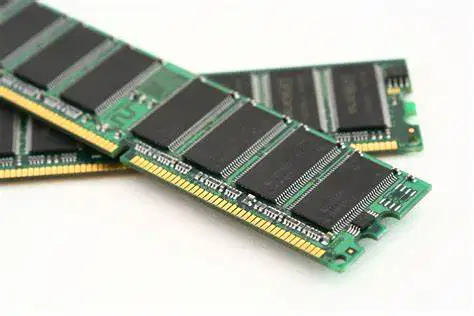
Identify the component as shown and briefly explain its main function in a computer system.

Identify the component as shown and briefly explain its main function in a computer system.
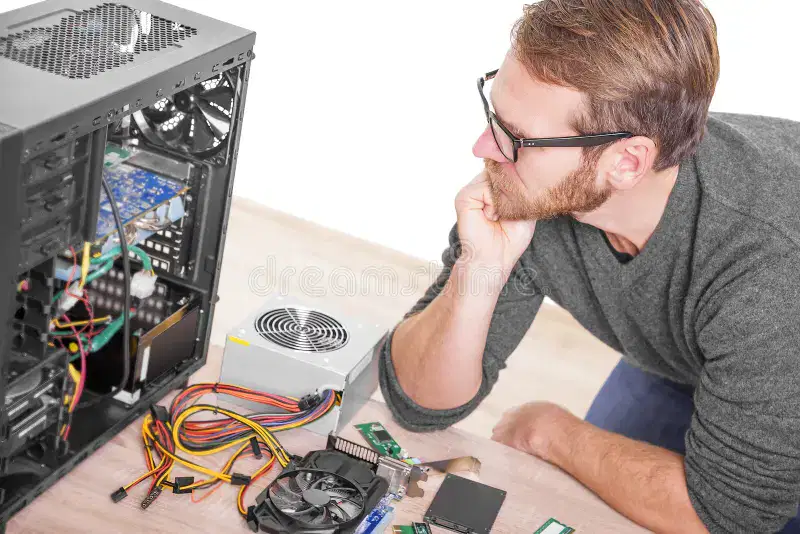
Explain the concept of "test and replace" in PC troubleshooting. Discuss the importance of this method in identifying and resolving hardware issues. Provide examples of scenarios where "test and replace" might be applied and highlight its advantages and limitations compared to other troubleshooting techniques.

