
 Worksheets
Virendra
Total questions: 60
Worksheet time: 51mins
The instructions that tell the computer what to do:
Hardware
Input
Software
Ooutput
The physical objects that make up the computer system:
Software
Storage
Input
Hardware
The 2 types of Software are:
Operating System
System
Business
Application
Hardware and Software do not have to work together.
True
False
You can touch software
True
False
Operating system for mobile devices
Netware
Unix
Android
Windows NT
Microsoft Word is an example of an operating system
False
True

A small program that allows a specific peripheral device to communicate with a computer system
Driver Programs
Firmware
Operating System
Types of operating systems:
Doors
Robotics
Windows
Business
Which of the following is NOT a type of application software?
Word processor
Operating System
Web browser
Games

What type of software is it?
Operating system
Application software

What type of software is it?
Operating system
Application software
Any part of your computer that has a physical structure, such as the keyboard or mouse
software
hard drive
hardware
digiware
Any part of your computer that has a physical structure, such as the keyboard or mouse
software
hard drive
hardware
digiware

Microphone
Hardware
Software
Peopleware

Teachers
Hardware
Software
Peopleware

PowerPoint
Hardware
Software
Peopleware

Mouse
Input Device
Processing Device
Output Device
Storage Device
What do we use to type letters, numbers or words?


Which part of the computer helps us to play games?


Which machine can be used to book tickets online?


Rearrange the jumbled letters CUP
PCU
CPU
UPC
A monitor looks like a ______________
CPU
television
football
A___________ is used to point at things on the monitor
mouse
keyboard
CPU

Identify the Picture.
Keyboard
Laptop
Printer
Its run with Human Power.


It runs on electricity.


It runs on fuel.


What is this?
Monitor
Mouse
Printer

What is this?
Keyboard
Mouse
Monitor

What is this?
Keyboard
Mouse
Monitor
What is the longest key on the keyboard?
Backspace key
Shift keys
Enter keys
Spacebar key
Which of these is a painting Software?
MS Paint
MS Word
Excel
Which of the following is a smart machine?


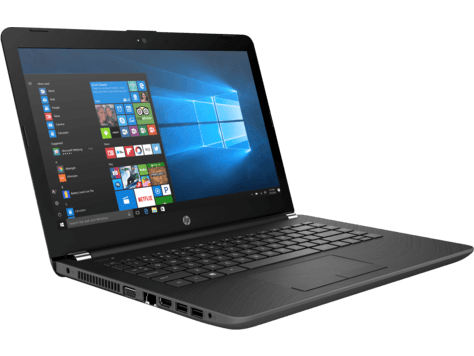
What is this?
Scanner
Projector
Laptop
Which one is the CPU?


The part of the computer that we use to listen the music


ICT is short for...
Information and Communication Technology
I Can Teach
A computer can do which of the following?


How many buttons does the mouse have?
1
2
3
4
Which key is used to type capital letter?
Caps Lock
Delete
Backspace
Computers make our work ___________
Easy
Hard
How many keys are there on a standard keyboard?
102
104
140
99
The keyboard is connected to the ______ by a wire.
Speakers
Mouse
Monitor
CPU
There are ____ arrow keys on a keyboard.
3
6
4
2
Which keys will you use to type your name?
Alphabet Keys
Number Keys
Arrow Keys
Backspace Key
I move the cursor to the next line.
Spacebar key
Number key
Arrow keys
Enter key
I am the longest key on the keyboard.
Spacebar key
Backspace key
Enter key
None of the above
The order of the first six keys on the top left letter row of the keyboard is
ASDFGH
ZXCVBN
QWERTY
ABCDEF
I work like an eraser.
Enter Key
Spacebar Key
Backspace Key
All of the above
Usually there are _________ Enter Keys in the keyboard.
2
1
3
4
Which keys will you use to type ," I am 6 years old"
Number keys
Alphabet Keys
Spacebar Key
All of the above
If you press me, you can type Capital Letters.
Backspace Key
CapsLock Key
Enter Key
All of the above
I allow you to move the cursor up, down, left or right.
Alphabet keys
Number keys
Arrow keys
Spacebar key
Numbers from _______ are written on the Number keys.
1 to 10
0 to 10
1 to 9
0 to 9
Which of the following is true?
Sit straight while typing.
Press the keys softly.
Do not eat or drink near the keyboard.
All of the above.
The buttons on the keyboard are called _____.
switches
keys
buttons
All of the above.

