
 Worksheets
3.1 - Features and Part Design
Total questions: 22
Worksheet time: 11mins
Which of the following is NOT a type of arc in Onshape?
Equal Radius Arc
3 Point Arc
Tangent Arc
Centerpoint Arc
Which type of Arc requires another entity to specify its start point?
Tangent Arc
3 Point Arc
Centerpoint Arc
Equal Radius Arc
Using the _________ option, you can change the state of a model back to where a particular feature or features weren’t yet created.
Undo
Redo
Rollback
Save As
To extrude a sketch in both directions relative to the drawing plane, you must use which end type?
Blind
Through All
Mid Plane
Symmetric
Which end type of an Extrude feature is used to add an equal amount of material to both sides of the sketch plane?
Symmetric
Up To Face
Blind
Through All

The only way to create the Tab feature shown in the image is to start a sketch on the top face of the rectangular base.
True
False
Which of the following ways allow you to place one sketch line, rather than a chain of lines?
Double click when placing the line
Press the spacebar
Use the right mouse button
All of these are correct
Which of the following is an indicator that a sketch profile is closed?
The profile will be shaded in gray
The sketch entities will turn red
A notification will pop up saying the profile is closed
A green check will appear near the sketch profile

What is the best way to make all of the fillets equal in size?
Manually adjust each fillet
Use the equal constraint on all fillets
Measure each fillet with a ruler
Guess the size of each fillet
What is the correct method to ensure all fillets have the same size in a geometric design?
Select all of the fillets and add an equal geometric constraint
Create a dimension for each fillet, using the same value for each
Add horizontal and vertical geometric constraints between the endpoints of the fillets
None of these are correct
Which end type is best used when you want to extrude to a specified depth?
Blind
Symmetric
Up to Face
Up to Vertex
You can mirror an entire feature by selecting just one of its faces in the graphics area and specifying a plane or face to mirror about.
TRUE
FALSE
If the part you are designing is completely symmetric, you can complete the part by designing just half of the part and using one mirror feature.
TRUE
FALSE
Sometimes
Never
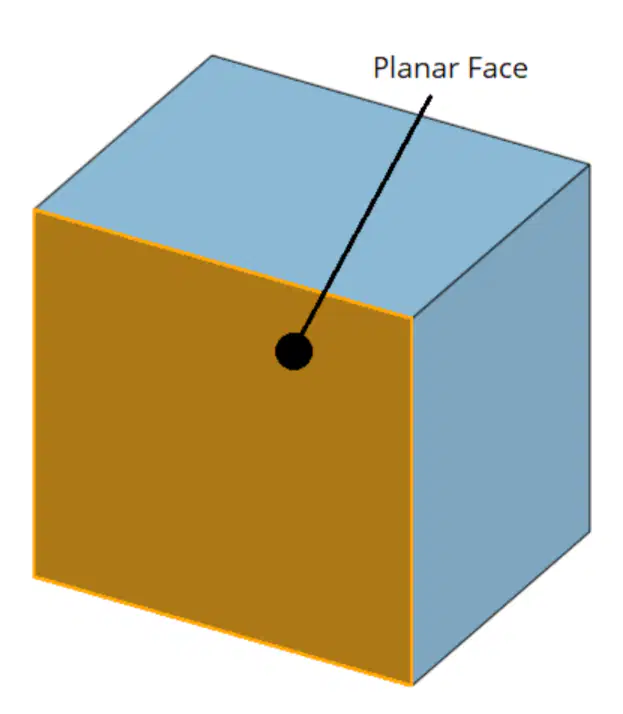
True or False: You can select a planar face as the reference plane for mirroring a feature.
TRUE
FALSE
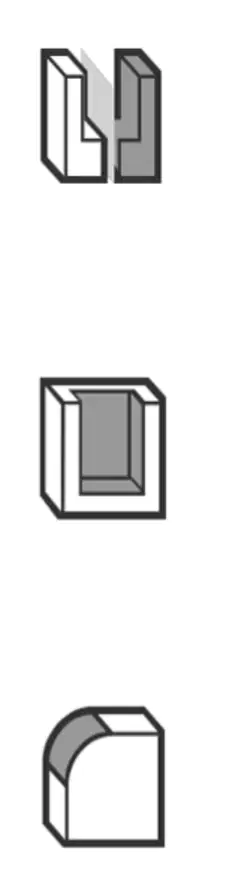
Which of the following icons represents the Onshape Mirror feature?
Icon 1
Icon 2
Icon 3
When using the Hole feature, is it only possible to create one hole?
TRUE
FALSE
Sometimes
Only in specific cases
Can faces, edges, features, and loops all be selected as entities to fillet?
TRUE
FALSE
Only faces and edges
Only features and loops
When creating a Fillet, the Tangent Propagation option ensures that the Fillet is applied to all edges that are tangent to a selected edge.
TRUE
FALSE
When applying fillets, to include the edges tangent to the selected edge in the fillet, select the following option:
Tangent Propagation
Circular
Conic
Variable Fillet
When creating a part, if the features are created in the wrong order, you must delete the features and recreate them in the correct order.
TRUE
FALSE
You can customize the material properties of a preset material.
TRUE
FALSE
Mass properties are calculated based on ___________.
The material that is specified
The color of the object
The shape of the object
The size of the object

