
 Worksheets
Robot Soccer Quiz
Total questions: 20
Worksheet time: 10mins
Which of the following best describes a manipulator?
Two motors that function as if they are one device
A mechanical sensor that reports if it is pressed or not pressed
A mechanism designed to manipulate an object to complete a task
A sensor capable of detecting ‘capacitive’ touch
The effectiveness of a manipulator is dependent on __________________________.
The object it is meant to interact with
The task it is meant to accomplish
The number of pins used to build it
Both A & B
Which of the following is NOT a consideration when designing a manipulator?
The color of the object being manipulated
The size and shape of the object being manipulated
The way the object is meant to be moved
The weight of the manipulator on your robot
A ___________ manipulator has ___________ attached to it.
Active; no motors
Passive; no motors
Passive; a motor
Intake; no motor
Which of the following is true of an active manipulator?
It has a power source or motor attached to it
It is not movable
It has no motors attached to it
It is not useful for lifting an object
An intake is an example of a __________ manipulator.
drivetrain
Active
Passive
Unpowered
Which of the following is NOT a consideration when designing an intake for your robot?
The parts you have available
The weight of the object you are trying to collect
The shape of the object being collected
The color of the object being gathered
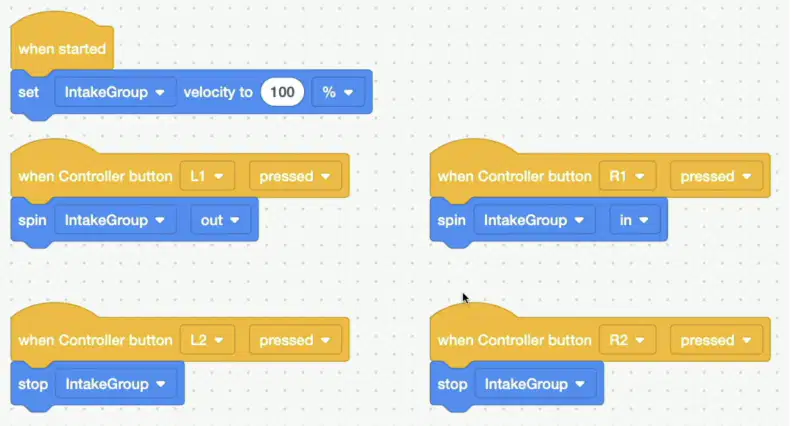
In the project shown here, what will the intake do when the R1 button is pressed?
The intake will stop spinning
The intake will spin out to push out an object
The intake will spin in to pull in an object
The intake will slow down to 50% velocity
Which of the following is NOT an example of a usage for an intake on a robot?
To collect an object and move it to a new location
To push out an object to score a goal in a game
To navigate around an immovable object
To collect multiple objects at once to move them across a Field
Which of the following best describes a motor group?
It is a type of gripper that is used to pick up and transport objects
It consists of two motors that are going to function as if they are one device
It is a decision made from observable and measurable data
It is a device where each motor must be coded individually
Which of the following is NOT an advantage of using a motor group?
It enables two motors to be programmed as one device
It can be controlled using one or two buttons on the Controller
It makes it more difficult to code your robot to move
It can make your robot have more power, or lifting ability
To make a motor group, you must have two motors that are ________________.
Connected to the same port on the Brain
Spinning in opposite directions
Disconnected to each other
Mechanically connected
Which of the following is NOT a possible mechanical connection for a motor group?
Beam and plate
Gear train
Chain and Sprocket
Two motors sharing a shaft
Which of the following is the correct order of steps to configure a motor group in VEXcode EXP?
Open the Help; select ‘Motion’ blocks; then select the [Spin motor] block
Open the Devices window; select ‘Add a Device’; select ‘Motor Group’; select the ports on the Brain that your motors are connected to; then select ‘Done'
Open the Devices window; select ‘Add a Device’; select ‘Help’; select ‘Bumper’; then select ‘Done'
Open the Devices window; then select ‘Controller’
Which of the following is TRUE of adding your motor group to your Controller?
You can select the buttons you wish to use to control your motor group, and the direction of movement for those buttons
The left joystick is automatically selected, and cannot be changed in any way
You must configure your Controller before configuring the motor group
The buttons will control the individual motors in the group, not the direction of movement
Which of the following statements is true about the One-on-One Soccer Challenge?
To earn one (1) goal, the Buckyball must be partially placed through the opposing team’s goal.
To earn one (1) goal, the entire Buckyball must be placed through the opposing team’s goal. No part of the Buckyball can remain in contact with the Field.
To earn one (1) goal, steal the Buckyball from the opposing team’s robot.
To earn five (5) goals, the Buckyball must be partially placed through the opposing team’s goal.
Where does your team’s robot start in the One-on-One Soccer Challenge?
The robot starts in the corner of the Field.
The robot starts inside your team’s goal.
The robot starts in front of your team’s goal, in the square on the left side.
The robot starts in front of the opposite team’s goal, in the square on the left side.
What happens when a goal is scored in the One-on-One Soccer Challenge?
The game is over.
The timer stops and the Field is reset.
]The timer continues to run.
The robots switch sides of the Field.
In the One-on-One Soccer Challenge, the robot must:
Fit completely inside of the starting square at the beginning of the match, including all attachments and/or modifications
Include attachments made only with EXP parts
Extend past the lines of the starting square
a and b
What size Field is One-on-One Soccer played on?
3’ x 3’
4’ x 4’
4’ x 6’
3’ x 4’

