
 Worksheets
WEB EXAM PHOTOSHOP
Total questions: 119
Worksheet time: 2hrs 59mins
Name
Class
Date
1.
1.Adjustments via Image > Adjustments menu
2.Using the Clone Stamp tool
a)
Destructive Editing
b)
PNG-24
c)
TIFF
d)
JPEG
2.
Masking
Adjustment Layers
Transforming Smart Objects
a)
Non-Destructive Editing
b)
TIFF
c)
Type Style
d)
Tracking
3.
Controls the amount of space between line of type
a)
Leading
b)
PNG-24
c)
Type Style
d)
JPEG
4.
Controls the space between two specific characters
a)
Kerning
b)
TIFF
c)
Tracking
d)
PNG-24
5.
Sets the amount of space between a range of characters
a)
Tracking
b)
Leading
c)
Non-Destructive Editing
d)
PNG-24
6.
A variation on a typeface, such as bold, italics, or normal
a)
Type Style
b)
JPEG
c)
Non-Destructive Editing
d)
Destructive Editing
7.
Commonly used format with lossy compression for digital photography
a)
JPEG
b)
PNG-8
c)
Destructive Editing
d)
Destructive Editing
8.
Raster graphics file format that supports lossless data compression and can display 256 colors
a)
PNG-8
b)
JPEG
c)
Tracking
d)
Leading
9.
Raster graphics file format that supports lossless data compression and supports unlimited colors
a)
PNG-24
b)
Destructive Editing
c)
TIFF
d)
Leading
10.
High quality raster file format that supports multiple layered images
a)
TIFF
b)
Destructive Editing
c)
JPEG
d)
PNG-24
11.
The default file format that Photoshop uses for storing data
a)
PSD
b)
Tracking
c)
Destructive Editing
d)
PNG-24
12.
A Smart Object can have a linked eternal file, or a linked instance inside Photoshop.
a)
True
b)
False
13.
Linked Smart Objects enable the ability to perform non-destructive transforms without losing original image quality.
a)
True
b)
False
14.
A Smart Filter cannot be hidden without hiding the entire layer.
a)
False
b)
True
15.
You can make changes to a Smart Filter after you've added it to a layer.
a)
True
b)
False
16.
A ______ is edited with the painting or selection tools.
a)
Layer Mask
b)
Burn
c)
Clone Stamp Tool
d)
Color Balance
17.
A ______ is created with the pen or shape tools.
a)
Vector Mask
b)
Grouping
c)
Healing Brush Tool
d)
Distort
18.
A ______ is a layer whose shape masks other layers below is so that only areas that lie within the shape are visible.
a)
Clipping Mask
b)
Spot Healing Brush Tool
c)
Grouping
d)
Vector Mask
19.
The ______ adjustment layer changes the overall color mixture in an image.
a)
Color Balance
b)
Layer Mask
c)
Dodge Tool
d)
Sponge
20.
The ______ tool can be used to saturate or desaturate the color in an area.
a)
Sponge
b)
Vector Mask
c)
Healing Brush Tool
d)
Spot Healing Brush Tool
21.
The ______ tool darkens areas of an image and is based on the darkroom technique of increased exprosure.
a)
Burn
b)
Sponge
c)
Clipping Mask
d)
Spot Healing Brush Tool
22.
Which of the following Transform commands can NOT be used to manipulate a text layer? (Choose two)
a)
Distort
b)
Perspective
c)
Dodge Tool
d)
Clipping Mask
23.
Copies exact pixels from one part of the image to another
a)
Clone Stamp Tool
b)
Perspective
c)
Healing Brush Tool
d)
Clipping Mask
24.
Lightens areas of an image and is based on the darkroom technique of decrease exposure
a)
Dodge Tool
b)
Layer Mask
c)
Grouping
d)
Spot Healing Brush Tool
25.
Paints with sampled pixels from an image, sample spot required
a)
Healing Brush Tool
b)
Spot Healing Brush Tool
c)
Layer Mask
d)
Dodge Tool
26.
Paints with sampled pixels from an image, sample spot NOT required
a)
Spot Healing Brush Tool
b)
Dodge Tool
c)
Grouping
d)
Layer Mask
27.
______ layers help organized you content through established visual hierarchy by nesting layers.
a)
Grouping
b)
Clone Stamp Tool
c)
Layer Mask
d)
Distort
28.
A layer with 100% opacity is completely opaque.
a)
True
b)
False
29.
Adjustment layers can make color adjustments to an image without permanently changing the pixel values.
a)
True
b)
False
30.
An Adjustment layer can only be applied to a single layer.
a)
False
b)
True
31.
Grids can be unlocked and moved around.
a)
False
b)
True
32.
The rulers must be visible in order to add grids or guides.
a)
False
b)
True
33.
Guides are nonprinting lines that can be placed to help align objects.
a)
True
b)
False
34.
The ______ tool lets you select a consistently colored area without having to trace its outline.
a)
Magic Wand
b)
Shape
c)
Magic Wand
d)
Temperature
Curves
Brightness and Contrast
35.
Which panel is used to insert superscript and subscript characters, currency symbols, and specialized characters?
a)
Glyphs
b)
File Types
c)
image quality.
d)
Project Scope
36.
Which of the following Export options allows you to save each layer (including hidden layers) as a separate file with designated prefix?
a)
Layers to Files
b)
Ctrl + R
c)
Marquee Tool
d)
Vector-based
Editable
37.
Paints hard-edged strokes using the foreground color
a)
Pencil Tool
b)
Character Panel
c)
Vector
d)
Brush Tool
38.
Paints soft strokes of color using the foreground color
a)
Brush Tool
b)
Vector
c)
8.5 x 11 in
d)
Image
39.
Paints a recreation of the selected state or snapshot
a)
History Brush Tool
b)
Focal Point
c)
Project Scope
d)
Layers to Files
40.
Paints over a targeted color with a replacement color
a)
Color Replacement Tool
b)
Paths
c)
180
d)
Contrast
41.
Which of the following can be accessed in the File > File Info section of Photoshop? (Choose two)
a)
File creation date
b)
Copyright status
c)
PANTONE
d)
Share-Alike
42.
Which of the following clearly outlines the goals and boundaries of a project?
a)
Project Scope
b)
Exposure
c)
Non-Destructive Editing
d)
Exposure
43.
Created with mathematical calculations and can be resized without loss of quality
a)
Vector
b)
Image
c)
Shift + Click
d)
#VALUE!
44.
Converts an image from mathematical calculations to pixels
a)
Rasterize
b)
rough sketches
c)
Smart Objects
d)
File Types
45.
Changes the total number of pixels in an image
a)
Resample
b)
Your own stylistic preferences
c)
Auto Color
d)
Image
46.
Represented by pixels in a grid layout
a)
Bitmap
b)
Proximity
c)
Complementary
d)
Curvilinear
47.
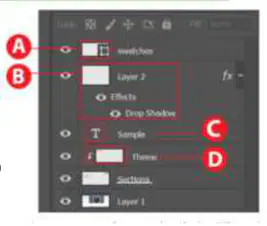
Using the image as a reference, identify the different layer types in the Layers panel.
a)
Shape Layer - A
Layer Style - B
Text Layer - C
Clipping Mask - D
b)
Shape Layer - B
Layer Style - C
Text Layer - D
Clipping Mask - A
c)
Shape Layer - C
Layer Style - D
Text Layer - A
Clipping Mask - B
d)
Shape Layer - D
Layer Style - A
Text Layer - B
Clipping Mask - C
48.
You may only use the work if you give author credit.
a)
Attribution (BY) Copyright
b)
Vector-based
Editable
c)
The art and design of arranging type when choosing a font, font style, and color.
d)
Additional resources needed for the project
Additional time needed for the project
49.
You may distribute derivative works only under a license identical to (not more restrictive that) the license that governs the original work.
a)
Share-alike (SA) Copyright
b)
To remove a selected area from an image
To make a selection and use content-aware fill
To make an non-geometric selection
c)
Paths
d)
Layers to Files
50.
You may use the work for only non-commercial purposes.
a)
Non-Commercial (NC) Copyright
b)
Ctrl + Z
c)
Shift + Click
d)
Complementary
51.
You may only use exact copies of the work, not derivative works and remixes based on it.
a)
Non Derivative Works (ND) Copyright
b)
Paint Bucket Tool
c)
180
d)
Vector Shapes
Paths
52.
Which of the following options will change the size of an image without changing the number of pixels in the image?
a)
Resizing
b)
Glyphs
c)
Shape
d)
Convert the type layer into a smart object
53.
Fills adjacent pixels similar in color value to the pixels you click
a)
Paint Bucket Tool
b)
Shift + Click
c)
Glyphs
d)
Target Audience
54.
Creates a gradual blend between multiple colors
a)
Gradient Tool
b)
Magic Wand Tool
c)
Shape
d)
History Brush Tool
55.
Draws free form selections around the desired area
a)
Lasso Tool
b)
Non Derivative Works (ND) Copyright
c)
Bitmap
d)
Focal Point
56.
Selects a consistently colored area without having to trace its outline
a)
Magic Wand Tool
b)
Additional resources needed for the project
Additional time needed for the project
c)
Proximity
d)
Vector
57.
Paints a selection as Photoshop automatically finds and follows defined edges
a)
Quick Selection Tool
b)
Intellectual property
c)
Convert the type layer into a smart object
d)
Magic Wand
58.
Makes a rectangular selection
a)
Marquee Tool
b)
To remove a selected area from an image
To make a selection and use content-aware fill
To make an non-geometric selection
c)
Rasterize
d)
90 Clockwise
59.
It is important to consider copyright any time you work on a project. Which of the following correctly describes copyright?
a)
The exclusive right to copy, distribute, and profit from a work
b)
Smart Objects
Adjustment Layers
Pixel Layers
c)
B
d)
Resizing
60.
What feature of the History Panel allows you to quickly compare and revert to an earlier image state?
a)
Snapshot
b)
Properties
c)
PANTONE
d)
Bitmap
61.
Which three of the following are valid used of the Lasso Tool? (Choose three)
a)
To remove a selected area from an image
b)
To make a selection and use content-aware fill
c)
To make an non-geometric selection
d)
To make a geometric selection
62.
Which of the following correctly describes Character Tracking?
a)
Changes the spacing between all characters in a block of text
b)
Gradient Tool
c)
Bitmap
d)
Proximity
63.
Which of the following options is an added benefit of using a Linked Smart Object over just using a Smart Object in Photoshop?
a)
Smart Objects are automatically updated if the source file is changed.
b)
Resizing
c)
Magic Wand
d)
Clipping Mask
64.
Which of the following is not a phase involved in a project plan?
a)
Budget Discussion
b)
Content-Aware Move
c)
Window > Swatches
d)
Rectilinear
65.
Which option is not a factor when determining which kinds of images to include in your project for a target audience?
a)
Your own stylistic preferences
b)
Demographics
c)
Non Derivative Works (ND) Copyright
d)
Properties
66.
During the process of interacting with your client, which of the following would be deliverables you would need to provide as you work through the project? (Choose two)
a)
Design Comps
b)
Project specifications
c)
Image
d)
Ctrl + Z
67.
In the beginning of the visual design process, it's important to work closely with your client. Which of the following methods is a good way to quickly explore creative options and ensure you are creating something the client is happy with?
a)
Make rough sketches
b)
Magic Wand Tool
c)
Image
d)
B
68.
From the following choices, select the best definition for Typography.
a)
The art and design of arranging type when choosing a font, font style, and color.
b)
PANTONE
c)
Auto Color
d)
Rasterize
69.
72 Which path would you follow to add new colors to an existed swatch library?
a)
Window > Swatches
b)
Properties
c)
The art and design of arranging type when choosing a font, font style, and color.
d)
Make rough sketches
70.
Since you are working with photographs you receive from the client, you don't want any editing changes to be permanent. What type of editing would you use if you wanted to preserve the original image data?
a)
Non-Destructive Editing
b)
Marquee Tool
c)
Magic Wand
d)
Roles
71.
When applying a filter to a text layer, how can you ensure that the type's editability is not lost?
a)
Convert the type layer into a smart object
b)
16:9
c)
Project specifications
d)
Ctrl + R
72.
You are editing a photo, and one of the trees in the landscape would balance the composition better if it were father to the right side of the frame. Which of the following features would be the most effective to move the tree to the right side of the image?
a)
Content-Aware Move
b)
Attribution
c)
Project Scope
d)
Pixels
73.
From the following options, which two are benefits of using a Linked Smart Object in Photoshop? (Choose two)
a)
Linked Smart Objects are automatically updated if the source file is changed.
b)
Linked Smart Objects enable the ability to perform non-destructive transforms without losing the original image quality.
c)
Linked Smart Objects enable destructive transforms losing the original image quality.
d)
Destructive Editing
74.
Which must be considered when beginning a new Photoshop project?
a)
Target Audience
b)
8.5 x 11 in
c)
Project Scope
d)
Smart Objects are automatically updated if the source file is changed.
75.
Which are factors that go into a project plan? Choose four answers.
a)
Scope
b)
Roles
c)
Benchmarks
d)
Demographics
e)
Business objectives
76.
Which is a legal term which indicates an idea, process, or physical creation that comes from the work of the mind?
a)
Intellectual property
b)
Pixels
c)
CMYK
d)
CMYK
77.
Which are used to create a raster image?
a)
Pixels
b)
Pixels
c)
Vector Shapes
Paths
d)
Shift + Click
78.
Which basic design principle is primarily made up of lines?
a)
Shape
b)
Content-Aware Move
c)
Scope
d)
Ctrl + Z
79.
Which type of colors are opposite each other on the color wheel?
a)
Complementary
b)
True
c)
90 Counter Clockwise
d)
Budget Discussion
80.
Which are technical and visual demands that need to be considered when planning a project? Choose three answers.
a)
Deliverables
b)
Resolution or DPI
c)
File Types
d)
Window > Swatches
81.
When handling project scope creep, which are two things that all parties involved need to be aware of?
a)
Additional resources needed for the project
Additional time needed for the project
b)
Smart Objects are automatically updated if the source file is changed.
c)
Harmony
d)
300 DPI
82.
Which Creative Commons license type allows other s to use and build upon work non-commercially, provided that they credit the original author and maintain the same licensing?
a)
Attribution
Non-Commercial
Share-Alike
b)
Attribution
Commercial
Share-Alike
c)
Attribution BY
Non-Commercial
Share-Alike
d)
Attribution
Non-Commercial
Derived
83.
Which is used to create a vector image?
a)
Paths
b)
Image
c)
Show them
Separate them
Nest them
d)
8.5 x 11 in
84.
What defines form?
a)
Light and Shadow
b)
Image
c)
Pixel Layers
d)
Non-Commercial (NC) Copyright
85.
Which aspect ratio is used in most modern images and screens?
a)
16:9
b)
Rectilinear
c)
Attribution (BY) Copyright
d)
Character Panel
86.
What do shape tools create? Choose two answers.
a)
Vector Shapes
b)
Paths
c)
Smart Objects are automatically updated if the source file is changed.
d)
Vector-based
Editable
87.
Under which Photoshop menu is the option for adjusting the color mode of a project?
a)
Image
b)
Shape Layer
c)
CMYK
d)
Image
88.
To get prints' truest color for higher-end printing, which color mode should be used?
a)
CMYK
b)
16:9
c)
Snapshot
d)
Quick Selection Tool
89.
Which are types of lines? Choose three answers.
a)
Curvilinear
b)
Rectilinear
c)
Straight
d)
Bitmap
90.
Which design principle refers to the justification of an object or text in a composition?
a)
Alignment
b)
Lasso Tool
c)
Ctrl + Z
d)
Temperature
Curves
Brightness and Contrast
91.
Which design principle indicates that a project is visually satisfying?
a)
Harmony
b)
Smart Objects are automatically updated if the source file is changed.
c)
Share-alike (SA) Copyright
d)
Pencil Tool
92.
Which design principle is the subject of a photo or image?
a)
Focal Point
b)
Attribution
Non-Commercial
Share-Alike
c)
Pencil Tool
d)
Glyphs
93.
Which design principle refers to subjects of elements in a composition that are close to each other?
a)
Proximity
b)
PANTONE
c)
Glyphs
d)
Light and Shadow
94.
What is the standard resolution size for new Photoshop print projects?
a)
300 DPI
b)
Copyright status
c)
Image
d)
Brightness
95.
The main window of Photoshop is also known as a ______.
a)
Canvas
b)
Non-Destructive Editing
c)
Image
d)
Multiple canvases in a single document
96.
Which three actions can be done to panels to customize a user's Photoshop space?
a)
Nest them
b)
Show them
c)
Separate them
d)
delete them
97.
What is the keyboard shortcut for setting up rulers in a Photoshop project?
a)
Ctrl + R
b)
Attribution (BY) Copyright
c)
Paths
d)
Image
98.
What preset commercial color libraries are some of the most widely used?
a)
PANTONE
b)
Attribution (BY) Copyright
c)
Target Audience
d)
Adjustment Layers
99.
What is a standard blank document size when creating a new Photoshop print project?
a)
8.5 x 11 in
b)
Points
Picas
Pixels
c)
Character Panel
d)
Glyphs
100.
Which panel gives users the option to utilize a text tool, as well as adjust typeface?
a)
Character Panel
b)
Pencil Tool
c)
Target Audience
d)
Paint Bucket Tool
101.
Which panel shows users a project's layers, including vector objects and masks?
a)
Properties
b)
Non-Destructive Editing
c)
Target Audience
d)
#VALUE!
102.
Which keyboard shortcut makes the current tool a brush?
a)
B
b)
Resizing
c)
Brush Tool
d)
Attribution (BY) Copyright
103.
When rotating an image, which are standard options to choose from? Choose three answers.
a)
90 Counter Clockwise
b)
90 Clockwise
c)
180
d)
270
104.
Which are measurement options for the ruler in Photoshop? Choose three answers.
a)
Pixels
b)
Points
c)
Picas
d)
cm
105.
Which are types of gradients to choose from when working in Photoshop? Choose three answers.
a)
Diamond
b)
Angle
c)
Linear
d)
Content-Aware Move
106.
Which describe type layers? Choose two.
a)
Editable
b)
Vector-based
c)
non-destructive
d)
Content-Aware Move
107.
Which can be modified using adjustment layers? Choose three.
a)
Temperature
b)
Brightness and Contrast
c)
Curves
d)
Vector
108.
Which does an artboard layer allow users to create in Photoshop?
a)
Multiple canvases in a single document
b)
Image
c)
Attribution (BY) Copyright
d)
Exposure
109.
Once multiple layers are selected, which keyboard shortcut merges them?
a)
Ctrl + E
b)
Ctrl + F
c)
Ctrl + G
d)
Ctrl + A
110.
Which keyboard shortcut hides a mask?
a)
Shift + Click
b)
Shift + Click + M
c)
Shift + Click + S
d)
Shift + Alt
111.
Which Photoshop tool allows users to select an area of an image using a specific color, or color range?
a)
The Magic Wand Tool
b)
Snapshot
c)
Marquee Tool
d)
Light and Shadow
112.
Which keyboard shortcut undoes an action made to a selection?
a)
Ctrl + Z
b)
Snapshot
c)
Multiple canvases in a single document
d)
Proximity
113.
Which image adjustment makes an image appear cooler through the addition of the color blue?
a)
Auto Color
b)
Copyright status
c)
Exposure
d)
Ctrl + R
114.
Which image adjustment allows users to adjust how exposed the light in an image is?
a)
Exposure
b)
Share-alike (SA) Copyright
c)
Temperature
d)
Nest them
115.
When using a brush, which key can be pressed to pull up the eyedropper?
a)
Alt
b)
Budget Discussion
c)
Project specifications
d)
Gradient Tool
116.
When duplicating a custom brush, a name is automatically assigned to the duplicate.
a)
False
b)
True
117.
The opacity of a selected layer or group can be changed, ranging from 100% to 0%.
a)
True
b)
False
118.
Using the Image menu is the only way to modify the size of a canvas.
a)
False
b)
True
119.
A type box is also known as a bounding box?
a)
True
b)
False
100 %

