
 Worksheets
Digital Proficiency test 2024- 25 -MEMS
Total questions: 20
Worksheet time: 28mins
What were the highlights of your technology integration this year?
Which digital tool did you use regularly in your classroom?
What challenges did you face while using technology in the classroom?
On a scale of 1–5, how confident do you feel integrating technology in your teaching?
What type of support would you like from the Digital Learning team?
Are there any digital tools you would like to explore or learn more about?
Which platform allows teachers to assign and collect digital assignments?
Canva
VLC player
Quizizz
MS Word
What type of tool is Canva?
Video editing software
Graphic design platform
File storage app
Music streaming app

Which platform does this logo represent?
Canva
Kahoot
Prezi
Edpuzzle
Which of the following can be embedded into a Google Slide presentation?
Videos from YouTube
Charts from Google Sheets
Images from Google Drive
All of the above
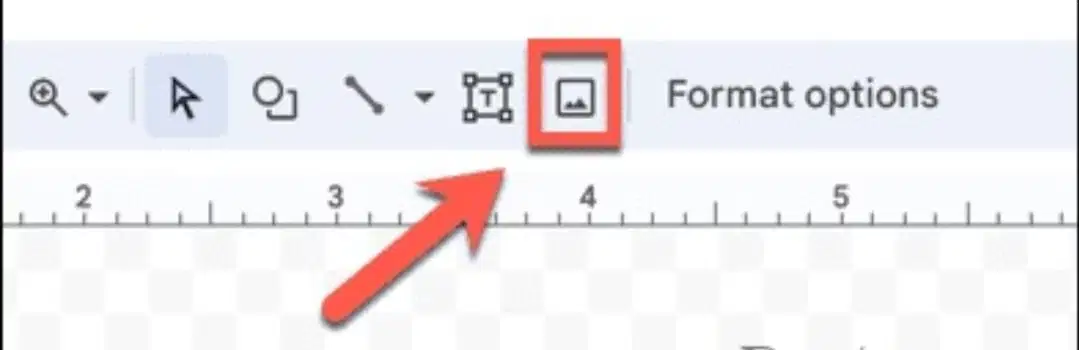
What does this option indicate?
It opens Google Slides
It allows you to insert a link
It lets you upload and insert an image from your computer
It changes the background of the document
You cannot share a Google Sheet with others for editing.
What is the most common reason a projector is not displaying your screen?
Low Wi-Fi connection
HDMI/VGA cable not connected properly
Projector doesn’t support Google
Battery not charged
What is the correct steps to share a Google Doc with edit access.
1) Enter the email address of the recipient
2) Click “Send”
3) Change permission from “Viewer” to “Editor”
4) Click the “Share” button
1, 2, 3, 4
4, 1, 3, 2
2, 1, 3, 4
3, 1, 2, 4
What is the primary function of Google Forms?
To create presentations
To collect survey responses
To edit images
To manage spreadsheets
Which apps help us to collect the data?
Wordwall
Khan Academy
Kahoot
Google form

This image captures a Jr. KG teacher incorporating Apple TV and Wordwall into her lesson. Consider how these digital tools may have enriched student engagement and learning experiences.

The art teacher integrated a camera as a digital tool during the lesson (see image )
It will not help much and may not engage students effectively.
It will just be a waste of time and distract students.
It will be useful and keep students engaged throughout the lesson.
It will make students more passive and less interested in the lesson.
You are teaching a mixed-ability students. Some students quickly complete tasks in Google Classroom, while others need more time and support.
How can you best use digital tools to differentiate instruction for all learners?
Assign the same task to everyone but give extra time to slower students.
Ask advanced learners to help slower students while you manage the rest.
Create printed materials for slower learners and digital tasks for the rest.
Use branching Google Forms or adaptive tools like EdPuzzle to provide varied levels of tasks based on student responses.
A fellow teacher is hesitant to integrate digital tools due to lack of training.
What is the most supportive way to encourage digital adoption?
Show them a successful example from your class and offer to co-plan a lesson using a simple tool.
Insist they must learn because it’s the norm.
Recommend a long list of apps to try on their own.
Ignore their concerns as it’s not your responsibility.

