
 Worksheets
PPT: Digital Literacy & Online Safety
Total questions: 119
Worksheet time: 3570secs
"insert" or "add" a slide means....
put a new slide in the presentation
make a copy of the current slide
go to a new slide
delete a slide
"navigate to slide 4" means...
go to slide 4
delete slide 4
copy slide 4
add a new slide 4
"modify," "format," and "convert" mean...
change something
copy something
open something
delete something
the "title" slide is ….
the first slide
the current slide
the last slide
the slide master
"browse" means...
look for something
add something
copy something
select something
"select" the chart means...
click on the chart
add a new chart
edit chart type
change chart style
"duplicate slide 2" means...
make copy of slide 2
cut slide 2
change slide 2
click on slide 2
"compress" means...
make something smaller
print something
add something
insert something
"merge the cells" means...
combine all the cells into one
add a row above or below
increase the size of the cell
delete the cells
"apply to all" means...
make the same changes to everything
make one change
undo the changes
redo the changes
"accept" means...
click OK
click CANCEL
press ESC
press DELETE
"advance to the next slide" means...
go to the next slide
go to the previous slide
undo changes to the slide
move the next slide
"customize" means...
make changes to the original
add an object
make something new
go somewhere
You are on slide 6. The previous slide is ________.
slide 7
slide 5
slide 6
slide 1
You are on slide 6. The next slide is ________.
slide 7
slide 6
slide 5
slide 1
You are on slide 6. The current slide is ________.
slide 6
slide 7
slide 5
slide 1
Slide 5 is ____________ slides 4 and 6.
between
before
below
beginning
"above" and "top" are most similar to...
up
down
beside
on
"below" and "bottom" are most similar to...
down
up
between
beside
width is the measure that goes....
up and down (vertically)
side to side (horizontally)
height is the measure that goes...
side to side (horizontally)
up and down (vertically)
"change the duration of the slide" means...
change the background of the slide
change the transition of the slide
change the amount of time the slide will show
change the size of the slide
"convert to WordArt" means...
change text to WordArt
make a new WordArt
edit the WordArt
insert SmartArt
"text" means....
written words
a shape
a chart or table
a picture
an "image" is...
a picture
a SmartArt
a WordArt
written words
.jpeg and .png files are.....
pictures
word documents
powerpoint document
pdf files
.docx and .doc files are...
word documents
excel spreadsheets
powerpoints
picture files
.pptx and .ppt files are...
picture files
powerpoint files
word documents
excel spreadsheets
.xlsx and .xls files are...
excel spreadsheets
powerpoint files
word documents
picture files
"set the orientation" means...
change between landscape and portrait
change between color and grayscale
add gridlines
change between normal and slide sorter view
"default" most closely means...
normal
custom
new
folder
a footer is at the _________ of the slide
bottom
top
left
right
a header is at the ______ of the slide
top
bottom
left
right
use the pen or highlighter to make ….
annotations
text boxes
SmartArt
WordArt
a section is a ….
group of slides
a group of items on a slide
a placeholder
a textbox
"encrypt your presentation" means...
add a password
change the size
add info
export to pdf
"center" most closely means...
top
bottom
middle
back
"zoom in" means...
to make the image appear bigger on the screen
to make the image appear smaller on the screen
"zoom out" means...
to make the image appear bigger on the screen
to make the image appear smaller on the screen
"corresponding" means ...
matching, the same
opposite
next
previous
"configure" most closely means...
change
create
add
delete
"landscape orientation" is....
more wide than tall
more tall than wide
square view
standard view
"portrait orientation" is...
more tall than wide
more wide than tall
square view
default view
'make the textbox 3" wide'
What do you change?
the width
the height
the color
the style
'make the SmartArt 1.4" high'
What do you change?
the height
the width
the fill
the format
What is a Slide in a presentation?
A complete set of colors, fonts, and effects
A screen or page in a presentation
A toolbar at the top of PowerPoint
A visual effect between two slides
What does a Theme in a presentation include?
A way to arrange content on a slide
A complete set of colors, fonts, and effects
A box that holds text or images
A type of chart for comparing data
What is the purpose of the Layout in a presentation?
To add movement to text or images
To arrange content on a slide
To save a file in another format
To line up objects neatly
What is the Design Tab used for in PowerPoint?
To choose themes and backgrounds
To add sound to a slide
To create a clickable link
To focus in or move between slides
What is the Ribbon in PowerPoint?
A box where you type text
A toolbar at the top of PowerPoint
A visual way to show numbers
A feature to bring files into a slide
What is a Transition in a presentation?
A visual effect between two slides
A ready-to-use presentation style
A space for speaker reminders
A graphic object like a circle or square
What does Animation do in a presentation?
Adds movement to text or images
Combines multiple items into one
Lines up objects neatly
Controls default styles for the presentation
What is a Template in PowerPoint?
A box that holds text or images
A ready-to-use presentation style
A type of chart for comparing data
A feature to save a file in another format
What is a Placeholder in a presentation?
A toolbar at the top of PowerPoint
A box that holds text or images
A clickable link to a website
A feature to focus in or move between slides
What is the purpose of Format in a presentation?
To change the appearance of text or objects
To add sound to a slide
To create a clickable link
To show a visual way to show numbers
What is an Object in a presentation?
Any item like text, image, or shape
A toolbar at the top of PowerPoint
A visual effect between two slides
A ready-to-use presentation style
What is the purpose of Notes in a presentation?
To add movement to text or images
To save a file in another format
To provide space for speaker reminders
To line up objects neatly
What does the Zoom feature do in a presentation?
Focuses in or moves between slides
Adds sound to a slide
Combines multiple items into one
Creates a clickable link
What is the purpose of Audio in a presentation?
To add sound to a slide
To create a clickable link
To line up objects neatly
To change the appearance of text or objects
What is a Video in a presentation?
A clip added to a presentation
A toolbar at the top of PowerPoint
A visual effect between two slides
A ready-to-use presentation style
What is a Hyperlink in a presentation?
A clickable link to a website or another slide
A box that holds text or images
A feature to focus in or move between slides
A graphic object like a circle or square
What is a Textbox in a presentation?
A box where you type text
A toolbar at the top of PowerPoint
A visual way to show numbers
A feature to bring files into a slide
What is a Chart in a presentation?
A visual way to show numbers
A type of chart for comparing data
A feature to save a file in another format
A box that holds text or images
What is a Graph in a presentation?
A type of chart for comparing data
A toolbar at the top of PowerPoint
A visual effect between two slides
A ready-to-use presentation style
What is the purpose of Export in a presentation?
To save a file in another format like PDF
To add sound to a slide
To create a clickable link
To line up objects neatly
What does Import do in a presentation?
Brings files or media into a slide
Combines multiple items into one
Lines up objects neatly
Controls default styles for the presentation
What is the purpose of Group in a presentation?
Combines multiple items into one
Adds sound to a slide
Creates a clickable link
Shows a visual way to show numbers
What does Align do in a presentation?
Lines up objects neatly
Adds movement to text or images
Saves a file in another format
Provides space for speaker reminders
What is the Background in a presentation?
The color or image behind content
A toolbar at the top of PowerPoint
A visual effect between two slides
A ready-to-use presentation style
What is the Title in a presentation?
The main text at the top of a slide
A box that holds text or images
A feature to focus in or move between slides
A graphic object like a circle or square
What is the View in a presentation?
Different ways to look at your slides
A toolbar at the top of PowerPoint
A visual effect between two slides
A ready-to-use presentation style
What is the Insert Tab used for in PowerPoint?
To add pictures, charts, or shapes
To add sound to a slide
To create a clickable link
To focus in or move between slides
What is a SlideShow in a presentation?
Full-screen mode for presenting
A toolbar at the top of PowerPoint
A visual effect between two slides
A ready-to-use presentation style
What does Master control in a presentation?
Default styles for the whole presentation
Adds sound to a slide
Creates a clickable link
Shows a visual way to show numbers
What is a Shape in a presentation?
A graphic object like a circle or square
A toolbar at the top of PowerPoint
A visual effect between two slides
A ready-to-use presentation style
Using Yellow and Orange together in your design helps to create contrast.
True
False
Avoid having too many random elements on the page.
True
False
Using a black background with white text is called:
Random Text
Redirected Text
Reverse Text
A terrible idea!
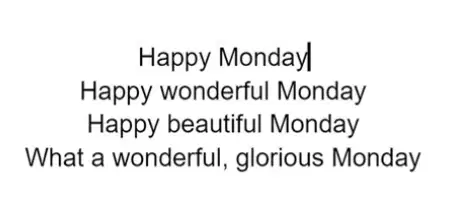
If all the lines line up in the middle, we have used the ___ alignment. (See image for an example)
Left
Right
Center
Justify
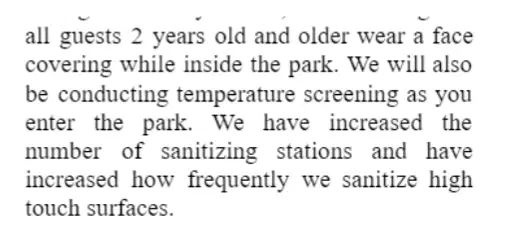
If all the lines line up on both sides, we have used the ___ alignment. See image for an example.
Left
Right
Center
Justify
Which of the following is NOT a good way to create contrast?
Using warm and cool colors together
Using thin lines with super wide lines
Placing things in the corners
Using small graphics with large graphics
Using dark backgrounds and light colored text can create eye strain if a lot of information needs to be read.
True
False
When designing, it is a good idea to use which of the following?
Pink background with red text
Text size 12 with Text size 14
Light Yellow background with Dark Green text
Purple background with a blue text
You can create contrast by:
Using size 12 text with size 20 text
Moving items closer together
Lining everything up on the right side
Filling up all the corners
Which alignment option would you most likely see in a magazine article?
Left
Center
Right
Justify
The design principle that states we should move items closer together is called:
Proximity
Alignment
Contrast
Balance
Empty space on the slide is called:
Blank Space
White Space
Empty Space
Space
Which of the following should you AVOID as you design?
Moving related items close together
Using warm and cool colors together
Placing things randomly on the page
Using Small and Large fonts together
Moving items closer together:
Creates Chaos
Creates a relationship between the elements
Makes it difficult to read
Creates contrast
Which alignment option do designers tend to overuse?
Left
Center
Right
Justify
The design principle that states we should make items really different is:
Proximity
Contrast
Alignment
Repetition
When creating a multi-slide presentation, you can apply the principle of repetition by:
Using the same size, style, and color for article titles
Using different sizes, styles, and colors for article titles
Using different page colors for each page
This principle cannot be applied to newsletters
When designing a presentation, you can apply the principle of repetition by using the same background color on each slide.
True
False
When designing a 4-slide presentation, you can create repetition by:
Using different fonts for each page
Using different colors for each page
Using different fonts on each page
Placing a logo in the same location on all slides
This principle states that you should repeat some elements throughout the design.
Proximity
Alignment
Repetition
Contrast
Which design principle suggests that elements should be organized in a visually appealing manner?
Contrast
Balance
Proximity
Alignment
For enhancing readability, it's best to use:
Multiple font styles in a paragraph
High contrast between text and background
Text size below 10pt for long paragraphs
Overlapping elements to save space
Which of the following is NOT recommended for creating a cohesive design layout?
Using a consistent color scheme
Applying the same font style across the entire design
Randomly placing elements without alignment
Ensuring elements are related by proximity
Images should be used to enhance not decorate.
True
False

What is the difference between private and personal information?
Personal information shares your private information to the world, but private info doesn't.
They are both about you, but personal info doesn't give away anything about you. Private info does.
Private information is not ok to share and neither is personal info as the both give away something about you.

Which ones are examples of personal information. Choose 2 answers.
Hobbies.
Full Name.
Favourite Food.
School.

Which ones are examples of private information. Choose 2 answers.
First Name.
Email address.
Phone Number.
Country you live in.

What is a digital footprint?
Everything you do and everywhere you go on your computer?
The trail of websites you visit on the internet.
Everything you do and everywhere you go on the internet.

True or False?
You can have both a positive and negative digital footprint.
True.
False.

Sarah's older sister wants to know her password for Roblox. What should she do?
Give it to her. Sarah can trust her family with her passwords.
Tell her no.
Give her a fake password so she can't get into her account.
Tell her sister no but check with her parents.

What does SMART stand for?
Be Safe, Don't meet up, Accepting emails and texts can be dangerous, is the info reliable, tell an adult.
Be smart, Meet up with your friends, Accepting files can be dangerous, is the information reliable, talk to someone.
Be Safe, Don't meet up, Dont share your address or age, remember the safety rules, tell an adult.
Be smart, Meet up with your friends, Accepting emails and texts can be dangerous, is the info reliable, tell and adult.

How does being SMART on the internet help us?
It means we can be better researchers and find reliable answers on the internet.
It means we can protect our identity and stop ourselves from being cyberbullied.
It means that we won't get into trouble and our parents will completely trust us to do what is right online.

Why is it dangerous to talk online with people we don't know in real life? Choose the best answer.
Because our parents and our teachers tell us not to.
Because we don't know if they are our friends or not.
They might not be who they say they are and they could trick us into revealing private information.

Who are examples of trusted adults we can go to if something doesn't feel right online? Choose 2 answers.
Parents.
All family members.
Teachers.
Random strangers.

What is a privacy policy?
It is a long, boring document that explains the privacy laws for that country.
It is a document on a website or app that tells you what kind of info they are collecting and how they will use it.
It is an app on your phone that explains how to keep your personal information private.

How do you know if a website is appropriate and safe to use?
It has a privacy policy, a seal of approval and a person to contact if you have questions.
It has a privacy policy and links to other safe websites that are good for kids.
It has a seal of approval and a lock symbol in the address bar which means they are keeping their website secure.

True or False?
You can accept an email from a stranger if it is from a big Australian company that has a good reputation (like Woolworths).
True.
False.

You are playing minecraft when a person who says they go to your school joins the game and starts chatting with you. What do you do?
Keep playing and ignore the chat box and the message.
Hop off Minecraft straight away and go tell your parents about the message.
Say hi and start chatting.
Say hi and keep playing but ignore any other messages that come through.

What is a troll?
It is a mean person who says rude things and bullies others.
It is a mean character from a fairy tale.
It is a person who makes mean comments online to others.

What is a hater?
Someone who hates everybody esle because they have low self esteem and like hurting others.
It is a mean person online who constantly sends rude, hurtful messages to others.
It is someone who hates you.

You are watching a funny cat video on YouTube when you see an ad pop up for free music downloads for kids. What do you do? Choose the best answer.
Ignore the ad and keep watching the video.
Report the ad as inappropriate.
Click on the ad to download the free music.

What is the 'feedback sandwich'?
A type of sandwich that is available at McDonalds for a good price.
A strategy we use in class when commenting on others work.
A tool that helps us comment to others in a positive way.

You receive an email about your Minecraft account. It says you need to update your password. What do you do?
Click on the link in the email to update your password.
Don't reply because it is probably a hacker trying to get your private information.
Reply and tell them you are blocking the address because this is a scam.
Ignore the email because you aren't having any problems with your account.

What is the number #1 cyber safety rule for kids your age?
Ask or tell a grown up before you do anything online.
Never share your private information online.
Always stand up for yourself and report or block cyberbullies.

