
Font size
 Worksheets
Quizizz: Lesson 3.7 If-Then-Else - Student Activity Guide
Total questions: 39
Worksheet time: 22mins

Mission Checklist: Did you make the backdrop change depending on which side of the screen the sprite is on?
True
False

Mission Checklist: Did you make your sprite change color depending on which side of the screen it is on?
True
False

One challenge is: Use more than one if-then instead of if-then-else, which will run in parallel?
True
False

Another challenge is: Use a not block in the condition?
True
False
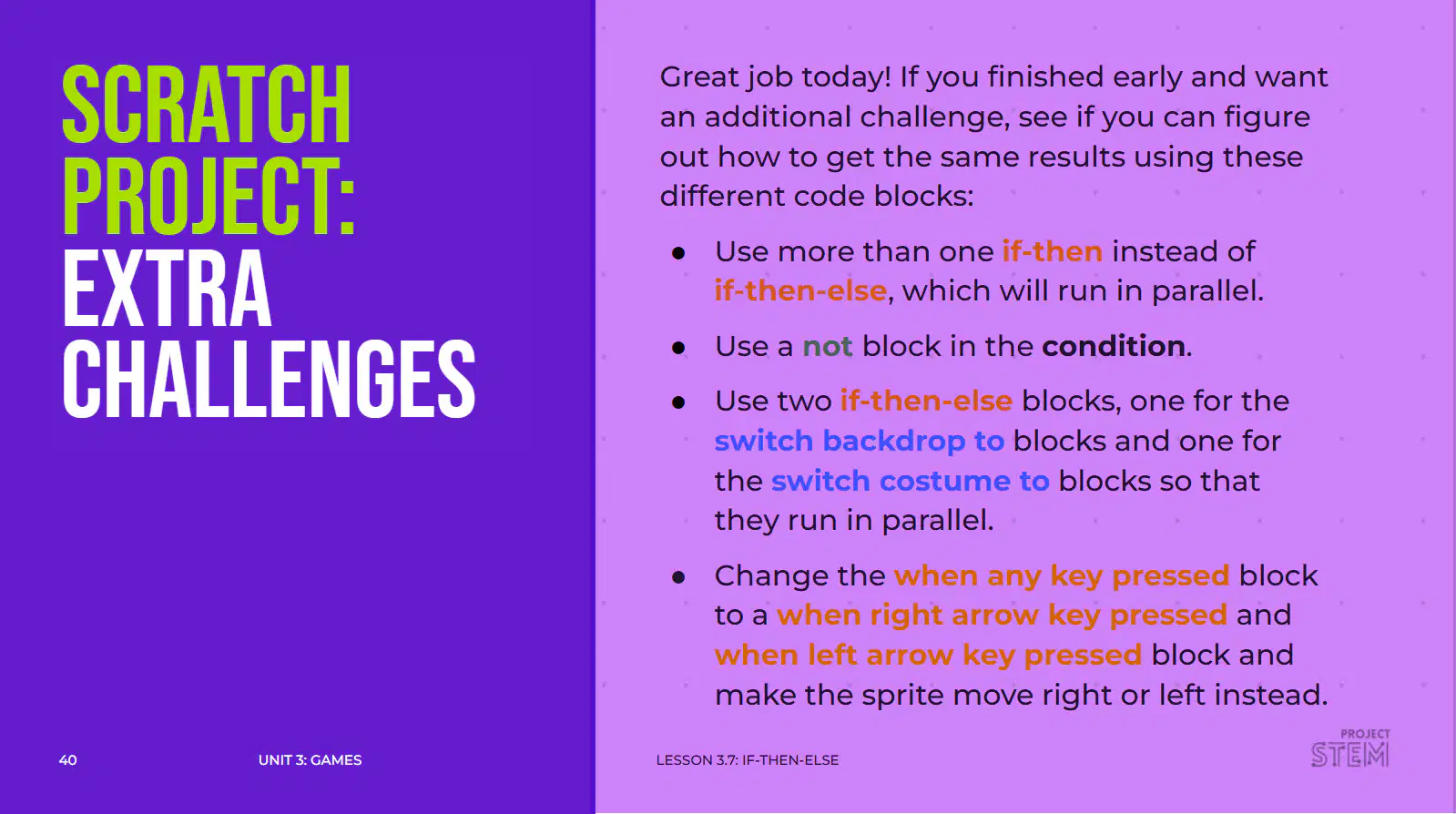
Another challenge: use two if-then-else blocks, one for the switch backdrop to blocks and one for the switch costume to blocks so that they run in parallel?
True
False

Another challenge is: Change the when any key pressed block to a when right arrow key pressed and a when left arrow key pressed block and make the sprite move right or left instead?
True
False
What is the first step to create a remix of the starter project?
Log in to your Scratch account.
Click the green flag to start the project.
Share the project with your friends.
Download the project to your computer.
Step 2: What do you click to make your project viewable?
Click 'Share'.
Click 'Delete'.
Click 'Download'.
Click 'Edit'.
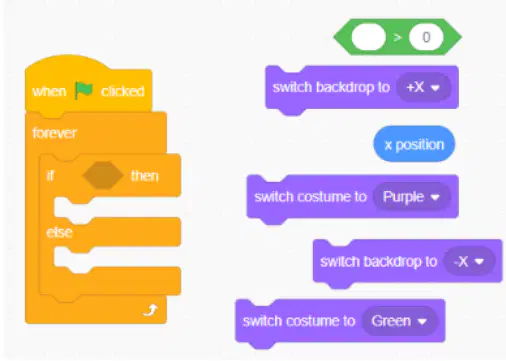
What type of block should be placed in the first missing space?
(a)

Which block should be used to test the condition that the sprite’s x-coordinate is greater than zero?
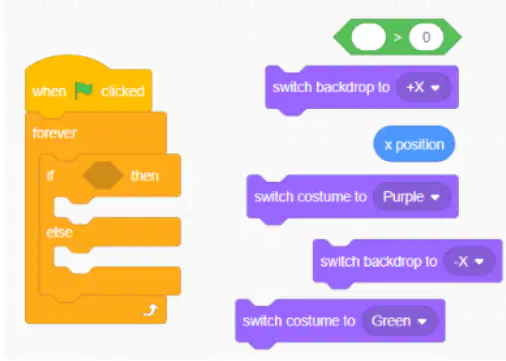
Which block should be placed to check the sprite's x-coordinate?
x position block
y position block
direction block
costume number block
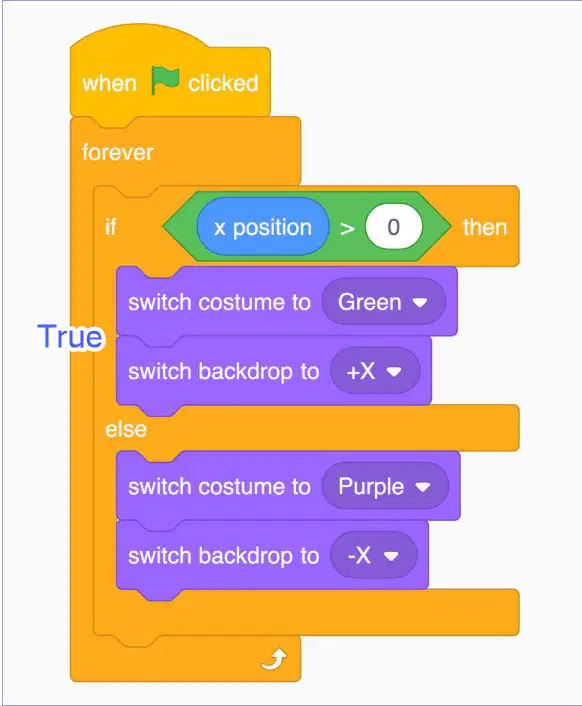
Which blocks should be placed in the first empty space for when the condition is true?
switch costume to (Green) and switch backdrop to (+X)
switch costume to (Red) and switch backdrop to (-X)
switch costume to (Blue) and switch backdrop to (Y)
switch costume to (Yellow) and switch backdrop to (-Y)

Which blocks should be placed in the second empty space for when the condition is false?
switch costume to Purple and switch backdrop to -X
switch costume to Green and switch backdrop to Y
switch costume to Red and switch backdrop to Z
switch costume to Blue and switch backdrop to W
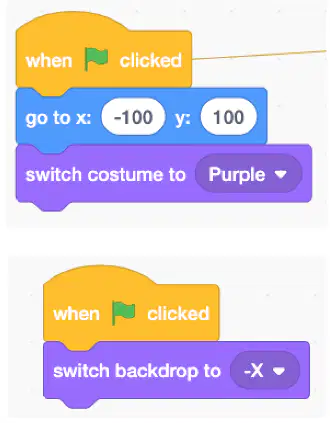
What block should be added after the when green flag clicked block?
go to block
repeat block
say hello block
wait block
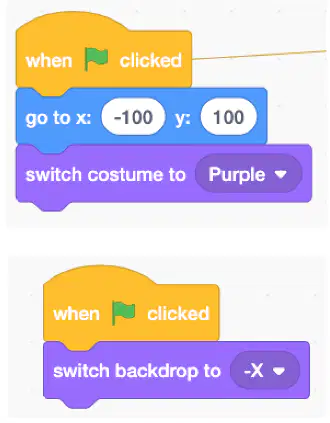
What block should be added under the backdrop's Code Area?
switch backdrop to block
when flag clicked block
move 10 steps block
repeat 10 times block
Fill in the blank: A statement which must be true or false. ______ can be used as conditions in programming.
Boolean
Integer
String
Array
Fill in the blank: A ______ is a boolean which is used to decide whether an action happens.
condition
loop
variable
function
Fill in the blank: A ______ is a statement with multiple possible outcomes which depend on a condition.
conditional statement
loop statement
assignment statement
print statement
The Scratch homepage is used for:
Creating new projects
Viewing featured projects and community updates
Editing sprites
Running scripts
What can you find in the Sample Project link provided in the Project Links section?
Project documentation
Sample code
User testimonials
Company history
What is the purpose of the Coding Activity Walkthrough Video in the Project Links section?
To provide a step-by-step guide for completing the coding activity
To introduce the project topic
To display the final project result
To list the project requirements
Boolean blocks in Scratch are:
Blocks that perform mathematical operations
Blocks that store text values
Blocks that return either true or false
Blocks that play sounds
Hat blocks in Scratch are:
Blocks that start a script when a specific event occurs
Blocks that control the movement of sprites
Blocks that change the appearance of sprites
Blocks that play sounds
Stack blocks in Scratch are:
Blocks that are used to control the flow of a program and are placed one after another vertically.
Blocks that are used to store variables.
Blocks that are used to create sounds.
Blocks that are used to draw shapes.
C blocks in Scratch are:
Blocks that repeat actions
Blocks that contain other blocks and control the flow of scripts
Blocks that play sounds
Blocks that move sprites
Reporter blocks in Scratch are:
Blocks that perform actions like moving sprites
Blocks that report a value, such as a number or text
Blocks that control the flow of the program
Blocks that play sounds
Cap blocks in Scratch are:
Blocks that can be placed anywhere in the script
Blocks that end a script or section of code
Blocks that repeat actions
Blocks that store variables
The 'if () then, else' control block in Scratch is used to:
Repeat a set of instructions a specific number of times
Choose between two sets of instructions based on a condition
Stop all scripts in the project
Broadcast a message to other sprites
The 'forever' control block in Scratch:
Runs a set of instructions once
Repeats a set of instructions a specific number of times
Repeats a set of instructions forever until the program stops
Stops the script immediately
What does the 'switch costume to ()' looks block do in Scratch?
It changes the sprite's costume to the selected one.
It changes the sprite's position on the stage.
It switches the backdrop of the stage.
It plays a sound effect.
What does the 'switch backdrop to ()' looks block do in Scratch?
It changes the stage's backdrop to the specified one.
It switches the sprite's costume.
It plays a sound effect.
It moves the sprite to a new position.
The 'x position' motion block in Scratch:
Changes the sprite's direction
Sets or reports the sprite's horizontal position
Changes the sprite's costume
Plays a sound
What does the 'not ()' operator block do in Scratch?
It inverts the value of a Boolean input.
It repeats a set of instructions.
It stops all scripts.
It changes the sprite's costume.
The '() or ()' operator block in Scratch is used to:
Perform addition of two numbers
Check if at least one of two conditions is true
Repeat actions multiple times
Join two strings together
What does the '() and ()' operator block do in Scratch?
It joins two strings together.
It performs a logical AND operation between two conditions.
It repeats actions a certain number of times.
It changes the sprite's costume.
What does the '() contains ()' operator block do in Scratch?
Checks if a string contains another string
Adds two numbers together
Repeats a set of instructions
Changes the sprite's costume
What does the '() is less than ()' operator block do in Scratch?
It checks if one value is less than another value.
It adds two numbers together.
It repeats a set of instructions.
It changes the color of a sprite.
What does the '() is greater than ()' operator block do in Scratch?
Compares two values and returns true if the first is greater than the second
Adds two numbers together
Checks if two values are equal
Subtracts one value from another
What does the '() = ()' operator block do in Scratch?
Checks if two values are equal
Adds two numbers together
Joins two strings
Repeats a set of instructions

