
 Worksheets
ICS Last Thing
Total questions: 41
Worksheet time: 24mins
Spell your ICS teacher's last name
(a)
What does ICS stand for?
Introduction to Computer Science
Investigations of Computer Science
Inspirations of Computer Science
Interrogations of Computer Science
What is our classroom number?
(a)
This question is about computer science classes for next year. If you are a senior, just write Senior. For everyone else, which course sounds more appealing to you?
- A one semester course where you learn about Artificial Intelligence
- A year long AP Computer Science Principles class where you learn to code in the text based programming language Python and can earn college credit if you do well on the end of year test.
Which platform did we NOT use this year?
Code.org
Makecode
CodeHS
Canvas
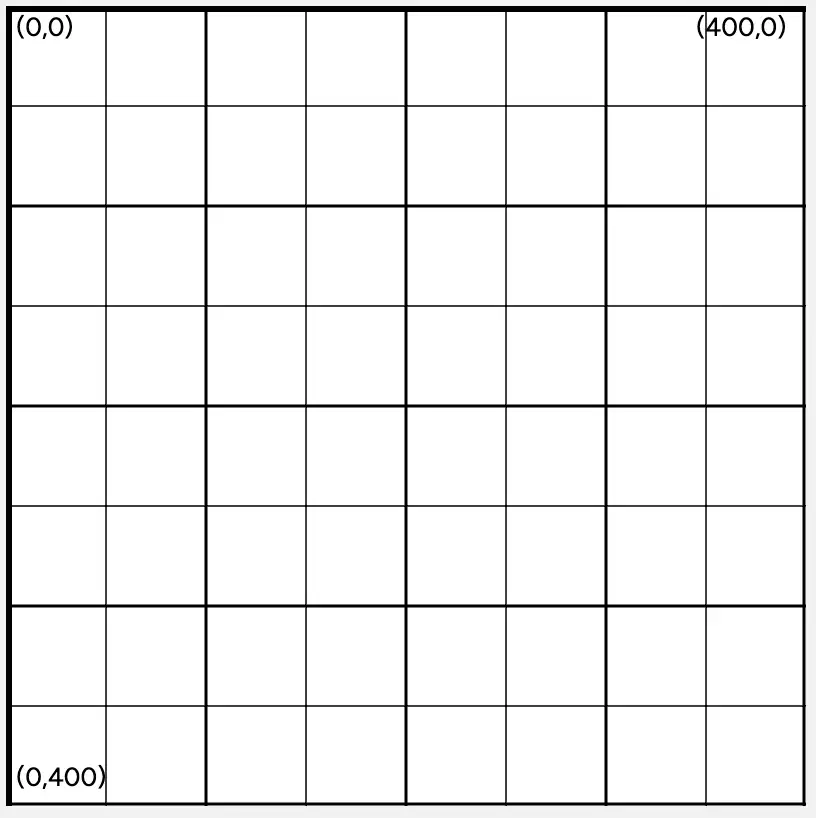
In GameLab, where is the point (0, 200)?
On the left side of the screen, in the middle
On the right side of the screen, in the middle
On the top side of the screen, in the middle
On the bottom side of the screen, in the middle

What code would draw the given picture?


Which block allows you to draw a circle in GameLab?


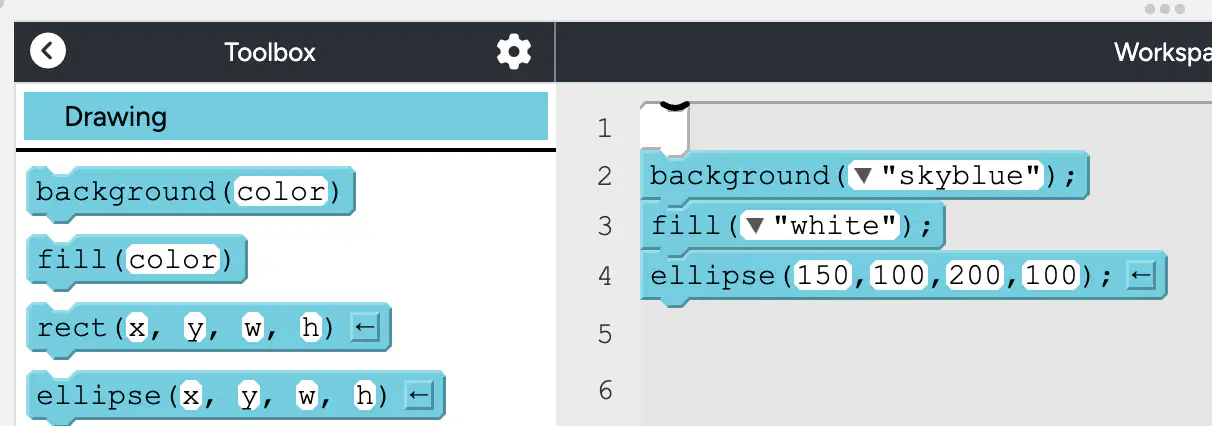
What is true about the ellipse being drawn by the code to the left?
The ellipse is drawn with y = 150
The ellipse is wider than it is tall
The ellipse is skyblue
The ellipse has a width of 100

You want to make a variable to holds the size of a circle, but the code you attempted has an error. What is the best way to make this variable?
var sizeOfCircle = 150;
var 1size = 150;
150 = var size;
var size : 150;
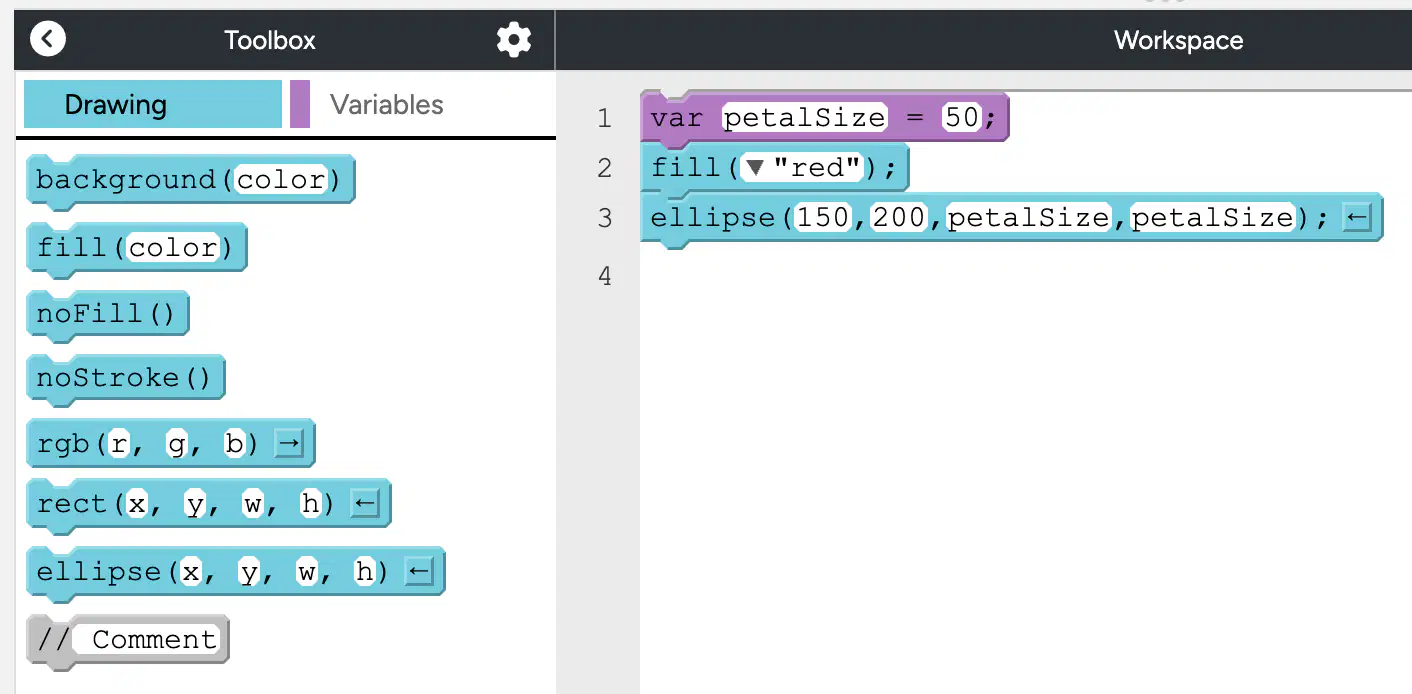
What is the width of the ellipse drawn by the code to the left?
150
200
50
100
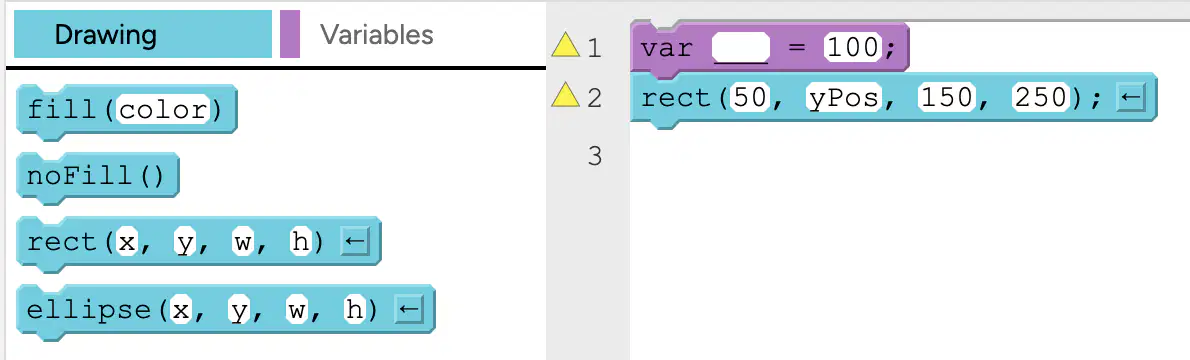
What should be typed into the blank so that the code will draw a rectangle with an x of 50, y of 100, width of 150, and height of 250
100
y
yPos
yValue
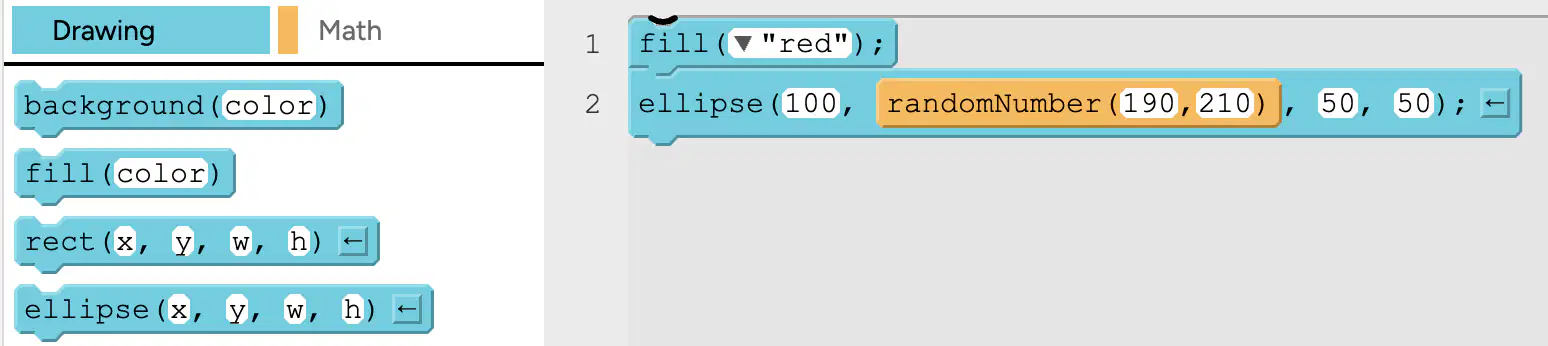
Which is true about this code?
The red ellipse will have an x between 190 and 210
The red ellipse will have a y between 190 and 210
The red ellipse will have a width between 190 and 210
The red ellipse will have a height between 190 and 210
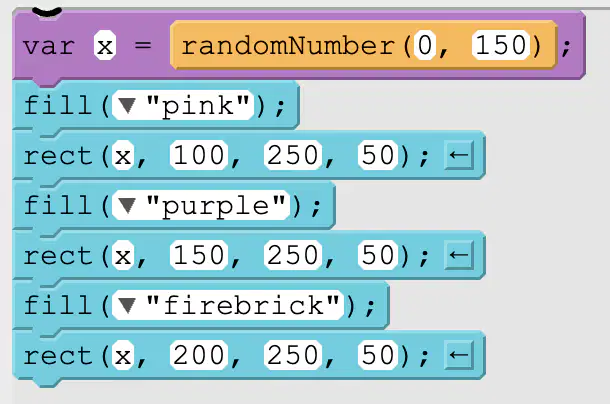
Which picture could be drawn by the code to the left?


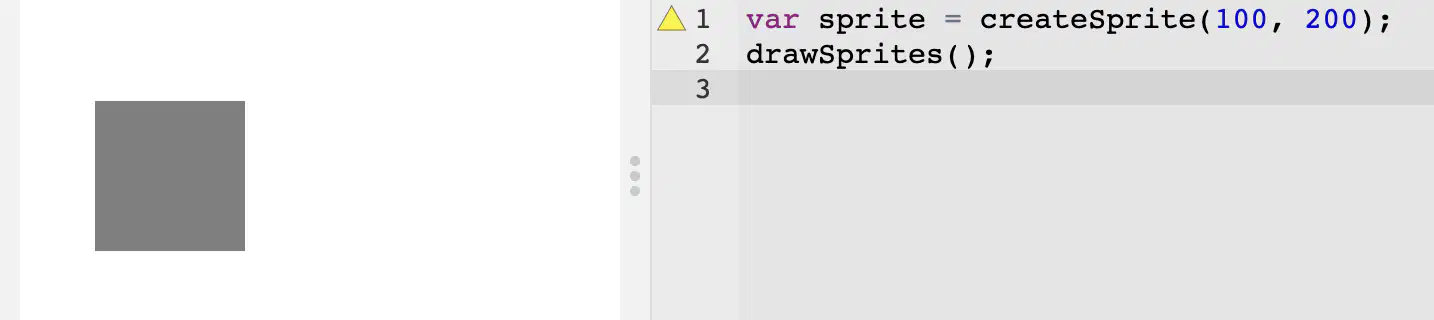
Why is the sprite appearing like a gray box instead of the picture of a dog?
The variable should have been named dog, not sprite
The command sprite.setAnimation is missing
Because lines 1 and 2 are in the wrong order
Because the dog went for a walk and hasn't returned

Where will the sprite be located?
On the top left
On the top right
On the bottom left
On the bottom right
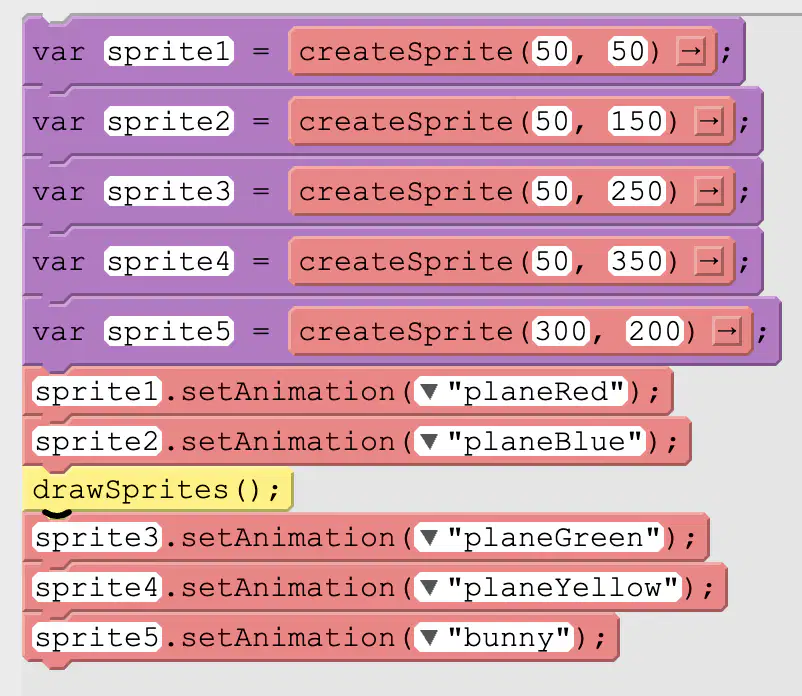
What is drawn by the code the left?


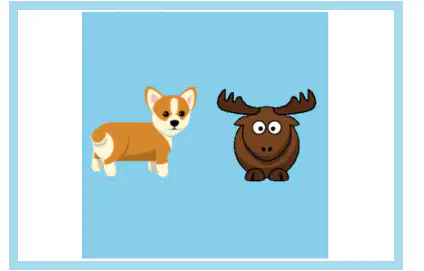
Which lines of code will correctly drawn the picture to the left?


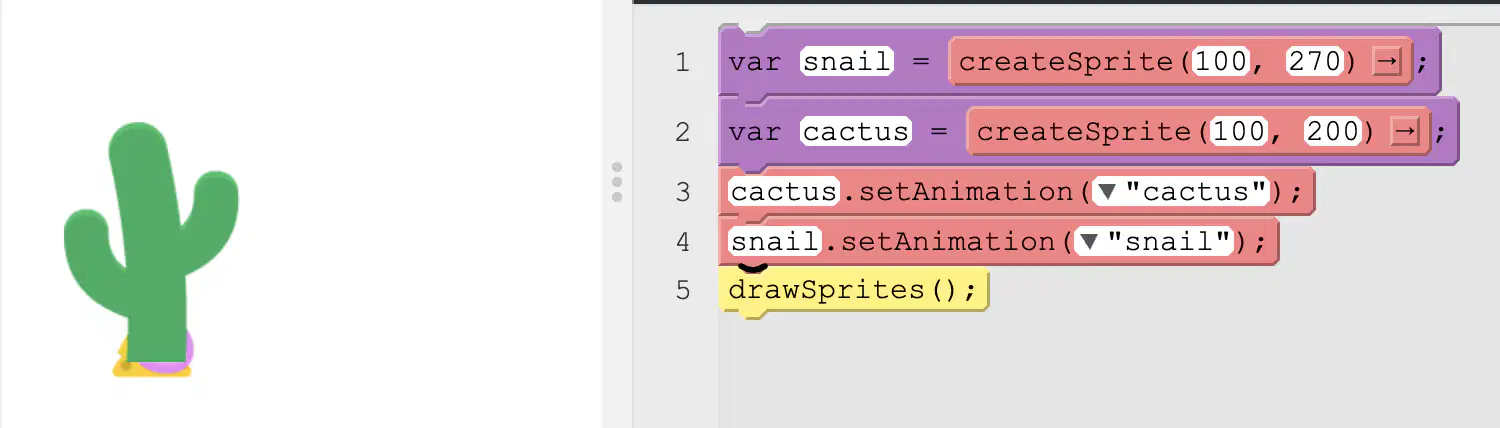
What changes need to be made to the program so that the snail appears on top of the cactus?
Lines 1 and 2 should be switched
Lines 3 and 4 should be switched
Line 5 should be moved to the beginning of the program
It is impossible to have the snail appear on top of the cactus
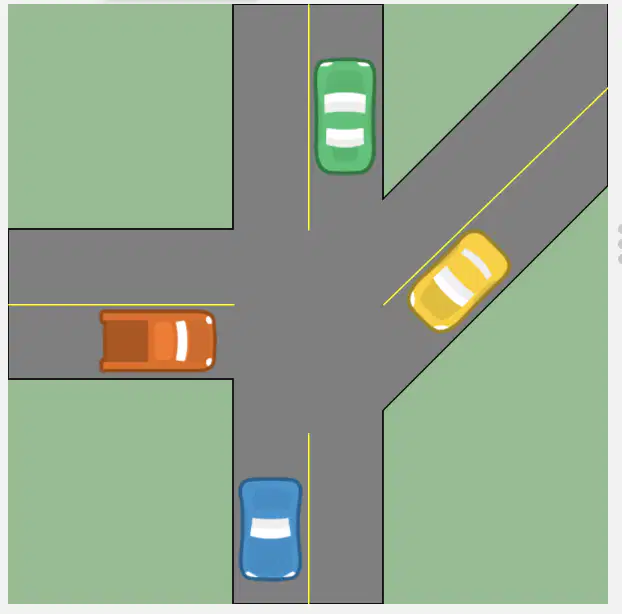
Uh oh! The yellow car is about to hit the red car. What sprite property of the yellow car should be changed to avoid the accident?
sprite.scale
sprite.tint
sprite.width
sprite.rotation
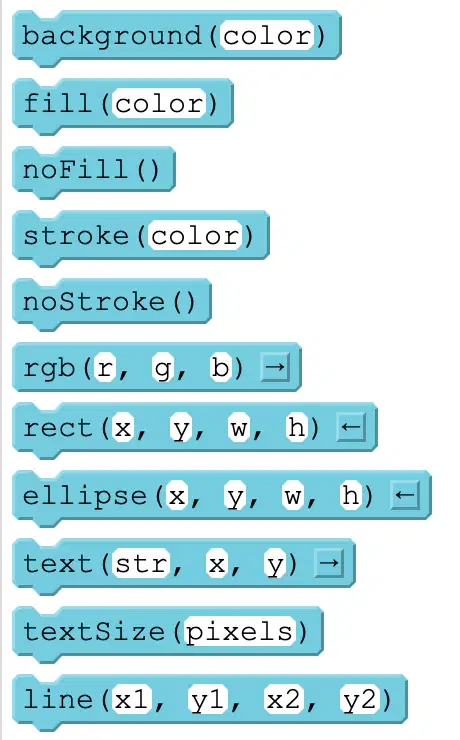
Which drawing command draws text on the screen?
fill(color)
stroke(color)
textSize(pixels)
text(str, x, y)

What code will cause the salt shaker to appear to shake up and down?


Based on this code, in which direction will the fly be moving?
Downward
Upward
To the Left
To the Right
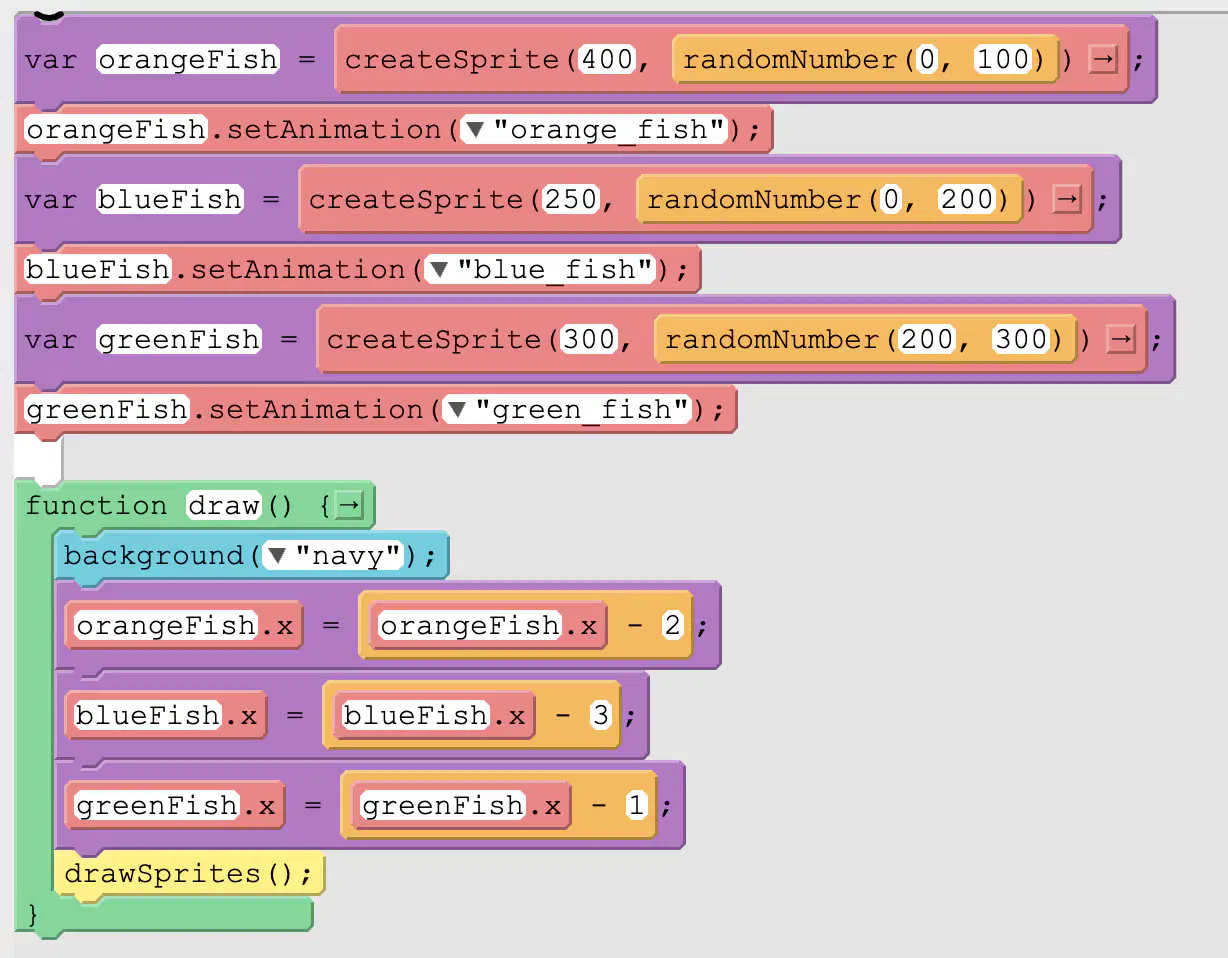
Which fish will move the fastest?
The orange fish
The blue fish
The green fish
The red fish
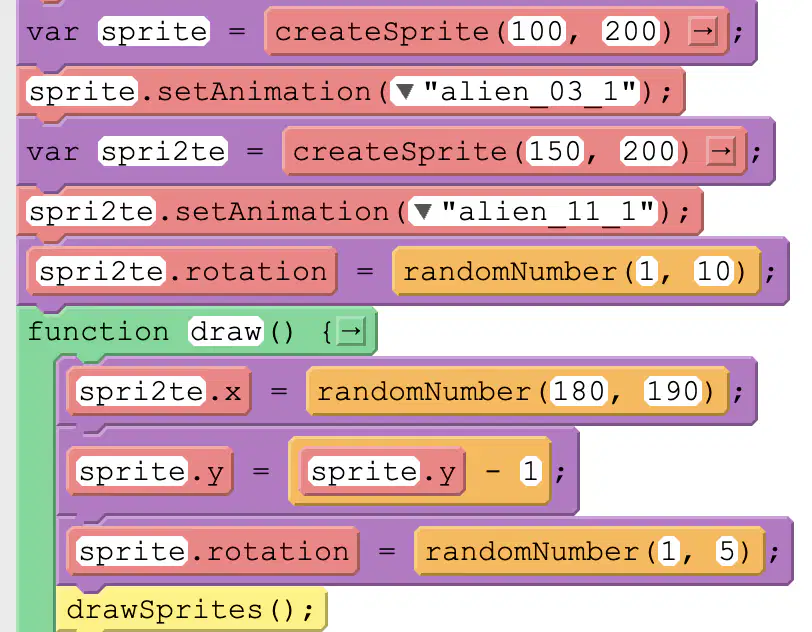
Which of the following is true?
spri2te.x's is updated using the counting pattern
sprite's y is updated using the counting pattern
spri2te.x's is updated using the counting pattern
none of the sprite properties are updated using the counting pattern

What happens when the scale of the sprite is greater than 2?
The sprite changes to an apple.
The sprite changes to a pear.
Nothing happens.
The scale goes back to 0.1

Why doesn't the turtle move up when the up arrow is pressed?
Because on line 9 it should say turtle.y = turtle.y + 3;
Because the if statement on line 8 should be outside the draw function
Because the turtle sprite is made in the draw loop
Because turtles do not know how to swim
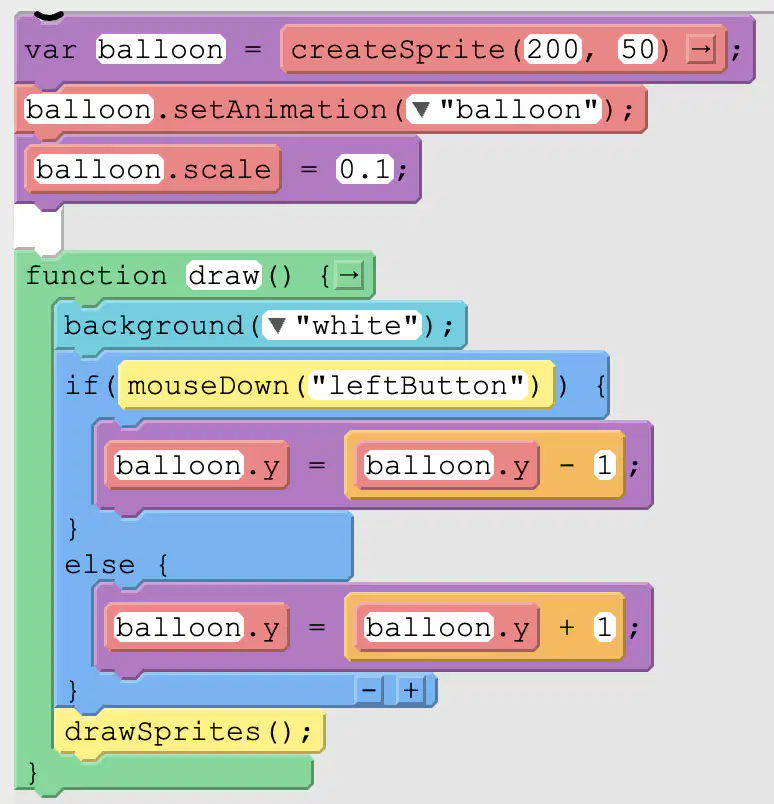
What best describes what actions occur in this program?
When the left arrow is pressed the balloon rises, otherwise it falls
When the left mouse is pressed the balloon rises, otherwise it falls
The balloon doesn't move
When the mouse is on the left side of the screen the balloon rises, otherwise it fallse
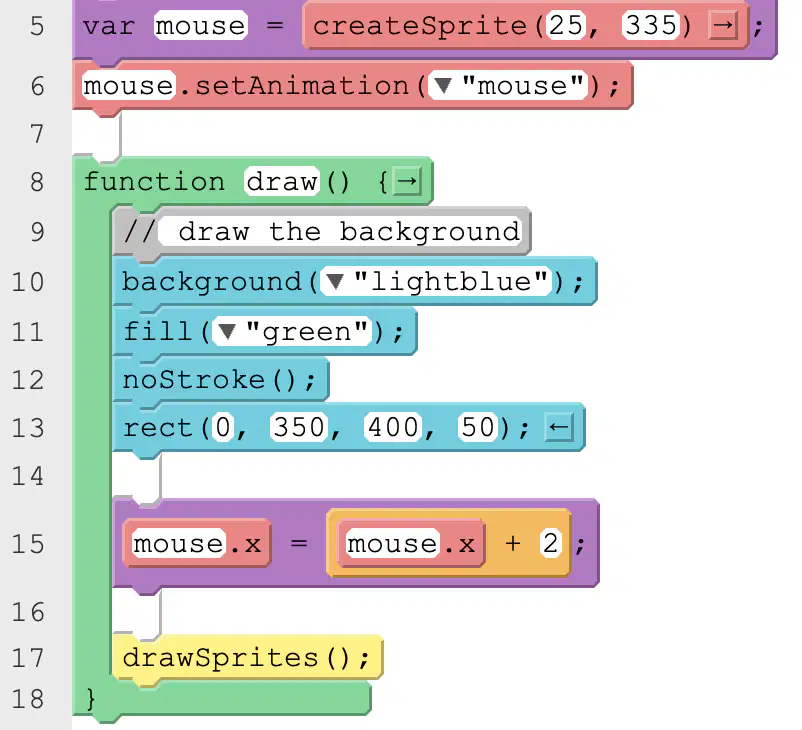
This code uses the counting pattern to move a mouse to the right across the screen. What property could you set above the draw loop that would also make the mouse move to the right?
mouse.veloctiyX
mouse.goRight
mouse.x
mouse.direction

According to the code, which direction is the bubble traveling?
Up
Down
To the Left
To the Right
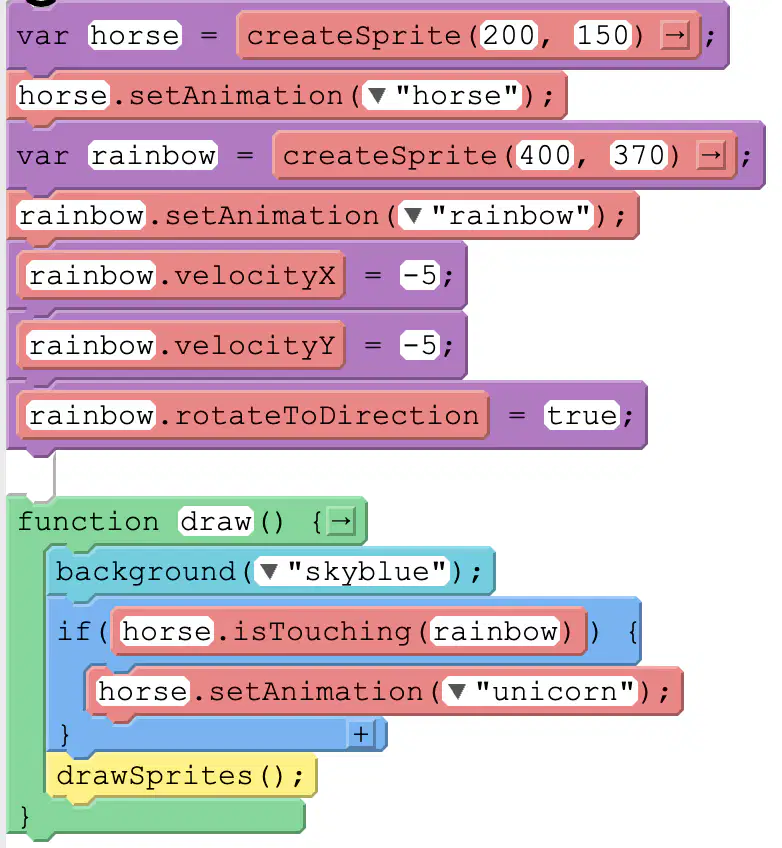
What best describes what happens with this code?
A horse turns into a rainbow when it touches a unicorn
A horse turns into a unciorn when it touches a rainbow
A unicorn turns into a rainbow when it touches a hours
A unicorn turns into a hourse when it touches a rainbow

According to the code, for what value of sprite.x will "winner" appear on the screen?
sprite.x=200
sprite.x=40
sprite.x=0
sprite.x=50
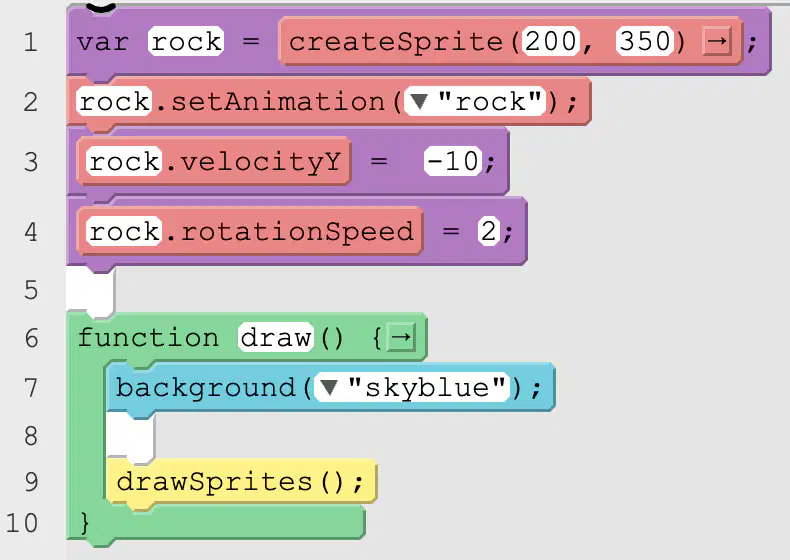
A rock is being thrown up in the air. What code should go on line 8 to make it fall back down using gravity?


A basketball is falling toward a wood ground. What command will cause the basketball to bounce when it hits the ground?
basketball.bounce(wood);
basketball.bounceOff(wood);
basketball.displace(wood);
basketball.collide(wood);
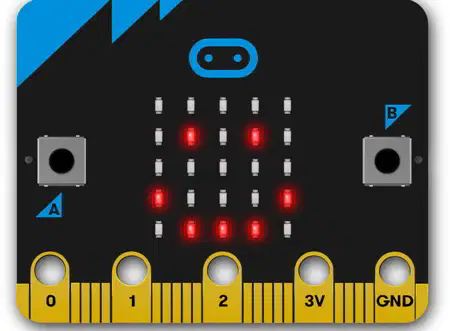
This device is called a...
Raspberry Pi
Micro:bit
Arduino
iPhone
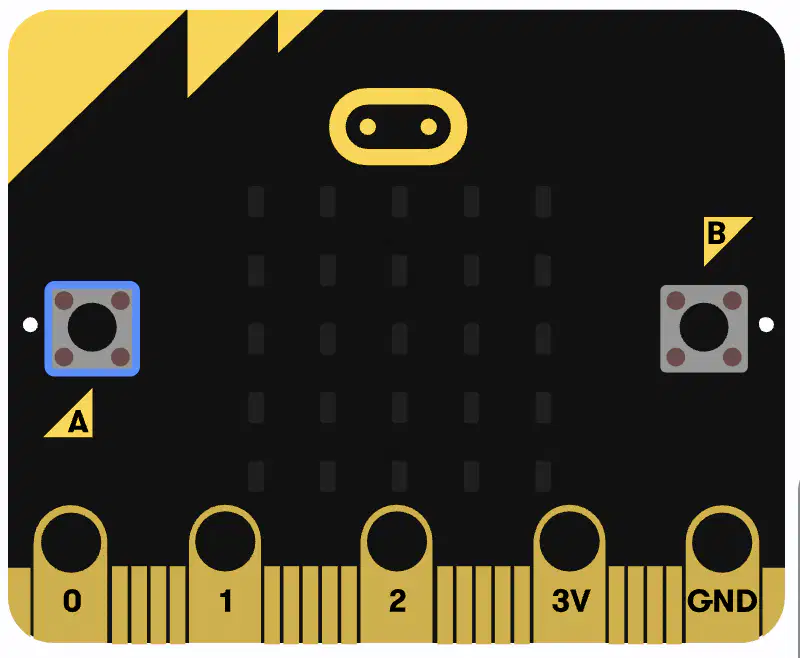
Which of the pins on the bottom of the Micro:bit provide power to external peripherals like LED lights?
Pin 0
3V
GND
Pin 1
Pin 2
Which of the following was NOT a project someone made with their micro:bit?
A piano
A basektball game
A maze game
A snake game
Your micro:bit had many sensors. But which of the following is not a sensor your micro:bit had?
Light sensor (detects bright and low light)
Sound sensor (detects loud / quiet noises)
Accelerometer (detects motion)
Smell sensor (detects sents)
What way can micro:bits easily talk to each other?
writing letters
text message
radio signals
they can't communicate with each other
Which Block do you use when you want code to run on your Micro:bit when it turns on?


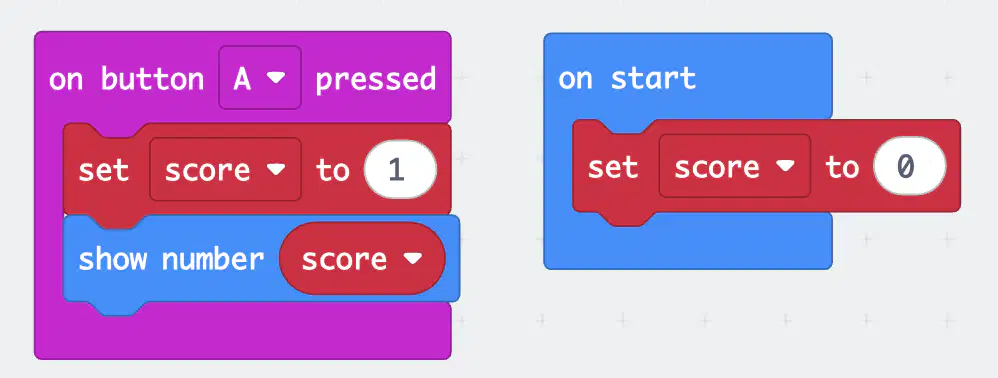
The code to the left is supposed to keep track of a score that changes when a is pressed and display the score to the screen, but it is broken. It always shows the number 1. How could you fix the program?
Remove the set score block from on button A pressed
Remove the set score block from on start
Switch the order of the blocks in on button A pressed
Use change score instead of set score in the on button A pressed block

