
 Worksheets
Power Automate (Quiz)
Total questions: 36
Worksheet time: 18mins
What is the first phase of the Robotic Process Automation cycle?
Manual Flow Understanding
Deployment and Maintenance
Testing
Bot Development
What are the benefits of using RPA?
Ensuring Accuracy
Intelligent Decision Making
Cost Reduction
Enhancing Speed
The recorder in Power Automate for desktop is used to;
Record your robot into a video
Automatically generate a flow based on recorded steps
Recorder is used to edit existing steps
All of the above
What expression is correct to retrieve values from third column of Excel worksheet through a loop?
%Currentitem{‘3’}%
%Currentitem[2]%
%Currentitem%[‘2’]
%Currentitem[3]%
While trying to find a branch name stored in variable and typing the same to eAudit, which option will be used?
Press button on web page
Populate text field on web page
Populate text field in window
Press button in window
Which of the following steps can be used to save email body to a folder on desktop?
Respond to outlook message
Send email messages through outlook
Save email messages in outlook
Retrieve email messages from outlook
Why is pager used in web scrapping?
To extract element value
To move to next pages
To search a particular item
To rearrange pages
We want to add a time gap between two steps in Power Automate Desktop, what step action be suitable for this?
Hold
Wait
Pause
All of these
There are a total 100 rows in an excel sheet which we want to read and populate in fast accounts, which action would be suitable for this?
Conditional loop
For each loop
Recorder
Loop
Send Keys option is used to
Populate text on web page
Use Keyboard Keys
Find UI element
Use Onscreen keyboard
Which type of automation in Power Automate Desktop can be scheduled to run at a specific time or on certain days?
Cloud Flow
Subflow
Business Flow
Desktop Flow
How can you extract data from a column "A" in row "7" in an Excel table containing employees list, using Power Automate?
From a range of cells
Values from a specific cell
First Free row/column
All available values in sheet
Which of the followings are examples of web scraping in the context of Power Automate?
Downloading files from websites
Extracting information from websites
Logging into websites to post comments
All of these
How can you specify the data you want to scrape from a web page in Power Automate?
By using a web scraping action "Download Data from Web Page"
By using a web scraping action "Scrape Data from Web Page"
By using a web scraping action like "Extract data from Web Page"
By manually copying and pasting the data
Which of the following scenarios is NOT a suitable use case for automating website activities in Power Automate?
Filling web forms with false information on forums
Automatically submitting job applications on career websites
Generating fake user reviews on e-commerce websites
Bypassing authentication on secure websites involving Captcha
A Loop in Power Automate always has a start and an end?
Yes
May be and may not be
No
What is the main difference between RPA and AI?
RPA learns from data while AI doesn’t
AI automates rule-based tasks, and RPA automates subjective tasks
RPA is rule-based, while AI is data-driven and capable of learning
AI cannot integrate into RPA tools
In Power Automate, what does the “Get first free column/row from Excel worksheet” action help with when writing data to Excel?
Navigating web pages
Finding an empty row to avoid overwriting data
Writing to the first row in Excel
Clearing all rows in the worksheet
In first information request filling in eAudit, how can dynamic UI elements be used for navigating between different rows?
By manually entering row numbers
By linking UI element structures to Excel sheets
By using "Find text on screen" action
All of the above
How does the “Click link on web page” action work in Power Automate when used in T24 automation?
It records manual interactions with the web page
It identifies and presses specific buttons using UI elements
It simulates mouse movements
It retrieves data from the web page
When using the "Send keys" action in Power Automate, which expression is correct to send key “Crtl+V”?
{Control}({V})
{Control}({‘V’})
%{Control}({V})%
{Control}(V)
Which Power Automate action allows you to automatically send an email with attachments?
Send email message
Send email message through Outlook
Process Email
Retrieve and Send Email message
In Outlook automation, which action is used to filter and process only unread emails?
Retrieve email messages
Filter emails by criteria
Read emails based on status
Retrieve email messages from Outlook
How can you modify recorded actions in Power Automate Desktop to customize automation flows?
Manually adding actions or editing recorded actions
Re-recording the flow
Adjusting the recorded steps using Power Automate Cloud
Editing using the "Recorder Editing" options
Which Power Automate action is used to launch a Windows application, such as Notepad, based on its file path or program name?
Start Windows application
Launch application
Run program
Run Application
Which of the following expressions is correct for populating data in a UI element field?
%CurrentItem['Name']%
%CurrentItem[0]['Name']%
%CurrentItem[‘0’]['Name']%
%CurrentItem[Name]%
Which action is used to increment the value of a variable in Power Automate?
Increase variable
Set variable
Increment value
Add to variable
In Power Automate, which action would you use to ensure that a certain step in the flow is skipped if an error occurs?
On Error action
Exit loop on error
Skip to next action
Trigger error handling
In Power Automate, which action would you use to retrieve data from an Excel file?
Get worksheet action
Read from Excel worksheet
Copy Excel data
Import Excel data
Which of the following actions is used to repeat actions a specific number of times in Power Automate?
If condition
Loop
Loop condition
For each
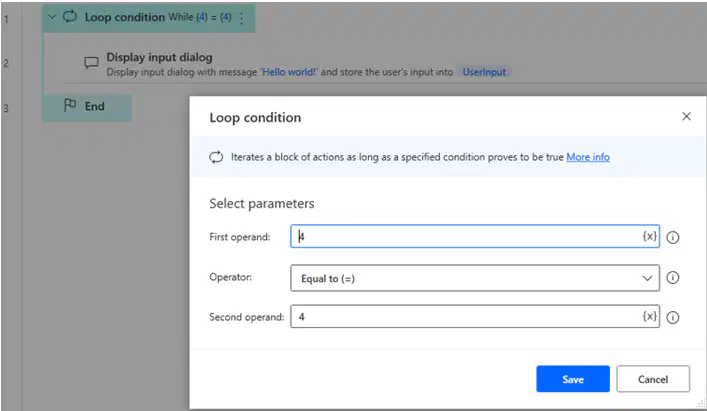
The loop, with this condition, will run:
4 times
8 times
Forever
3 times
Can a single UI element be used more than once in a flow?
Yes, if we use the setting 'Multiple use'
Yes, if the application allows
Yes
No
Which of the following expressions is correct to read data from last column from the Excel worksheet?
%FirstFreeColumn% - 1
%FirstFreeColumn - 1%
%FirstFreeColumn - 0%
%FirstFreeColumn% - 0
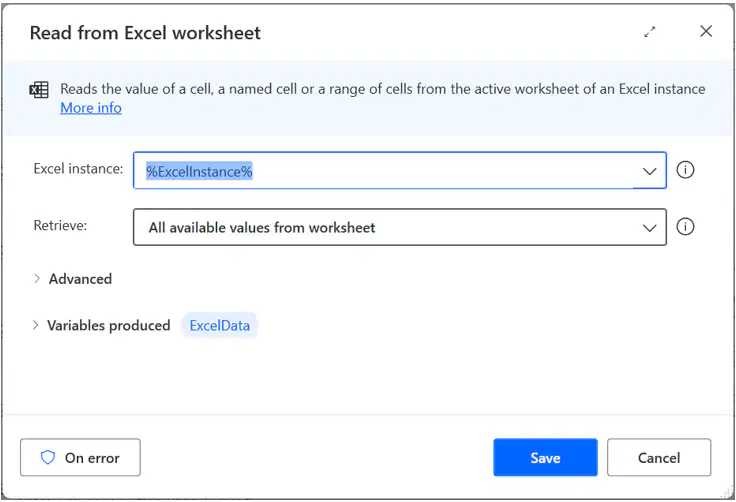
In this action, can we change the name of variable produced “ExcelData”?
Yes
No
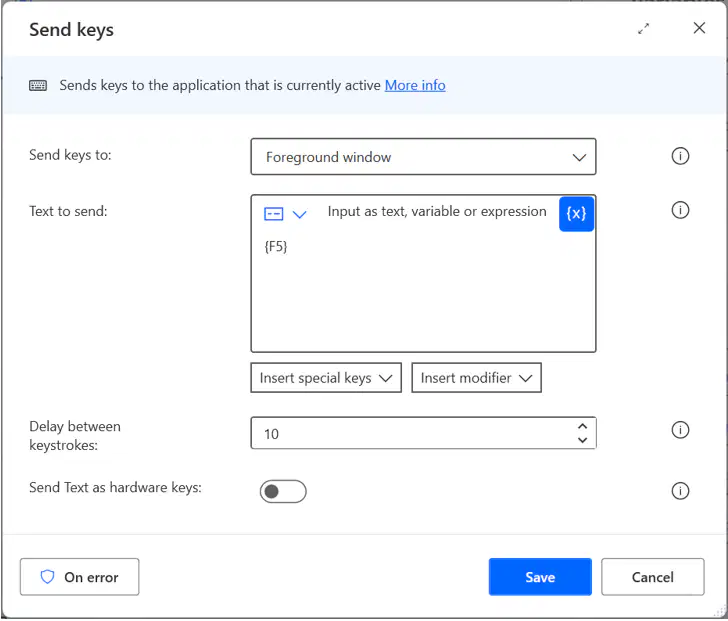
The option to send “F5” key, in the give action can be found in;
Insert special keys
Insert modifier
Inset keyboard keys
Use Onscreen keyboard
If we add “Wait” action to the flow and specify the wait time as “10”. This will hold the execution of steps for
10 minutes
10 seconds
10 miliseconds
10 times the normal flow speed

