
 Worksheets
year 8 - Scratch Intermediate Programming 25/26
Total questions: 53
Worksheet time: 33mins
Which of the following is a feature commonly used in Scratch Intermediate Programming to keep track of a player's progress or score?
Variables
Backgrounds
Costumes
Sprites
What is the main purpose of using lists or arrays in a Scratch project?
To store multiple values in a single variable
To change the color of sprites
To control the movement of the main character
To add sound effects
Which step comes after "Game Proposal / Algorithm Design" in the process of creating a game in Scratch, according to the learning material?
Game Production
Testing / Bug Fix and Improvements
Level Completion
Randomisation / Collectibles
Why is testing and bug fixing important in game development?
It helps ensure the game works as intended and improves the player experience.
It makes the game look more colorful.
It increases the number of levels in the game.
It adds more characters to the game.
Match each game development concept with its correct description related to adding features in a Scratch game.
Randomisation / Collectibles
Feature that allows a player to collect random items in a game.
Level Completion
Feature that marks the end of a stage or section in a game.
Aims and Objectives
Feature that defines what the player is trying to achieve in the game.
Game Proposal
Document or idea outlining the plan for creating a game.
If a player loses all their lives in a Scratch game, which feature would you use to allow them to start over?
Reset and Restart
Lists / Arrays
Game Production
Movement / Control
Match each method with how it helps ensure your Scratch game has a clear goal for players to achieve.
By setting Aims and Objectives
Helps players understand what they need to accomplish
By using randomisation
Adds unpredictability but does not clarify the goal
By adding more sprites
Increases characters but does not define the goal
By changing the background
Changes scenery but does not set a clear objective
Which of the following best describes the purpose of "Algorithm Design" in game development?
Planning the steps and logic needed to make the game work
Drawing the characters for the game
Adding music to the game
Testing the game for bugs
Which tool in Scratch allows users to design or modify the appearance of sprites?
Costume Editor
Sound Editor
Script Editor
Background Selector
How do you make a sprite move when the arrow keys are pressed in Scratch?
Use "if key [arrow] pressed" blocks inside a "forever" loop.
Use "wait 1 second" block.
Use "when green flag clicked" block only.
Use "repeat until" block with no condition.
A variable in Scratch is (a)
What is the correct way to reset the score to zero at the start of a Scratch game?
Set the score variable to 0 using the "set score to [0]" block at the beginning of the game.
Use the "show" block at the beginning of the game.
Change the sprite's costume at the beginning of the game.
Play a sound at the beginning of the game.
What does the "pick random" block do in Scratch?
It selects a random number between two values.
It repeats an action a set number of times.
It changes the color of a sprite.
It plays a sound effect.
Match each Scratch block or action with its correct effect.
Use "go to x: (pick random) y: (pick random)" when the item appears.
Makes a collectible appear in a random location.
Use "repeat until" block.
Repeats actions until a condition is met.
Use "change color effect by 25".
Changes the sprite's color effect.
Use "forever" block.
Repeats actions endlessly.
How does randomisation make a game more challenging?
It makes events unpredictable, such as enemy movement or item placement, increasing difficulty.
It makes the game easier to play.
It reduces the number of levels in the game.
It changes the background color.
What block is used to start a game in Scratch?
When green flag clicked
When space key pressed
When sprite clicked
When backdrop switches to
What is an objective in a game?
A goal the player tries to achieve, like collecting coins or reaching a finish line.
The background music of the game.
The number of sprites in the game.
The color of the main character.
How can you program a win condition when the player reaches the objective in Scratch?
Use "if score = [target] then broadcast [win]" and show a win screen or message.
Use "repeat until" block.
Use "hide" block.
Use "change color effect by 25".
What is a level in a game?
A stage or section of the game with specific challenges.
A type of character in the game.
A background image in the game.
A sound effect in the game.
Which statement best explains how to switch to a new level using Scratch’s broadcast system?
Broadcast a message like “next level” and use “when I receive [next level]” to hide current sprites and show new ones.
Change the sprite’s costume to a new one.
Increase the score by 1.
Play a sound and stop the script.
How can you use a list to store and display high scores in Scratch?
Add scores to the list after each game, sort them, and display the top values using “say” or “join” blocks.
Change the sprite’s color.
Play a sound when a new score is added.
Delete all items from the list after each game.
What is a game proposal?
A plan that outlines the game’s idea, goals, and features.
A list of all the sprites in the game.
A set of instructions for moving a sprite.
A collection of sound effects.
What is an algorithm in Scratch?
A step-by-step set of instructions that control how the game works.
A type of sprite.
A background image.
A sound effect.
Which of the following is a good first step in designing an algorithm for a Scratch game where the player collects 10 stars to win?
Set a variable to count the number of stars collected.
Change the background color.
Play a sound effect.
Delete all sprites.
What is game production in Scratch?
The process of designing, building, and testing a game using Scratch.
The process of playing games on Scratch.
The process of drawing characters in Scratch.
The process of writing stories in Scratch.
Match the following stages with their correct descriptions in Scratch game production.
Planning and coding
Deciding the structure and creating the scripts for a Scratch game
Drawing and singing
Making visuals and performing music for a game
Testing and eating
Checking for bugs and having a meal during game development
Writing and reading
Composing the story and reviewing text for a game
What is a bug in Scratch?
A mistake in the code that causes the game to not work as expected.
A type of sprite in Scratch.
A background image in Scratch.
A sound effect in Scratch.
How can you test a Scratch game for bugs?
Play the game and check if all features work correctly.
Only look at the code without playing.
Ask someone else to write the code.
Change the background color.
Which category would the following be, input or output?
- Temperature Sensor
- Alarm System
Input devices
Output devices.

Which rows in the program are inputs?
Row 1
Row 2
Row 3
Row 4
Row 5

Which row in the program is an output?
Row 1
Row 2
Row 3
Row 4
Row 6
The list of commands in Scratch is called (a) .
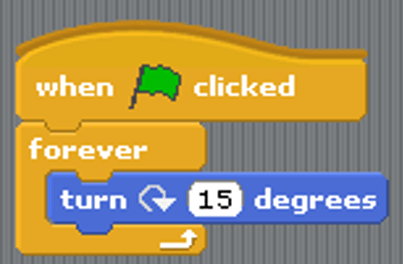
What would this script do?


Which of the following is the term for anything used to put data IN to a computer system?
Input Device
Output Device
Memory
Computer System
Which of the following is the term for anything used to get data OUT of a computer system?
Output Device
Input Device
Monitor
Data Cable
Organise the input and output devices in to the correct category
Mouse
Keyboard
Microphone
Webcam
Light Sensor
Speaker
Monitor
Printer
Light Bulb
Motorised arm
Tablet Computer
Gaming Headset
Match the following hardware to the correct label

CPU

RAM

HDD

USB FLASH DRIVE

CD ROM
Which component inside a computer "temporarily stores currently running instructions"?
RAM (Random Access Memory)
CPU (Central Processing Unit)
ROM (Read Only Memory)
HDD (Hard Disk Drive)
Which component inside a computer "Permanently stores data, files and programs"?
HDD (Hard Disk Drive)
RAM (Random Access Memory)
CPU (Central Processing Unit)
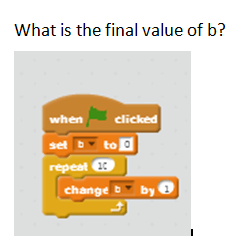
What will the final value of B be if this code is run?
0
9
10
11

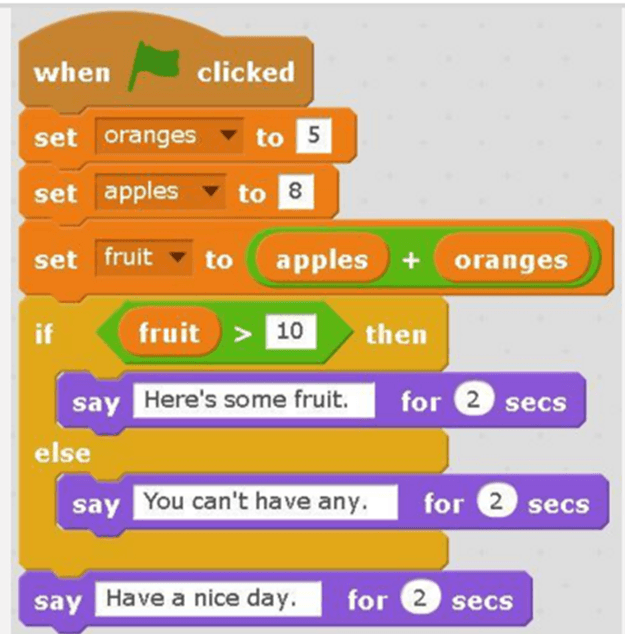
When this script is run, the cat will say (a)

What do we need to create to keep a running score?
A variable
A constant
A loop
What is the opposite to a variable and doesn't change as the program runs?
A constant
A variable
A number
A letter
What is an algorithm?
A sequence of instructions to help solve a problem
The solution to a problem
Programming code
What is the best way to approach a difficult computing problem?
Break the big problem down in to smaller problems
Complete it all at once
Don't include hard sections
Scratch is a (a) type of programming.
WWW: What has gone well in your computing lessons so far this year in your opinion? (Don't press enter while typing as this will submit your answer, just type until you are done with no paragraphs)
Can you explain something you would like to know about in Year 8 before you move to Year 9? (Don't press enter while typing as this will submit your answer, just type until you are done with no paragraphs)
EBI: What could you improve on moving forward this year in your opinion? (Don't press enter while typing as this will submit your answer, just type until you are done with no paragraphs)

