
 Worksheets
BSIT3201-Finals
Total questions: 50
Worksheet time: 25mins
Which of the following best explains why using #!/bin/bash at the beginning of a script is important?
It makes the script executable.
It defines the location of the shell to execute the script.
It comments out the second and last line of the executable script
It sets the default permissions of the file in bash scriptng
You are writing a script to check disk space. Which command combination is most effective for storing and analyzing the used disk percentage?
ls | grep
df -h | awk '{print $5}'
du -h | head -1
ps aux | sort
Which statement is true regarding variables in shell scripting?
All variables must be declared with var int.
Variables are declared with a dollar sign $ prefix.
Variable values are assigned using = without spaces.
All variables are automatically global.
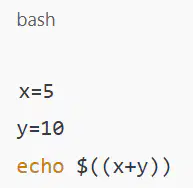
What will the following script output?
bashx=5
y=10echo $((x+y))
x+y
15
5+10
Error
Why is chmod +x script.sh necessary before executing a script directly?
It changes the owner of the script.
It adds write permissions to the script.
It allows the script to be executed.
It creates a backup of the script.
A system admin wants to create a backup script that copies all .conf files from /etc to /backup and logs the time of backup.
Which of the following commands is most appropriate in the script?
cp /etc/*.conf /backup && date >> log.txt
mv /etc/*.conf /backup && time >> log.txt
cat /etc/*.conf > /backup && echo $date >> log.txt
ls /etc/*.conf | cp /backup && echo date >> log.txt

You wrote a script with this snippet:
What would happen if the user entered a non-numeric input like "abc"?
The script prints "Low".
It compares text and prints "High".
It shows a syntax error.
It crashes with an error message.
A user complains that their script doesn’t respond to keyboard interrupts (Ctrl+C) during a loop. What is the best way to handle this in the script?
Add trap 'exit' INT at the beginning.
Use kill -9 $$ inside the loop.
Add continue to the loop.
Use echo off to ignore input.
You want to display all files modified in the last 24 hours using a script. Which command best fits?
ls -lt
find . -mtime -1
grep "today" *
history | tail
Your script processes user data from a file line by line. Which loop is best suited for this task?
for user in file; do ...
while read user; do ... done < file
until read user; do ... done < file
if read user; then ... fi
What is the most efficient way to ensure a script variable is not empty before using it in a calculation?
Use if $var != ""
Use if [ -z "$var" ]
Use test $var == NULL
Use if [ $var -eq 0 ]
What is the purpose of using double brackets [[ ... ]] instead of single brackets [ ... ] in conditionals?
There is no difference.
It allows the use of && and || without escaping.
It prevents variable expansion in an expression.
It disables arithmetic comparisons between variables.
A script is designed to accept one argument—a filename—and print "File exists" if it is present.
Which conditional best fits?
if [[ -f $1 ]]; then echo "File exists"; fi
if test $1; then echo "File exists"; fi
if ls $1; then echo "File exists"; fi
if $1 -eq 1; then echo "File exists"; fi

You wrote a script with this loop:
Which issue might arise if no .txt files exist in the directory?
It loops infinitely.
It throws a segmentation fault.
It prints Processing *.txt
It silently exits.
You want a script to notify the user if a directory does not exist before trying to enter it. What is the best conditional structure?
if [ -d "$dir" ]; then cd "$dir"; else echo "No such directory"; fi
cd "$dir" || echo "Directory created"
mkdir "$dir" && echo "Error"
cd "$dir" && echo "Invalid folder"
What does the -p option do when used with the read command in a shell script?
Prints the input after reading
Pauses the script before reading
Prompts the user with a custom message before reading input
Prevents the user from entering blank input upon running the script
Which of the following best explains the use of -gt in the conditional [ $a -gt $b ]?
Compares strings lexicographically
Compares two integers to check if $a is greater than $b
Checks if both variables are positive integers
Checks if both variables are null
You are writing a script that accepts user age as input. If the user is older than 17, it should print "You are eligible". Which script fragment works correctly?
if [ $age > 17 ]; then echo "You are eligible"; fi
if (( $age > 17 )); then echo "You are eligible"; fi
if [ $age -gt 17 ]; then echo "You are eligible"; fi
Both b and c
You want to prompt the user for their name and store it in a variable. Which is the most appropriate line?
input "Enter name: " name
read -n "Enter name: " name
read name < "Enter name: "
read -p "Enter name: " name

A script runs the following:
What should the user avoid doing to prevent a script error?
Inputting negative numbers
Pressing Enter without typing anything
Entering text instead of a number
Both b and c
You are troubleshooting system boot issues. Which directory should you inspect for essential boot-related files?
/boot
/dev
/lib
/opt
A Linux user is complaining that their GUI is consuming too much RAM on an old PC. As an administrator, which environment would you recommend switching to?
GNOME
Xfce
Cinnamon
KDE
You are asked to configure a multi-user server. Each user should have isolated space to store personal files. Which directory will you configure for this?
/home
/bin
/etc
/sbin
Which combination of commands allows a user to create a directory, move into it, and confirm the change?
mkdir, cd, ls
mkdir, cd, pwd
cp, cd, man
cd, pwd, tree
A user reports that a file is missing. Before restoring from backup, which command would be best to search for all files and directories under the current folder recursively?
tree
ls
pwd
file
You are tasked to audit software in /usr/bin and /opt/bin. What does this suggest about the nature of these directories?
Both B and C are reserved for device drivers
/opt/bin contains optional or third-party software;
/usr/bin contains essential shared programs
Both are temporary storage
/opt/bin is for system libraries; /usr/bin is for user scripts
You need to write a command-line instruction that navigates to the parent directory from the current one. Which command would be best?
pwd
cd ..
cd /
cd ~
You are using a system where typing ls provides a list, but you want to know which files are directories, executables, or symbolic links. What should you do?
Use pwd to check file types
Use file on each listed item
Use whatis
Use tree instead
A colleague wants to install a new app from source code without interfering with system files. Which directory is the most appropriate installation target?
/boot
/opt
/home
/usr
A user with limited access needs to move a file into a protected system directory. The move fails. What is the best solution to resolve this issue?
Try from the /home directory
Run the command again with sudo
Restart the system
Use cp instead of mv
What advantage does vi have over gedit in managing remote Linux servers?
It supports only one editing mode
It is available by default on all Linux distributions
It has a graphical interface
It can’t be used in command-line mode
How does the Insert mode in vi differ from the Replace mode in terms of user interaction?
Insert mode overwrites characters; Replace mode adds new ones.
Insert mode adds characters; Replace mode overwrites them.
Replace mode deletes whole lines
Both work the same way
A user accidentally deleted 10 lines in vi.
Which command could have done that?
x10
10dd
10yy
:q!
Why is LibreOffice Base considered useful for enterprise users?
It offers presentation slide tools
It supports integration with major database systems
It comes with Python pre-installed
It has tools for vector graphics
How does the Presenter Console in LibreOffice Impress enhance presentation delivery?
By converting slides to animated GIFs for presentation
By giving the presenter control over timing and slide notes
By automatically translating slides
By allowing note-taking by the audience
While coding in vi, you want to copy the current line and the next four lines for reuse later. What command should you use?
yy5
5yy
5dd
yG
What is the purpose of the A command in vi, and how does it differ from the i command?
Both insert text at the beginning of the line
A inserts at the end of the line, i inserts at the cursor
A inserts text at the cursor, i inserts after the line
A deletes text; i saves changes
How does LibreOffice Writer’s AutoComplete enhance document creation efficiency?
It translates foreign words automatically
It suggests words based on a dictionary and open documents
It completes code blocks using Artificial Intelligence
It limits the use of non-standard words
What would be the most efficient way in vi to delete from the current cursor position to the end of the line?
x
d$
dd
dW
Why is vim often preferred over the original vi editor in modern Linux distributions?
It is the only GUI-based editor
It offers enhancements like syntax highlighting and plugins
It is easier to install and configure
It does not require command mode
The comparison [ 5 -gt "3" ] in a shell script will return an error because one operand is a string.
True
False

This condition will safely handle blank input:
True
False
The command mkdir -p /home/user/docs will throw an error if /home/user already exists.
True
False
Using a graphical user interface (GUI) for Linux system administration offers the same level of system control and scripting flexibility as the command line interface (CLI).
True
False
Placing compiled third-party applications into the /opt directory instead of /usr/bin helps maintain a cleaner and more maintainable file structure.
True
False
The man command can only be used by administrators and requires superuser privileges to display manual pages of commands.
True
False
The /proc directory contains real, physical files stored on disk that remain unchanged after rebooting the system.
True
False
LibreOffice Calc’s ability to integrate real-time data streams is especially useful for financial forecasting and live reporting.
True
False
LibreOffice Impress’s Presenter Console reduces distractions during a presentation by hiding slide notes and timers from the presenter.
True
False
In vi, the command dG deletes only the current line and leaves the rest of the file intact.
True
False

