
 Worksheets
TLE-ICT PART 1
Total questions: 148
Worksheet time: 1hrs 29mins
Creativity (art/design) + Technology(tools/code)
(a)
Is a contextualized Technology and Livelihood Education (TLE)
subject for stand-alone science high schools.
(a)
Choose all definitions of Creative Technology
Is the use of technology as a tool for creative expression and innovation.
It blends art, design, media, and engineering to develop new, interactive, and often immersive experiences.
Is a series of related instructions, organized to perform some specific task or used to operate a computer. It is also called a PROGRAM.
is a contextualized Technology and Livelihood Education (TLE) subject for stand-alone science high schools.
Technology= Creativity (art/design) + Technology(tools/code)
A series of related instructions, organized
to perform some specific task or used to operate a computer.
(a)
Consist of programs that control or maintain
the operations of the computer and its devices.
(a)
Is a set of programs that coordinates all the activities
among computer hardware devices..
(a)
Software is also called a (a) .
Are specialized software programs that allow input and output devices to communicate with the rest of the computer system.
(a)
Allows a user to perform maintenance-type tasks
usually related to managing a computer, its devices or its programs.
(a)
Is any program or group of programs capable of dealing
with user inputs and helps the user to complete the tasks.
(a)
Used to manipulate and format text,
creates memos, letters, faxes and documents.
WORD PROCESSING SOFTWARE
SPREADSHEET SOFTWARE
PRESENTATION SOFTWARE
SYSTEM SOFTWARE
APPLICATION SOFTWARE
Is used to perform and manipulate calculations.
WORD PROCESSING SOFTWARE
SPREADSHEET SOFTWARE
PRESENTATION SOFTWARE
SYSTEM SOFTWARE
APPLICATION SOFTWARE
Is a collection of data related to any applications.
WORD PROCESSING SOFTWARE
SPREADSHEET SOFTWARE
PRESENTATION SOFTWARE
SYSTEM SOFTWARE
APPLICATION SOFTWARE
Programs that control or maintain the operations
of the computer and its devices.
WORD PROCESSING SOFTWARE
SPREADSHEET SOFTWARE
PRESENTATION SOFTWARE
SYSTEM SOFTWARE
APPLICATION SOFTWARE
A single program or a group of small programs referred to as an application suite consist of programs designed to make users more productive and/or assist them with personal tasks.
WORD PROCESSING SOFTWARE
SPREADSHEET SOFTWARE
PRESENTATION SOFTWARE
SYSTEM SOFTWARE
APPLICATION SOFTWARE
Interface between the user, the application software
and the computer’s hardware.
WORD PROCESSING SOFTWARE
SPREADSHEET SOFTWARE
PRESENTATION SOFTWARE
SYSTEM SOFTWARE
APPLICATION SOFTWARE
TYPES OF APPLICATION SOFTWARE
WORD PROCESSING SOFTWARE
SPREADSHEET SOFTWARE
PRESENTATION SOFTWARE
DATABASE SOFTWARE
MULTIMEDIA
SOFTWARE
Used to perform and manipulate calculations.
WORD PROCESSING SOFTWARE
SPREADSHEET SOFTWARE
PRESENTATION SOFTWARE
DATABASE SOFTWARE
MULTIMEDIA
SOFTWARE
Provides formulas and function to perform calculations
like arithmetic operations, logical operations and text operations.
WORD PROCESSING SOFTWARE
SPREADSHEET SOFTWARE
PRESENTATION SOFTWARE
DATABASE SOFTWARE
MULTIMEDIA
SOFTWARE
Program that shows the information in the form of slides.
WORD PROCESSING SOFTWARE
SPREADSHEET SOFTWARE
PRESENTATION SOFTWARE
DATABASE SOFTWARE
MULTIMEDIA
SOFTWARE
A grid of columns and rows.
(a)
What do we add to make slides more informative?
text
graphics
poll
video
images
The three components of presentation software:
Music editor for adding music and sound clips
Text editor for inputting and formatting text
Inserting graphics, text, video and other multimedia files
Slideshow information
Video editor for manipulating short clips in the presentation
A collection of data related to any applications.
(a)
Which ones are Database Software?
MySQL
MS Outlook
MS Access
Microsoft SQL Server
Oracle
A combination of text, graphics, audio and multimedia software used in editing of video, audio and text. Used in the growth of business, educations, information, remote system and entertainment.
(a)
3 BASIC COMPONENTS OF A SYSTEM SOFTWARE
OPERATING SYSTEM
APPLICATION SOFTWARE
DEVICE DRIVERS
PRESENTATION SOFTWARE
UTILITY SOFTWARE
A low-level, master system of programs that
manage the basic operations of the computer.
OPERATING SYSTEM
APPLICATION SOFTWARE
DEVICE DRIVERS
PRESENTATION SOFTWARE
UTILITY SOFTWARE
Comes with the system software when you purchase a computer
and will guide you through installing the necessary drivers.
OPERATING SYSTEM
APPLICATION SOFTWARE
DEVICE DRIVERS
PRESENTATION SOFTWARE
UTILITY SOFTWARE
Provides a means for users to communicate with the computer and they handle the control and use of hardware resources, disk space, memory, CPU, time, location and peripheral devices.
OPERATING SYSTEM
APPLICATION SOFTWARE
DEVICE DRIVERS
PRESENTATION SOFTWARE
UTILITY SOFTWARE
Used to support, enhance or expand
existing programs in a computer system.
OPERATING SYSTEM
APPLICATION SOFTWARE
DEVICE DRIVERS
PRESENTATION SOFTWARE
UTILITY SOFTWARE
Which ones are UTILITY SOFTWARE?
antivirus
recycle bin
debuggers
compression utility
registry cleaners
Is the first programmer
CHARLES BABBAGE
AUGUSTA ADA LOVELACE
BILL GATES
PAUL ALLEN
DAN BRICKLIN
Was considered as the father of computing
after his concept on Analytical Engine.
CHARLES BABBAGE
AUGUSTA ADA LOVELACE
BILL GATES
PAUL ALLEN
DAN BRICKLIN
He introduced Microsoft Windows
as a graphical user interface for MS-DOS
CHARLES BABBAGE
AUGUSTA ADA LOVELACE
BILL GATES
PAUL ALLEN
DAN BRICKLIN
Harvard University students who
wrote a version of BASIC that would run on Altair
CHARLES BABBAGE
BOB FRANKSTON
BILL GATES
PAUL ALLEN
DAN BRICKLIN
Who developed VISICALC?
CHARLES BABBAGE
BOB FRANKSTON
BILL GATES
PAUL ALLEN
DAN BRICKLIN
Who programmed VISICALC?
CHARLES BABBAGE
BOB FRANKSTON
BILL GATES
PAUL ALLEN
DAN BRICKLIN
The first computer spreadsheet software program.
VISICALC
BASIC
COMPILER
WORDSTAR
Apple II computer
Is a program that translates instructions into a machine-code or lower-level form so that they can be read and executed by a computer.
VISICALC
BASIC
COMPILER
WORDSTAR
Apple II computer
A word processor that was first written for the CP/M operating system. -it was ported to MS-DOS. Popular during the first half of 1980s.
VISICALC
BASIC
COMPILER
WORDSTAR
Apple II computer
ACRONYM: BASIC
(a)
ACRONYM: ALU
(a)
Fundamental building block of the
central processing unit (CPU) of a computer
(a)
First known computer algorithm
written by Charles Babbage in 1837
(a)
Computer language made by the US Defense Department
named after Lady Lovelace.
(a)
Developed in Dartmouth College in 1967
to teach students programming
(a)
Who introduced Wordstar.
Microsoft
MicroPro International
Lotus Development Corporation
IBM
Apple
They bought Visicalc and
used it as the basis for their own spreadsheet application.
Microsoft
MicroPro International
Lotus Development Corporation
IBM
Apple
1980 - Who was chosen by IBM to provide programs
that would run in the IBM PC?
Microsoft
MicroPro International
Lotus Development Corporation
IBM
Apple
1981 - a compiler was developed by Microsoft
for the other computer languages. What are those 3 compilers?
FORTRAN
QDOS
COBOL
PCDOS
Pascal
WHEN did Lotus Development Corporation introduce Lotus 1-2-3,
a spreadsheet program that was released by Lotus software (now part of IBM)?
January 26, 1981
January 26, 1982
January 26, 1983
January 26, 1984
WHEN did Bill Gates introduce Microsoft Windows
as a graphical user interface for MS-DOS?
November 10, 1982
November 10, 1983
November 10, 1984
November 10, 1985
1984 - What do you call the family of personal computers designed,
manufactured and sold by Apple Inc.?
(a)
A bundle of several applications in one package
introduced by Microsoft in November 19, 1990.
It includes Microsoft Word, Microsoft Excel and Microsoft PowerPoint.
Microsoft office
Google Workspace
Adobe Creative Cloud
iWork Suite
Microsoft introduced Microsoft Office for windows,
which is a bundle of several applications in one package
January 26, 1983
November 10, 1983
November 19, 1990
August 30, 1992
Microsoft Office 3.0 for windows and Office 92 on a CD-ROM were released.
This version contains Word 2.0, Excel 4.0A, PowerPoint 4.0 and Microsoft Mail.
January 26, 1983
November 10, 1983
November 19, 1990
August 30, 1992
Release of Office 4.0 for Windows
1994
1995
1996
November 2003
January 2007
Release of Office 95
1994
1995
1996
November 2003
January 2007
Release of Office 97
1994
1995
1996
November 2003
January 2007
Release of Office 2003 (added security features)
1994
1995
1996
November 2003
January 2007
Release of Office 2007 (with ribbon interface)
1994
1995
1996
November 2003
January 2007
Release of Office 365
November 2003
January 2007
mid 2011
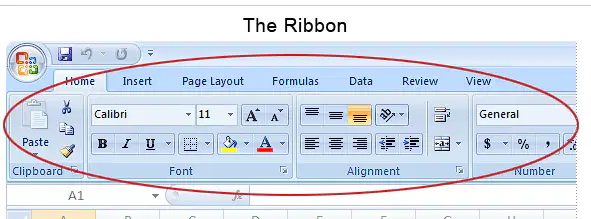
In which Office version was the ribbon interface introduced?
Office 3.0
Office 97
Office 2007
Office 2013
Office 365

In which Office version was the first Office Assistant introduced?
Office 3.0
Office 97
Office 2007
Office 2013
Office 365
Which Office version contained Microsoft Mail for the first time?
Office 3.0
Office 97
Office 2007
Office 2013
Office 365
Which is the first Web-based Office version?
Office 3.0
Office 97
Office 2010
Office 2013
Office 365
Which is the first Web-based Office version?
Office 3.0
Office 97
Office 2010
Office 2013
Office 365
Office introduced as a replacement of Microsoft’s cloud-based business suite that includes the web versions of Word, Excel, PowerPoint, OneNote, mail program and the unlimited storage on OneDrive for the subscribers.
Office 3.0
Office 97
Office 2010
Office 2013
Office 365
Office version that was optimized for mobile and touchscreen
Office 3.0
Office 2010
Office 2013
Office 2016
Office 365
A valuable and efficient tool with the right application software.
COMPUTER
SOFTWARE
APPLICATION SOFTWARE
PRODUCTIVITY SOFTWARE
Allows users to create reports, certificates, documents, make presentations, draw images, design Web pages, play games, use spreadsheets and many more tasks.
COMPUTER
SOFTWARE
APPLICATION SOFTWARE
PRODUCTIVITY SOFTWARE
Consists of programs designed to make users more productive with tasks at hand. Can be classified in many ways such as entertainment, personal, education/reference software, specialty software and productivity software.
COMPUTER
SOFTWARE
APPLICATION SOFTWARE
PRODUCTIVITY SOFTWARE
Includes games, MP3 and videoplayer
Entertainment software
Personal software
Education/reference software
Productivity software
Specialty software
Includes encyclopedia, phone books, almanacs, library searches, children's learning program, course management, and computer-aided instruction.
Entertainment software
Personal software
Education/reference software
Productivity software
Specialty software
A software whose purpose is to make users more productive at a particular task. These includes word processing, spreadsheets, database managers, personal information managers, web browsers, e-mail.
Entertainment software
Personal software
Education/reference software
Productivity software
Specialty software
Includes presentation graphics, financial, desktop publishing, drawing & painting (image editing), video/audio editing, animation, multimedia authoring, web page design, project management, computer-aided design, PDF.
Entertainment software
Personal software
Education/reference software
Productivity software
Specialty software
Includes medical, home decoration, gardening. home repair, tax preparation.
Entertainment software
Personal software
Education/reference software
Productivity software
Specialty software
THREE FEATURES OF WORD PROCESSING
THAT AFFECTS ITS PROCESS ARE:
CURSOR
RIBBON
SCROLLING
WORD WRAP
Is the movable and blinking symbol on the document area
that shows you where you may type/enter data and commands.
CURSOR
RIBBON
SCROLLING
WORD WRAP
MICROSOFT WORD
Means that the text will automatically continue to the next line
when you reach the right margin.
CURSOR
RIBBON
SCROLLING
WORD WRAP
MICROSOFT WORD
Is the moving quickly upward, downward, or sideways
through the document area.
CURSOR
RIBBON
SCROLLING
WORD WRAP
9 ELEMENTS OF MICROSOFT WORD
The only Office Menu in Office 2010.
It includes commands like NEW, OPEN, SAVE, SAVE AS, and PRINT.
File Menu/Tab
Ribbon
Dialog Box Launcher
Title Bar
Quick Access Toolbar
9 ELEMENTS OF MICROSOFT WORD
At the top part of the screen containing
TABS, GROUPS, and COMMANDS
File Menu/Tab
Ribbon
Dialog Box Launcher
Title Bar
Quick Access Toolbar
9 ELEMENTS OF MICROSOFT WORD
Small Arrow in the lower right that opens a TASK PANE with more options.
File Menu/Tab
Ribbon
Dialog Box Launcher
Title Bar
Quick Access Toolbar
9 ELEMENTS OF MICROSOFT WORD
Shows the program and document title.
File Menu/Tab
Ribbon
Dialog Box Launcher
Title Bar
Quick Access Toolbar
9 ELEMENTS OF MICROSOFT WORD
Appears at the above the file tab and
provides easy access to the commands you use most frequently.
File Menu/Tab
Ribbon
Dialog Box Launcher
Title Bar
Quick Access Toolbar
9 ELEMENTS OF MICROSOFT WORD
Appears at the above the file tab and
At the top right, containing Minimize, Maximize/Restore, and Close.
Quick Access Toolbar
Control Buttons
Document Area
Status Bar
Scroll Bar
9 ELEMENTS OF MICROSOFT WORD
Appears at the above the file tab and
Where everything you type appears.
Quick Access Toolbar
Control Buttons
Document Area
Status Bar
Scroll Bar
9 ELEMENTS OF MICROSOFT WORD
Appears at the above the file tab and
Bar on the right that allows you to move within the document.
Quick Access Toolbar
Control Buttons
Document Area
Status Bar
Scroll Bar
9 ELEMENTS OF MICROSOFT WORD
Appears at the above the file tab and
Displays the document information and insertion point.
Quick Access Toolbar
Control Buttons
Document Area
Status Bar
Scroll Bar
Used to zoom in or out a window by clicking and dragging the slider.
(you can also use the + and – buttons.)
W Button
Tabs
Groups
Commands
Zoom Slider
MICROSOFT WORD
Allows you to minimize, maximize or close Word
without having to transverse your mouse across the screen.
W Button
Tabs
Groups
Commands
Zoom Slider
MICROSOFT WORD
3 COMPONENTS OF A RIBBON
W Button
Tabs
Groups
Commands
Zoom Slider
They put together or ORGANIZE related commands
Example: Group of commands related to text
W Button
Tabs
Groups
Commands
Zoom Slider
Contains groups of related commands
Example: File, Home, Insert
W Button
Tabs
Groups
Commands
Zoom Slider
7 TYPES OF TABS
The most used tab, it incorporates all text formatting such as font and paragraph changes, copy/cut and paste a text or picture as well as editing of the text.
HOME TAB
INSERT TAB
PAGE LAYOUT TAB
REFERENCE TAB
MAILING TAB
7 TYPES OF TABS
Allows you to insert a variety of items into a document from pictures, clip art, tables, text box, word art, symbols and equation, and headers and footers. This tab enables you to add cover page, blank page and page break in your document.
HOME TAB
INSERT TAB
PAGE LAYOUT TAB
REFERENCE TAB
MAILING TAB
7 TYPES OF TABS
Has commands to adjust page elements such as margins orientation, inserting columns, page backgrounds and themes.
HOME TAB
INSERT TAB
PAGE LAYOUT TAB
REFERENCE TAB
MAILING TAB
7 TYPES OF TABS
Has commands to use when creating a Table of Contents and citation page for a paper. It provides you with many simple solutions to create these typically difficult to produce documents.
HOME TAB
INSERT TAB
PAGE LAYOUT TAB
REFERENCE TAB
MAILING TAB
7 TYPES OF TABS
Allows you to create documents to help when sending out mailings such as printing envelopes, labels and processing mail merges.
PAGE LAYOUT TAB
REFERENCE TAB
MAILING TAB
REVIEW TAB
VIEW TAB
7 TYPES OF TABS
Allows you to make any changes to your document due to spelling and grammar issues. It also holds the track changes feature which provides people with the ability to make notes and changes to a document of another person.
PAGE LAYOUT TAB
REFERENCE TAB
MAILING TAB
REVIEW TAB
VIEW TAB
7 TYPES OF TABS IN MICROSOFT WORD
Allows you to change the view of your document to a different two-page document or zoom, split the window, customize ruler, gridlines and navigation pane.
PAGE LAYOUT TAB
REFERENCE TAB
MAILING TAB
REVIEW TAB
VIEW TAB
MICROSOFT EXCEL
An area where the column and row intersect.
(a)
MICROSOFT EXCEL
The selected cell or the cell where you can enter or edit data.
(a)
MICROSOFT EXCEL
Allows you to view, enter and edit data in the active cell.
Displays the values or formulas in the cell.
(a)
MICROSOFT EXCEL
Displays the active cell address or object name.
Worksheet Area
Name Box
Column Heading
Row Heading
Navigation Button
MICROSOFT EXCEL
Are labeled in a combination of letters located above the grid lines.
There are 16,384.
Worksheet Area
Name Box
Column Heading
Row Heading
Navigation Button
MICROSOFT EXCEL
Located at the left side of the grid of columns and rows
which are represented by numbers. There are 1,048,576.
Worksheet Area
Name Box
Column Heading
Row Heading
Navigation Button
MICROSOFT EXCEL
Displays the cells in different sections of the current worksheet.
Worksheet Area
Name Box
Column Heading
Row Heading
Navigation Button
MICROSOFT EXCEL
Allow you to move to another worksheet in an excel workbook. They are used to display the first, previous, next and last worksheets in the workbook.
Worksheet Area
Name Box
Column Heading
Row Heading
Navigation Button
MICROSOFT EXCEL
Used to quickly switch between normal,
page layout and page break preview views
Scroll Bar
View Buttons
Worksheet Tabs
MICROSOFT EXCEL
Used to view different parts of the worksheet
using the vertical and horizontal scroll bar.
Scroll Bar
View Buttons
Worksheet Tabs
MICROSOFT EXCEL
A workbook have five worksheets by default, however, it can be added up to 650 worksheets (depends on the computer’s memory).
True
False
An application software that is intended to create visual aids for presentations to communicate ideas, messages and other information to group.
WORD PROCESSING SOFTWARE
SPREADSHEET SOFTWARE
PRESENTATION SOFTWARE
DESKTOP PUBLISHING SOFTWARE
A graphic design application that is similar to Microsoft Word but differs with emphasizing more on page layout and design, and less on words composition and formatting.
WORD PROCESSING SOFTWARE
SPREADSHEET SOFTWARE
PRESENTATION SOFTWARE
DESKTOP PUBLISHING SOFTWARE
A software that allows users to organize data by entering, editing, manipulating and printing information in a tabulated form.
WORD PROCESSING SOFTWARE
SPREADSHEET SOFTWARE
PRESENTATION SOFTWARE
DESKTOP PUBLISHING SOFTWARE
A program that allows the user to create, edit, format, print and store documents such as letter, papers, flyers, certificates and etc.
WORD PROCESSING SOFTWARE
SPREADSHEET SOFTWARE
PRESENTATION SOFTWARE
DESKTOP PUBLISHING SOFTWARE
MICROSOFT POWERPOINT
Opens the BACKSTAGE view
FILE TAB
BACKSTAGE
SLIDE AREA
ZOOM OPTIONS
SLIDE VIEWS
MICROSOFT POWERPOINT
Allows you to manage the file and settings in PowerPoint
FILE TAB
BACKSTAGE
SLIDE AREA
ZOOM OPTIONS
SLIDE VIEWS
MICROSOFT POWERPOINT
Area where the actual slide is created and edited. You can add, edit, and delete text, images, shapes and multimedia in this section.
FILE TAB
BACKSTAGE
SLIDE AREA
ZOOM OPTIONS
SLIDE VIEWS
MICROSOFT POWERPOINT
Lets you zoom in for a closer look at your text.
FILE TAB
BACKSTAGE
SLIDE AREA
ZOOM OPTIONS
SLIDE VIEWS
MICROSOFT POWERPOINT
Group of four buttons located to the left of the Zoom control, near bottom of the screen, lets you switch between PowerPoint views.
FILE TAB
BACKSTAGE
SLIDE AREA
ZOOM OPTIONS
SLIDE VIEWS
MICROSOFT POWERPOINT
Allows you to add notes for the presentation.
NOTE SECTION
QUICK ACCESS TOOLBAR
SLIDE TAB
MICROSOFT POWERPOINT
Available only in the normal view. It displays all the slides in sequence.
NOTE SECTION
QUICK ACCESS TOOLBAR
SLIDE TAB
3 SLIDE VIEWS IN MICROSOFT POWERPOINT
This view is like a slideshow with access to the windows.
However, like slideshow you cannot edit in this view.
NORMAL LAYOUT VIEW
SLIDE SORTER VIEW
READING VIEW
3 SLIDE VIEWS IN MICROSOFT POWERPOINT
Displays all the slides as a matrix. This view only
allows you to rearrange the slides but not edit the contents of each slide.
NORMAL LAYOUT VIEW
SLIDE SORTER VIEW
READING VIEW
3 SLIDE VIEWS IN MICROSOFT POWERPOINT
Displays page in normal view with the slide on the right
and a list of thumbnails to the left.
NORMAL LAYOUT VIEW
SLIDE SORTER VIEW
READING VIEW
THINGS YOU CAN DO WITH DESKTOP PUBLISHING :
Creating and printing greeting cards, banners postcards, candy wrappers, and iron-on transfers.
Making digital scrapbooks and print or digital photo albums.
Creating decorative labels, envelopes, trading cards, calendars and charts.
Designing packaging for retail merchandise from wrappers for bars of soap to software boxes.
Taking work designed by others and putting into correct format for digital or offset printing or for publishing online.
The most common Desktop Publishing software:
(a)
MICROSOFT PUBLISHER
Where the options for saving, printing and creating publications are located
RULERS
BACKSTAGE VIEW
BOUNDARIES
GUIDES
THE TASK PANE
MICROSOFT PUBLISHER
Where you can make changes in the color scheme, font, scheme, business information, page size, layout, etc.
RULERS
BACKSTAGE VIEW
BOUNDARIES
GUIDES
THE TASK PANE
MICROSOFT PUBLISHER
Are dark blue dashed borders that appear around your objects.
RULERS
BASELINES
BOUNDARIES
GUIDES
THE TASK PANE
MICROSOFT PUBLISHER
Are evenly-spaced horizontal lines that you can use to line up text.
RULERS
BASELINES
BOUNDARIES
GUIDES
THE TASK PANE
MICROSOFT PUBLISHER
On the left and top of your publication to help you line up text, images and other objects and get a clearer idea of exactly where those objects will appear on the printed page
RULERS
BASELINES
BOUNDARIES
GUIDES
THE TASK PANE
MICROSOFT PUBLISHER
Are thin lines that help you align various objects.
RULERS
BASELINES
BOUNDARIES
GUIDES
THE TASK PANE
MICROSOFT PUBLISHER: TYPES OF GUIDES
Blue lines that mark the edges, or margins of the printable area
on each page of your publication.
MARGIN GUIDES
CUSTOMIZABLE GUIDES
MICROSOFT PUBLISHER: TYPES OF GUIDES
Green lines that you can add anywhere in your publication.
MARGIN GUIDES
CUSTOMIZABLE GUIDES
Is a software graphics that
allows the user to draw or paint images on a computer.
(a)
MS PAINT
Is indicated by the red circle in the illustration at the left.
TITLE BAR
CONTROL BUTTONS
CANVAS
MENU
EDITING WINDOW
MS PAINT
Buttons at the right side of the toolbar which are
the minimize, maximize/restore and close
TITLE BAR
CONTROL BUTTONS
CANVAS
MENU
EDITING WINDOW
MS PAINT
Appear beneath the Title Bar in the window. There are 6 options within it.
TITLE BAR
CONTROL BUTTONS
CANVAS
MENU
EDITING WINDOW
MS PAINT
This is where the image is shown and edited.
All drawing, selecting and other editing occur here.
TITLE BAR
CONTROL BUTTONS
CANVAS
MENU
EDITING WINDOW
MS PAINT: Contents of the Menu Bar
Where you’ll find commands that affect the file
you’re working on in its most basic aspects.
File Menu
Edit Menu
Image Menu
Colors Menu
Help Menu
MS PAINT: Contents of the Menu Bar
Is where you’ll find most of your commands that are useful for working within your file to make changes of one kind or another like Undo, Cut/Copy, Paste, Select All.
File Menu
Edit Menu
Image Menu
Colors Menu
Help Menu
MS PAINT: Contents of the Menu Bar
Is where you’ll find the Paint Power Tools. These tools are used to alter your image or selection in a number of interesting and useful ways.
File Menu
Edit Menu
Image Menu
Colors Menu
Help Menu
MS PAINT: Contents of the Menu Bar
Menu that has one command in it which is Edit Colors, however; the interface for this command is a bit complicated compared with the other commands.
File Menu
Edit Menu
Image Menu
Colors Menu
Help Menu
MS PAINT: Contents of the Menu Bar
Contains two sections to minimize complexity - Help topics that launches HELP and About Paint which are the copyright and licensing information
File Menu
Edit Menu
Image Menu
Colors Menu
Help Menu

