
 Worksheets
Summative Test Grade 7
Total questions: 52
Worksheet time: 21mins

Identify the name of the icon shown
Mouse Pointer
Arrow hand
Keyboard Shortcut
All of the above

What type of operating system does the logo represents
Machintosh
Linux
Windows
Android

A digital image (photo, drawing etc.) used as a decorative background on the screen of a computer, smartphone or other electronic devices.
Wallpaper
Picture
Background
Icon

What icon is this?
Basket
Container
Recycle Bin
Trash Can
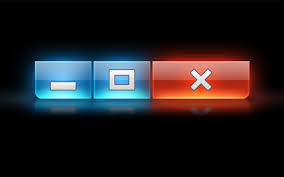
What icon is this?
Minimize, Maximize and Close
Open, Maximize and Close
Close, Minimize and Delete
Minimize, Maximize and Open

What icon is this?
Paper
Folder
File
Drawer

What icon is this?
Screen
My Computer
Recycle Bin
Folder

What icon is this
Volume
Bluetooth
WiFi
All of the above
_____ are posted on walls
Flyers
Posters
Billboards
Tarpaulin
To highlight a whole paragraph
CTRL + S
CTRL + A
CTRL + E
Left align paragraph
CTRL + L
CTRL + E
CTRL + R
To centered a paragraph alignment
CTRL + L
CTRL + R
CTRL + E
Align the paragraph to the right
CTRL + R
CTRL + J
CTRL + E
Justified the alignment of the paragraph
CTRL + E
CTRL + L
CTRL + J
To make the font BOLD
CTRL + B
CTRL + I
CTRL + U
To ITALIC a paragraph
CTRL + B
CTRL + I
CTRL + U
To UNDERLINE the paragraph
CTRL + I
CTRL + U
CTRL + SHIFT + D
Short Cut key to save a document
Ctrl+S
Ctrl+A
Ctrl+V
Short Cut key to Open old document
Ctrl+N
Ctrl+O
Ctrl+P
Short Cut Key to Cut
Ctrl+D
Ctrl+F
Ctrl+X
Short Cut Key for Copy
Ctrl+C
Ctrl+CC
Ctrl+BCC
Short Cut Key for Paste
Ctrl+U
Ctrl+V
Ctrl+P
Short Cut Key for Print
Crtl+I
Ctrl+L
Ctlr+P
Short Cut Key to Underline
Ctrl+L
Ctrl+U
Ctrl+E
Short Cut Key for center Alignment
Ctrl+M
Ctrl+L
Ctrl+E
That is used to drag-and-drop objects and give you access to the right-click menu.
mouse
keyboard
monitor
computer case
A device for storing and processing data, typically in binary form, according to instructions given to it.
typewriter
internet
computer
abacus
It is used to enter commands, text, numerical data and other types of data by pressing the keys on the keyboard.
monitor
computer case
keyboard
mouse
Which part of the computer that is used to display the result of any data.
monitor
computer case
keyboard
mouse
What is the most important part of a computer?
CPU
RAM
SSD
GPU
What device is use to point and click things on the computer software?
Keyboard
Mouse
Headset
Microphone

Computer or Not A Computer?
Computer
Not a Computer
an input device used to type a document, use keystroke shortcuts, access menus, play games and perform a variety of other tasks.
keyboard
monitor
mouse
CPU

Computer or Not A Computer?
Computer
Not a Computer

Computer or Not A Computer?
Computer
Not a Computer

Computer or Not A Computer?
Computer
Not a Computer

identify what part of the computer is on the picture.
speakers
monitor
microphone
mouse

Identify what part of the computer is on the picture.
Monitor
CPU
Keyboard
System Unit

Computer or Not A Computer?
Computer
Not a Computer

Computer or Not A Computer?
Computer
Not a Computer

What is this?
The monitor
The screen
The mousepad
The computer stand

The computer can work without CPU.
True
False
Maybe
Half true
It is used to move a cursor on a computer screen.


What is the purpose of the keyboard?
To input data such as letters, numbers, and punctuation
To make clicky sounds
To look at it
To click on an item on the screen
Hardware is the technology that you can physically touch.
True
False


What does CPU stand for?
Computer Programs User
Computer Program Unit
Central Processing Unit
Central Program User
The main circuit board in a computer is called the ________.
RAM
motherboard
dongle
power supply unit


What letter shows the monitor in the image?
A
B
C
D

