
Font size
 Worksheets
Computer Science 2 First Quarter Exam
Total questions: 52
Worksheet time: 46mins
It helps you align shapes, slices, and selections.
(a)
Displays unlocked windows stacked and cascading from the upper left to the lower right of the screen.
(a)
It is useful for laying out elements symmetrically.
(a)
It is commonly used to display photographs and images in HTML documents that retain color in RGB.
(a)
Determines the graphics quality of your image.
(a)
It guides you to place images or elements precisely with ease.
(a)
Large file format that saves up to 4 GB.
(a)
It determines how the components of a color are combined, based on the number of color channels in the color mode.
(a)
It is a layered image file that saves your file as an editable format.
(a)
Screen mode that displays window edge to edge. (Hint. Often used in floors)
(a)
What will you do to determine the position of an element?
alter the ruler origin to the element position
use the grid line to locate the element
use guide to trace the exact position of the element
all of these
Which of the following processes will NOT able to produce guides?
choose from menu tab, View > New Guide
drag from the horizontal ruler
drag from the vertical ruler
choose from menu tab, Open > Show > Guide
Which image format will you choose in saving a very large file size photo?
JPEG
GIF
PNG
TIFF
You need an image of a bouncing ball in your PowerPoint presentation. What format is needed to hide the ball’s background?
PSD
TIFF
GIF
JPEG
What format will you use for photos or images that are commonly used and retains colors in RGB?
PSD
TIFF
GIF
JPEG
Which bit depth will you select if you desire to create a high-resolution image in HDR?
8-bit
16-bit
32-bit
64 bit
Which of the following are NOT included in the drop-box list of the background content?
clear and gray
white and color
black and transparent
transparent and color
Which of the following is needed to set the size of your new document?
pixel, height and width
width, height and length
unit, width and height
bit, length and thickness
What is a possible solution if your image in the actual size view has coarse or low quality?
adjust the value of resolution to higher number
export your image to TIFF format
reduce the size of your image
use smaller grid lines
Which of the following color modes are you going to use for common editing process?
Bitmap
Grayscale
CMYK
RGB
You would like to re-edit an image you previously created, but there are no layers of element or image found in the window. What could possibly happen?
You failed to save the file in PSD format.
You open a JPG format from your exported image.
You did not open the file which is in PSD format.
c, a and b
Your laptop always resets or hangs when editing high-resolution files. What precautionary measures should you consider?
Save the image in TIFF
Remove some layers
Save your file before editing
Use a transparent background
You have noticed that the title bar in your window is not visible, and the image is maximized. What could possibly happen to your editor?
The screen mode is set to standard.
You accidentally set to full-screen mode.
Your image size is too large for the window.
The resolution is too high for the editor.
TRUE or FALSE. Resizing means adjusting the photo to make it huge.
(a)
TRUE or FALSE. Cropping is used to remove unwanted objects from the image.
(a)
TRUE or FALSE. Adobe Photoshop is a Photo editing software used to create a moving photo.
(a)
TRUE or FALSE. You also change the white balance on the picture as you change the brightness.
(a)
TRUE or FALSE. Too much sharpening can lead to distortion of your image.
(a)
TRUE or FALSE. You can create multi-edge shapes with Adobe Photoshop.
(a)
TRUE or FALSE. In renaming your file name, you can use the drawing tools.
(a)
TRUE or FALSE. By using a type tool, you can remove non-essential objects.
(a)
TRUE or FALSE. You may use the layer panel to copy a certain color hue.
(a)
TRUE or FALSE. The default colors for the Foreground and Background colors are black and white.
(a)
TRUE or FALSE. The menu bar contains the document's printing commands.
(a)
TRUE or FALSE. You can access the help command by clicking on the shape tool.
(a)
TRUE or FALSE. You can add effects and filters by tapping on the document window.
(a)

Fill in the blank of item #1. Choose your answer from the box.
(a)
Fill in the blank of item #2. Choose your answer from the box.
(a)
Fill in the blank of item #4. Choose your answer from the box.
(a)
Fill in the blank of item #5. Choose your answer from the box.
(a)
Fill in the blank of item #6. Choose your answer from the box.
(a)
Fill in the blank of item #7. Choose your answer from the box.
(a)
Fill in the blank of item #8. Choose your answer from the box.
(a)
What PNG stands for?
(a)
What JPEG stands for?
(a)
What PSF stands for?
(a)
What PSD stands for?
(a)
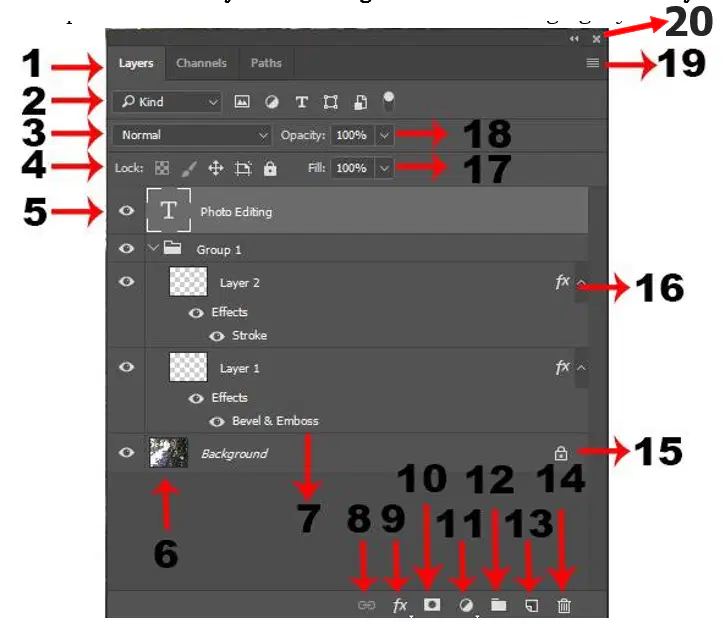
Identify the following functions and commands in Layers Panel. Item number 5 is Layer (a) ?
Identify the following functions and commands in Layers Panel. Item number 6 is Layer (a) ?
Identify the following functions and commands in Layers Panel. Item number 7 is Layer (a) ?
Bonus points (5pts). Give the complete name of your Computer Science 2 teacher. (middle initial is included)
(a)
Bonus points (3pts). Give the name of your School Head.
(a)

