
 Worksheets
COMPUTER SERVICING
Total questions: 85
Worksheet time: 1hrs 9mins
First calculating device
Abacus
Napier's bones
Pascaline
Difference engine


This input device is used by computers without camera. It is connected to computers in order to take picture or video.


The numbers, letters, pictures, and symbols we put inside the computer are called_______________.
data
date
anything

Name this Icon
MS Word
MS Excel
MS PowerPoint
MS Access
You cannot insert a picture in PowerPoint
True
False
Maybe
Why Not
When you sit in front of your computer, you must?
Slouch over the keyboard
Sleep
Sit Upright
Cry

Name the Web browser?
Google Chrome
Internet Explorer
Mozilla Firefox
Opera Mini

Name the Web browser?
Mozilla Firefox
Internet Explorer
Opera Mini
Google Chrome
______ is known as the brain of the computer?
Floppy Disk
Hard Drive
Central Processing Unit
Flash Drive
Which of the following is a "PRESENTATION PROGRAM"
MS Word
MS Powerpoint
MS Excel
None of the above
Microsoft word is used for?
Painting
Typing
Drawing
Hunting
Keyboard is ______ device
An output
Software
An input
Memory
A _____ is a personal computer that can easily moved and used in a variety of locations.
Desktop Computer
Laptop
Allows you to see what you are doing in computer.
CPU
Mouse
Monitor
Keyboard
Used to type data into the computer
Keyboard
Monitor
Speaker
Mic
Speakers and headphones are input devices.
True
False
An ATM machine is an example of a computer.
True
False
A small, light, low-power notebook computer that has less processing power than a full-sized laptop but is still suitable for word processing, running a Web browser and connecting wirelessly to the Internet.
Laptop
Tablet
Desktop computer
Netbook
A wireless, portable personal computer with a touchscreen interface.
Laptop
Tablet
Desktop computer
Netbook
A portable computer, usually battery-powered, small enough to rest on the user's lap and having a screen that closes over the keyboard like a lid
Laptop
Tablet
Desktop computer
Netbook
A computer that is designed to be used on a desk or table.
Laptop
Tablet
Desktop computer
Netbook
Task of the Computer
5. It can make you see and talk with somebody who is in a faraway place.


identify what part of the computer is on the picture.
floppy disk
keyboard
hard drive
cd/dvd drive

identify what part of the computer is on the picture.
floppy disk
cd/dvd drive
monitor
printer

identify what part of the computer is on the picture.
monitor
cd/dvd drive
keyboard
CPU

identify what part of the computer is on the picture.
keyboard
cd/dvd drive
speaker
floppy disk
who invented the first computer?
Albert Einstein
Thomas Edison
Nikola Tesla
Charles Babbage
what is a machine that can store and process information?
television
laptop
computer
cellular phone

Which tool will you use if you want to drive this type of screw?
Allen Wrench
Philip Head Screwdriver
Flat Head Screwdriver
Torx screw driver

Torx screwdriver
Part retriever
Flat head screwdriver
hex driver

Shaped like a six-pointed star that requires star bits to install them.
Phillips Head screwdriver
Torx Screwdriver
Flat heat screwdriver
Hex driver

It is used to get small parts on unreachable locations or narrow places.
Hex Driver
Torx screwdriver
tester
Parts retriever

It is used to manipulate small parts and usually held between the thumbs and index fingers.
Parts retriever
screw
multimeter
tweezer

It is used to hold small parts also for grasping and bending thin wires.
Needle nose pliers
Tweezers
Parts retriever
Scissors
Which of the following tools is used for tightening and loosening slotted screws?
anti - static mat
flat head screwdriver
hex driver
wire cutter
Which of the following hand tools also known as nut driver?
Flat screwdriver
Hex driver
Parts retriever
Philips screwdriver
There are different tools needed in repairing computer, which of the following categories does parts retriever, screw driver, wire cutter and long nose plier belongs?
Cleaning tools
Diagnostic tools
Electro-Static Discharge (ESD) tools
Hand tools
When cleaning computer system unit, which of the following tools is best used to blow away dust in electronic components?
compressed air
lint free cloth
hex driver
wire cutter
Damaged or defective equipment/tools should be tagged and removed from service.
TRUE
FALSE
Properly stored tools and equipment will be easy to find when needed and are less likely to be lost.
TRUE
FALSE

What is it?
utility knife
tool kit
claw hammer
long-nose pliers

What is it?
wrench
screwdriver
hammer
pliers
A device for performing work on a material or a physical system using only hands.
cleaning tools
hand tools
ESD tools
diagnostic tools

Identify the picture above.
loopback adapter
analog multimeter
compressed air
digital multimeter
Which tool is used to clean different computer components without scratching or leaving debris?
Part Retriever
Cable ties
Lint-free Cloth
Flat head screwdriver
Which tool is sometimes called a nut driver? It is used to tighten nuts in the same way that a screwdriver tightens screws?
Anti-static mat
Hex driver
Philips head screwdriver
Wire cutter
Which tool is used to loosen or tighten cross-head screws?


Which tool is used for hardware to stand on to prevent static electricity from building up?


phillips screw driver
flat screw driver
ice pick

combination pliers
diagonal cutting pliers
long nose pliers

pipe wrench
socket wrench
adjustable wrench

Which part of the computer displays in photographic form use for viewing activity being done?
Monitor
Mouse
Keyboard
Camera
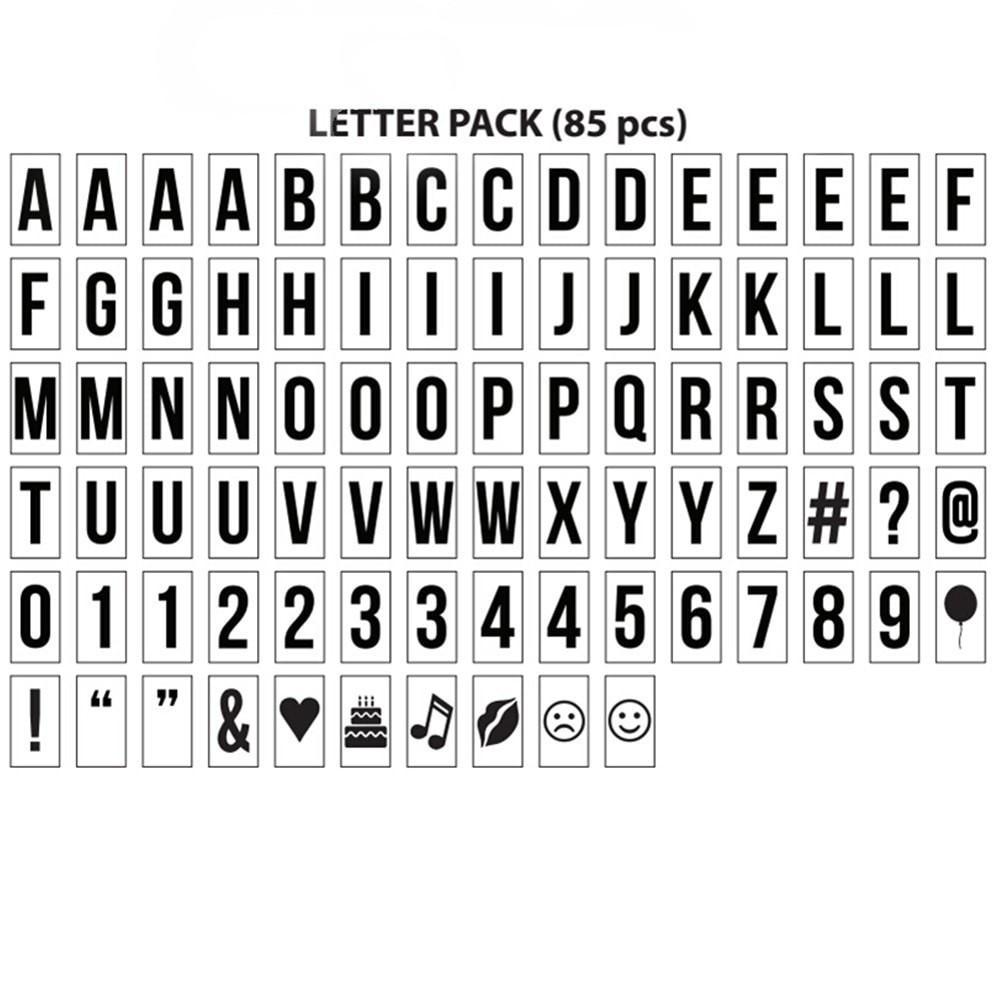
A device for inputting letters, numbers and symbols.
PC
Keyboard
Mouse
Port
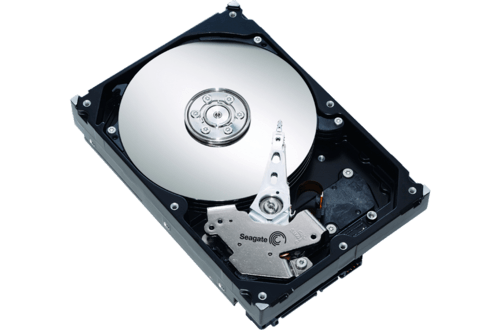
It is the permanent storage unit of the computer.
Keyboard
Hardware
Tower
Hard Disk Drive (HDD)

1. The main circuit board of a computer. It contains all the circuits and components that run the computer.
Motherboard
Hard Disk Drive
Optical Drive
Power Supply Unit


What does CPU stand for?
Computer Processing Unit
Central Peripheral Unit
Central Processing Unit
Computer Processing User
Which of the following actions should be taken in case of fire?
Run to the nearest door to escape.
Attack the fire with the nearby extinguisher at once
If you find fire, assess the fire prior to doing anything
If the designated fire officer is not present, take the responsibility and locate the source of fire
What is the best thing to do when there are hazards in the school?
Report the hazard to the police nears you
Report the hazards to the principal to obtain assistance
Report hazard to the barangay captain
Protect first the victim against the hazard
Which of the following defines Occupational Health and Safety (OHS) ?
Planned system of working to prevent illness and injury
Identifying hazards and risks
Eliminate the hazard or modify the risk that presents
All of the above
Part of the computer which is basically anything you can touch with your fingers.
Hardware
Network
CPU
Software

Regularly backing up important files secures computer data.
TRUE
FALSE
Removing unnecessary files in the computer will decrease space and speed of the computer.
TRUE
FALSE
Computer maintenance and systems cleaning are routine activities conducted to keep computers system work properly
TRUE
FALSE
Shutting down the computer often increases its life span.
TRUE
FALSE
Computer monitors are cleaned using a soft cloth.
TRUE
FALSE
Sharing computer passwords to anybody ensures the security of files.
TRUE
FALSE
How can you maintain handtools to ensure their longevity and efficiency?
Leaving them out in the rain
Throwing them in a toolbox without cleaning
Using them for purposes they were not designed for
Regular cleaning, proper storage, and occasional lubrication

