
 Worksheets
ASTORINO Operation Manual Worksheet
Total questions: 99
Worksheet time: 50mins
What is the title of the document shown in the image?
ASTORINO Operation Manual
Kawasaki Robotics User Guide
ASTORINO Safety Instructions
Robotics Maintenance Handbook
Which company is associated with the ASTORINO Operation Manual?
Kawasaki Robotics
Honda Robotics
Mitsubishi Electric
FANUC Corporation

Based on the cover, what type of device is likely discussed in the ASTORINO Operation Manual?
Robotic arm
Conveyor belt
3D printer
Welding machine
What does the ASTORINO Operation Manual describe?
The handling of the 6-axis robot "astorino" and its software
The history of robotics
The maintenance of industrial machines
The programming of all Kawasaki robots
Who is the ASTORINO robot specially developed for?
Educational institutions
Manufacturing companies only
Home users
Medical professionals
According to the manual, what can pupils and students use the ASTORINO for?
To learn robot-assisted automation of industrial processes in practice
To play games
To design new robots
To repair household appliances
From which firmware and software versions is this manual valid?
Firmware version 3.8.1 and astorino software version 1.8.9
Firmware version 2.0.0 and astorino software version 1.0.0
Firmware version 4.0.0 and astorino software version 2.0.0
Firmware version 3.0.0 and astorino software version 1.5.0
Why might it be important for students to know the specific firmware and software versions mentioned in the manual?
To ensure compatibility and correct usage of the manual's instructions
To update their computer's operating system
To access online games
To register for classes
According to the ASTORINO Operation Manual, where is the "astorino" software licensed to be used?
With the ASTORINO robot only
With any robot
On any computer
In any environment
What is Kawasaki NOT liable for according to the ASTORINO Operation Manual?
Any accidents, damages, and/or problems caused by improper use of the ASTORINO robot
Proper use of the ASTORINO robot
Software updates
Manual printing errors
Which of the following actions requires prior written permission from Kawasaki?
Reprinting or copying the manual in whole or in part
Reading the manual
Using the ASTORINO robot
Contacting customer support
Why should the ASTORINO Operation Manual be kept in a safe and easily accessible place?
So it can be used at any time
To prevent theft
To avoid losing the robot
For warranty purposes
If the ASTORINO Operation Manual is lost or seriously damaged, what should you do?
Contact Kawasaki
Ignore it
Try to repair it yourself
Download any manual online
Suppose Kawasaki decides to update the ASTORINO Operation Manual. What right do they reserve according to the manual?
The right to change, revise, or update the manual without prior notice
The right to remove the manual from all users
The right to charge extra for the manual
The right to restrict robot usage

What does the WARNING symbol in the manual indicate?
It identifies precautions regarding robot specifications.
It marks items that require special attention for maintenance.
Failure to observe the specified contents could possibly result in injury or, in the worst case, death.
It provides instructions for regular operation.
What is the purpose of the ATTENTION symbol in the manual?
To indicate possible injury or death.
To identify precautions regarding robot specifications, handling, teaching, operation, and maintenance.
To provide contact information for the manufacturer.
To highlight legal regulations.
According to the manual, what should you do if unexplained problems occur with the robot?
Ignore the problem and continue working.
Contact Kawasaki Robotics GmbH at the provided address.
Attempt to fix the problem without assistance.
Refer only to the diagrams in the manual.
Why is it important to read and understand the manual before performing any work with the robot?
To ensure all work is performed safely and to prepare appropriate safety measures and procedures.
To speed up the operation process.
To avoid reading unnecessary information.
To reduce the cost of maintenance.
How should you ensure proper operation of the robot and prevent injury or property damage?
By ignoring the safety instructions.
By following the safety instructions in the boxes with the specified symbols.
By only reading the introduction of the manual.
By using the robot without any precautions.
According to the manual, how is a particular keystroke represented in the formatting rules?
Enclosed in angle brackets, e.g.
Enclosed in curly brackets, e.g. {F1} or {Enter}.
Enclosed in parentheses, e.g. (F1) or (Enter).
Enclosed in quotation marks, e.g. "F1" or "Enter".
How are button names for dialog boxes or toolbars formatted in the manual?
Enclosed in square brackets, e.g. [Ok] or [Reset].
Enclosed in angle brackets, e.g.
Enclosed in curly brackets, e.g. {Ok} or {Reset}.
Enclosed in parentheses, e.g. (Ok) or (Reset).
What symbol is used to indicate a selectable field in the manual?
A square box □
A circle ○
A triangle △
A star ☆
If a selectable field is chosen, how is this shown in the manual?
A check mark is shown inside the symbol ☑.
The box turns black.
The text becomes bold.
The field is underlined.
Why do you think the manual uses different symbols for keystrokes, button names, and selectable fields? (DoK Level 3)
To help users quickly identify different types of actions or elements.
To make the manual look more colorful.
To confuse the reader.
To save space in the document.
What is the main purpose of the ASTORINO Operation Manual?
To provide instructions for operating the ASTORINO robot
To describe the history of robotics
To explain computer programming languages
To review general safety in factories
Which section of the ASTORINO Operation Manual would you refer to for information about the robot's range of motion?
Section 5
Section 2
Section 8
Section 12
If you wanted to learn about the different coordinate systems used by the ASTORINO robot, which section should you consult?
Section 12
Section 4
Section 9
Section 15
Which of the following topics is NOT listed in the table of contents of the ASTORINO Operation Manual?
Robot maintenance schedule
Payload chart
Electrical connections
Safety notes
Based on the table of contents, what is the likely sequence of steps for starting up the ASTORINO robot?
Unboxing, connecting accessories, installing software, making ready for operation
Programming, testing, packaging, shipping
Designing, manufacturing, marketing, selling
Charging, calibrating, painting, storing
Which section would most likely contain information about how to manually control the robot's joints?
Section 14.1
Section 8
Section 10
Section 16.2
Which section of the ASTORINO Operation Manual covers "Motors (ON/OFF)"?
16.2.3
16.4.1
16.5.2
16.7.3
What is the main topic of section 16.5 in the ASTORINO Operation Manual?
Programs
JOG
Calibration
Home/Tool
Which of the following is NOT listed as a subsection under "Terminal" in the manual?
IO
MODBUS
Visualization window handling
Firmware
If you wanted to learn about "Collision detection (B version of the robot)", which section would you refer to?
16.12.1.4
16.13
16.5.5
16.7.2
Which section would most likely contain information about updating the system software?
16.14
16.10
16.6
16.2.2
Based on the table of contents, what is the relationship between "Jogging" and "JOG" in the manual?
"Jogging" is a subsection under "JOG"
"JOG" is a subsection under "Jogging"
They are unrelated sections
"Jogging" is part of "Calibration"
Which section of the ASTORINO Operation Manual covers the procedure for updating the system?
16.14.1 Basic information
16.14.2 Update procedure
16.15 Update fail recovery
16.17 Programming
What is the main focus of section 18 in the ASTORINO Operation Manual?
Example programs
Tool Data
Calibration
Manufacturer information
If you want to learn about the configuration of the Ethernet port in the ASTORINO robot, which section should you refer to?
22.3
21
18.2.2
17.2
Which appendix would you consult for information on PNP wiring?
Appendix 1
Appendix 2
Appendix 3
Appendix 4
A student needs to understand how to teach the robot the Four Base Poses. Which subsection should they look at?
18.2.1
18.2.2
18.2.3
18.2.4
Suppose you are troubleshooting a failed update on the ASTORINO robot. Which section would most likely help you recover from this issue?
16.14.1 Basic information
16.15 Update fail recovery
17.1 Pick & Place – Palletization example
19 Auto-calibration of collision detection
Why might a user refer to section 22.5 in the manual?
To learn about ARM inputs/outputs
To use Modbus registers to read/write numeric data
To calibrate the robot
To find manufacturer information
What is the main goal of the author when choosing terminology for the manual?
To use generally valid terminology while achieving the greatest possible logical sense.
To use only the most complex terminology available.
To satisfy every expert's opinion 100%.
To use outdated terminology from previous manuals.
According to the manual, why might terminology be reversed?
Because it depends on the point of view when considering the same topic.
Because the author prefers reversed terminology.
Because reversed terminology is always more accurate.
Because experts require reversed terminology.
Why is it difficult for a modern manual to satisfy 100% of expert opinions regarding terminology?
Because terminologies have developed differently over the course of computer and software history.
Because experts do not read manuals.
Because manuals are not updated regularly.
Because terminology is always the same in every field.
If you were writing a manual, how would you address the challenge of differing expert opinions on terminology? (DoK Level 3: Strategic Thinking)
By using generally accepted terminology and explaining any differences in meaning.
By ignoring all expert opinions.
By using only the terminology from the oldest sources.
By making up new terminology for every concept.
What is the primary purpose of the ASTORINO robot?
To be used as a toy for children
To serve as a 6-axis learning robot for educational institutions
To replace industrial robots in factories
To be used as a household cleaning device
Which material is recommended for 3D printing the ASTORINO robot parts?
PLA filament
ABS filament
PET-G filament
Nylon filament
What software is used to program and control the ASTORINO robot?
Python
Astorino software
Java
C++
Where can users download the latest software version and 3D files for the ASTORINO robot?
From the official Kawasaki Robotics website homepage
From the Kawasaki Robotics FTP server
From a local electronics store
From a mobile app store
How does programming the ASTORINO robot benefit students in terms of real-world applications?
It only teaches them how to play games
It provides transferable programming skills for industrial applications
It focuses only on theoretical knowledge
It is unrelated to any real-world skills
Explain how the design of the ASTORINO robot supports its use in educational settings.
The robot is lightweight and easy to carry
The robot is designed to be 3D printed, allowing damaged parts to be reproduced by users, making it cost-effective and practical for schools and universities
The robot is only available in one size
The robot cannot be repaired if damaged
What is the maximum lifting capacity of the ASTORINO 6-axis robot?
1 kg
5 kg
10 kg
0.5 kg
How many axes does the ASTORINO robot have?
6
4
8
3
What is the maximum range of the ASTORINO robot?
578 mm
1000 mm
250 mm
800 mm
Which controller is used in the ASTORINO robot?
Teensy 4.1
Arduino Mega
Raspberry Pi
PLC S7-1200
What is the repeatability of the ASTORINO robot?
±0.1 mm
±1 mm
±0.5 mm
±2 mm
Which communication protocols are supported by the ASTORINO robot?
MODBUS TCP, TCP/IP, UDP, SERIAL
Bluetooth, Wi-Fi, Zigbee
EtherCAT, PROFINET, CANopen
RS232, RS485, USB
What is the maximum single axis speed of Axis 6 (JT6) in the ASTORINO robot?
128.5°/s
38°/s
67.5°/s
26°/s
Which material is used for the ASTORINO robot?
PET-G
Aluminum
Steel
ABS
If you need to connect a vision system to the ASTORINO robot, which system is specified in the options?
OpenMV
Kinect
PixyCam
Intel RealSense
A user wants to ensure the robot is safe during power loss. Which feature provides this safety in the ASTORINO robot?
Brakes on JT2 and JT3
Emergency stop button
Automatic shutdown
Battery backup
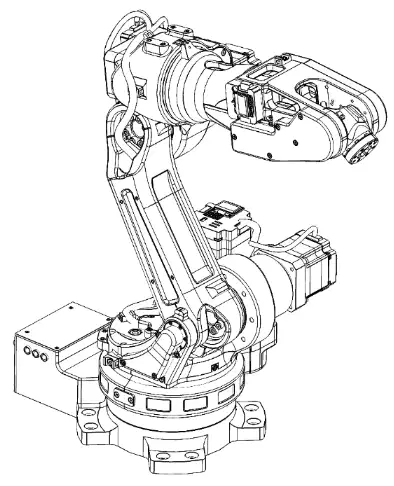
Which of the following items is included in the ASTORINO robot package contents?
astorino Robot
Wireless mouse
Laptop computer
Printer
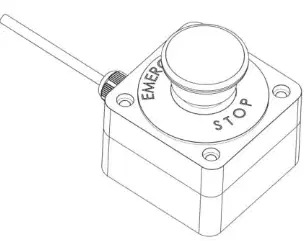
What is the purpose of the external emergency stop included in the robot package?
To quickly stop the robot in case of emergency
To increase the robot's speed
To charge the robot's battery
To connect the robot to Wi-Fi
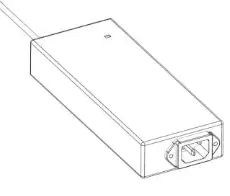
Which power supply is provided with the ASTORINO robot package?
24V/DC power supply
12V/AC power supply
9V battery pack
Solar panel
If you need to transfer data to the ASTORINO robot, which item from the package would you most likely use?
USB stick
External emergency stop
astorino Robot
Power supply
What is the main topic of section 5 in the ASTORINO Operation Manual?
Safety instructions
Range of motion
Maintenance procedures
Troubleshooting
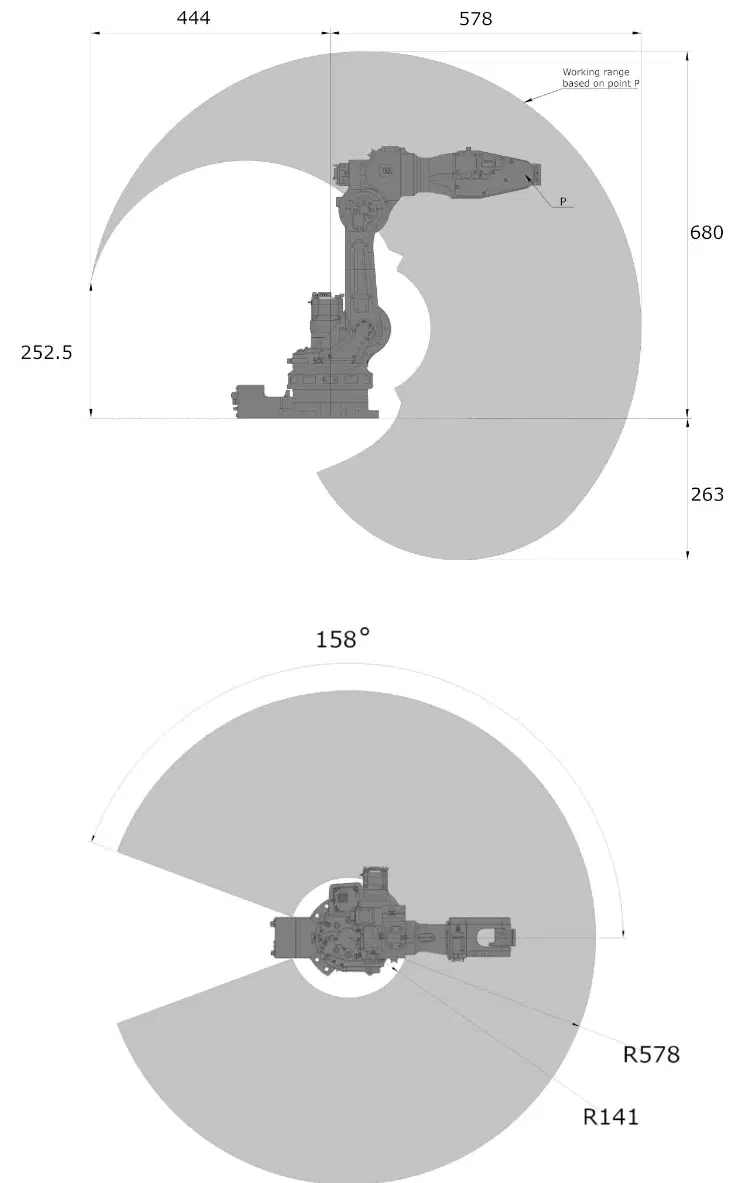
According to the diagram, what is the maximum radius (R) shown for the robot's range of motion?
R252.5
R444
R578
R680
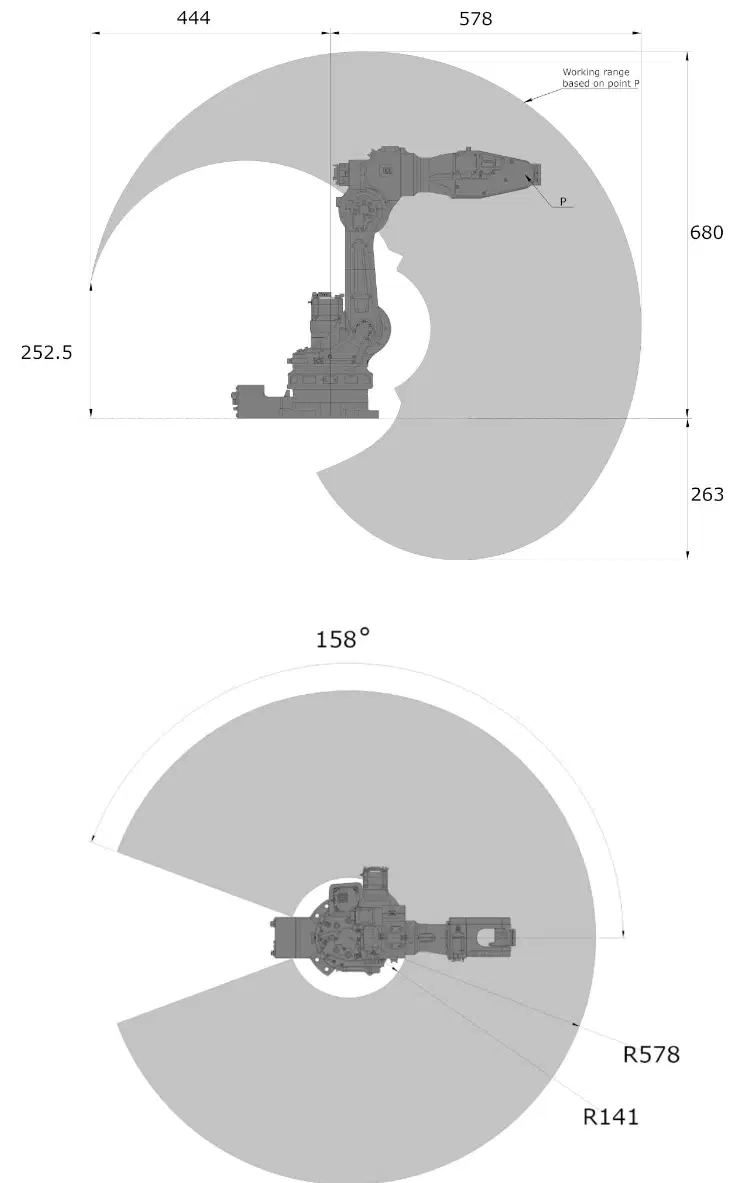
What is the angle of the range of motion depicted in the lower diagram?
90°
120°
158°
180°
If you were to plan a workspace for the ASTORINO robot, which measurement would be most important to ensure the robot can reach all necessary points?
The robot's color
The maximum range radius
The number of joints
The weight of the robot
What is the main topic of section 6 in the ASTORINO Operation Manual?
Mounting dimensions
Electrical wiring
Safety instructions
Maintenance procedures
Which company is associated with the ASTORINO Operation Manual as shown in the image?
Kawasaki
Honda
Yamaha
Suzuki

Based on the diagrams provided, which of the following is most likely the purpose of the illustrations in section 6?
To show the mounting dimensions and hole placements for installation
To display the electrical wiring connections
To illustrate safety warnings
To provide a list of spare parts
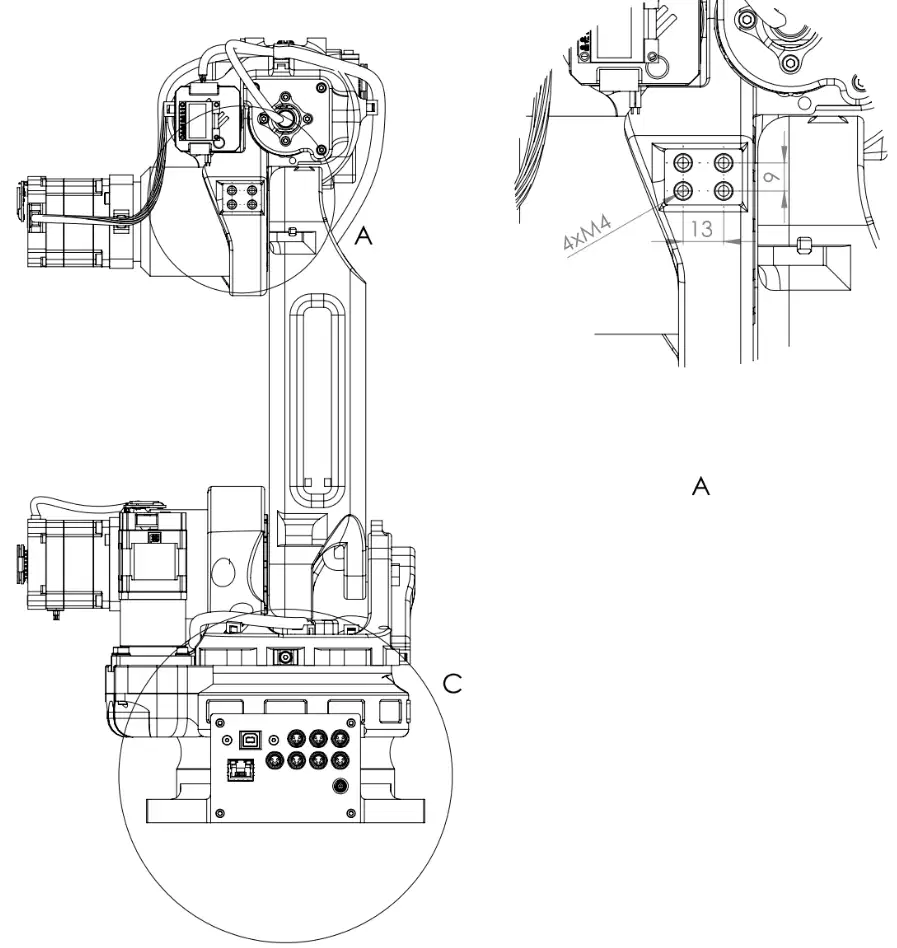
What is the main topic of section 7 in the ASTORINO Operation Manual?
Safety precautions for operation
Installation points for accessories
Maintenance procedures
Troubleshooting errors
Which company is associated with the ASTORINO Operation Manual?
Honda
Kawasaki
Yamaha
Suzuki
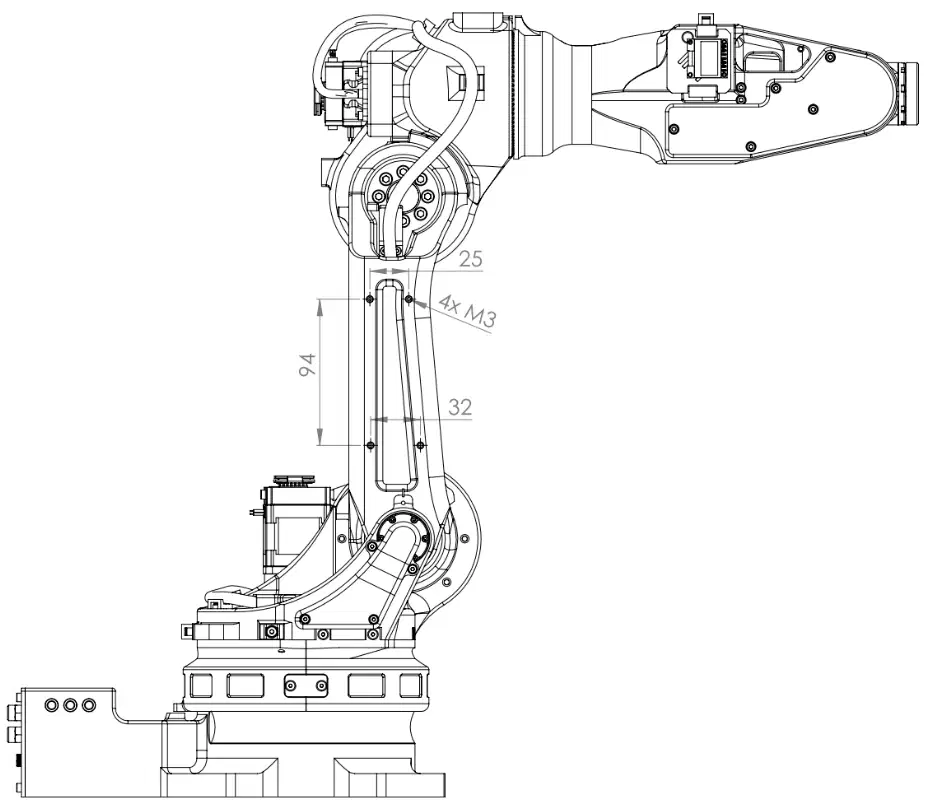
Based on the diagram, what is the likely purpose of the measurements and labels (such as "4X M3", "25", "94", "32") shown on the robotic arm?
To indicate decorative features
To show installation points for accessories
To display the robot's speed
To identify power supply locations
Which company is associated with the ASTORINO Operation Manual as shown in the image?
Kawasaki
Honda
Toyota
Mitsubishi
What type of document is shown in the image?
Operation Manual
User Agreement
Warranty Card
Safety Certificate
What is the title of section 8 in the ASTORINO Operation Manual?
Safety Instructions
Maintenance Schedule
Payload chart
Troubleshooting Guide
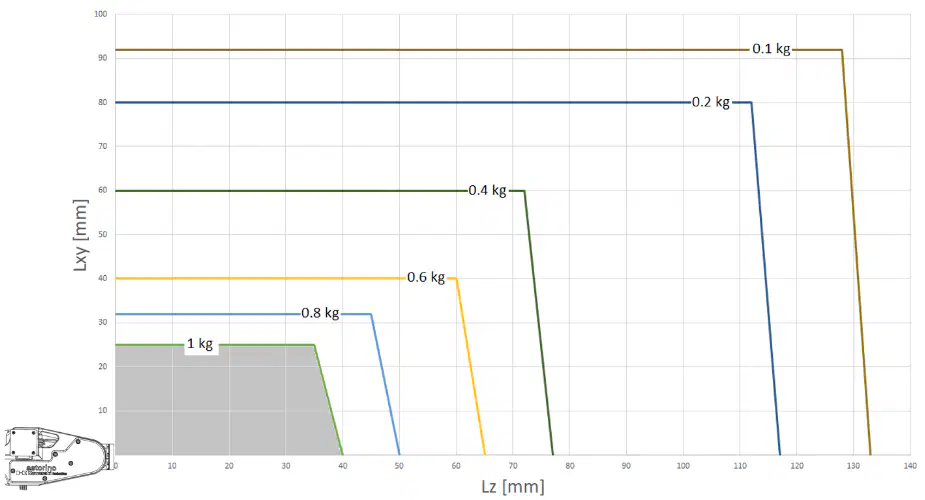
According to the payload chart, which payload weight is associated with the smallest Lz (mm) value?
0.2 kg
0.4 kg
1 kg
0.6 kg
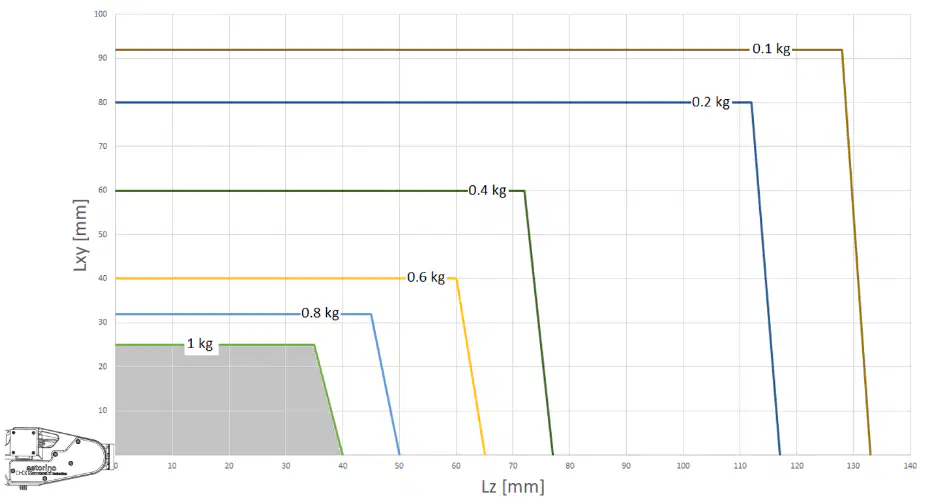
If you need to lift a payload of 0.8 kg, what is the approximate maximum Lz (mm) value you should not exceed according to the chart?
20 mm
40 mm
60 mm
100 mm
Why is it important to refer to the payload chart when operating the ASTORINO robot?
To ensure the robot is powered on
To avoid exceeding the robot's lifting capacity at different positions
To check the battery level
To find the robot's serial number
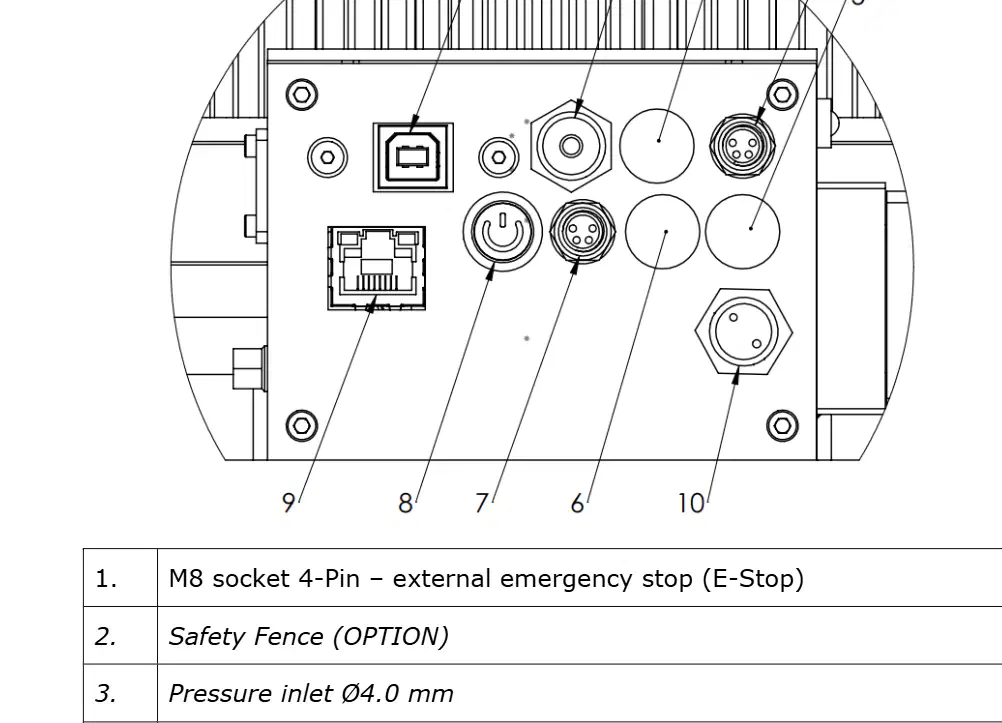
Which port is used for external emergency stop (E-Stop) in the ASTORINO electrical connections?
USB-B port
M8 socket 4-Pin
Ethernet port (RJ45)
Power supply
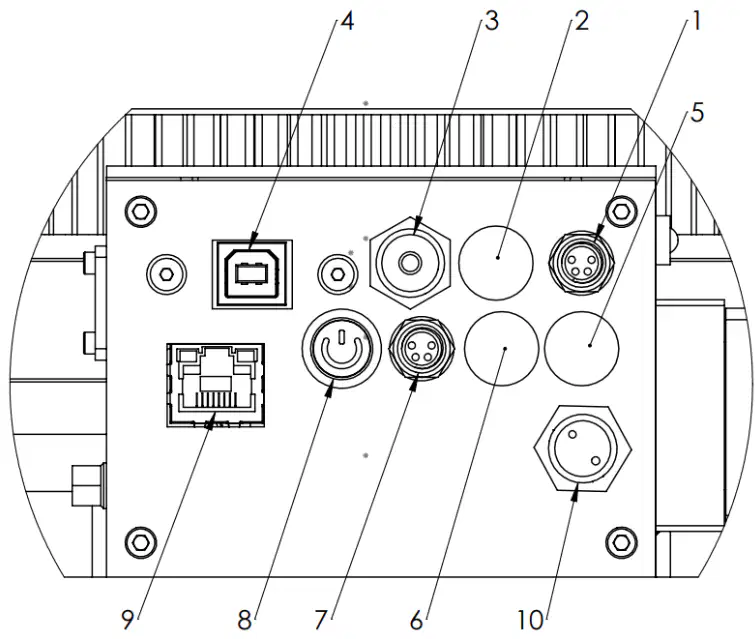
Which option is used for connecting Encoder 2 or Conveyor 2/JT7?
OPTION 1
OPTION 2
Power supply
Safety Fence
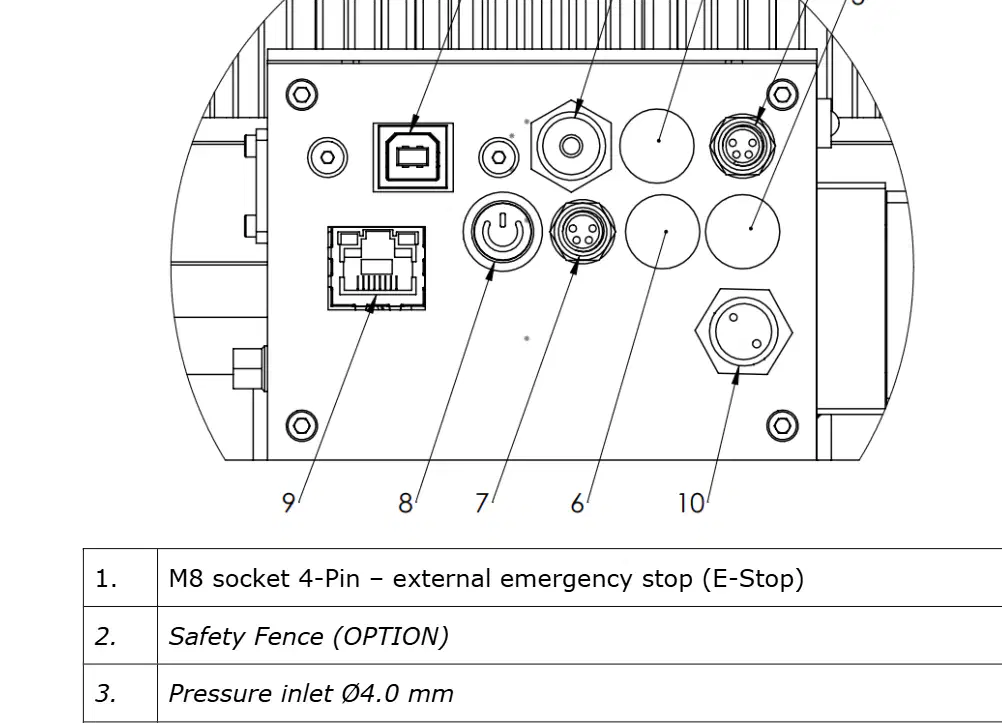
If you need to connect the ASTORINO to a network, which port should you use?
USB-B port
Ethernet port (RJ45)
Power ON/OFF switch
Pressure inlet Ø4.0 mm
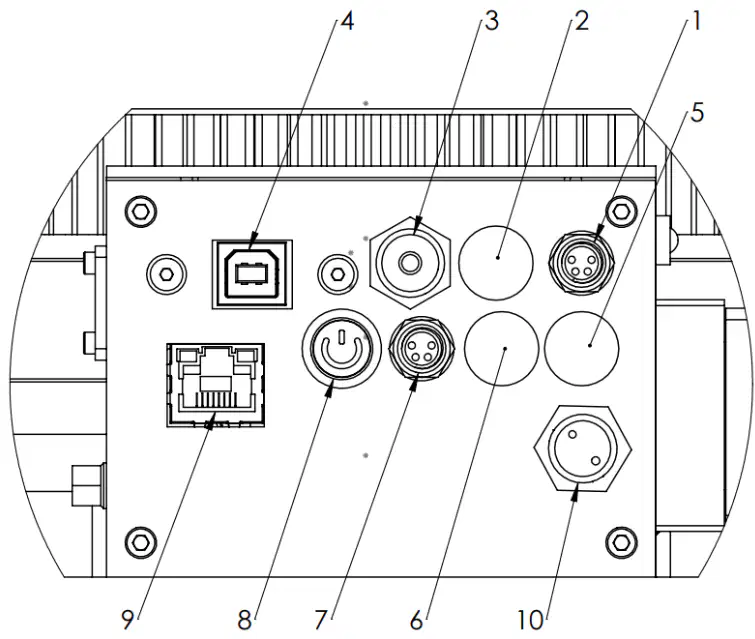
A technician wants to enable serial communication for a vision system. Which connection should they use?
Vision-System/Serial-Communication
Power supply
Safety Fence
Encoder 1
Explain why it is important to have an external emergency stop (E-Stop) in an electrical connection panel.
To provide a backup power supply
To allow quick shutdown in case of emergency
To enable network communication
To control conveyor speed
What is the primary reason for always paying attention to personal safety when operating the robot arm?
To ensure the safety of the user and other persons
To increase the speed of the robot arm
To reduce the cost of operation
To improve the appearance of the robot arm
According to the safety notes, what must be connected before the first start-up of the basic version of the robot?
An external emergency stop button
A wireless controller
A cooling fan
A backup battery
Which of the following is required if the robot arm is used in a factory?
A risk assessment and compliance with safety regulations
A weekly cleaning schedule
A decorative cover for the robot arm
A software update every month
Who is allowed to connect the power supply unit of the robot controller to the mains and put it into operation?
Only qualified personnel
Any user
The cleaning staff
The delivery person
Why should work on the electronic components of the robot only be carried out by qualified personnel?
To observe guidelines for electrostatic discharge (ESD)
To save time
To reduce noise
To improve the robot's appearance
What should you always do before working on the robot base or electronic components connected to the robot controller?
Disconnect the robot from the power supply
Increase the room temperature
Lubricate the robot arm
Change the robot's software
What is the risk of hot plugging modules or connectors while the power supply is switched on?
Permanent damage to the motor modules
Faster operation of the robot
Improved safety
Lower energy consumption
What is recommended for the placement of the robot arm?
It must stand on a stable surface and be screwed down or otherwise secured
It should be placed on a moving cart
It should be hung from the ceiling
It should be placed near a water source
What is the recommended room temperature for using and storing the robot system?
15° to 32°C
0° to 10°C
40° to 50°C
-10° to 0°C
What is the first step after removing the robot from the packaging according to the ASTORINO Operation Manual?
Secure it to a solid surface.
Turn on the power supply.
Connect the gripper.
Install the software.
Which of the following is NOT mentioned as a suitable base for mounting the robot?
Plastic sheet
Table
Metal plate
Suitable base

