
 Worksheets
R4-E-TECH-EXCEL
Total questions: 20
Worksheet time: 10mins
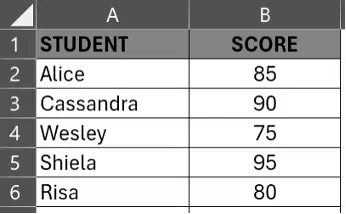
Using the attached table. Which of the following formulas will get the average?
=AVERAGE(B2:B6)
=AVE(B2:B6)
=(B2+B3+B4+B5+B6)/5
Which of the following shows the correct syntax for a VLOOKUP formula in Excel?
=VLOOKUP(table_array, lookup_value, column_index_num_range_lookup)
=VLOOKUP(lookup_value,table_array,column_index_num,range_lookup)
Which of the following combines two or more text strings.
Concatenate
Text to columns
In Microsoft Excel, what is the function of a cell's address, such as "A1"?
It identifies the cell's location within the worksheet.
It determines the font and formatting of the cell's content.
Which Excel function is used to find the lowest value in a range of numbers?
Count
Sum
Minimum
What happens when a user enters data that doesn't meet the data validation rules in Excel?
The data is automatically corrected.
The data is accepted but highlighted in red.
The data is stored but the cell is flagged for review.
An error message is displayed, and the invalid data is rejected.
Which tool helps visualize and understand spreadsheet data through graphical representation?
Filters
Graphs
Models
Tables
Teacher Jeric is tracking his student grades in Excel and wants all scores below 50 to be highlighted in red automatically. Which Excel feature must Ryan use to make this happen?
Filter
Function
Data Validation
Conditional Formatting
What refers to a group or collection of cells which can be a group of cells within a row, column, or combinations of both?
Condition
Criteria
Range
Function
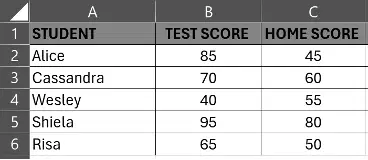
What will the formula =AND(B5>=60,C5>=50) return?
Error
Invalid
True
False
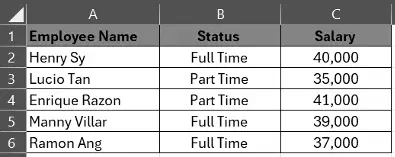
If you want to retrieve the salary of the employees using VLOOKUP, what should you enter as the column index number?
0
1
2
3
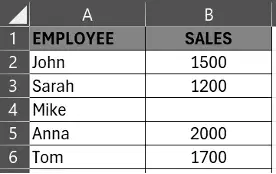
What will the formula =COUNT(B2:B6) return?
5
2000
4
6400
Which of the following feature in Excel allows you to split text from column into multiple columns based on a specific separator?
Explode
Concatenate
Text to Column
Conditional Formatting
In Excel, every formula must always begin with the symbol:
#
>
=
( )
In Excel, a column and row intersect at a:
(a)
In Excel, Columns are represented by letters, while Rows are represented by:
(a)
What does the AVERAGE function in Excel calculate?
The highest value in a range
The total sum of numbers in a range
The mean of a range of numbers
The middle value in a range of numbers
If cell B1 contains the value 75, what will the formula =IF(B1<50,"Below Average","Above Average") return?
75
Error
Below Average
Above Average
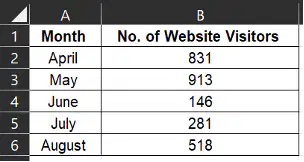
Using the table below. Which formula will get the total number of website visitors during the Months of May and July?
=AVE(B2,B5)
=MAX(B3,B5)
=AND(B2,B5)
=SUM(B3,B5)
What is the right order of procedure for creating a formula in MS Excel?
Select the cell –> Type the Equal sign –> Click the actual cell you want to reference first in the formula –> Type the mathematical operator –>Type the cell address -> Press enter
Type the mathematical operator –> Type the Equal sign –> Click the actual cell you want to reference first in the formula –> Select the cell –> Type the cell address –> Press enter
Type the mathematical operator –> Click the actual cell you want to reference first in the formula –> Type the equal sign –> Select the cell –> Type the cell address
–> Press enter
Select the cell –> Press enter –> Click the actual cell you want to reference first in the formula –> Type the mathematical operator –>Type the equal sign –> Type the cell address

