
NEW
Font size
 Worksheets
Spreadsheet and Multimedia Quiz
Total questions: 20
Worksheet time: 10mins

To count the number of cells in a range that have numbers in them COUNT is used.
What formula will we use if we would like to know how many subjects Teddy has grades already?
=COUNT(C4:J4)
=COUNT(C5:J5)
=COUNT(B4:J4)
=COUNT(B4:J4)
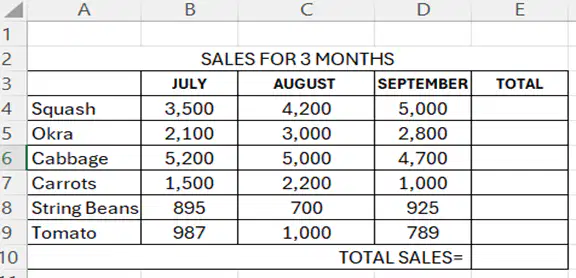
Your family owns a small vegetable store in Champaca street at Baranggay Fortune. Your mother asked help from you to get the total sales of the vegetable for the month of July, August and September. Using a spreadsheet, what formula will you use to get the total sales?
=SUM(E4:E9)
=SUM(A4:A9)
=SUM(D4:D9)
=SUM(C4:C9)
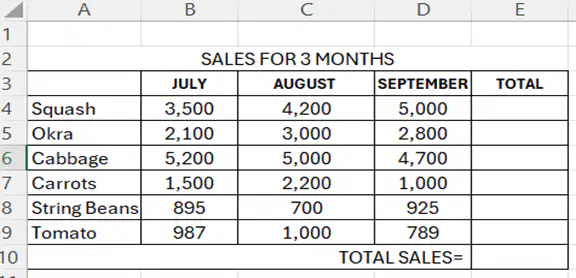
What formula will you use to get the sales of carrots for three months?
=SUM(B4:D4)
=SUM(B7:D7)
=SUM(B9:D9)
=SUM(B8:D8)
Which of these is a Skype logo?

A.

B.

C.

D.
The following are the requirements for audio-video conferencing, EXCEPT one:
Microphone
Viber Account
Speakers or headsets
Web camera or webcam
Which of the following is the benefit of using audio-video conferencing?
It is difficult for people to collaborate.
The application will just consume large amounts of your gadget's memory.
It will interrupt someone to show demonstrations to larger audience that may come from several places from all over the world.
It reduces travel time and expenses since it allows people to communicate to several places in an instant without having to leave the office.
This is the most most important technology in operating any software and connecting to the internet.
Internet
Broadband
Personal Computer
Classes in NCR were suspended due to smog, asynchronous classes were implemented. What is the alternative way to communicate with teachers and classmates?
broadband
speaker
Internet
Audio-videoconferencing
________ are also known as online or web communities. It is a convenient way to share messages, photos, and ideas and keep people with the same interests who stay connected.
E-groups
Speaker phone
Wi-fi Connection
Personal Computer
The following are the challenges in e-groups. Which one is not?
Overloading of information.
Occurrence of time intervals.
Having uncooperative members.
People learned to reach out, share ideas, solve problems encountered, and develop companionship.
Which of the following is the benefit of using audio-video conferencing?
It is too expensive.
It lacks personal connection.
It causes a severe latency.
It allows people from different fields and places to easily collaborate and share ideas.
Below are the steps in inserting textbox in a slide. Arrange them in correct sequence.
I. Enter any text, numbers, or symbols desired.
II. Click the Text Box Button, then drag the text's desired size.
III. Reposition or resize the Text Box by clicking and dragging the corners or edges.
IV. Choose the slide where you want the Text Box to appear. From the menu, click the insert tab. them go to the text section.
IV, II, I, III
I, II, III, IV
III, IV, I, III
III, I, II, IV
As one of your Performance Tasks in TLE. Your teacher asked you to insert an image on the slide. What tab will you click first?
Save Tab
Hyperlink
Insert Tab
Insert Audio
Which of the following does not refer to a Presentation Tool?
It is used for info or background.
It is used in the classroom for visual aids.
It is used perform advanced numerical calculations.
It is used as a creative, animated, informational, and motivational presentation.
Which of the following best elaborates the steps in adding 'animation?'
Highlight Choose Animation Sequence Preview
Choose Animation Highlight Preview Sequence
Preview Choose Animation Sequence Highlight
Sequence Choose Animation Highlight Preview
Which of the following media refers to a moving picture?
Text
Graphic
Photo
Video
In this section, you can build and edit your multimedia content. You can add multiple Audio, Pictures, and Videos then combine them, change the start and end point, and add transitions to your video clips.
Timeline
Task Pane
Preview Monitor
Content Pane
This is where you create and edit your video project with two views.
Task Pane
Storyboard
Menu bar
Preview monitor
After working on your multimedia presentation, pupils need to do this in order not to spoil their work.
Save
Post
Remove
Delete
Julio wants to save his PowerPoint presentation as a video to make it a short movie for his project on TLE. What steps will he use in saving the project on his computer?
I. Click save.
II. Click the file
III. Click the save project as.
IV. Select the file's destination where you would like to save the project.
II, IV, I, III
II, IV, III, I
II, III, IV, I
IV, III, II, I

