
 Worksheets
MS Word and PPT Basics
Total questions: 20
Worksheet time: 10mins
Which of the following tabs helps us work with our text, change paragraph styles, and search words?
home tab
insert tab
file tab
view tab

The Ribbon
you can quickly see the total number of slides in your presentation, as well as which slide you are viewing.
makes it easy to align text and objects on your slide.
contains all of the commands you will need to perform common tasks in PowerPoint
works like a search bar to help you quickly find tools or commands you want to use.
Which of the following commands is used if you want to save your document with a different file name in a different location?
save
save as
new
open

The Quick Access Toolbar
There are four ways to view a presentation. Simply click a command to select the desired view.
lets you access common commands no matter which tab is selected.
you can view and edit the selected slide.
The scroll bars allow you to scroll up and down or side to side.
File tab is also called as _________.
Ribbon
Background View
Backstage View
None of the above
This is an act of creating, editing, and producing a text document.
dragging
word wrapping
place holder
word processor
A black blinking line located on the document.
font color
cursor
clipboardslide

Identify the area within the box.
file tab
quick access toolbar
command group
backstage view
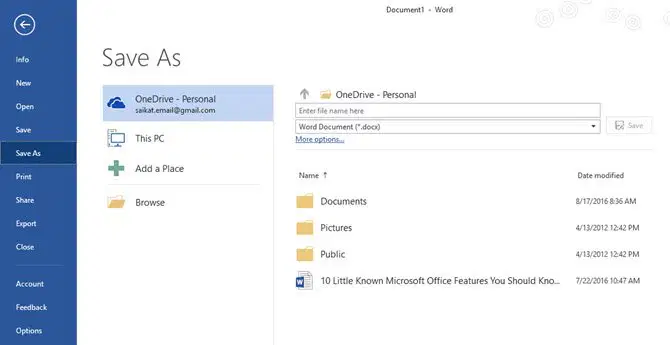
Identify this view.
file tab
home tab
backstage view
info view
The _________ indicates where you will begin typing.
insertion point
cursor
blinking line
mouse
A ________ is a file that comes with its own design and placeholders for your content
template
new document
previous file
none of the above

The "Tell Me" Box...
allows you to view and organize the slides in your presentation
works like a search bar to help you quickly find tools or commands you want to use.
quickly see the total number of slides in your presentation, as well as which slide you are viewing.
can access your Microsoft account information, view your profile, and switch accounts.

The Slide Pane...
you can view and edit the selected slide.
you can quickly see the total number of slides in your presentation, as well as which slide you are viewing.
Reviewers can leave comments on any slide.
There are four ways to view a presentation. Simply click a command to select the desired view.
MS Word automatically saves your work in real-time.
True
False
If you want to save a different version of a document, or possibly to a different location, you would click ______________ in the backstage view.
save
save as
info

Identify the image.
Ribbon
Tabs
Commands
none of the above

Identify the area within the box.
commands
group
tabs
file

Identify the items within the box.
tell me
ruler
scroll bars
none of the above

Slide View Options...
There are four ways to view a presentation. Simply click a command to select the desired view.
Reviewers can leave comments on any slide.
you can quickly see the total number of slides in your presentation, as well as which slide you are viewing.
It makes it easy to align text and objects on your slide.

Notes
The scroll bars allow you to scroll up and down or side to side.
Reviewers can leave comments on any slide.
Often called speaker notes, they can help you deliver or prepare for your presentation.
Click and drag the slider to use the zoom control.

