
 Worksheets
Introduction to 3D Printing Test
Total questions: 30
Worksheet time: 10mins
Name
Class
Date
1.
What material is most commonly used in school 3D printers?
a)
TPU
b)
PLA
c)
Black and White Filament
2.
The file type most 3D printers use is (check all that apply):
a)
.jpg
b)
.stl
c)
.obj
3.
What is slicing software used for?
a)
Cutting filament
b)
Converting 3D models into printer instructions (G-code)
c)
Making flat drawings
4.
In Tinkercad, what is the workspace called?
a)
Canvas
b)
Design Plate
c)
Workplane
5.
What tool lets you rotate objects in Tinkercad?
a)
Rotation Arrows
b)
Duplicate Tool
c)
Rotation Tool
6.
What shape do you drag to make a hole in another shape?
a)
Any solid shape
b)
The "hole" version of a shape
c)
Drill Tool
7.
What button combines two or more shapes into one?
a)
Copy
b)
Move
c)
Group
8.
What button separates grouped objects back into single shapes?
a)
Explode
b)
Detach
c)
Ungroup
9.
What does the Align tool do?
a)
Centers or lines up shapes
b)
Turns objects into holes
c)
Rotates objects
10.
What grid can you place on any surface to build on it?
a)
Sketch grid
b)
Layer grid
c)
Workplane
11.
Which of these tools lets you make a copy of an object?
a)
Group Tool
b)
Duplicate Tool
c)
Align Tool
12.
What does the ruler tool in Tinkercad show?
a)
Straight Lines
b)
Exact Measurements
c)
Layers
13.

What does this button do?
a)
Groups objects together
b)
Aligns Objects
c)
Rotates Objects
14.

What is this tool used for?
a)
To measure objects
b)
To build on a new surface
c)
To rotate objects
15.
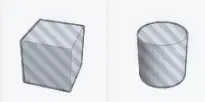
What does this shape represent?
a)
A hidden object
b)
A rotated shape
c)
A hole that cuts through other shapes
16.

What does this button do?
a)
Deletes and object
b)
Copies an object
c)
Moves and object
17.

What is this tool used for?
a)
Measuring and positioning objects
b)
Making holes
c)
Making straight lines for objects
18.
If you group a red cube and a "hole" cylinder, what happens?
a)
Nothing changes
b)
The cube becomes round
c)
A cylinder-shaped hole is cut through the cube
19.
To make a box hollow, you would:
a)
Add a hole cube inside a solid cube and group them
b)
Carve out a hole in the inside with the carving tool
c)
Group two solid boxes
20.
To align two shapes perfectly in the center, you:
a)
Use the align tool, and click on the top dot and the center dot
b)
Use the workplane tool
c)
Use the align tool, and click on the center dot on the top/bottom and side
21.
Why do we "slice" a 3D model before printing?
a)
To add colors
b)
To create G-code instructions for the printer
c)
To always add supports
22.
Which of these could cause a print to fail?
a)
Loose filament spool
b)
Nozzle clog
c)
Unlevel bed
d)
All of the above
23.
Why might you add supports when printing?
a)
To make prints colorful
b)
To use more filament
c)
To help print overhangs or bridges
24.
How do you know when to use supports?
a)
When there is a bridge 1" or greater (H)
b)
When there are 90 degree overhangs (T)
c)
When the angle is greater than 45 degrees (Y)
d)
All of the above
25.
What does "export" mean in Tinkercad?
a)
To save your file as an .stl or .obj for printing
b)
To delete a file
c)
To print immediately
26.
When should you use an .obj file?
a)
Single Color Print
b)
Multicolor Print
c)
You should never use an .obj file
27.
What word describe the building up of layers of material to make a 3D object?
a)
Subtractive Manufacturing
b)
Manufacturing of Product
c)
Additive Manufacturing
28.
How do you send a finished design to a 3D printer?
a)
Save as .obj or .jpg or .stl file
b)
Expport as a .stl or .obj and import it into a slicer software and then print it
c)
Save it, Attach it as an email file, and hit send, so that it prints
29.
Which Tinkercad feature lets you type custom text onto your design?
a)
Hole Tool
b)
Workplane
c)
Text Shape
30.
What is the heated platform where prints are created inside the 3D printer called?
a)
Print Bed
b)
Build Plate
c)
Base Plate
100 %

