
 Worksheets
POST TEST-4
Total questions: 10
Worksheet time: 5mins
Fungsi utama UniversalTelegramBot library pada Arduino IDE adalah …
Menambahkan kontrol servo pada Telegram
Menghubungkan ESP32 dengan bot Telegram untuk komunikasi data
Menyimpan data sensor DHT11
Mengontrol LCD 16x2 melalui Telegram
Dalam proyek IoT dengan Telegram, fungsi dari Token API yang diberikan oleh BotFather adalah …
Menyimpan data yang diterima dari bot
Mengatur koneksi WiFi ke ESP32
Autentikasi dan identifikasi bot pada program Arduino
Menentukan alamat IP ESP32
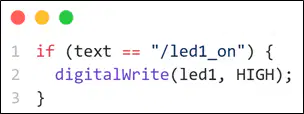
The function of this code is …
Turn OFF LED 1 if the command is received
Turn ON LED 1 if the command is received
Send the status of LED 1 to Telegram
Delete the status of LED 1 from memory
Dalam proyek IoT Telegram, ESP32 terhubung ke jaringan internet melalui …
WiFi
Bluetooth
Kabel USB
Ethernet LAN

Fungsi dari kode tersebut adalah …
Mengirim data suhu ke bot Telegram
Menampilkan data suhu di Serial Monitor
Menampilkan data suhu di LCD 16x2
Menyimpan data suhu di EEPROM ESP32
Fungsi utama dari Bluetooth Client pada aplikasi Kodular adalah …
Menyimpan data sensor pada ponsel
Menghubungkan ponsel ke jaringan WiFiMenghubungkan ponsel ke jaringan WiFi
Mengganti fungsi List Picker
Menyambungkan aplikasi ke perangkat Bluetooth
Pada aplikasi Kodular, List Picker digunakan untuk …
Memilih file dari memori ponsel
Menampilkan daftar perangkat Bluetooth yang tersedia
Mengganti teks pada tombol ON dan OFF
Menghapus data dari Arduino
Langkah pertama sebelum mengirim data dari aplikasi Kodular ke ESP32 melalui Bluetooth adalah …
Menyalakan LED pada Arduino
Menghapus semua perangkat Bluetooth yang tersimpan
Menginstal library Servo pada Arduino IDE
Menghubungkan Bluetooth ponsel ke ESP32
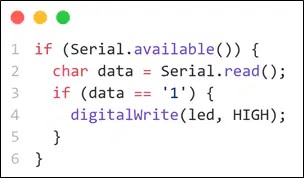
If you want the LED to turn ON when receiving a command from the Kodular application, the data that must be sent is …
0
OFF
1
ON
In Kodular, the block program "When Button1 Click → BluetoothClient1 Send Text 'ON'" functions to …
Turn ON the LED on the Arduino via Bluetooth
Delete the Bluetooth connection on the phone
Save data to the Arduino memory
Display the text "ON" on the phone screen

