
 Worksheets
File Operations Quiz
Total questions: 100
Worksheet time: 50mins
Which of the following is a topic listed in the content?
File Operations
Animal Habitats
Weather Patterns
Math Equations
Which topic is about sending file stream objects to functions?
Passing File Stream Objects to Functions
Binary Files
Random-Access Files
Member Functions for Reading and Writing Files
Which topic deals with reading and writing files?
Member Functions for Reading and Writing Files
File Operations
Binary Files
Random-Access Files
Which topic is about files that store data in a special format?
Binary Files
File Operations
Random-Access Files
Passing File Stream Objects to Functions
Which topic is about accessing files in any order?
Random-Access Files
File Operations
Binary Files
Member Functions for Reading and Writing Files
What is a file?
A collection of data stored on a computer's disk.
A type of fruit.
A kind of animal.
A piece of clothing.
What can you do with data saved in a file?
Reuse it later.
Throw it away.
Eat it.
Paint it.
Which of the following is a program that uses files to store and retrieve data?
Word processing
Cooking recipes
Running shoes
Television
Which of these is NOT mentioned as a program that uses files?
Television
Databases
Spreadsheets
Compilers
Which data type is used only to read data from files into memory?
ifstream
ofstream
fstream
int
What is the main purpose of the ofstream data type?
To create files and write data to them
To read data from files only
To delete files
To sort data in files
Which data type can be used to create files, write data to them, and read data from them?
fstream
ifstream
ofstream
string
What header file is required for ifstream, ofstream, and fstream data types?
fstream
iostream
math.h
stdio.h
Which header file is required to use file streams in C++?
fstream
iostream
math.h
stdio.h
Which data type is used for input files in C++?
ifstream
ofstream
fstream
string
Which data type is used for output files in C++?
ofstream
ifstream
fstream
int
Which data type can be used for both input and output files in C++?
fstream
ifstream
ofstream
char
What symbols can be used to read from and write to a file in C++?
>> , <<
++ , --
== , !=
&& , ||
Which member function can be used to test for the end of an input file?
eof
end
close
open
What can the fstream object be used for?
For either input or output
Only for input
Only for output
For printing only
What must you specify on the open statement when using fstream?
Mode
File name only
File size
File type
What does ios::in mode mean?
For input files
For output files
For printing files
For deleting files
What does ios::out mode mean?
For output files
For input files
For copying files
For renaming files
How can you combine modes on an open call in fstream?
By using a vertical bar (|)
By using a comma (,)
By using a plus (+)
By using a dash (-)
What does the file access flag ios::app do?
It appends data to the end of the file.
It deletes the file contents.
It reads data from the file.
It opens the file in binary mode.
Which file access flag allows data to be written or read in pure binary format?
ios::binary
ios::app
ios::in
ios::trunc
What happens when you use the ios::in flag?
Data will be read from the file.
Data will be deleted from the file.
Data will be written to the file.
The file will be opened in binary mode.
Which file access flag causes the file’s contents to be deleted if it already exists?
ios::trunc
ios::app
ios::binary
ios::in
What does the ios::out flag do?
It allows data to be written to the file.
It reads data from the file.
It opens the file in binary mode.
It appends data to the file.
If the file already exists, which flag causes the program to go directly to the end of the file?
ios::ate
ios::app
ios::out
ios::binary

What is the purpose of the example shown in the image?
To copy 10 numbers between files
To add numbers together
To print numbers on the screen
To delete files
Which function is used to open a file for reading in the example?
fstream infile("input.txt", ios::in);
fstream outfile("output.txt", ios::out);
int num;
for (int i = 1; i <= 10; i++)
What does infile.close() do in the code?
Closes the input file
Opens the output file
Reads a number from the file
Writes a number to the file
How many times does the loop run in the example?
10 times
5 times
1 time
20 times
What is the main purpose of ifstream in file operations?
Open for input only
Open for output only
Open for both input and output
Open for deleting files
What happens if you try to open a file with ifstream and the file does not exist?
The file is created
The open fails
The file is deleted
The file is renamed
What is the main purpose of ofstream in file operations?
Open for input only
Open for output only
Open for both input and output
Open for copying files
What happens if you open a file with ofstream and the file already exists?
The file is left unchanged
The file contents are erased
The file is renamed
The file is copied
What type must the filename be when used by ifstream, ifstream, and fstream objects?
An integer
A c-string (array of char)
A float
A boolean
If you have a C++ string and want to use it as a filename in ifstream, what should you do?
Use it directly
Convert it to a c-string using c_str()
Change it to an integer
Delete the string
What is the correct way to open a file called "grades.txt" using ifstream in C++?
ifstream gradeList("grades.txt");
ifstream openFile("grades.txt");
file gradeList("grades.txt");
open grades.txt;
What does it mean if the file stream object is set to NULL or 0 (false) after trying to open a file?
It means the file could not be opened.
It means the file was opened successfully.
It means the file is empty.
It means the file is read-only.
Which code can be used to check if a file failed to open using the fail member function?
if (gradeList.fail())
if (gradeList.open())
if (fail.gradeList())
if (open.fail(gradeList))
Why is it useful to pass file stream objects to functions?
Because it helps in handling files easily.
Because it makes the code longer.
Because it is not allowed.
Because it makes the program slower.
How should you always pass file stream objects to functions?
By reference
By value
By copying
By deleting
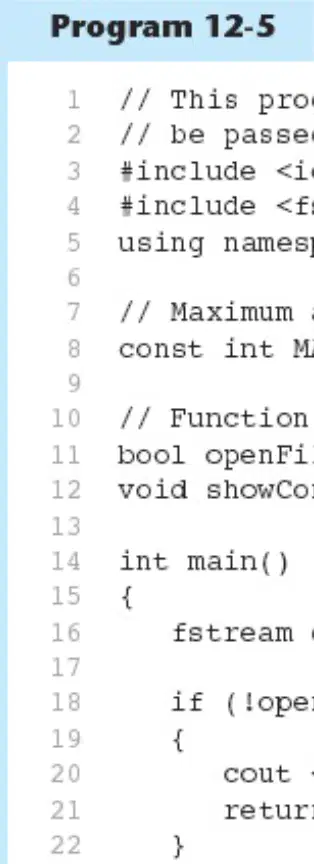
What is the main topic of the program shown in the image?
Passing file stream objects to functions
Reading numbers from a file
Sorting a list of numbers
Drawing shapes on the screen
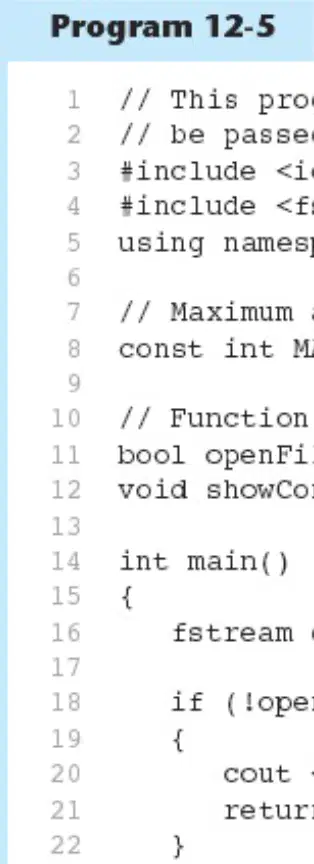
Which header file is included to use file streams in the program?
#include
#include
#include
#include
What is the name of the function that tries to open a file in the program?
openFileIn
showContents
main
readFile
What does the program do if the file cannot be opened?
It prints "File open error!" and exits
It tries to open another file
It continues running without reading the file
It prints "File opened successfully!"
What is the name of the file the program tries to open?
demofile.txt
myfile.txt
data.txt
output.txt
What is the maximum amount to read from a line in the file, as defined in the program?
81
100
50
10
What is a function call in a program?
When you use a function in your program
When you write the function for the first time
When you close the program
When you save your file
What is a function definition?
When you write what a function does
When you call a function
When you print something
When you open a file
What does the function openFileIn do?
Opens a file for input
Prints a message
Closes a file
Reads a number
What does the function openFileIn return if the file fails to open?
false
true
1
0
What does the function openFileIn return if the file opens successfully?
true
false
0
-1
What does the function showContents do in the program?
It reads each name from a file and displays it on the screen.
It adds numbers together.
It draws a picture.
It sends an email.
Which of the following names is NOT shown in the program screen output?
Brown
Jones
Smith
Willis
What message is displayed when the file is opened successfully?
File opened successfully.
File closed.
Error in file.
File not found.
What is the last word shown in the program screen output?
Done.
Start.
Hello.
End.
Which member function reads input including whitespace?
getline
get
put
write
What does the 'get' member function do?
Reads input including whitespace
Reads a single character
Writes a single character
Deletes a character
Which member function writes a single character?
getline
get
put
read
What is a c-string used for in the getline method?
To hold input
To display output
To add numbers
To print text
How many arguments are needed for the getline method when working with C-strings?
Three
One
Two
Four
What is the default delimiter for the getline method?
'\n'
'\t'
' '
','
Which of the following is NOT an argument for the getline method?
File name
C-string to hold input
Number of characters to read
Terminator (or delimiter)
What does the terminator (or delimiter) do in the getline method?
Stops reading if encountered before the number of characters was read in
Starts the program
Prints the output
Adds two numbers
What is the purpose of the getline member function in the program?
To read a line of data from a file.
To write data to a file.
To delete a file.
To print data to the screen.
Which header file is included to use file stream objects in the program?
What does the variable 'input' hold in the program?
File input
File name
File size
File output
What happens if the file "murphy.txt" cannot be opened?
An error message is displayed.
The program continues as normal.
The file is created.
Nothing happens.

What is the output of the program shown in the image?
Jayne Murphy 47 Jones Circle Almond, NC 28702
John Smith 123 Main Street New York, NY 10001
Jane Doe 456 Elm Street Los Angeles, CA 90001
Michael Brown 789 Oak Avenue Chicago, IL 60601
What does the code do after reading each line from the file?
It prints the line to the screen.
It deletes the line.
It saves the line to another file.
It changes the line to uppercase.
What is used as a delimiter in the getline function in the code?
\n (newline)
,
.
;
What is the default delimiter for the getline function in C++?
'\n'
','
';'
' '
Which programming language is the getline function used for, as shown in the material?
C++
Python
Java
HTML
What is the correct prototype for the getline function?
getline(fileObject, stringBuffer, delimiter);
getline(stringBuffer, fileObject, delimiter);
getline(delimiter, fileObject, stringBuffer);
getline(fileObject, delimiter, stringBuffer);
In the example, what is the name of the file being read?
input.txt
output.txt
data.txt
file.txt
What is the purpose of the getline function in the program?
To read a line of data from a file.
To write data to a file.
To delete a file.
To print a file name.
What is the name of the input file used in the program?
murphy.txt
input.txt
data.txt
output.txt
What will the program do if it cannot open the file?
It will show an error message.
It will print the file contents.
It will create a new file.
It will do nothing.
Which of the following is the correct output shown on the screen?
Jayne Murphy 47 Jones Circle Almond, NC 28702
John Smith 123 Main Street New York, NY 10001
Jane Doe 456 Elm Road Boston, MA 02110
Mary Lee 789 Oak Avenue Chicago, IL 60616
What is the name of the file being opened in the example program?
murphy.txt
jones.txt
circle.txt
input.txt
What does the program do if it cannot open the file?
It prints "ERROR: Cannot open file."
It prints "File opened successfully."
It continues reading the file.
It closes the file.
Which programming language is used in the example?
C++
Python
Java
HTML
What is the purpose of the getline function in the program?
To read a line of data from a file
To write data to a file
To close the file
To print data to the screen
What is the first line in the input file?
Jayne Murphy
47 Jones Circle
Almond, NC 28702
NC
What is the output shown on the screen for the first line of the input file?
Jayne
Murphy
47
Circle
What does the "get" function do in single character I/O?
To read a single character from an input file.
To write a single character to an output file.
To delete a file.
To copy a file.
What does the "put" function do in single character I/O?
To write a single character to an output file.
To read a single character from an input file.
To rename a file.
To move a file.
Which function will read any character, including whitespace?
get
put
delete
copy
Which function is used to write a single character to an output file?
put
get
read
open
What type of data do binary files contain?
Unformatted and non-human-readable data
Formatted and human-readable data
Only numbers
Only text
How do you specify that a file should be opened as a binary file?
By using a binary flag
By using a text flag
By using a number flag
By using a color flag
What is used instead of << to read data from files in binary mode?
read
write
scan
In the function fin.read(&ch, sizeof(ch)), what does the first parameter represent?
The address of where to put the data being read in
How many bytes to read from the file
The name of the file
The type of data
In the function fin.read(&ch, sizeof(ch)), what does the second parameter represent?
How many bytes to read from the file
The address of the data
The file name
The type of variable
What type does the function expect the data variable to be?
char
int
float
double
If the data variable is not of type char, what must be done?
It must be type casted
It must be deleted
It must be printed
It must be ignored

