
 Worksheets
General Model of a Computer System
Total questions: 85
Worksheet time: 43mins
What are the four basic functions identified in a general computer system?
Input, process, output, and storage
Input, calculation, deletion, and transfer
Input, transmission, encryption, and backup
Input, analysis, networking, and security
In a general computer system, what is the function of 'Input'?
External data is being entered into the system
The system processes the data internally
The system displays information to the user
The system stores data for future use
In a general computer system, what is the function of 'Process'?
An action is performed on data
It stores data permanently
It displays output to the user
It connects to the internet
In a general computer system, what is the function of 'Output'?
Giving out the information that was in the system. This can be in a printed, on screen or electronic format.
Storing data permanently for future use.
Processing the input data to generate results.
Receiving data from the user or another system.
In a general computer system, what is the function of 'Storage'?
Storing the data and information in the system. It may be the data that has been input, required during processing or results of processing.
Performing arithmetic and logical operations on data.
Controlling the flow of data between input and output devices.
Displaying the processed information to the user.
Refer to the diagram showing the general model of a computer system. Which of the following is NOT one of the four basic functions?
Input
Process
Output
Transmission
Using a smart device to type and post a message on social media can be related to which of the following main steps in a general model of a computer?
Input, Processing, Output, Storage
Only Output and Storage
Only Input and Output
Only Processing and Output
What is the main function of a barcode reader?
A barcode reader reads a set of parallel lines of differing thicknesses which represents a number.
A barcode reader prints barcodes on products for identification.
A barcode reader stores product information in a database.
A barcode reader generates random numbers for inventory control.
Where are barcodes commonly used?
Barcodes are used in supermarkets, library systems, luggage handling systems at airports, and stock control systems at warehouses.
Barcodes are only used in ancient manuscripts for decoration.
Barcodes are mainly used in outer space missions for communication.
Barcodes are exclusively used in underwater archaeology.
What does OCR stand for and what is its use?
OCR stands for Optical Character Reader. It is useful to convert text from paper to an electronic format that can be edited.
OCR stands for Optical Code Reader. It is used to scan barcodes only.
OCR stands for Online Character Recognition. It is used for voice recognition.
OCR stands for Optical Character Recorder. It is used to record audio files.
Optical Mark Readers (OMRs) are used to sense marks printed on special forms in specific positions.
True
False
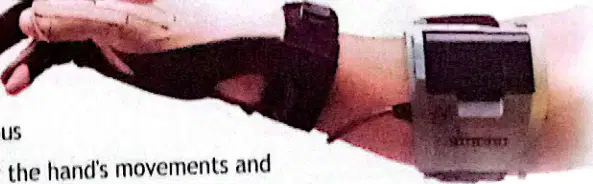
A data glove is an input device that is essentially a glove worn on the hand that contains various sensors that monitor the hand's movements.
True
False
What is a smart card and where is it used?
A smart card is a plastic card which has its own processor and memory and the reader can interpret the information related to the card. These cards are used in security entrances, telephone cards, transport cards, and credit cards.
A smart card is a plastic card used only for decorative purposes and contains no electronic components.
A smart card is a paper card used for writing notes and is not used for any security or payment purposes.
A smart card is a metal card used exclusively in industrial machines for mechanical operations.
What is a dataglove?
An output device that displays images
An input device that is essentially a glove worn on the hand that contains various sensors
A type of printer
A type of monitor
Fill in the blank: Output devices are used to obtain _______ of the results after processing.
hard copies (printouts)
input data
software updates
network signals
Which of the following is referred to as a 'soft copy'?
Printed paper
Display on a monitor
3D printed object
Printed photograph
3D printers are output devices that create physical objects from digital models.
True
False
What is the main function of output devices?
To input data into the computer
To obtain results from the computer in a usable form
To store data
To process data
The CPU has three main parts. Which of the following is NOT a part of the CPU?
Control Unit (CU)
Arithmetic Logic Unit (ALU)
Processor Register
Hard Disk
What does the Control Unit (CU) of a computer do?
The control unit controls and directs the operation of the entire computer system. It interprets program instructions stored in the primary memory and issues signals that cause other units of the system to execute them.
The control unit stores all data permanently in the computer system.
The control unit performs all arithmetic and logical operations in the computer system.
The control unit is responsible for connecting the computer to external devices only.
The ALU (Arithmetic and Logic Unit) is responsible for carrying out all ______ and ______ operations in a computer system.
arithmetic, logical
storage, retrieval
input, output
display, printing
Which arithmetic operations are performed by the ALU?
Addition (+)
Subtraction (-)
Multiplication (*)
Division (/)
Which logical operations are performed by the ALU?
Equal to (=)
Less than (<)
Greater than (>)
Less than or equal to (<=)
Greater than or equal to (>=)
Fill in the blank: The combination of I-time and E-time is called the '_________'
machine cycle
instruction set
clock pulse
register file
What does the main memory consist of?
A group of chips made up of tiny electronic components.
A set of magnetic tapes used for storage.
A collection of optical disks for data retrieval.
A series of mechanical levers and gears.
There are two types of computer memory. What are they?
A) RAM and CPU
B) RAM and ROM
C) ROM and Hard Disk
D) CPU and Hard Disk
What does RAM stand for?
Random Access Memory
Readily Available Memory
Rapid Application Module
Remote Access Machine
Which of the following is true about RAM?
Data in RAM is permanent
Data in RAM is lost when power is off
RAM cannot be written to
RAM is slower than hard disk
RAM speed is measured using _____
MB/s (Megabytes per second)
GHz (Gigahertz)
ms (milliseconds)
GB (Gigabytes)
List one application of RAM in a computer system.
To store data being transferred to and from peripherals.
To permanently store the operating system.
To process graphics for display.
To provide internet connectivity.
RAM is volatile memory, meaning data is erased when power is lost.
True
False
What device can be used to prevent data loss in RAM during a power failure?
Uninterrupted Power Supply (UPS)
Network Switch
External Hard Drive
Printer
The operations performed by the Arithmetic Logic Unit (ALU) are:
Arithmetic and logical operations
Data storage and retrieval
Input and output operations
Network communication
Fill in the blank: The main circuit board of a computer is called the ___________.
Motherboard
Processor
Hard Drive
Power Supply
What is the difference between a storage device and storage media?
Storage device is the hardware that stores information, while storage media is the physical material where information is stored.
Storage device is the software that stores information, while storage media is the hardware.
Storage device and storage media are the same thing.
Storage media is the software that stores information, while storage device is the hardware.
Why is a backing store needed in computers?
Because main memory is permanent
Because main memory is erased when the computer is switched off
Because storage devices are expensive
Because computers do not need to store data
Fill in the blank: The amount of storage required for storing programs and data is very ____, so a cheaper form of backing store is needed to store vast quantities of information.
large
small
tiny
limited
What is a hard disk made of?
Flexible plastic disks
Thin, inflexible magnetic disks made of highly polished metal
Glass plates
Paper sheets
A hard disk might be a good option if: (Select all that apply)
A) A user needs lots of storage capacity, up to 10TB
B) A user wants a more expensive option
C) A user looks for a cheaper option
D) The factor 'how fast a computer boots up or opens programs' is important
What type of memory chip does an SSD use instead of a spinning disk?
Magnetic tape
Flash memory
Optical disk
Hard disk
SSDs are lighter than hard disks.
True
False
An SSD might be good if a user needs ______ performance.
faster
slower
average
unstable
Name one area where SSDs are widely used.
Business, Gaming, Mobility, or Servers
Home gardening
Cooking recipes
Painting techniques
Disks that are read by laser lights are called ______ disks.
optical
magnetic
floppy
hard
Which of the following is NOT a type of optical disk?
CD
DVD
SSD
CD-ROM
Once data is written to a CD-ROM, it can be erased or altered.
True
False
CD-RW disks can be rewritten as many as ______ times.
1000
10
100
10000
What is a flash drive?
A) A type of computer program
B) A type of flash memory storage device usually connected to a computer through the USB port
C) A type of application software
D) A type of operating system
A flash drive requires additional software to be installed before it can be used with a computer.
True
False
What is software in a computer system?
The physical parts of a computer
The set of instructions that directs the operations of a computer
The USB port
The memory card
Fill in the blank: The computer cannot do anything on its own. It works according to ________ installed in its system or entered by the operator.
pre-defined instructions
random guesses
manual labor
external devices
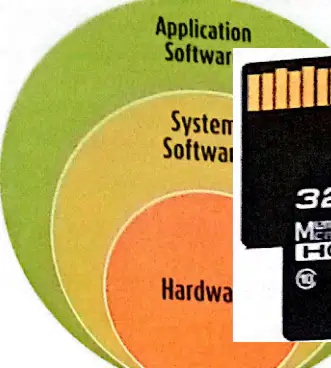
According to the diagram, which of the following is NOT a type of software?
Application Software
System Software
Hardware
What is the main purpose of Application Software?
To carry out specific tasks or solve particular problems.
To manage computer hardware resources.
To control the booting process of a computer.
To provide basic functions for computer operation.
Who is known as an application programmer?
The person who creates application programs.
The person who repairs hardware devices.
The person who manages network security.
The person who designs operating systems.
Which of the following is an example of word processing software?
MS Word
MS Excel
MS Access
Audacity
Which software is used to create presentations?
MS PowerPoint
Google Docs
MS Access
Photoshop
Name two examples of social networking websites mentioned in the text.
Facebook, Twitter (also Google+, MySpace)
Amazon, eBay
Wikipedia, Britannica
YouTube, Netflix
What is the main function of Security Software according to the passage?
To store and protect important information related to people and organisations.
To increase the speed of the computer.
To design websites and applications.
To play multimedia files.
What is the main function of anti-malware software?
To detect and remove spyware
To disinfect a virus-infected system by removing or disabling known viruses
To manage system resources
To update the operating system
Which of the following is an example of anti-malware software?
Windows XP
Kaspersky
Chrome OS
FreeBSD
Anti-spyware software is designed to detect and remove ________ programs installed in the computer without the user's knowledge.
spyware
antivirus
firewall
malware
Antivirus software is designed to prevent, search, detect and remove malicious software such as ________, worms, and Trojans.
viruses
cookies
firewalls
browsers
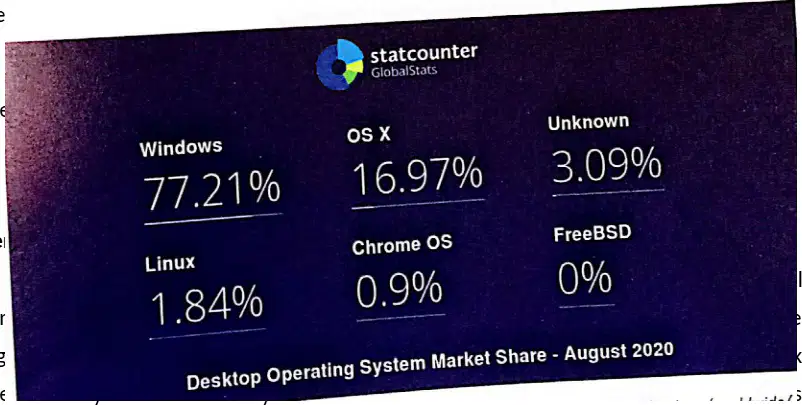
According to the Desktop Operating System Market Share chart (August 2020), which operating system had the largest market share?
OS X
Linux
Windows
Chrome OS

Fill in the blank: As of August 2020, Windows had a desktop operating system market share of ________%.
77.21
62.15
85.34
69.50
Which of the following is NOT listed as an example of a desktop operating system in the text?
Windows XP
MAC OSX
Android
UNIX
What is the process of loading the operating system from the hard disk to memory called?
The process of loading the operating system from the hard disk to memory is called the Start-up Process of a Computer.
The process of loading the operating system from the hard disk to memory is called Formatting.
The process of loading the operating system from the hard disk to memory is called Defragmentation.
The process of loading the operating system from the hard disk to memory is called Shutdown.
Which of the following is NOT a function of the operating system?
Controls the backing store and peripherals
Organises the use of memory between programs
Backs up files
Maintains security and access rights of users
Utility programs are system software that perform specific tasks related to the management of computer functions, resources, or files.
True
False
Which of the following are two functions of the operating system?
Memory management and process management
Web browsing and email sending
Document editing and printing
Game development and animation
Fill in the blank: The operating system provides the _______ between user and computer.
interface
hardware
database
compiler
Which of the following is a function of utility programs?
Organises priorities between program and users
File defragmentation
Maintains security and access rights of users
Deals with errors and user instructions
What does the operating system do after it is loaded into memory?
The operating system runs tests to check whether its components are working properly. If any of its main components are not working, an error message will be displayed.
The operating system immediately shuts down the computer to save power.
The operating system deletes all user files to free up space.
The operating system starts running user applications without any checks.
Select two functions of utility programs mentioned in the worksheet.
File management and disk cleanup
Word processing and spreadsheet creation
Web browsing and email management
Image editing and video playback
What is the function of virus protection software?
To protect the computer from viruses and other malicious software.
To speed up the internet connection.
To increase the screen brightness.
To install new hardware drivers.
File managers allow users to manage the files that are ______ on their computers.
stored
deleted
shared
downloaded
System (Task Managers) monitors that summarise a computer’s performance for the user.
True
False
Device Manager is used to view and manage device hardware settings and driver software installed on the computer.
True
False
What is a device driver program?
A set of instructions that instructs a computer’s operating system on how to communicate with the hardware and make the device function properly.
A program that manages user accounts and passwords.
A software used to create and edit documents.
A tool for compressing and extracting files.
What does the term 'Licensing' refer to in the context of software?
An agreement that gives an end user permission to use a software program and explains how the software can be used and distributed.
A process of updating software to the latest version.
A method of encrypting software for security purposes.
A technique for compressing software files to save space.
Proprietary software is licensed under exclusive legal right of the copyright holder and is restricted from uses such as modification, sharing, studying, and redistribution.
True
False
What is shareware?
Software that is always free and open to the public
Software delivered free of charge but requires a fee for regular use after a trial period
Software that cannot be downloaded from the Internet
Software that is always paid
Fill in the blank: Freeware is copyrighted software that may be used _______ and can be downloaded from the Internet and used free of charge.
free of charge
for a limited time only
with a paid subscription
only after registration
Which of the following is a risk of using freeware?
Freeware always provides help if something goes wrong
Freeware cannot be downloaded from the Internet
Freeware does not provide help if something goes wrong
Freeware is always paid
In open source software, the source code is available to _______.
Only the copyright holder
The general public
Only registered users
Only after paying a fee
Windows Operating System and Microsoft Office products are well-known examples of _______ software.
commercial
open-source
freeware
shareware

