
 Worksheets
CC 111 Midterm Examination
Total questions: 76
Worksheet time: 3570secs
An output device that produces physical output in the form of text and image on a paper.
Printer
Monitor
Speaker
Scanner
It comprises the development of Computer Hardware, the use of Computer Applications, and the development of Computer Software.
Computer
Computing
Electrical Devices
Mechanical Devices
One of the most important inventions of the 20th century.
Hardware
Data Structures and Algorithms
Software
Electronic Computer
Computer has been discovered on what year?
1950s
1600s
1700s
2000s
ENIAC stands for?
Electric Numerical Integrator and Computer
Electronic Numerical Integrator and Computer
Electronic Numeric Integrator and Computer
Electric Numeric Integrator and Computer
A hardware device or a peripheral that receives data from the computer usually for display, projection, or for physical reproduction.
Output Device
Input Device
Storage Device
Processing Unit
Which of the following device that stores large data in its portability?


Which of the following device that inputs text and commands to the computer?

Basically a handheld computer that is designed to be extremely portable, often fitting in the palm of your hand or in your pocket.
Smartphone or PDA (Personal Digital Assistant)
Desktop Computer
Mainframe Computer
Supercomputer
RAM is one of the primary storage devices and stands as ______
Random Access Memory
Read Access Memory
Random Auto Memory
A machine that can be programmed to carry out sequences of arithmetic or logical operations automatically.
Computer
Refrigerator
Microwave
Television
A key used in keyboarding that is useful to move around.
Tab Key or Arrow Keys
Caps Lock
Spacebar
Enter
It is a computer device used in computing.
Hardware
Software
Database
Network
An extremely fast computer that can perform hundreds of millions of instruction per second.
Supercomputer
Microcomputer
Laptop
Tablet
A devices are responsible for storing all kinds of data and information.
Storage Devices
Input Devices
Output Devices
Processing Devices
Which of the following that does not belong to a PRINTER.
plotter
laser jet
ink-jet
Dot
A classification of computer that is designed to perform a particular task.
general purpose computer
hybrid computer
analog computer
special purpose computer
An input device that scans documents such as photographs and pages of text, creating an electronic version that can be viewed and edited on a computer.
Scanner
Printer
Monitor
Keyboard
Stores data and programs permanently and data is retained after the power is turned off.
ROM (Read Only Memory) or Hard Drive
RAM (Random Access Memory)
Cache Memory
Registers
The worlds largest network.
Internet
Intranet
LAN
PAN
A software stored on a small memory chip on the motherboard that is responsible for the POST and is the very first software to run when the computer started.
BIOS (Basic Input/Output System)
RAM (Random Access Memory)
GPU (Graphics Processing Unit)
HDD (Hard Disk Drive)
It is known as the brain of the Computer.
CPU (Central Processing Unit)
Monitor
Keyboard
Mouse
A short cut key for pasting data in a certain documents.
Ctrl + V
Ctrl + C
Ctrl + X
Ctrl + Z
Which of the following computer that belongs to electronic device?
abacus
pascaline
difference engine
laptop
A short cut key for selecting the whole data in a document.
Ctrl + A
Ctrl + C
Ctrl + X
Ctrl + Z
The keys on your keyboard can be divided into several groups based on functions except.
Knowledge
Control
Typing
Indicator
It is a board of keys that operate a computer or typewriter.
Mouse
touch screen
Keyboard
projector
A study of people's efficiency in their working environment.
Efficiency
Economics
Effectivity
Ergonomics
A mechanical or electromechanical machine for typing characters
Keyboard
Typewriter
Touch screen
Bar Code Reader
Shortcut Keys for minimizing folder or browser.
Ctrl + m
Ctrl + x
Ctrl + n
none of the above

Identify the names of the device and classify what type of device does the picture belong. Write the name first to be followed by the type of devices at the space provided below. ex. USB, Output device
(a)
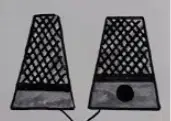
Identify the names of the device and classify what type of device does the picture belong. Write the name first to be followed by the type of devices at the space provided below. ex. USB, Output device
(a)
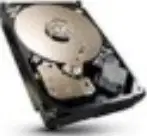
Identify the names of the device and classify what type of device does the picture belong. Write the name first to be followed by the type of devices at the space provided below. ex. USB, Output device
(a)
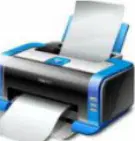
Identify the names of the device and classify what type of device does the picture belong. Write the name first to be followed by the type of devices at the space provided below. ex. USB, Output device
(a)
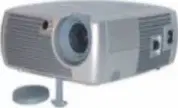
Identify the names of the device and classify what type of device does the picture belong. Write the name first to be followed by the type of devices at the space provided below. ex. USB, Output device
(a)
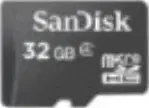
Identify the names of the device and classify what type of device does the picture belong. Write the name first to be followed by the type of devices at the space provided below. ex. USB, Output device
(a)
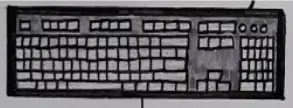
Identify the names of the device and classify what type of device does the picture belong. Write the name first to be followed by the type of devices at the space provided below. ex. USB, Output device
(a)
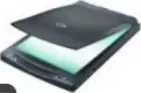
Identify the names of the device and classify what type of device does the picture belong. Write the name first to be followed by the type of devices at the space provided below. ex. USB, Output device
(a)
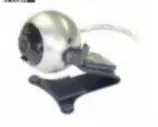
Identify the names of the device and classify what type of device does the picture belong. Write the name first to be followed by the type of devices at the space provided below. ex. USB, Output device
(a)

Identify the names of the device and classify what type of device does the picture belong. Write the name first to be followed by the type of devices at the space provided below. ex. USB, Output device
(a)

Identify the names of the device and classify what type of device does the picture belong. Write the name first to be followed by the type of devices at the space provided below. ex. USB, Output device
(a)

Identify the names of the device and classify what type of device does the picture belong. Write the name first to be followed by the type of devices at the space provided below. ex. USB, Output device
(a)
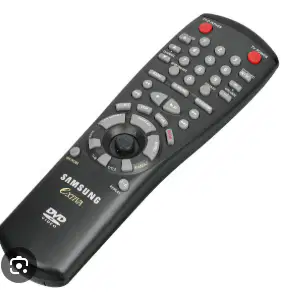
Identify the names of the device and classify what type of device does the picture belong. Write the name first to be followed by the type of devices at the space provided below. ex. USB, Output device
(a)
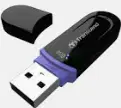
Identify the names of the device and classify what type of device does the picture belong. Write the name first to be followed by the type of devices at the space provided below. ex. USB, Output device
(a)

Identify the names of the device and classify what type of device does the picture belong. Write the name first to be followed by the type of devices at the space provided below. ex. USB, Output device
(a)
Shorcut key Zooming into 100%
(a)
The first computer in the World.
(a)
Shortcut key pasting documents.
(a)
Shortcut key to undo the latest action
(a)
A group of keyboard keys that are used to perform specific tasks, example is F1.
(a)
A key on the keyboard that cancels the current operations or exits current window
(a)
The shortcut keys Ctrl+X is use to cut and Ctrl+P is use to paste a data in a document.
True
False
ENIAC means Electronic Numerical Integral and Computer.
True
False
BIOS is a hardware integrated with software is also known as Software.
True
False
Blogging is a fantastic way to share your thoughts, ideas, and experiences with the world.
True
False
Multitasking is a capability of a computer in operating multiple applications at the same time. State whether this statement is True or False.
True
False
One of the default locations in which the computer saves your files is My Files.
True
False
Subject Searching is a type of searching the words in a search box using a keyword. State whether this statement is True or False.
True
False
State whether the following statements are True or False: 2. Ctrl V is used to paste.
True
False
Organizing files and saving them to a computer or external storage device is very similar to how we used to set up filing systems in a filing cabinet.
True
False
WWW is the interconnections of computers around the world that brings all the systems together.
True
False
State whether the following statements are True or False: 7. My Files is a type of software.
True
False
WWW and Internet are just the same, they are all interconnected of different devices.
True
False
ABC Folder Method is the simplest method to get quickly to the files.
True
False
Servers stores the information on the Website.
True
False
CMOS a short-term memory if the BIOS.
True
False
GIVE AT LEAST 4, CLASSIFICATION OF COMPUTER BY SIZE
(a)
Enumerate at least 4 input devices. (Separate your answer with a slash (/))
(a)
GIVE AT LEAST 2, CLASSIFICATION OF COMPUTER BY PURPOSE
(a)
List the 5 alphabet home keys for the left hand. (Separate your answer with a slash (/))
(a)
Give the 2 alphabet guide keys for left and right hands. (Separate your answer with a slash (/))
(a)
Two primary Memory.
(a)
GIVE AT LEAST 3, CLASSIFICATION OF COMPUTER BY TYPE
(a)
Why is it important to manage your file in a folder?
Would you agree that the importance of shortcut keys is "Time saving with Technology"? Explain your answer.
BONUS: Attach your signature in the white blank provided for traceability purpose. (5points)


