
NEW
Font size
 Worksheets
Lesson 1: Introduction to Flowcharts
Total questions: 10
Worksheet time: 5mins
Which statement best describes a flowchart in this lesson?
A diagram that shows steps in a process in the order they happen
A list of computer parts arranged by cost
A picture meant to decorate a presentation
A chart that compares different brands of software
Based on the morning routine example (Get out of bed → Get a drink → Have breakfast → Get dressed → Brush teeth), which step should come immediately after “Have breakfast” to keep the sequence correct?
Brush teeth
Get dressed
Get out of bed
Pack school bag
Which flowchart symbol is used to show the start or end of a process?
Terminator (rounded rectangle)
Parallelogram
Rectangle
Diamond
A step that reads data from the keyboard or shows text on the screen should use which symbol?
Rectangle for a process
Parallelogram for input/output
Oval for annotation notes
Diamond for a loop
You are drawing a flowchart for making toast. Which action belongs in a Process symbol?
Decide if the bread is burnt
Display the word 'Done' on the screen
Insert bread into the toaster and heat it
Press a key to start
A student’s flowchart shows Stage 1 → Stage 2 → Stage 3 but has no Start or End symbols. What is the best fix?
Add a decision diamond before Stage 1
Add a terminator at the beginning and another at the end
Replace Stage 2 with an input/output symbol
Remove arrows so the flow is not linear
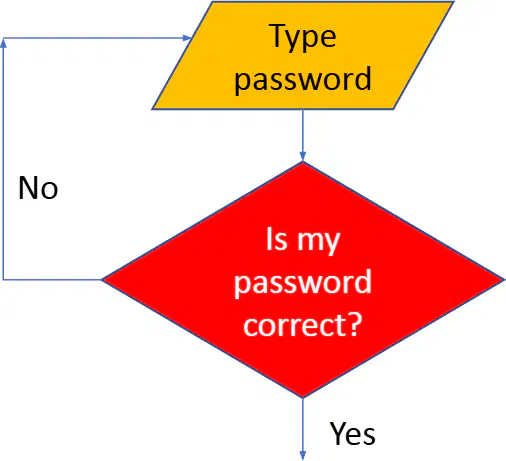
A flowchart for logging in asks, "Is my password correct?" If the answer is No, what should happen next according to decision logic?
Proceed to the next stage without changes
End the program immediately
Go back to re-type the password before continuing
Skip the login and access the system
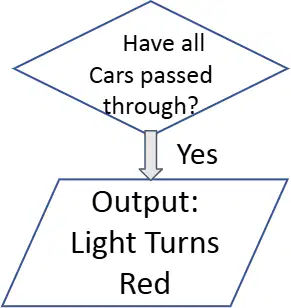
Look at the flowchart of a simple traffic light system. Which symbol is used to ask the question "Have all cars passed through?"
Decision (diamond)
Start/End (oval)
Process (rectangle)
Input/Output (parallelogram)

In Google Slides, which menu path should you use to access the flowchart shapes needed to build a diagram?
Insert > Shape > Shapes
Tools > Diagram > Flowchart
Format > Line > Arrows
Slide > Layout > Shapes
How do flowcharts connect to computational thinking in practical terms?
Flowcharts show the artistic style of a program
Flowcharts break a process into clear, ordered steps, mirroring decomposition and algorithms
Flowcharts replace the need to think about a problem
Flowcharts are only used after a program is fully built

