
 Worksheets
Programmvadāma ierīce un Datora sastāvdaļas
Total questions: 28
Worksheet time: 14mins
Which statement best defines a programmable device as described in the lesson?
A device that only stores data without running instructions
Any electronic device that operates with power from a battery
A device that operates using specially created programs to perform tasks
Any machine that connects to the internet by default
Select all items that are examples of commonly used programmable devices mentioned in the lesson.
Desktop computer
Portable (laptop) computer
Paper notebook
Tablet
Smartphone
Hardware vs. Software: Which option correctly contrasts them according to the text?
Hardware is the physical part of a data processing system, while software includes programs, documentation, and data needed for the system to work
Hardware includes operating systems and apps, while software is only the casing and cables
Hardware and software are both physical components located inside the system unit
Hardware is optional for a computer to run, while software is required only for printing
According to the material, why is software necessary in addition to hardware?
Software only decorates the desktop background and has no effect on tasks
Software is needed both to control the computer’s operation (e.g., operating system) and to perform specific tasks like drawing or text entry and formatting
Software replaces all hardware in modern devices
Software is used only to connect external peripherals

Refer to the labeled diagram of computer parts. Which components are shown as typical parts of a computer setup?
Monitor
System unit (system block)
Printer
Keyboard
Mouse
What is the role of the system unit (system block) as described in the text?
It is a decorative case that improves airflow but has no components
It consists of various devices and circuits without which the computer cannot operate
It is only an external peripheral used for printing
It is a touch-screen device used to display output only
Which statement best describes the function of a computer monitor?
It stores programs and files for later use
It displays processed information on the screen and supports user dialogue
It sends print jobs to paper using ink or toner
It captures images from the real world for editing
How is the size of a monitor commonly measured according to the material?
By the width of the screen in centimeters
By the height of the case in inches
By the diagonal of the screen
By the number of USB ports
Which keyboard layout is mentioned as the one we use?
AZERTY layout
DVORAK layout
QWERTY layout
Colemak layout
Which device is primarily used to move the pointer on the screen and select commands or objects?
Mouse
Printer
Monitor
Speaker
According to the material, which features are typical for a standard mouse?
Two buttons with a scroll wheel between them
Only wireless connectivity is possible
Additional buttons may be added for easier work
It is mainly used to print documents
Which alternatives can be used instead of a traditional mouse as mentioned in the lesson?
Touchpad
Touchscreen
Scanner
Game controller
What is the main purpose of a printer according to the text?
To output information by printing on paper or other materials
To display images on a screen for the user
To input text into the computer
To store files and applications securely
Which statement best describes a mainframe (lieldators) computer?
A compact desktop used by a single person at home
A powerful computer for storing and processing large amounts of information used by many users at the same time
A handheld device designed only for touch input
A battery-only computer that must always be portable
What is meant by a personal computer in this unit?
Any computer customized for individual use that can operate independently of other devices
Only a desktop computer with a tower and separate monitor
Only a tablet with a touch screen
Any computer that requires constant network connection to function
Select all options that are types of personal computers described here.
Desktop computer (galda dators)
All-in-one (vienkorpusa) computer
Portable (portatīvais) computer
Tablet (planšetdators)
Mainframe (lieldators)
According to the description, what characterizes a desktop computer (galda dators)?
A table-like device with a touch screen used for input
An individually used computer intended to be placed on a desk and not carried around
A single unit where the system unit and monitor are built into one case
A phone-like device that adds computer-like features
How does an all-in-one (vienkorpusa) computer differ from a standard desktop?
It is designed only for battery power and travel
Its system unit and monitor are built into a single case, sometimes with a touch screen
It is a table-shaped device where input happens only via touch
It is a mainframe serving many users at once
Which feature defines a portable computer (portatīvais dators) as described in the material?
Fixed placement on a desk and not portable
A detachable keyboard and only mains power
A personal computer with a foldable display and autonomous power supply that can match desktop capabilities
A device used only for touch input without a keyboard option
Who are tablets (planšetdatori) primarily designed for, according to the text?
Users who need a portable computer without the need to type a lot of information
Users who must run large multiuser databases
Users who require only wired network connections
Users who need to carry a desktop computer case
Which items are given as examples of other programmable devices? Select all that apply.
Smartphones (viedtālruņi) that add computer-like capabilities
Washing machines (veļas automāti)
Robots used in homes or factories
Printers that can only print on paper
Typewriters without electronics
Which statement best contrasts a laptop and a tablet based on the material?
Both require constant mains power and have no screens
A laptop has a foldable display and autonomous power; a tablet is a slate-like device with a touch screen where input happens using the screen
A laptop is a mainframe; a tablet is a personal computer
A laptop can be used only with a touch screen; a tablet needs a mouse to work
Which device in a computer stores the operating system, applications, and user data?
Central processing unit (CPU)
Hard drive (internal drive)
Power supply unit
Graphics card
What is an external hard drive?
A hard drive built into the motherboard and not removable
A separate hard drive in its own case that connects via USB or another port
A memory card used in smartphones only
A compact disc used for backups
Which storage device is most convenient for carrying files from one computer to another using a USB port?
USB flash drive (zibatmiņa)
Internal hard drive
CD-ROM
Memory card reader
How can information on a memory card be read on a computer?
Only by connecting the camera with a special cable
By using a memory card reader that may be built-in or a separate device
By installing new operating system drivers only
It cannot be read on a computer
Which statement about CDs and DVDs in this context is correct?
They are types of memory cards for phones
They are compact optical discs for storing information if the computer has a suitable drive
They are external hard drives that connect by Wi‑Fi
They are only used to install printers
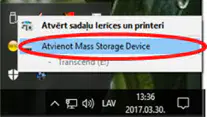
Select all actions you should take before removing a USB flash drive from a computer safely.
Click the taskbar icon to eject the device
Wait for the message that hardware removal is safe
Unplug the device immediately after copying files
Shut down the entire computer every time

