
 Worksheets
Introduction to Web Technology and CSS
Total questions: 60
Worksheet time: 31mins
Which of the following is NOT a way to add CSS to a web page?
Inline CSS
Internal CSS
External CSS
Embedded JavaScript
What is the term for CSS that is written directly inside an HTML element?
Inline CSS
Internal CSS
External CSS
Browser default
When multiple style sheets are used in a web page, which value will be applied?
The value from the first style sheet
The value from the last read style sheet
The value from the browser default
The value from the internal style sheet only
Arrange the following style sources in order of priority, from highest to lowest: Inline style, External/Internal style sheets, Browser default.
Inline style > External/Internal style sheets > Browser default
Browser default > Inline style > External/Internal style sheets
External/Internal style sheets > Inline style > Browser default
Browser default > External/Internal style sheets > Inline style
Which statement best describes the concept of 'cascading' in CSS?
All styles are ignored except the browser default.
Styles from different sources combine into a new virtual style sheet, following a set priority.
Only external style sheets are used for final styling.
Internal style sheets override all other styles.
Which type of CSS is typically placed in the head section of an HTML document?
Inline CSS
Internal CSS
External CSS
Browser default
If a web page has conflicting styles from an inline style, an external style sheet, and the browser default, which style will be applied?
Browser default
External style sheet
Inline style
Internal style sheet

Which part of a CSS rule specifies which HTML elements will be styled?
Selector
Declaration
Property
Value
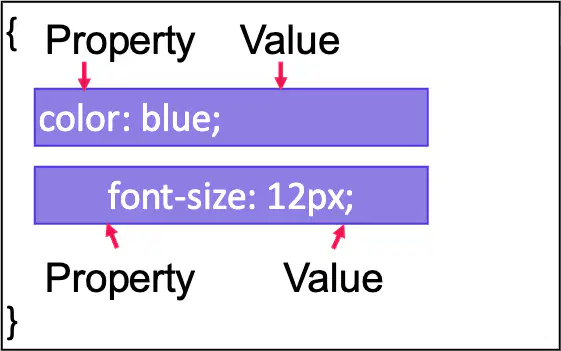
In the CSS rule h1 { color: blue; font-size: 12px; }, what is the value for the property 'font-size'?
12px
blue
h1
font-size
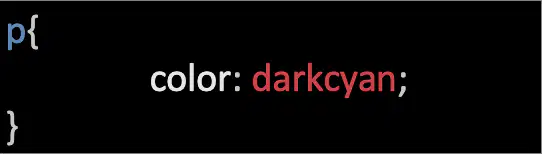
What does the CSS selector 'p' target in an HTML document?
All paragraph elements
All list items
All headings
All elements with class 'p'
How can you target both paragraphs and list items in a single CSS rule?
By separating selectors with a comma
By using a period before each selector
By writing the selectors in separate rules
By using a semicolon between selectors
Which symbol is used in CSS to select elements by their class name?
A period (.)
A comma (,)
A hash (#)
A colon (:)
Why might a web developer use a class selector in CSS?
To style a subset of elements without changing the others
To style all elements of a certain type
To apply styles to the entire document
To remove styles from elements
Given the CSS rule .highlight { color: yellow; }, which HTML element will be affected?
Any element with class 'highlight'
All paragraph elements
All list items
Any element with id 'highlight'
If you want to style all paragraphs and all list items in dark cyan, which CSS selector should you use?
p,li
p li
p.highlight
li p
What is the correct way to assign a CSS class named 'beginner' to a paragraph element in HTML?
This is a beginner paragraph.
This is a beginner paragraph.
This is a beginner paragraph.
This is a beginner paragraph.
Which CSS rule will color all list items with the class 'intermediate' in orange?
li.intermediate { color: orange; }
.intermediate li { color: orange; }
li#intermediate { color: orange; }
.intermediate { color: orange; }
In CSS, what is the difference between '.beginner' and 'li.beginner'?
.beginner selects all elements with the class 'beginner', while li.beginner selects only list items with the class 'beginner'.
.beginner selects only paragraphs with the class 'beginner', while li.beginner selects all elements with the class 'beginner'.
.beginner selects all elements with the id 'beginner', while li.beginner selects only list items with the id 'beginner'.
.beginner selects only list items with the class 'beginner', while li.beginner selects all elements with the class 'beginner'.
What will be the color of the text for a list item with class 'advanced' if the following CSS is used? li.advanced { color: red; }
Red
Green with a red border
Orange
Blue
How can you assign more than one class to an HTML element?
By listing multiple class names separated by spaces in the class attribute, like class="beginner highlighted".
By using multiple class attributes in the element, like class="beginner" class="highlighted".
By separating class names with commas in the class attribute, like class="beginner, highlighted".
By using a semicolon between class names in the class attribute, like class="beginner; highlighted".
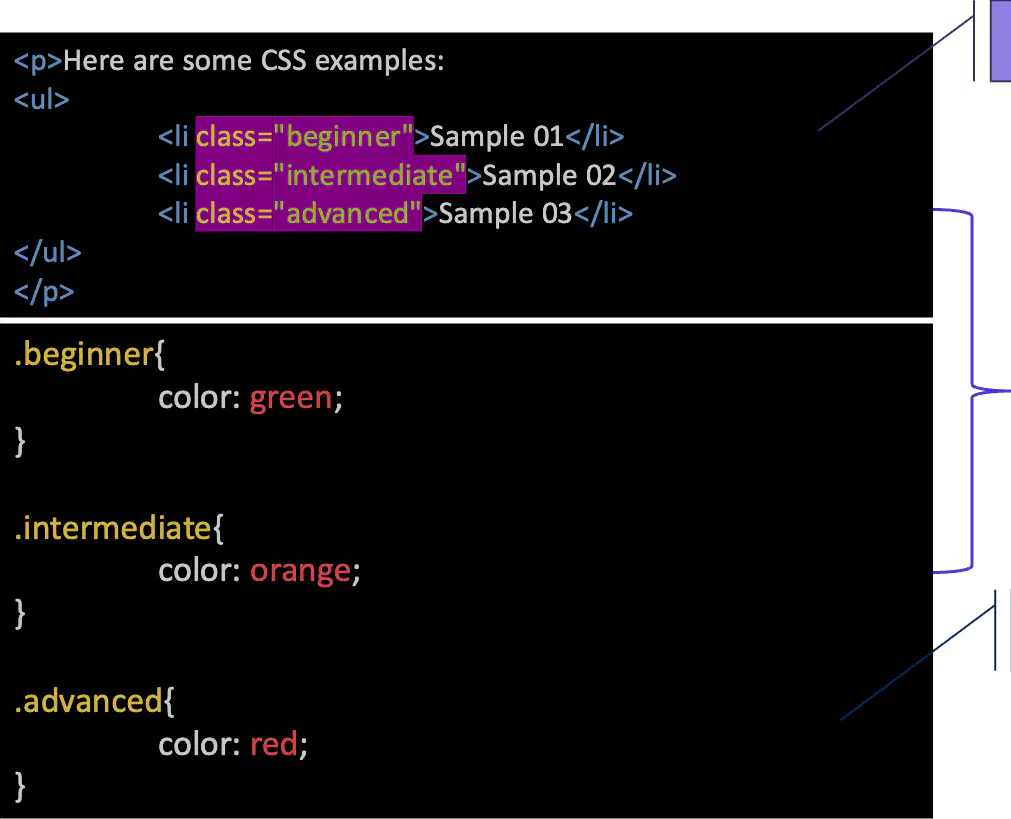
Refer to the browser output image showing three colored list items labeled 'Sample 01', 'Sample 02', and 'Sample 03'. Which CSS class is responsible for making 'Sample 02' appear in orange?
intermediate
beginner
advanced
highlighted
If you want to apply a style only to list items with the class 'beginner', which selector should you use in your CSS?
li.beginner
.beginner li
li#beginner
#beginner li
Which symbol is used in CSS to select an element by its id?
A hash (#) character
A dot (.) character
A colon (:) character
A dollar ($) character
What is the main reason for using the id selector in CSS?
To select one unique element on a page
To select all elements of a certain type
To select elements by their class
To select elements by their tag name
Which CSS property is used to change the color of text in a header element?
color
font-family
background-color
text-align
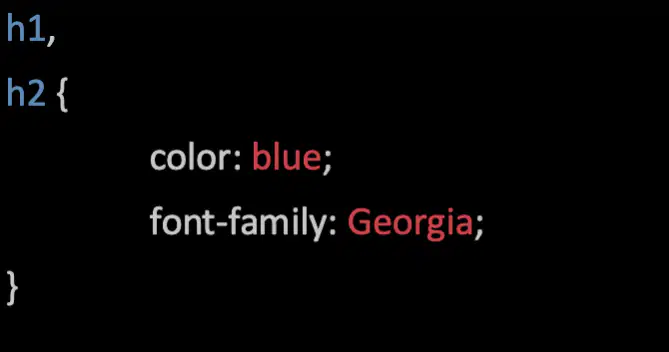
In the CSS code shown, which font is applied to the h1 and h2 headers?
Georgia
Arial
Times New Roman
Verdana
What is the correct way to write a comment in CSS?
/* This is a comment */
// This is a comment
<!-- This is a comment -->
# This is a comment
How many standard color names are supported by CSS/HTML?
140
100
256
16
Which of the following is NOT a valid way to specify a color in CSS?
Binary value
RGB value
HEX value
Predefined color name
Which of the following is a valid named color in CSS?
DodgerBlue
BrightBlue with extra saturation
Blue
LightBlue with high intensity
What is the effect of the following CSS code: color: DodgerBlue; background-color: lightyellow;
The text color will be DodgerBlue and the background will be lightyellow.
The background will be DodgerBlue and the text will be lightyellow.
Both the text and background will be DodgerBlue.
Both the text and background will be lightyellow.
Which CSS property is used to set the style of a border?
border-style
border-color
border-width
border-type
In CSS, which formula is used to specify a color using the RGB model?
rgb(red, green, blue)
rgb(intensity, saturation, brightness)
rgb(hue, saturation, lightness)
rgb(blue, green, red)
What color will be displayed by the CSS code rgb(255, 0, 0)?
Red
Black with a red tint
White with a red shade
Gray
If you want to create a shade of gray using the RGB model in CSS, what must be true about the values for red, green, and blue?
All three values must be equal.
Red must be higher than green and blue.
Green must be set to zero.
Blue must be set to 255.
Which CSS property is used to specify an image as the background of an element?
background-image
background-color with image value
background-repeat
background-style
By default, what happens when you set a background image using the background-image property in CSS?
The image is repeated so it covers the entire element
The image is displayed only once in the top left corner
The image is stretched to fill the element
The image is centered and not repeated
Which three properties are used to define a CSS border?
border-width, border-style, border-color
border-radius, border-style, border-image
border-width, border-radius, border-shadow
border-style, border-image, border-spacing
What is the minimum property you must set to display a border in CSS?
border-style
border-width
border-color
border-radius
To create rounded borders in CSS, which property should you use?
border-radius
border-style
border-width
border-color
What do CSS margin properties do?
Create space around elements, outside of any defined borders
Create space inside the borders of elements
Set the width of the border
Set the color of the border
Which value for a CSS margin property allows the browser to automatically calculate the margin?
auto
length
%
inherit
What is the main purpose of CSS padding properties?
To generate space around an element’s content, inside of any defined borders.
To change the color of an element’s border.
To align text within an element.
To set the font size of an element.
Which of the following correctly lists the four sides for which you can set padding in CSS?
Top, left, bottom, right
Top, center, bottom, right
Top, left, middle, right
Top, left, bottom, center
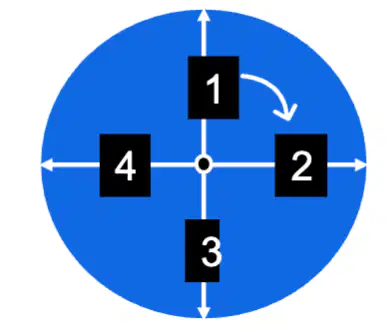
Refer to the diagram showing the four sides of padding in CSS. Which side is represented by the number 3 in the diagram?
Padding-top
Padding-right
Padding-bottom
Padding-left
Which of the following is NOT a part of the CSS box model?
Margin
Border
Padding
Selector
In the CSS box model, what is the area directly inside the border called?
Margin
Padding
Content
Outline
In CSS, what is a generic family?
A group of font families with a similar look, such as 'Serif' or 'Monospace'.
A specific font family like 'Times New Roman' or 'Arial'.
A font style used only for headings.
A color property for fonts.
Which of the following is a Sans-serif font family?
Times New Roman
Georgia
Arial
Courier New
Which font family would you use to ensure all characters have the same width?
Serif
Sans-serif
Monospace
Cursive
What is the difference between a generic family and a font family in CSS?
A generic family is a group of font families with a similar look, while a font family is a specific font like 'Arial'.
A generic family is a specific font, while a font family is a group of fonts.
There is no difference between the two.
A generic family refers to color, while a font family refers to size.
Which CSS property can be used to style a link?
font-family
background
color
All of the above
What does the a:hover state represent in CSS?
A link when the user moves the mouse over it.
A link that has been visited by the user.
A normal, unvisited link.
A link the moment it is clicked.
If you want a link to change color when clicked, which state should you style?
a:link
a:visited
a:hover
a:active
Why is it important to style links differently based on their state in CSS?
It helps users understand which links they have visited, which are active, and which are being hovered over, improving navigation and user experience.
It makes the website load faster.
It increases the number of links on a page.
It prevents links from being clicked.
Which of the following statements about CSS length units is correct?
Length in CSS is expressed as a number followed by a unit, such as 10px or 2em.
Length in CSS is always expressed as a unit followed by a number, such as px10 or em2.
Length in CSS can be expressed with a whitespace between the number and the unit, such as 10 px.
Length in CSS must always use positive numbers; negative lengths are not allowed.
How many types of CSS length units are there, and what are they called?
There are two types: absolute and relative.
There are three types: fixed, flexible, and dynamic.
There is only one type: absolute.
There are four types: pixel, em, rem, and percent.
Which CSS properties commonly use length values?
Width, margin, padding, and font-size.
Color, font-family, and text-align.
Display, position, and float.
Border-style, background-image, and z-index.
What selector can be used to specify the style of the submit button in the code snippet below:
<form>
<label for="fname">First Name</label>
<input type="text" id="fname" name="firstname"/>
<label for="lname">Last Name</label>
<input type="text" id="lname" name="lastname"/>
<label for="country">Country</label>
<select id="country" name="country">
<option value="australia">Australia</option>
<option value="canada">Canada</option>
<option value="usa">USA</option>
</select>
<input type="submit" value="Submit">
</form>
(a)
The following css block will add a visible black border around all paragraph elements.
p{
border: 1px black;
}
True
False

