
 Worksheets
External Threats
Total questions: 81
Worksheet time: 41mins

According to the passage, who are considered a genuine threat to personal and organisation data in the digital world?
Hackers
Teachers
Students
Friends
Fill in the blank: In the digital world, hackers are a genuine threat to ______ and organisation data.
personal
public
shared
temporary

CryptoLocker is:
a type of ransomware malware
an antivirus software
a secure messaging app
a cryptocurrency wallet
Operation Tovar was:
an international law enforcement operation to take down the Gameover Zeus botnet
a military operation in the Middle East
a humanitarian mission in Africa
a space exploration project by NASA
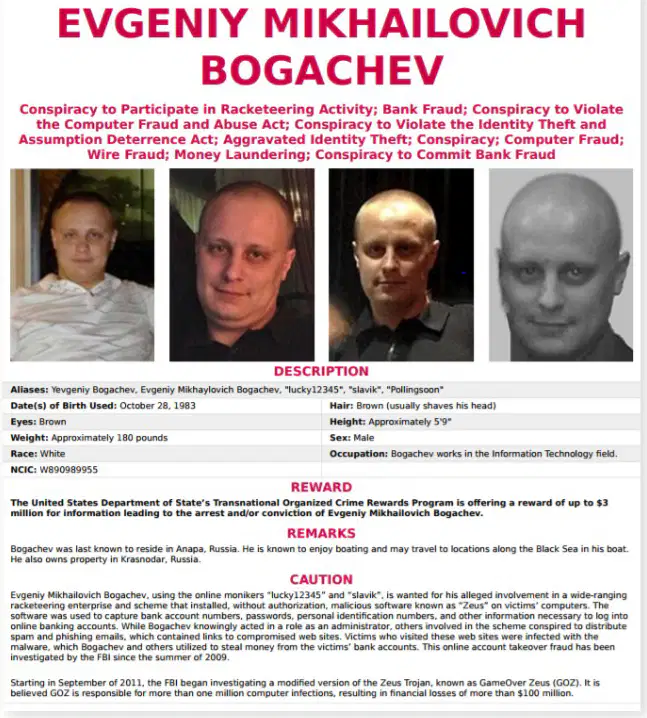
Evgeniy Bogachev was:
a Russian cybercriminal
a famous chess grandmaster
an Olympic gold medalist
a renowned physicist
The reward for capturing Bogachev was:
$3 million
$1 million
$500,000
$10 million
CryptoLocker made how much money?
About $3 million
About $100,000
About $10 million
About $500,000
What type of malware is CryptoLocker?
Virus
Ransomware
Worm
Trojan
What was the name of the operation to capture Evgeniy and the gang of hackers?
Operation Zeus
Operation Tovar
Operation Lockdown
Operation Crypto
How much money did the FBI offer for Evgeniy’s capture?
$1,000,000
$2,000,000
$3,000,000
$5,000,000
CryptoLocker made $__________ in 100 days.
$300,000,000
$3,000,000
$30,000,000
$1,000,000
Describe what a Virus is in the context of network threats and explain how to protect against it.
A virus is a type of malicious software that attaches itself to a legitimate program or file and can replicate itself to spread to other computers. Protection includes using antivirus software, not opening suspicious emails, and keeping software updated.
A virus is a hardware device that prevents unauthorized access to a network. Protection includes installing more hardware devices.
A virus is a type of network cable used to connect computers. Protection includes using shielded cables.
A virus is a legitimate software update that improves computer performance. Protection includes installing all available updates.
Describe what a Worm is in the context of network threats and explain how to protect against it.
A worm is a standalone malware program that replicates itself to spread to other computers, often exploiting vulnerabilities. Protection includes using firewalls, keeping systems updated, and using antivirus software.
A worm is a type of firewall that blocks unauthorized access to a network. Protection includes disabling firewalls and avoiding software updates.
A worm is a security protocol used to encrypt data during transmission. Protection includes using weak passwords and sharing credentials.
A worm is a hardware device that prevents malware infections. Protection includes not using antivirus software and ignoring system updates.
Describe what a Trojan is in the context of network threats and explain how to protect against it.
A Trojan is a type of malware disguised as legitimate software that, once activated, can give attackers access to the infected system. Protection includes not downloading software from untrusted sources and using antivirus software.
A Trojan is a type of firewall that blocks all incoming network traffic. Protection includes disabling your antivirus software.
A Trojan is a legitimate software update that improves system security. Protection includes always installing updates from any source.
A Trojan is a type of hardware device used to secure networks. Protection includes using only wireless connections.
Describe what Ransomware is in the context of network threats and explain how to protect against it.
Ransomware is a type of malware that encrypts a user's files and demands payment for the decryption key. Protection includes regular backups, not clicking on suspicious links, and using security software.
Ransomware is a type of firewall that blocks unauthorized access to a network. Protection includes disabling firewalls and sharing passwords.
Ransomware is a network protocol used to securely transfer files. Protection includes using outdated software and ignoring security updates.
Ransomware is a type of antivirus software that removes all malware automatically. Protection includes never updating the antivirus and clicking on all email attachments.
Describe what Spyware is in the context of network threats and explain how to protect against it.
Spyware is software that secretly monitors and collects user information without their knowledge. Protection includes using antispyware tools and being cautious about what is downloaded and installed.
Spyware is a type of hardware device used to speed up network connections. Protection includes upgrading your network cables.
Spyware is a legitimate software that helps users manage their passwords securely. Protection includes sharing passwords with trusted friends.
Spyware is a virus that only affects mobile devices. Protection includes turning off your phone regularly.
Describe what a Rootkit is in the context of network threats and explain how to protect against it.
A rootkit is a collection of software tools that enable unauthorized access to a computer while hiding its presence. Protection includes using rootkit detection tools and keeping systems updated.
A rootkit is a type of firewall that blocks all incoming network traffic. Protection includes disabling the firewall.
A rootkit is a legitimate software update that improves system performance. Protection includes avoiding software updates.
A rootkit is a type of antivirus program that scans for malware. Protection includes running regular antivirus scans.
Describe what a Botnet is in the context of network threats and explain how to protect against it.
A botnet is a network of infected computers controlled by an attacker, often used to launch attacks. Protection includes using firewalls, antivirus software, and keeping systems updated.
A botnet is a type of firewall that protects computers from malware. Protection includes disabling firewalls and avoiding software updates.
A botnet is a legitimate network used by companies to improve internet speed. Protection includes sharing your network with others.
A botnet is a software tool used to scan for viruses on a computer. Protection includes never using antivirus software.
Describe what a Denial of Service attack is in the context of network threats and explain how to protect against it.
A Denial of Service (DoS) attack is an attempt to make a network or service unavailable by overwhelming it with traffic. Protection includes using firewalls, intrusion detection systems, and load balancers.
A Denial of Service (DoS) attack is a method of encrypting data to prevent unauthorized access. Protection includes using strong passwords and regular software updates.
A Denial of Service (DoS) attack is a way to gain administrative access to a network by exploiting software vulnerabilities. Protection includes disabling unused ports and services.
A Denial of Service (DoS) attack is a technique for intercepting network traffic to steal sensitive information. Protection includes using VPNs and secure communication protocols.
Describe what Social Engineering is in the context of network threats and explain how to protect against it.
Social engineering is the use of deception to manipulate individuals into divulging confidential information. Protection includes user education and awareness, and verifying identities before sharing information.
Social engineering is a type of malware that infects computer systems. Protection includes installing antivirus software and updating operating systems regularly.
Social engineering is a method of encrypting data to prevent unauthorized access. Protection includes using strong encryption algorithms and secure passwords.
Social engineering is a network protocol used to transfer files securely. Protection includes configuring firewalls and monitoring network traffic.
Describe what Pharming is in the context of network threats and explain how to protect against it.
Pharming is a cyberattack intended to redirect a website's traffic to a fraudulent site. Protection includes using secure DNS servers and keeping software updated.
Pharming is a method of encrypting data to prevent unauthorized access. Protection includes using strong passwords and two-factor authentication.
Pharming is a type of malware that locks files and demands ransom. Protection includes regular backups and antivirus software.
Pharming is a technique for intercepting wireless signals. Protection includes using VPNs and strong Wi-Fi passwords.
Describe what Shoulder Surfing is in the context of network threats and explain how to protect against it.
Shoulder surfing is the act of obtaining confidential information by observing someone’s screen or keyboard. Protection includes shielding screens and being aware of surroundings when entering sensitive information.
Shoulder surfing is a type of malware that infects computers through email attachments. Protection includes installing antivirus software and not opening suspicious emails.
Shoulder surfing is a method of intercepting wireless network traffic using specialized equipment. Protection includes using strong encryption on wireless networks.
Shoulder surfing is a technique for bypassing firewalls by tunneling traffic through allowed ports. Protection includes updating firewall rules regularly.
Describe what Man in the Middle Attacks are in the context of network threats and explain how to protect against them.
A Man in the Middle Attack is when an attacker secretly intercepts and possibly alters communication between two parties. Protection includes using encryption and secure communication protocols.
A Man in the Middle Attack is when two users communicate directly without any risk. Protection includes disabling all security protocols.
A Man in the Middle Attack is when a server fails to respond to a client request. Protection includes increasing server bandwidth.
A Man in the Middle Attack is when a user forgets their password. Protection includes resetting the password regularly.
What tool will you use to create a website for new computer users that provides information about different forms of attack and ways to protect themselves?
Google Docs
Google Sites
Microsoft Word
PowerPoint
According to the instructions, what should you use Google for during this project?
Research
Entertainment
Shopping
Social Media
What is the purpose of the website you are creating according to the instructions?
To play games
To provide information about different forms of attack and protection methods for new computer users
To sell products
To share photos
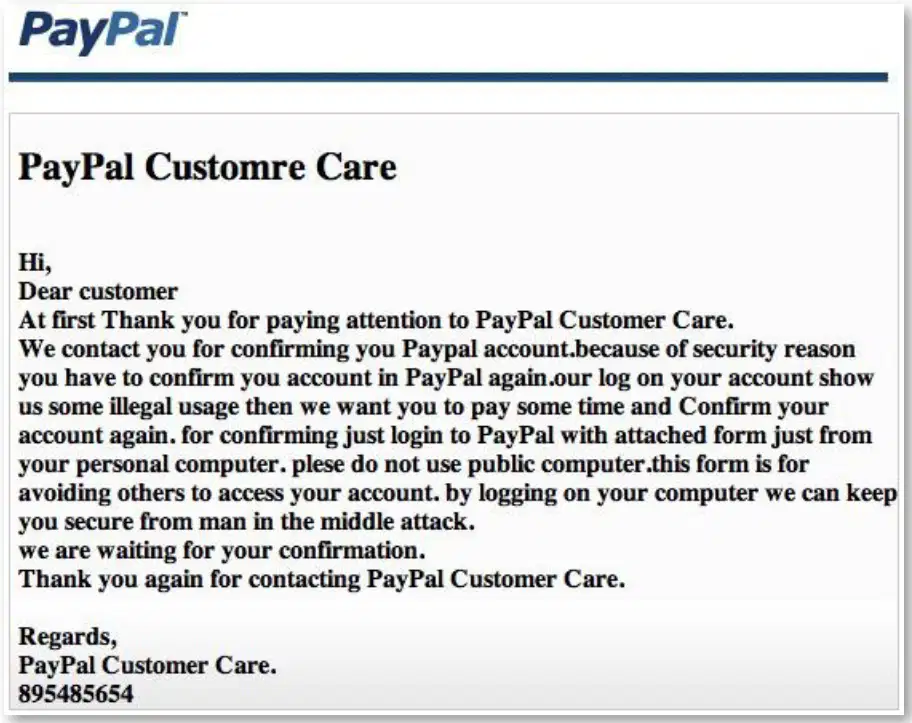
Identify how you can tell this email is phishing.
It contains suspicious links or requests for personal information.
It is sent from a known and trusted sender.
It uses professional language and correct grammar throughout.
It does not ask for any sensitive information.

Read the sample email from 'PayPal Customer Care'. Which feature indicates that this email may not be genuine?
Professional language
Poor spelling
Personalized greeting
Clear instructions

Read the sample email from 'PayPal Customer Care'. What type of salutation is used in the email?
Personalized salutation
Generic salutation
No salutation
Formal salutation

Read the sample email from 'PayPal Customer Care'. Identify the grammatical issue present in the email.
Poor grammar
Incorrect punctuation
Spelling mistake
Incorrect subject-verb agreement
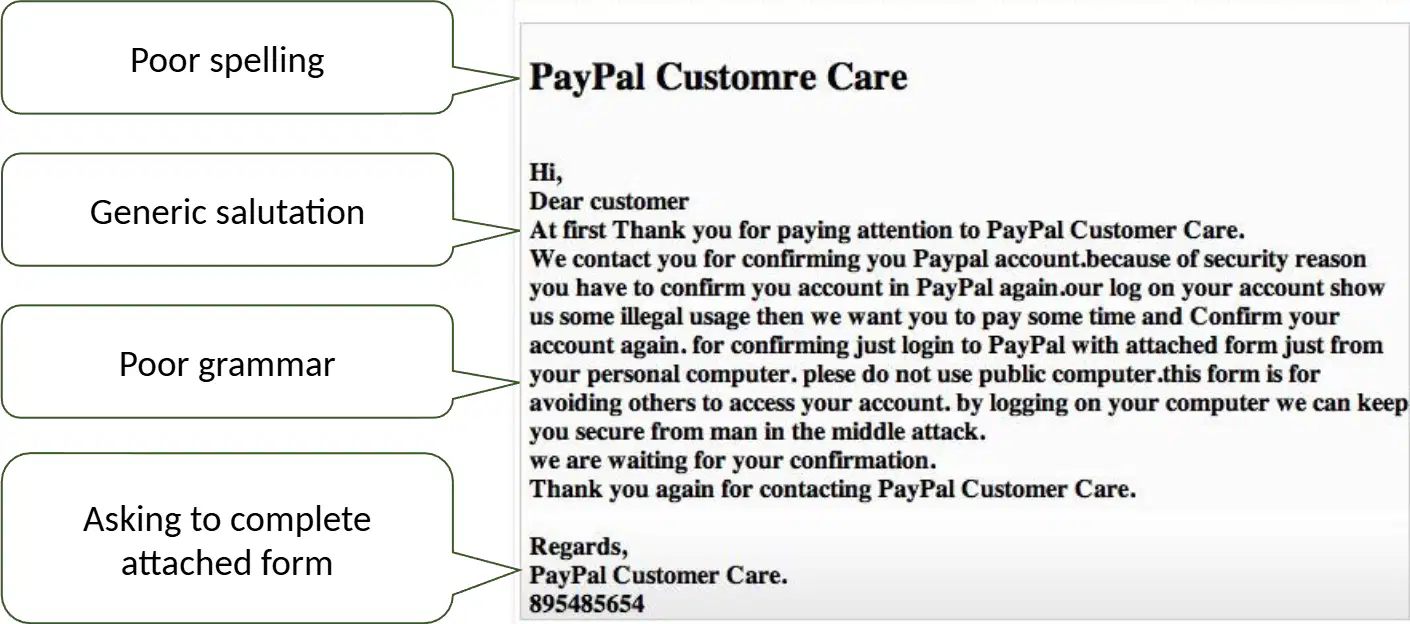
Read the sample email from 'PayPal Customer Care'. What action does the email ask the recipient to complete?
Ignore the email
Complete the attached form
Call customer service
Change password
The security of an organisation can be compromised and improved by:
Implementing strong security policies and addressing vulnerabilities
Ignoring security protocols and updates
Allowing unrestricted access to sensitive data
Neglecting employee training on security measures
External threats to a network and reasons why hackers attack digital systems include:
Gaining unauthorized access, stealing data, and causing disruption
Improving network security and helping users
Reducing network traffic and increasing speed
Providing free software updates to users
The security of an organisation can be compromised and improved in which of the following ways?
By implementing strong security policies and addressing vulnerabilities
By ignoring security updates and using weak passwords
By sharing confidential information publicly
By disabling firewalls and antivirus software
Lesson 1 - 3: External threats to a network and reasons why hackers attack digital systems include:
Malware, phishing, and financial gain
Routine software updates and system maintenance
User collaboration and teamwork
Legal compliance and ethical behavior
Staff within an organisation can pose a threat to digital systems by:
Accidentally leaking sensitive information
Always following security protocols
Never using digital systems
Eliminating all cyber threats
Lesson 5: The consequences of a data breach for an organisation and its stakeholders include:
Financial loss, reputational damage, and legal penalties
Increased profits and market share
Improved customer trust and loyalty
Enhanced data security and privacy
Lesson 6: Access restrictions can help protect digital systems by:
Limiting who can view or change information
Allowing everyone to access all data
Making systems slower and less efficient
Removing all security measures
Lesson 7: Protecting data while it's stored and in transit involves:
Using encryption methods
Ignoring security protocols
Sharing passwords openly
Disabling firewalls
Organisations detect weaknesses in their digital systems by:
conducting security audits and vulnerability assessments.
increasing the number of employees.
upgrading office furniture.
holding more team meetings.
Clear responsibilities and defined rules are essential in a security policy because:
They ensure accountability and consistent enforcement of security measures.
They make the policy more difficult to understand.
They allow for more flexibility in breaking rules.
They reduce the need for employee training.
Lesson 10 (Assessment): After a cyber attack, an organisation should:
Assess the damage, report the incident, and strengthen security measures.
Ignore the incident and continue normal operations.
Delete all data to prevent further attacks.
Blame employees and take no further action.
Lesson 11 (Assessment): Cyber security considerations for an organisation include:
Protecting data, managing access, and ensuring compliance
Increasing physical office space
Hiring only remote employees
Focusing solely on marketing strategies

Which of the following lists two forms of attack that new computer users should be aware of and describes one way to protect against each?
Phishing and malware; use strong passwords and install antivirus software.
Phishing and hardware failure; use backup drives and update hardware.
Malware and slow internet; restart the router and clear cache.
Spam emails and low disk space; delete old files and empty recycle bin.

An important success criteria for your website project is:
Meeting the project objectives
Ignoring user feedback
Delaying the launch date
Overcomplicating the design
It is important to use tailored search terms like 'bitesize' when researching online safety topics because:
they help you find more relevant and specific information.
they make your search results less accurate.
they increase the number of unrelated websites.
they slow down your research process.
Define what a Botnet is.
A Botnet is a network of infected computers controlled by a hacker to perform tasks such as sending spam or launching attacks.
A Botnet is a type of antivirus software used to protect computers from malware.
A Botnet is a secure network used by banks for online transactions.
A Botnet is a programming language used to develop web applications.
Describe a method to protect against Botnets.
Use antivirus software and keep systems updated to prevent botnet infections.
Disable all internet connections permanently.
Share your passwords with friends to avoid botnets.
Ignore software updates and security patches.
Define what a Denial of Service attack is.
A Denial of Service attack is an attempt to make a computer or network resource unavailable to its intended users by overwhelming it with traffic.
A Denial of Service attack is a method to encrypt data for secure communication.
A Denial of Service attack is a process of backing up data to prevent loss.
A Denial of Service attack is a technique to improve network speed by reducing traffic.
Describe a method to protect against Denial of Service attacks.
Use firewalls and intrusion prevention systems to block excessive traffic and prevent Denial of Service attacks.
Increase the number of open ports on the server to allow more connections.
Disable all security software to improve network speed.
Share your network credentials publicly to increase transparency.
Define what Social Engineering is.
Social Engineering is the use of deception to manipulate individuals into divulging confidential or personal information.
Social Engineering is the process of designing social media platforms for better user engagement.
Social Engineering is the study of human behavior in social groups.
Social Engineering is the practice of creating secure computer networks.
Describe a method to protect against Social Engineering.
Educate users about common social engineering tactics and encourage them to verify requests for sensitive information.
Ignore all emails from unknown senders without exception.
Share passwords only with trusted colleagues.
Disable antivirus software to avoid false alarms.
Define what Pharming is.
Pharming is a cyber attack intended to redirect a website's traffic to a fake website without the user's knowledge.
Pharming is a method of encrypting data for secure communication.
Pharming is a process of removing viruses from a computer system.
Pharming is a technique used to speed up internet connections.
Describe a method to protect against Pharming.
Use secure DNS servers and keep software updated to prevent pharming attacks.
Disable your firewall to allow all traffic.
Share your passwords with friends for convenience.
Ignore software updates and security patches.
Define what Shoulder Surfing is.
Shoulder Surfing is the act of obtaining personal information by observing someone’s screen or keyboard.
Shoulder Surfing is a method of securing data by encrypting it.
Shoulder Surfing is a technique used to improve posture while working.
Shoulder Surfing is a way to increase internet speed by using multiple connections.
Describe a method to protect against Shoulder Surfing.
Be aware of your surroundings and use privacy screens to prevent shoulder surfing.
Share your passwords with friends to avoid forgetting them.
Write your passwords on sticky notes and keep them on your monitor.
Disable your computer's firewall for easier access.
Define what a Man in the Middle Attack is.
A Man in the Middle Attack is when a hacker secretly intercepts and relays messages between two parties who believe they are communicating directly with each other.
A Man in the Middle Attack is when a hacker physically steals a device to access information.
A Man in the Middle Attack is when a hacker sends spam emails to multiple users.
A Man in the Middle Attack is when a hacker uses brute force to guess passwords.
Describe a method to protect against Man in the Middle Attacks.
Use encryption such as SSL/TLS to secure communications and prevent man in the middle attacks.
Disable all firewalls to allow open communication.
Share your passwords openly to ensure transparency.
Use public Wi-Fi networks without any security measures.
A small company’s staff try to log in to their payroll system at “payroll.outwood.com” but keep getting redirected to a fake site that captures their usernames and passwords. What is the name of this type of attack?
Phishing
Brute force attack
Denial of Service (DoS)
Man-in-the-middle attack
How can an attacker redirect users to a fake site that captures their usernames and passwords when they try to log in to a payroll system?
By modifying DNS records to point the legitimate domain to a malicious server
By sending users a legitimate login link via email
By installing antivirus software on the users' computers
By updating the payroll system with security patches
Select two different technical measures the company could put in place to prevent this attack.
Implement firewalls and intrusion detection systems
Increase employee salaries and offer more benefits
Host company events and team-building activities
Reduce the number of company meetings
Simply checking for “HTTPS” in the browser’s address bar might not be enough to detect this attack because:
Attackers can use HTTPS with fraudulent certificates.
HTTPS always guarantees the website is safe.
Browsers block all phishing sites automatically with HTTPS.
HTTPS prevents all types of cyber attacks.
The security of an organisation can be compromised and improved in which of the following ways?
By implementing strong access controls and regular security audits
By ignoring security policies and procedures
By sharing passwords among employees
By using outdated software and systems
External threats to a network and reasons why hackers attack digital systems include:
Gaining unauthorized access, stealing data, and causing disruption
Improving network performance and security
Providing free technical support to users
Enhancing user privacy and protection

The security of an organisation can be compromised and improved in which of the following ways?
By implementing strong security policies and addressing vulnerabilities
By ignoring security updates and using weak passwords
By sharing confidential information publicly
By disabling firewalls and antivirus software
Lesson 1 - 3: External threats to a network and reasons why hackers attack digital systems include which of the following?
Malware, phishing, and financial gain
Regular software updates and backups
Physical security measures only
Internal employee collaboration

Lesson 4: Staff within an organisation can pose a threat to digital systems by:
Accidentally leaking sensitive information
Improving system security
Increasing system efficiency
Reducing cyber risks
Lesson 5: The consequences of a data breach for an organisation and its stakeholders include:
Financial loss, reputational damage, legal penalties, and loss of trust
Increased profits and improved public image
Guaranteed immunity from legal action
Automatic increase in customer base
Access restrictions can help protect digital systems by:
Limiting who can view or change information
Allowing everyone to access all data
Making systems slower
Removing all passwords
Lesson 7: Protecting data while it's stored and in transit can be achieved by:
Using encryption methods
Ignoring security protocols
Sharing passwords openly
Disabling firewalls
Organisations detect weaknesses in their digital systems by:
Conducting security audits and vulnerability assessments
Ignoring potential threats
Relying solely on employee intuition
Disabling security features
Lesson 9: Clear responsibilities and defined rules are essential in a security policy because:
They ensure accountability and consistent enforcement of security measures.
They make the policy more difficult to understand.
They allow for more flexibility and less structure.
They reduce the need for employee training.
Lesson 10 (Assessment): After a cyber attack, an organisation should:
Assess the damage, report the incident, and strengthen security measures.
Ignore the incident and continue normal operations.
Delete all data to prevent further attacks.
Blame employees without investigating the cause.

Cyber security considerations for an organisation include:
Protecting sensitive data and systems from unauthorized access
Ignoring software updates and patches
Sharing passwords among employees
Allowing unrestricted access to all users
The UK experiences over 375 cyber attacks every hour. 1 in 5 UK citizens have had an online account hacked. What is a likely reason people hack computers?
To steal personal information or data
To improve internet speed
To create new software
To fix security issues for free
Who is a hacker?
A person who gets access to a computer system without permission
A person who builds computer systems
A person who repairs computers
A person who writes computer programs
Which of the following is something a hacker can do with access to a computer system?
Make the computer run different programs such as a virus or a botnet
Paint the computer
Upgrade the computer hardware
Clean the computer screen
Which of the following is something a hacker can do with access to a computer system?
Steal information
Install games
Change the wallpaper
Increase internet speed
Which of the following is something a hacker can do with access to a computer system?
Damage files by corrupting or deleting them
Print documents
Organize folders
Update software
A hacker who misuses computers is known as a ________ hacker.
black hat
white hat
grey hat
blue hat
A hacker that helps people is known as a ________ hacker.
white hat
black hat
grey hat
blue hat

