
 Worksheets
แนวข้อสอบ Year 3 เทอม 1
Total questions: 25
Worksheet time: 25mins
1. Which one is the Scratch program?
(ข้อใดคือ โปรแกรม Scratch)
Youtube
Scratch
python
2. What is the Scratch program used for?
(โปรแกรม scratch ใช้ทำอะไร)
Used to practice code or program content.
ใช้ฝึกการเขียนโค้ดหรือโปรแกรม
Use to practice typing
ใช้ฝึกพิมพ์
Use it to watch movies.
ใช้ดูหนัง
Use for cooking
ใช้ทำอาหาร

3. From code figure 1, which number is a sprite in the Scratch program?
(จากรูปโค้ดที่ 1 ตัวเลขในข้อใดเป็นตัวละครในโปรแกรม Scratch)
1
2
3
4
4. What do we call a character in the Scratch program?
(เราเรียกตัวละครในโปรแกรม Scratch ว่าอะไร)
backdrop
Name
Sprite
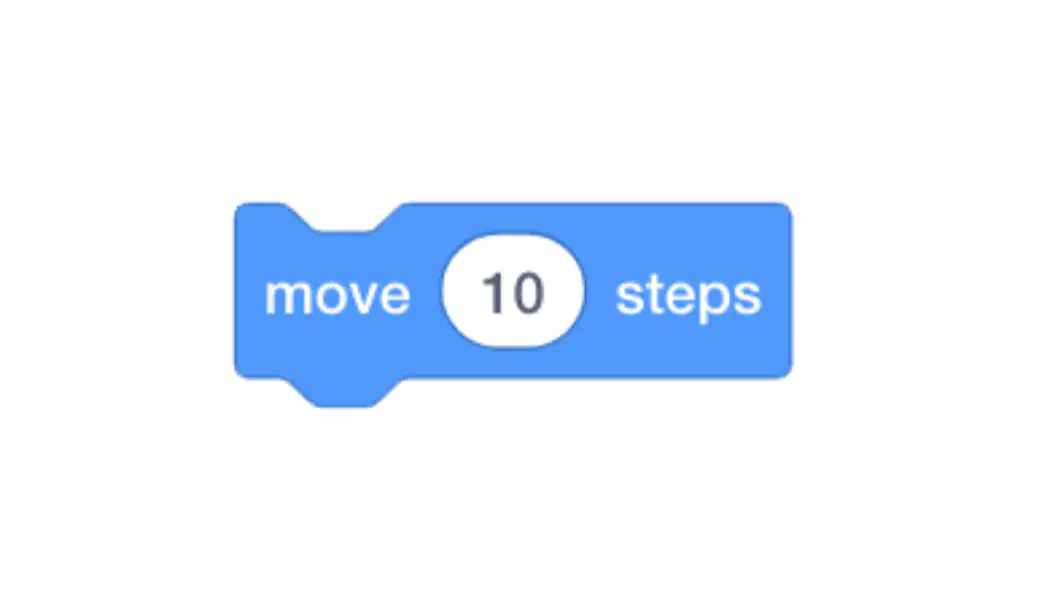
5. From code figure 2, what does this code block do?
(จากรูปโค้ดที่ 2 โค้ดบล็อกคำสั่งนี้ ใช้ทำอะไร)
Make it resize
ทำให้เปลี่ยนขนาด
Make the character change color
ทำให้ตัวละครเปลี่ยนสี
Make the character rotate in any direction.
ทำให้ตัวละครหมุนทิศทาง
Make the character move
ทำให้ตัวละครเคลื่อนที่
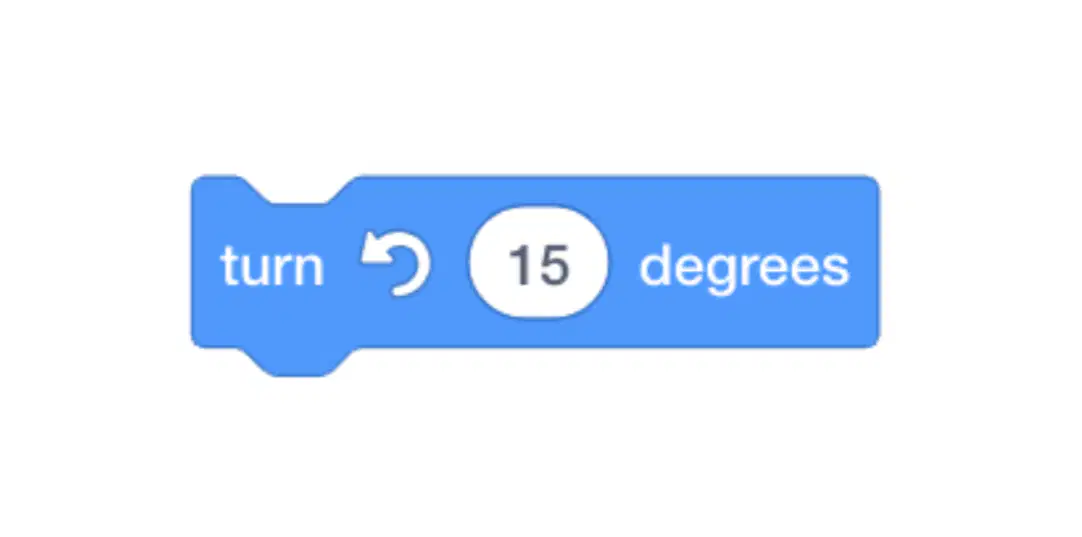
6. From code figure 3, what does this code block do?
จากรูปโค้ดที่ 3 โค้ดบล็อกคำสั่งนี้ ใช้ทำอะไร
Make it resize
ทำให้เปลี่ยนขนาด
Make the character change color
ทำให้ตัวละครเปลี่ยนสี
Make the character turn 15 degrees to the left.
ทำให้ตัวละครหันไปทางซ้าย 15 องศา
Make the character move
ทำให้ตัวละครเคลื่อนที่
7. Which one is the code block that makes a sprite do something in an endless loop?
ข้อใดคือ โค้ดบล็อกคําสั่ง ทำให้ตัวละครทําบางอย่างแบบวนซํ้าไม่รู้จบ
change color
forever
wait
move
8. Which code block makes a sprite speak?
โค้ดบล็อกข้อใด ทำให้ตัวละครพูดได้
change color
wait
say
move
9. Which code block is used to set position?
(โค้ดบล็อกข้อใด เอาไว้กำหนดตำแหน่ง)
go to x y
change size by
say
switch costume
10. Which one is the code block that makes a sprite move left or right?
ข้อใดคือ โค้ดบล็อกที่ ทำให้ตัวละครเคลื่อนที่ไปทางขวาหรือขวาได้
go to x y
change x
change size
switch costume
11. Which one is the code block that makes a sprite move up or down?
(ข้อใดคือ โค้ดบล็อกที่ ทำให้ตัวละครเคลื่อนที่ไปข้างบนหรือล่างได้)
change y
change x
change size
switch costume
12. Which one is the code block used to change the sprite's color?
(ข้อใดคือ โค้ดบล็อกที่ ใช้เปลี่ยนสีตัวละคร)
change y
change x
change size
change color effect
13. Which one is the code block used to change the sprite's costume?
ข้อใดคือ โค้ดบล็อกที่ ใช้เปลี่ยนท่าทางของตัวละคร
move
switch costume
change size
say
14. Which one is the code block that requires clicking the green flag to make the sprite with this code work?
ข้อใดคือ โค้ดบล็อกที่ ต้องกดที่..ธงสีเขียว เพื่อให้ตัวละครที่ใส่โค้ดนี้ทำงาน
switch costume
green flag
change size
say
15. Which is the code block that requires pressing the right arrow key to make the character with this code work?
(ข้อใดคือ โค้ดบล็อกที่ ต้องกดปุ่ม..ลูกศรที่ชี้ไปทางขวา. เพื่อให้ตัวละครที่ใส่โค้ดนี้ทำงาน)
say
green flag
change size
when right arrow key pressed
16. Which is the code block that requires clicking on the character to make the character with this code work?
(ข้อใดคือ โค้ดบล็อกที่ ต้องกดตัวละคร. เพื่อให้ตัวละครที่ใส่โค้ดนี้ทำงาน)
green flag
when this sprite clicked
say
when right arrow key pressed

17. From code figure 4, what type of command block group does the "say" block that makes the sprite speak belong to?
(จากรูปโค้ดที่ 4 โค้ดบล็อกที่ทำให้ตัวละครพูด say อยู่ในกลุ่มบล็อกคำสั่งประเภทใด)
Motion
Looks
Sound
Events
18. If we add a speech code to only one cat, will other sprites speak too?
(ถ้าเราใส่โค้ดพูดให้แมวแค่ตัวเดียว ตัวละครตัวอื่นจะพูดด้วยหรือไม่)
No
Unsure
Yes
Of course!
19. Which one is a benefit of the Scratch program?
(ข้อใดเป็นประโยชน์ของโปรแกรม Scratch)
Practice programming skills
ฝึกทักษะการเขียนโปรแกรม
Practice imagination
ฝึกการจินตนาการ
Practice design
ฝึกการออกแบบ
All are correct.
ถูกทุกข้อ
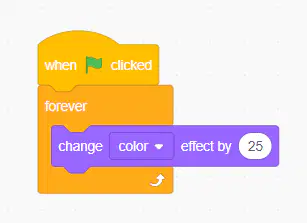
20. From code figure 5, when this program starts running, how will the sprite behave?
(จากรูปโค้ดที่ 5 เมื่อโปรแกรมนี้เริ่มทำงาน ตัวละครจะทำงานอย่างไร)
Change color 1 time
เปลี่ยนสี 1 ครั้ง
Change color 2 time
เปลี่ยนสี 2 ครั้ง
Change color 3 time
เปลี่ยนสี 3 ครั้ง
Change color forever
เปลี่ยนสีตลอดไป
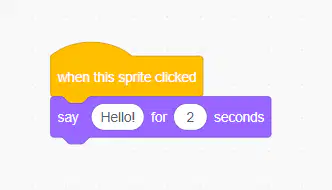
21. From code figure 6, where do we need to click for this program to start working, and what does this program do?
จากรูปโค้ดที่ 6 โปรแกรมนี้ เราต้องกดตรงไหน เพื่อให้โปรแกรมเริ่มทำงาน และโปรแกรมนี้ทำอะไร
Click the green flag and the character will say.
คลิกธงเขียว แล้วตัวละครจะพูด
Click on a character and they will say.
คลิกตัวละคร แล้วตัวละครจะพูด
Click on the character and it will change color.
คลิกตัวละคร แล้วตัวละครจะเปลี่ยนสี
Click on the green flag and the character will change color.
คลิกธงเขียว แล้วตัวละครจะเปลี่ยนสี
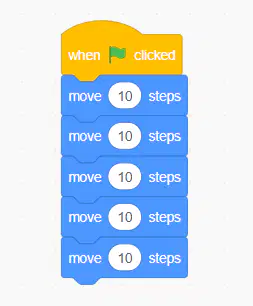
22. From code figure 7, which option can make this code shorter?
(จากรูปโค้ดที่ 7 สามารถทำให้โค้ดนี้สั้นลงได้ คือข้อใด)
Use the move code for just one block and change the number to 30.
ใช้โค้ด move แค่ 1 บล็อก เเล้วเปลี่ยนเลขเป็น 30
Use the move code for just one block and change the number to 40.
ใช้โค้ด move แค่ 1 บล็อก เเล้วเปลี่ยนเลขเป็น 40
Use the move code for just one block and change the number to 50.
ใช้โค้ด move แค่ 1 บล็อก เเล้วเปลี่ยนเลขเป็น 50
Use the move code for just one block and change the number to 60.
ใช้โค้ด move แค่ 1 บล็อก เเล้วเปลี่ยนเลขเป็น 60
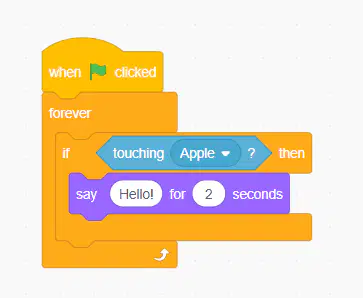
23. From code figure 8, if we put this code on the cat, what sprite name must the cat touch or collide with to say "Hello"?
(จากรูปโค้ดที่ 8 ถ้าใส่โค้ดนี้ให้แมว แมวจะต้องไปชนหรือสัมผัสกับตัวละครที่ชื่ออะไร เพื่อให้พูดคำว่า “Hello”)
Cat
Apple
Ball
Dog
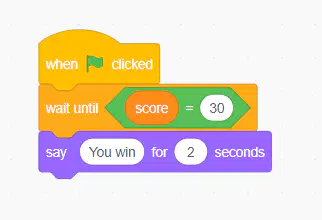
24. From code figure 9, what score must we achieve in the game to say "You win"?
(จากรูปโค้ดที่ 9 เราต้องเล่นเกมส์ให้ได้ Score เท่าไรจึงจะพูดคำว่า “You win” ออกมา)
40
30
-30
50
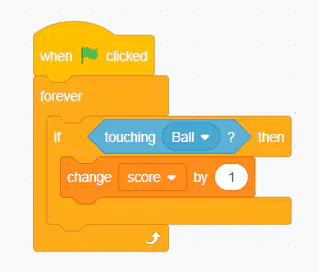
25. From code figure 10, if it actually touches or collides with Ball, what will happen?
(จากรูปโค้ดที่ 10 ถ้าชนหรือสัมผัสกับ Ball ขึ้นจริง จะเกิดอะไรขึ้น)
Deducted 1 score
โดนลดคะแนน 1 คะแนน
Deducted 2 score
โดนลดคะแนน 2 คะแนน
Get 1 additional score.
ได้คะแนนเพิ่ม 1 คะแนน
Get 3 additional score.
ได้คะแนนเพิ่ม 3 คะแนน

