
 Worksheets
MS Word, Excel, Powerpoint
Total questions: 40
Worksheet time: 37mins
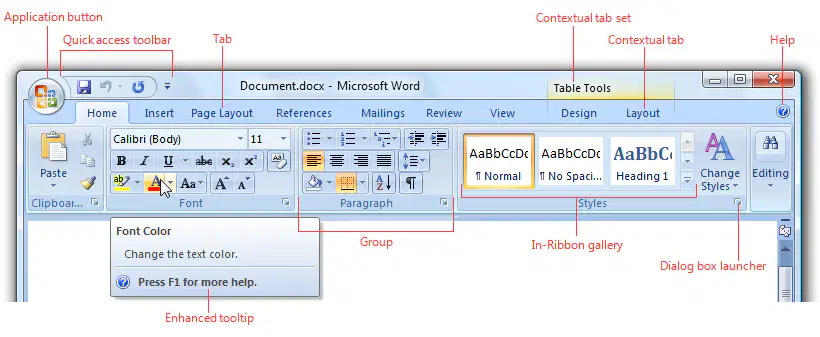
What is the purpose of the Ribbon in MS Word?
To store all user data and preferences.
To create complex documents with advanced formatting.
The purpose of the Ribbon in MS Word is to provide a user-friendly interface for accessing tools and commands.
To manage system settings and configurations.
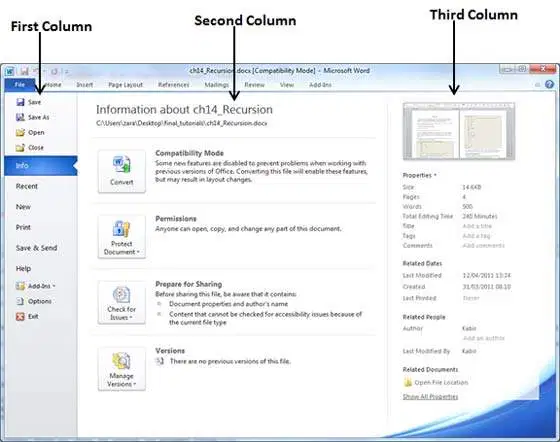
What is the Backstage View used for in MS Word?
To create charts and graphs in MS Word.
To format text styles and fonts in the document.
To insert images and shapes into the document.
The Backstage View is used for managing files and document settings in MS Word.
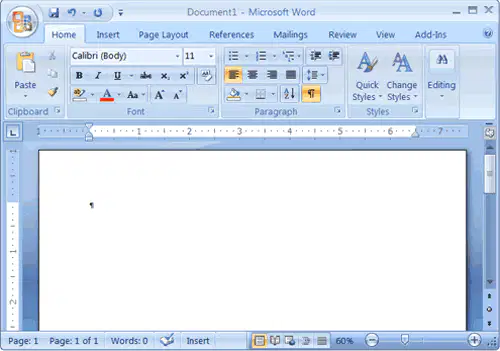
How do you insert an image into a Word document?
Use the 'File' menu and select 'Upload Image' option.
Right-click and select 'Add Image' from the menu.
Drag and drop the image directly onto the document.
Use the 'Insert' tab, select 'Pictures', and choose your image.
How can you resize an image in MS Word?
Right-click the image and select 'Delete' to resize.
Use the 'Insert' tab to resize the image.
Copy the image and paste it in a new document to resize.
Select the image and drag the corner handles or use the 'Format' tab to resize.
How do you edit a shape once it is created in Word?
Select the shape, then use the Format tab under Drawing Tools to edit it.
Double-click the shape to remove it.
Right-click the shape and select 'Delete'.
Use the Insert tab to create a new shape.
What is the difference between Cut, Copy, and Paste?
Cut inserts content, Copy moves content, and Paste duplicates content.
Cut duplicates content, Copy removes content, and Paste deletes content.
Cut removes content, Copy duplicates content, and Paste inserts content from the clipboard.
Cut and Copy both remove content, while Paste only displays content.
What happens to the original text when you use Cut?
The original text is saved to a file instead of the clipboard.
The original text is removed and placed in the clipboard.
The original text is duplicated in the document.
The original text is highlighted but remains in place.
The default orientation of a page in Ms-Word is_____________.
Landscape
Book
Portrait
None of these
Keyboard shortcut to underline the selected text is
Ctrl + U
Shift +U
Ctrl + I
Shift + I
The shortcut command of ‘save’ in word:
Ctrl+A
Ctrl+V
Ctrl+S
Ctrl+P
Choose all answers that are Tabs on the Ribbon
File
Home
Paragraph
Font
To create a NEW file, which of the following is the keyboard shortcut?
Ctrl + O
Ctrl + N
Ctrl + V
Alt +F4


What is the process for creating a table in MS Word?
File tab > New > Table
Insert tab > Table > select number of rows and columns
Home tab > Insert > Table
Layout tab > Design > Table

What are the white circles surrounding the triangle called?
little circles
corners
sizing handles
click and drag
What is the difference between a workbook and a worksheet?
A workbook is the actual file that contains the worksheets, which turn contain the data.
A workbook is a section that contains the worksheet reports; both are contained in a spreadsheet.
A program using a table comprising of rows, columns and cells.
MS Word
MS PowerPoint
MS Outlook
MS Excel
What is an EXCEL Spreadsheet used to make?
Calendar
Publisher
Graph
Card
Which new workbook option displays the title, Book1, when it is created?
A blank workbook.
A workbook created from a template.
Which is NOT a term used in Excel?
Workbook
Worksheet
Cell
Document
How are ROWS in MS EXCEL spreadsheet named?
numbers
letters
cells
columns
What is the symbol for division when using MS EXCEL.
/
+
*
-

What is the name of the cell that is colored blue?
A
B
2B
B2
What does every formula in MS EXCEL start with?
+
-
=
*

What is the address of this cell?
B3
3B
AB3
None of them is correct
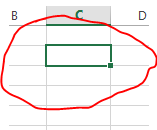
Define Cell?
The dark bordered box in excel.
A box in Excel that has formulas.
The intersection of a column or row in a worksheet or table.
Fx Bar where you input data.
Which of the following is not a correct cell address?
2D
A27
BB15
All of the above


Here in Excel, Which button will you select to calculate total marks ?


How do you make a cell into the active cell
Cells are always active
Click INSERT Cell
Click on the Cell
Click the ACTIVE button
____________is a single unit of a PowerPoint Presentation.
Layout
Slide
View
Animation
________bar shows the name of the presentation.
Quick access toolbar
Title
Status
Name
________-button is used to exit from the PowerPoint Application.
Ctrl
Alt
Close
Quit
Collection of slides is called Presentation.
False
True

