
 Worksheets
51-100
Total questions: 50
Worksheet time: 25mins
MS Access program works with …
databases
spreadsheets
presentations
documents
movies
Program works with databases…
MS Access
MS PowerPoint
MS Word
MS Explorer
MS Excel
MS Access. Important properties of fields:
type and size
units
requests
shape and size
report and chart
MS Access. Each table has:
structure
report
macros
module
form
The … is not an Access database object.
scheme
report
macros
inquiry
form
MS Access. "Reports" are used for:
creating of document for printing
fetch of data from one or more tables
creating of document for viewing
ensuring of relationships between tables
entering and viewing of data
MS Access. For creating, searching, and sorting of the data bases are used:
database management of system
library database modules
world wide web
computer-aided design system
automatic control systems
MS Access - it is:
program for creation and processing of databases
software for creating and processing of text
spreadsheets
editing
operating system
MS Access. For the name of the field "Cost" and "Price", the type is selected:
«Monetary»
«Textual»
«Numeral»
«Memo»
«Logical»
MS Access. For the name of the field "Date of Birth", the type is selected:
«Date/Time»
«Monetary»
«Textual»
«Numeral»
«Memo»
MS Access. For the name of the field "Name" and "Position", the type is selected:
«Textual»
«Monetary»
«Numeral»
«Memo»
«Logical»
MS Access. For the name of the field "number of drugs", the type is selected:
«Numeral»
«Textual»
«Monetary»
«Memo»
«Logical»
MS Access. Command of data systematization in alphabetical order in the "Surname":
sorting
filtering
search
archiving
preview
MS Access. Button for calling of reference:
«F1»
«F10»
«F12»
«Enter»
«Esc»
In MS Access is not database:
Art book
Address Book
Phonebook
List of 1st year students
List for registration of votes
MS Access. Regime of fields description and their type selection:
constructor
records
window
table
layout
MS Access. Moving button between the table columns:
«Tab»
«Esc»
«Ctrl»
«And»
«Shift»
MS Access. Function of the "Right arrow with an asterisk" button:
entering of a new record
delete records
change the view mode
transition in the database window
sorting database
MS Access. Relational database consists of:
multiple tables and relations between them
one table and forms
one table and query
one table and reports
multiple reports and links between them
MS Access. Show data and results on print operations mode allows:
«Reports»
«Table»
«Request»
«Macros»
«Form»
MS Access. Operations of dialing, editing, filtering, sorting and retrieval are performed in the mode:
«Table»
«Reports»
«Request»
«Macros»
«Form»
MS Access. The table is created with the command:
"Create" - "tables"
"File" - "tables"
"Fields" - "tables"
"Table" - "Table Properties"
"Home" - "tables"
MS Access. Connections between tables are displayed in the window:
data scheme
report constructor
panel of substitutions
designer table
form design
MS Access is:
a database management system
a browser
an operating system
an image editor
a word processor
MS Access files have the extension:
*.accdb
*.xlsx
*.mp3
*.docx
Which data type in MS Access is used for storing graphic objects?
OLE Object
Number
Memo
Text
Currency
A table in MS Access is:
a place to store data in the form of records and fields
a visual element
a form for data entry
a tool for creating reports
a query wizard
A form in MS Access is used for:
entering data
searching for data
storing data
creating reports
running macros
Which SQL function in MS Access is used to select data?
SELECT DELETE
INSERT
UPDATE
CREATE
The Lookup Wizard in MS Access is used for:
simplifying data entry through a dropdown list
creating queries
deleting records
changing the data format
creating reports
How does a "Lookup Field" differ from a regular text field?
it provides a dropdown list of values
only numbers can be entered in it
it doesn’t display data
text cannot be entered in it
it automatically generates values
In MS Access, the object used for visualizing data based on queries is called:
report designer
form
wizard
macro
Defining the data type for fields in MS Access allows:
determining how data is stored and processed
reducing the database size
simplifying the addition of new tables
speeding up the database
improving the appearance of the form
Filters in MS Access are used for:
finding and selecting only the required data
combining multiple tables
sorting data
creating a new table
deleting data
Which data type should be used for storing dates in MS Access?
Date/Time
Memo
Text
Number
OLE Object
The primary function of relational databases is:
storing data in tables with relationships between them
storing data in graphs
managing files and directories
creating text files
displaying images
What elements can be used to create a query in MS Access?
fields from multiple tables and criteria
only fields from one table
only data from reports
only fields with numerical data
only text fields
Relationships between tables in an MS Access database are used to:
avoid data duplication and optimize searching
improve the user interface
increase the amount of data in tables
create reports
reduce the number of tables
A Primary Key in an MS Access table:
identifies each record as unique
stores duplicate data
links tables to external sources
is used for calculations
has no importance
To limit the set of values for a table field in MS Access, you need to:
create a lookup with a dropdown list
set the data type to "Memo"
enable data validation
enable Design View
use the Compact and Repair function
How do you import data from an Excel file into MS Access?
Use the "Import Data" feature from the External Data tab
Use the "Compact and Repair" tool
Enter the data manually
Create a new table
Use macros
To automate the process of entering data into an MS Access database, the tool used is:
forms
queries
reports
filters
the Properties window
The MS Access tool that helps create a report showing employee data with their salaries is:
Report Wizard
Query Wizard
Navigation Pane
Lookup Wizard
Form Designer
MS Excel. Toolbar using for changing the data format in a separate cell:
«Cells»
«Editing»
«Styles»
«Font»
«Clipboard»
MS Excel.For highlighting of an entire column it’s necessary:
left-click on the column letter
left-click on the line number
define the command "Insert" - "Select"
right-click on the line number
command set "Home" - "Select"
Mask of file group selection with the extension «.xlsx»:
*. xlsx
.xlsx
Xlsx *
xlsx
Xxls *
MS Excel.The symbol for the determination of the absolute cells addressing:
«$»
«@»
«&»
«^»
«*»
MS Excel.Current cell contents is reflected:
in the formula bar
in the formula wizard
in the status bar
on the Quick Access Toolbar
toolbar
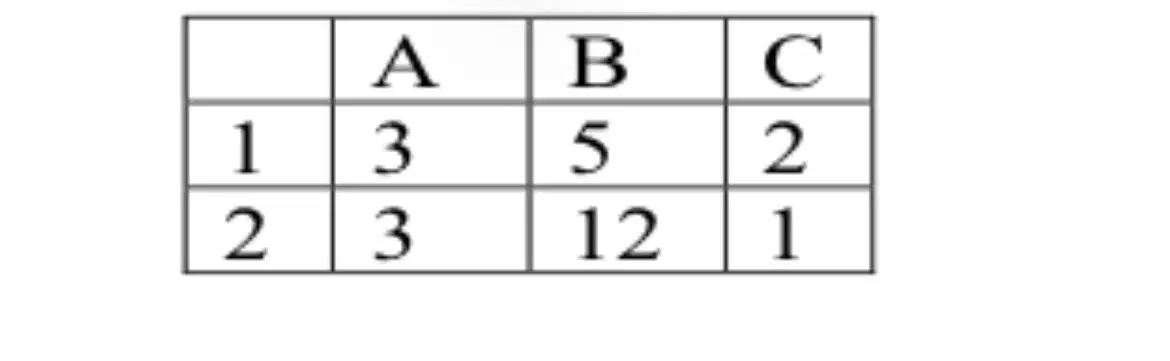
MS Excel.The number of cells are included in the cells range A1:С1:
6
5
4
3
2
MS Excel. In the spreadsheet cannot be deleted:
cell name
column
line
cell contents
sheet

