
 Worksheets
Photography Final 2025
Total questions: 83
Worksheet time: 41mins

option

What is this tool? What does it allow you to do?
Band-aid; allows you to patch up an area by using the surrounding area
Healing brush; allows you to change a selected are by using different effects
Eraser; erases anything on the selected layer
Healing brush; allows you to change a select area by replacing using the area surrounding it

What is this tool? What does it allow you to do?
Crop; allows you to change the canvas size
Crop; allows you to change the layer size
Arrow; allows you to select and delete certain areas based on color
Crop; allows you to change the color of the canvas

What is this tool? What does it allow you to do?
Crop tool; allows you to select a rectangular area on the entire canvas
Rectangle Marquee tool; allows you to select an area in a rectangular shape
Oval Marquee tool; allows you to select a area in a rectangular shape
Lasso tool; allows you to select and area of your choice

What is this tool? What does it allow you to do?
Move tool; allows you to move the canvas
Hand tool; allows you to re-position the canvas
Crop tool; allows you to resize the layer
Move tool; allows you to move the selected layer
Shortcut to deselect (remove dancing ants)
Ctrl + D
Ctrl + T
Ctrl + V
Ctrl + R
What tool or tools can you use to remove some acne from a face?
Healing brush
Spot healing brush
Clone stamp
Duplicate stamp
Best resolution for print documents.
54
72
150
300
Best resolution for web graphics:
54
72
150
300
Tool that lightens areas in an image.
Burn tool
Lighten tool
Dodge Tool
Lightener Tool
Tool that darkens an image.
Dodge Tool
Darken Tool
Burn Tool
Burner Tool

Which hardness level will give you a hard brush?
100%
25%
0%

What type of brush is this?
Hard brush
Soft brush
Which tool creates a layer mask?


Which tool allows you to select different types of adjustment layers?

Which of the following tools would be best to get rid of skin blemishes in a photo?
Healing brush
Quick selection
Pen tool
Burn tool
Which setting adjusts the amount of depth of field (or Bokeh) in the image?
ISO
Aperture
Shutter Speed
Which setting changes your camera sensor's sensitivity to light?
Shutter Speed
Aperture
ISO
Which setting changes the speed in which the shutter opens and closes?
Shutter Speed
Aperture
ISO
If I raise the number of my ISO, my exposure....
gets brighter
gets darker
doesn't change
If you want a brighter image, would you change your aperture to a higher number F-Stop or lower number F-Stop?
Higher
Lower
Doesn't Change
Which setting is measured in fractions of a second?
Shutter Speed
ISO
Aperture
F-stop
Which aperture has the largest opening, letting in the most light?
3.5
22
11
Which shutter speed would freeze the motion of a moving subject: 1/20 or 1/1000?
1/20
1/1000
Since our camera doesn't always know what we want from our image, it's a photographers goal to shoot in which mode?
Programmed Mode
Aperture Priority
Manual
Shutter Priority
If my exposure looks too bright (over exposed), I could darken it by....
Lowering my ISO
Raising my ISO
If my exposure looks too bright (over exposed), I could darken it by....
Raising my F stop number
Lowering my F stop number
If my exposure looks too dark (under exposed) at a shutter speed of 1/500,
I could brighten it by changing the shutter speed to....
1/200
1/1000
1/640
1/4000

If you wish to freeze the motion of a fast-moving subject, which shutter speed would you use?
1/500 second
1/30 second
2/1 second

Which shutter speed would be best to create motion blur?
1/1000 second
1/20 second
1/200 second
What is another name for f stop?
Sensor
Pixel
Aperture or f number
Shutter speed

Which of the following shutter speeds would be more likely to FREEZE motion?
1/800
f/2.8
4”
f/22

What is wrong with the exposure of this photo?
Overexposed
Underexposed
Nothing! It is perfectly exposed.
You are at a basketball game taking photos of the players playing basketball and wanted to freeze the motion, what type of Shutter Speed would you use?
Frozen
Fast
Slow
Super Speed
Which of the following is measured in fractions of a second
ISO
Aperture
Shutter Speed

What part of the Exposure Triangle does the following values/examples belong to?
Aperture
Shutter Speed
ISO

Which part of the Exposure Triangle does the following values/examples belong to?
ISO
Aperture
Shutter Speed

What type of Depth of Field is being utilized in this photo?
Deep
Shallow
Medium

What would be the best solution to fix the exposure of this photo?
Slow down the Shutter Speed
Speed up the Shutter Speed
Change the depth of field to shallow
Add a shade over them to hide the light

Which f/stop would this most similar to?
f/1.8
f/2.8
f/11
f/32
What is the primary function of a camera obscura?
To capture and store digital images
To project an image onto a screen through a small hole
To print photographs directly from the lens
To enhance the brightness of photographs
What was a significant feature of Polaroid cameras when they were introduced?
They could take color photographs.
They allowed users to instantly develop and view their photographs.
They were the first digital cameras.
They had built-in flash.
Which of the following best describes Ansel Adams' photography?
Abstract and surreal
Iconic landscape photography with technical excellence and a deep connection to nature
Urban street photography
Portrait photography
What film format did the Leica camera popularize?
120mm film
35mm film
50mm film
70mm film
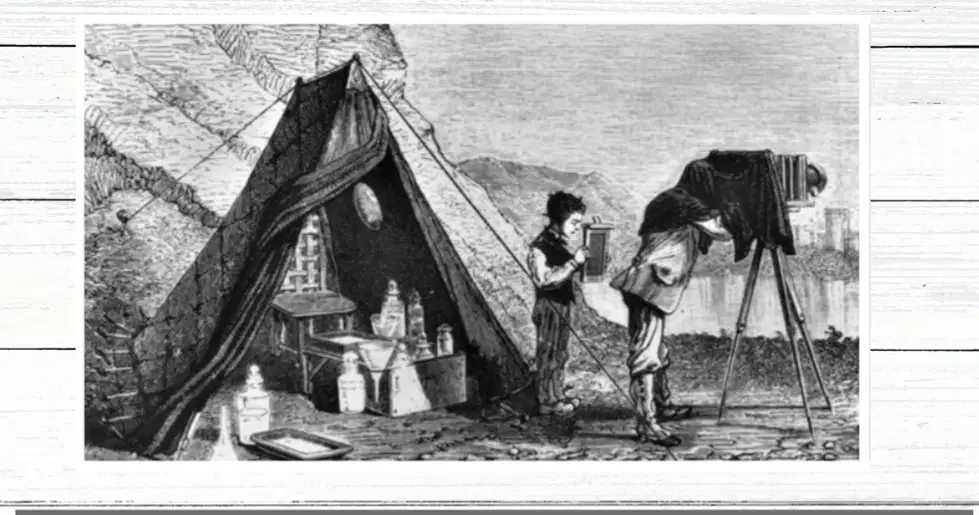
What was required for the wet plate collodion process to produce images?
A) A portable darkroom
B) A digital camera
C) A computer
D) A smartphone
What was required to prepare the silver-plated copper plate for the daguerreotype process?
It had to be heated
It had to be painted
It had to be coated with light sensitive chemicals, then cleaned and polished
It had to be frozen

Who unveiled the daguerreotype, the first commercially successful photographic process, in 1839?
Thomas Edison
Louis Daguerre
Alexander Graham Bell
Nikola Tesla


This photo is an example of using
Framing
Rule of Thirds
Aperture
Negative Space

This photo is an example of using
Leading Lines
Golden Triangle
Contrast Lighting
Focal Length

This photo is an example of...
Dynamic Tension
Color Combination
Rule of Odds
Frame Within a Frame
Foreground Interest

What composition rule is BEST being shown in this photograph?
Leading Lines
Contrast
Asymmetrical Balance
Which one best shows the composition rule of symmetry?


This photograph is an example of...
Rule of thirds
Patterns and repetition
Worms eye
Depth of field

What type of composition is displayed in this photo?
Rule of Space
Framing
Diagonals and Triangles
Negative Space

What type of composition is displayed in this photo?
Golden Ratio
Framing
Cropping
Leading Lines

In photo B, the photographer
Waited for the athlete to walk into a better background.
Got down low to isolate the foreground against a clear background.
Photoshopped the trees out of the background.
Made a mistake with his lighting.
Ctrl + Z
Zoom In
Undo
Redo
Paste
Ctrl + Shift + Z
Redo
Crop Tool
Eraser
Undo
Ctrl + T
Deselect
Select Multiple Items
Zoom Out
Free Transform
Ctrl + +
Zoom Out
Zoom In
Copy
Cut
Ctrl + -
Adjust Brush/Eraser Size
Text Tool
Zoom Out
Move Tool
Ctrl + C
Copy
Cut
Paste
Crop Tool
Ctrl + X
Hand Tool
Zoom In
Undo
Cut
Ctrl + V
Select Multiple Items
Paste
Copy
Free Transform
Hold Shift
Select Multiple Items
Eraser
Adjust Brush/Eraser Size
Text Tool
E
Paste
Redo
Eraser
Move Tool
V
Hand Tool
Undo
Move Tool
Zoom In
C
Zoom Out
Cut
Copy
Crop Tool
T
Free Transform
Text Tool
Select Multiple Items
Eraser
H
Hand Tool
Text Tool
Crop Tool
Move Tool
[ or ]
Paste
Free Transform
Zoom In
Adjust Brush/Eraser Size
What is light painting?
The art of creating photos by using a stationary light source to capture images in the dark.
The art of creating photos by setting long exposure times on a camera and using a moving light source to “paint.”
The art of creating photos by using a flash to capture images in low light conditions.
The art of creating photos by using a camera with a fast shutter speed to capture moving lights.
Why is a sturdy tripod important for light painting photography?
To provide stability for the photographer while painting with light.
To allow for quick adjustments to camera settings during light painting.
To capture moving objects with precision in low light conditions.
To keep the camera still during long exposure times for light painting.
What tool do you use to create light painting photographs?
a) Paintbrush
b) Flashlight
c) Pencil
d) Crayon

