
 Worksheets
Mid Term Review (HTML Basics and SkillStruck Units 1-3
Total questions: 80
Worksheet time: 7mins
Which of the following computer languages gives a website its structure (the bones of the website)?
HTML
CSS
Java
Javascript
Which of the following computer languages dresses up the website (gives it design and visuals)?
HTML5
CSS
Java
Javascript
Which of the following computer languages adds more functions to the website and makes it more interactive?
HTML5
CSS
Java
Javascript
What does the "DOCTYPE" tell you?
What type of HTML we are using.
How to type a document
Where the images should go
What type of computer you are using
Which section of an HTML file will not display on the actual webpage?
html
body
head
foot
An attribute is always in the ____________.
content
opening tag
closing tag
head section
Which is the format attributes follow?
<name=value>
"name=value"
name=<value>
name="value"
Which tag in the head section will display on the tab at the top of the webpage?
heading
html
head
Fill in the building blocks and essential code line we have learned.
<!DOCTYPE html>
< (a) >
< (b) >
< (c) >
</head >
< (d) >
</body>
<_ (e) >
Which meta tag allows the webpage to scale to the width of the device the user is accessing it from?
frame-width
viewscape
viewport
portview
Which is the proper way to write an h1 element
<h1>Hello</h1>
<h1>"Hello
{h1}Hello{/h1}
<h1>Hello<h1>
What is the proper closing tag for the smallest default header size?
</h1>
</h6>
<h1>
<h6>
Match the following entities
<
<
>
>
&
&
"
"
©
©
Select all of the following that are meta tags.
description
keywords
body
author
charset
In the code below, which word is CSS the value?
<h1 style="color:blue;">Hello</h1>
h1
style
color
blue
What do child elements and parent elements refer to in HTML?
The order in which elements appear in the code.
Elements with a higher precedence in styling.
Elements that have special attributes.
Elements that are nested inside other elements.
What property is used to change a font?
font-family
font
font-group
font-style
Which property is used to change the size of the font of an element?
font-size
font-height
font-family-size
size
Image is what type of element? Select ALL tha apply.
empty
container
block
inline
void
Paragraph is what type of element? Select ALL tha apply.
empty
container
block
inline
void
Which is the correct way to type a paragraph tag?
paragraph
par
pg
p
Inside what element do anchor elements belong?
title
head
h1
body
Which semantic element typically has a title name or logo and is commonly positioned at or near the top of a webpage?
main
article
section
header
Which tag will create a line across the page of your website?
lr
line
hr
br
Which of these elements is needed to make an ordered list? Select 2 that apply.
ol
ul
li
il
list
By default, an unordered list item will automatically have what at the beginning?
A lowercase letter
A number
A roman numeral
A bullet
Which of the following is NOT a position that can be used in text align?
center
left
right
top
Select the correct syntax to align text to the center.
<h2 style="text-align:center;">Hello</h2>
<h2 style=text-align:center;>Hello</h2>
<h2 style="align-text:center;">Hello</h2>
<h2 style=align-text:center;>Hello</h2>
The target="_blank" attribute opens the link in
the same tab
a new window
a new tab
the browser determines between a new tab or a new window
Every anchor element should have a ______ attribute.
src
href
meta
name
Every image element should have which 2 attributes?
src
href
meta
name
alt
The following is an example of what kind of link? Select 2 that apply.
<a href="puppy.html">Puppy Page</a>
internal
external
relative
meta
absolute
The following is an example of what kind of link? Select 2 that apply. <a href="https://www.youtube.com">YouTube</a>
internal
external
asbolute
meta
relative
What is the name of the folder that this image is stored in?
<img src="dogs/puppy.png" alt="cute dog">
dogs
puppy
it is not in a folder
cute dog
What should the alt text hold?
The author's name
The source URL of the image
The image's file size
A brief description of the image
If you see
<style>
body {color: blue}
</style>
what type of styling is being used?
HTML
Inline CSS
Internal CSS
External CSS
In body {color:blue; }, what is color:blue; ?
selector
attribute
declaration
property
In body {color:blue; }, what is body ?
selector
attribute
declaration
property
Which of the following is correct code?
<button onclick=alert('Hello World')> Click Me</button>
<button onclick="alert('Hello World')">Click Me</button>
<button onclick=alert(Hello World)>Click Me</button>
<button onclick="alert(Hello World)">Click Me</button>
Which HTML elements can put a video on the website? Select ALL that apply.
video
frame
media
film
iframe
Which of the following is proper code?
<video> <source src="soda.mp4" type="video/mp4"> </video>
<video> <source src:soda.mp4; type:video/mp4;> </video>
<video> <src source="soda.mp4" type="video/mp4"> </video>
<iframe> <source src="soda.mp4" type="video/mp4"> </iframe>
What are the two tags required to make an image a link? Select ALL that apply.
<a>
<link>
<img>
<pic>
<image>
Inside which HTML tag do I put my <link> tag that links to a CSS file?
<title>
<head>
<body>
<h1>
What are marquees used for?
Displaying static text on the screen
Showing moving text in different directions
Highlighting images on a webpage
Creating interactive animations
What does the "direction" attribute determine?
The way the marquee moves and where it stops (keeps moving, back and forth, across then stop)
How fast the marquee moves
The text inside the marquee
Where the marquee starts from and goes to (left, up, down, right)
Which of the following is proper code?
h1 { font-family:impact; color:orange;
h1 ( font-family:impact; color:orange; )
h1 { font-family:impact; color:orange; }
h1 { font family:impact; color:orange; }
Which is proper code?
<link type="stylesheet" rel="text/CSS" href="mystyles.css">
<link rel="stylesheet" type="text/CSS" href="mystyles.css">
<a rel:"stylesheet" type:"text/CSS" href:"mystyles.css">
<a rel="stylesheet" type="text/CSS" href="mystyles.css">
In which type of CSS is the "magic" word style used as part of a separate file name and referenced in the link tag?
Inline CSS
Internal CSS
External CSS
All of them.
Which of the following text-shadow values will create a blurry shadow?
text-shadow: 5px 10px gray;
text-shadow: 5px 5px 10px gray;
text-shadow: 10px 10px gray;
text-shadow: 5px 5px gray;
How do you round corners in HTML/CSS?
corner-radius
rounded-corner
border-radius
corner-round
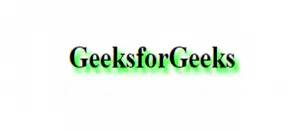
What property could be used to make the effect in the image?
text shadow
font shadow
box shadow
family shadow
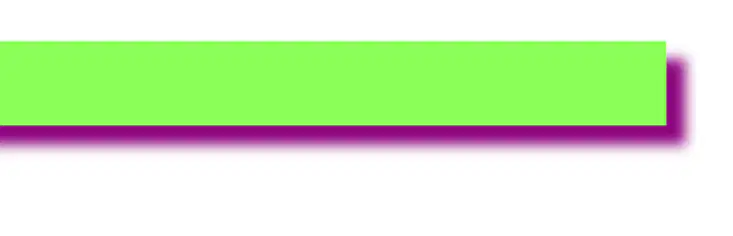
What can you use to make this effect?
text shadow
font shadow
box shadow
family shadow
What do you put before a color code to show it is in hexadecimal?
#
.hex
.
@
What do you put before a selector to show that you are calling a class in CSS?
#
.cl
.
@
What would you type to create a class called marker?
class:marker;
.class=marker;
class="marker"
class-marker
Which pseudo class would be used for an unvisited link?
link
visited
hover
active
Which is the correct syntax to style a hover effect on a header element?
h1hover
hover:h1
h1:hover
hover-h1
Which is a proper HTML comment?
<-- Comment -->
<!-- Comment -->
/* Comment */
// Comment //
Which is a proper CSS comment?
<!-- Comment -->
*/ Comment /
/* Comment */
// Comment //
What is the space between the element and the border called?
padding
margin
border
content

If I wanted to add more blue space in the picture, what element would I use?
padding
margin
border
content
What property is required to create a gradient?
background-image
background-gradient
gradient
gradient-image
Which of the following is coded correctly?
a::link
a::visited
a::first-letter
a::after
What element makes an "invisible" rectangle that starts a new line and takes up the full width of the container on your page you can style using CSS but has no other meaning?
span
heading
head

In the picture, blue and brown were styled using what type of element? <________>
div
heading
a
How can you make all buttons on a website look uniform using CSS?
Use pseudo-selectors
Use different class names for each button
Use the same class name for each button
Use JavaScript to style the buttons
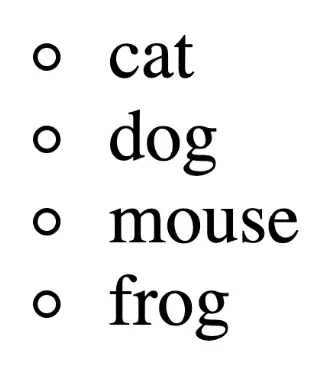
What is the proper code to style the list as shown in the image?
list-style: disc;
list-style: circle;
style-list: disc;
style-list: circle;
What 2 elements can be used for icons?
<icon>
<i>
<span>
<sp>
Select the 2 necessary items to have an icon work on your webpage.
a div element in the body section
an i element in the body section
a link element in the head section
a link element in the body section
a meta element in the head section
Which of the following are border-style options? Select all that apply.
invisible
dashed
round
solid
outset
Which of the following properties can you abbreviate in the border shortcut?
border-color
border-width
border-thickness
border-type
border-style
If two inline elements are placed one after another in code, how will they appear?
Hidden until hovered with the mouse
Stacked vertically with big gaps
Side by side in the same line
On separate lines across the page
Which CSS position value is the default and keeps elements in normal document flow without offsetting by top, right, bottom, or left?
relative
static
fixed
absolute
If you want a heading to stay visible at the same spot from the beginning and while the page scrolls, which position value should you use?
static
fixed
absolute
relative
Which of the following is correct snytax for a media query?
@media (max-width: 400px) { body { background-color:green; }
.media (min-width: 540px) { body { background-color:green; }
@media (min-width: 768px) { body ( background-color: blue;) }
.media {max-width: 400px} { body { background-color:green; }
How many columns are in the following example?
.container { background-color: navy; display: grid; grid-template-columns: 20px auto auto auto; }
2
3
4
5
In CSS Flexbox, how are items laid out by default?
Column-wise (up and down)
Diagonally
Row-wise (left to right)
In a grid
What is a limitation of using Flexbox for layouts?
It cannot handle one-dimensional layouts
It cannot handle two-dimensional layouts
It cannot handle flexible layouts
It cannot handle responsive designs

