
 Worksheets
ÔN TẬP TIN LỚP 4
Total questions: 28
Worksheet time: 14mins
What is the first step when searching for images on the Internet using keywords?
Click on the image you want
Type the keywords into the search box
Save the image to your computer
Print the image
Which of the following is NOT a step in saving an image from the Internet to your computer?
Right-click on the image
Select "Save image as..."
Type keywords in the search box
Choose a location to save the image
Why is it important to use specific keywords when searching for images online?
It helps find more accurate results
It makes the computer faster
It saves the image automatically
It prints the image
If you want to insert an image you found online into a PowerPoint presentation, what should you do after saving the image?
Delete the image
Open PowerPoint and insert the saved image
Print the image
Search for the image again
Which of the following is a famous landscape in Vietnam that is recognized by UNESCO?
Ha Long Bay
Eiffel Tower
Statue of Liberty
Mount Everest
What is the purpose of practicing searching for information about Ha Long Bay on the Internet?
To learn how to find information online
To play games
To watch movies
To print documents
What is the first step to rename a file or folder in File Explorer?
Right-click the file or folder
Double-click the file or folder
Drag the file or folder
Delete the file or folder
What happens when you use the "Copy" and "Paste" commands on a file?
The file is duplicated in a new location
The file is deleted
The file is renamed
The file is moved to a new location
Why is it important to delete unnecessary files and folders from your computer?
To free up storage space
To make the computer slower
To increase the number of files
To change the file names
If you want to copy a file from your computer to a USB drive, which steps should you follow?
Copy the file, then paste it into the USB drive folder
Delete the file, then paste it into the USB drive folder
Rename the file, then paste it into the USB drive folder
Move the file, then paste it into the USB drive folder
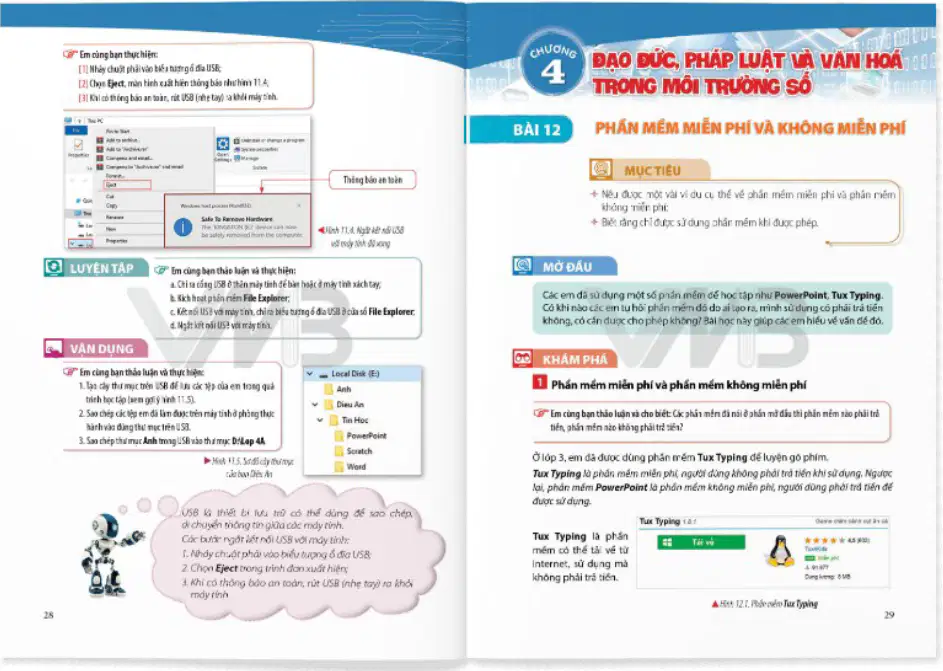
Which of the following is an example of free software?
Tux Typing
Microsoft Word
Adobe Photoshop
Windows OS
Which software is mentioned as a paid software in the material?
PowerPoint
Tux Typing
Notepad
Paint
What is the purpose of Notepad software?
To edit and save text files.
To create presentations.
To play music.
To browse the internet.
What is the main purpose of saving a Word document?
To keep your work safe and be able to open it later.
To print the document immediately.
To delete the document.
To change the font style.
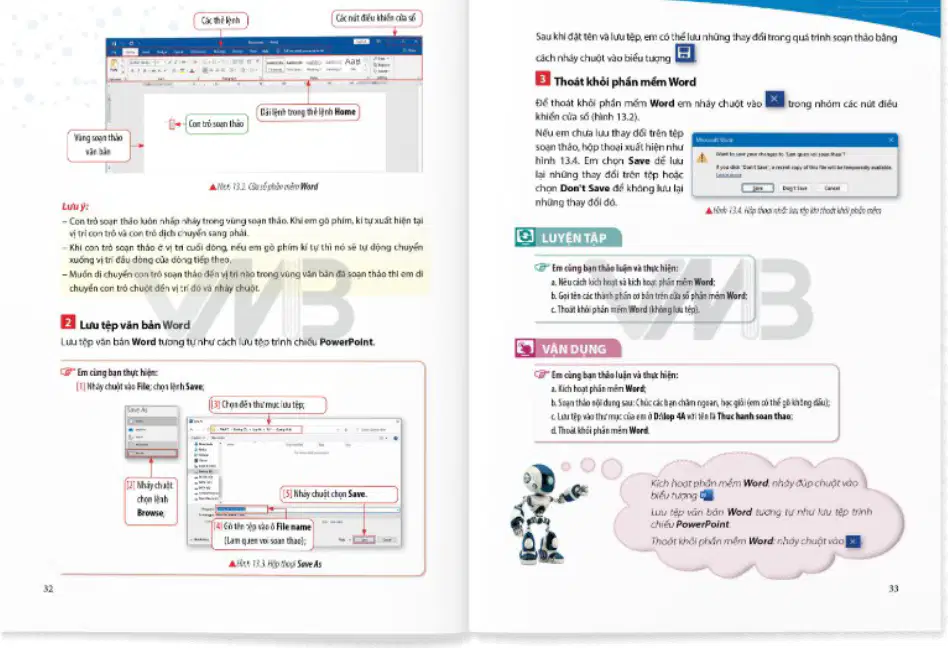
Which button do you click to save a file in Word?
Save
Open
Close
What should you do before closing Word to avoid losing your work?
Save the document.
Change the font color.
Insert a picture.
Print the document.
How can you type Vietnamese characters in Word?
By using a Vietnamese typing tool like Unikey or Vietkey.
By changing the font to bold.
By copying and pasting from the internet.
By using the Print option.
If you want to change the language input to Vietnamese, what should you do?
Use a Vietnamese typing tool and select the correct mode.
Change the font color to red.
Insert a table.
Print the document.
If you want to change the size of an image in Word, what should you do?
Drag the corners of the image
Double-click the image
Right-click and select Print
Click the Home tab
Why might you want to insert an image into a Word document?
To illustrate the text
To delete the text
To print the document
To save the document
What is the purpose of the "Insert Picture" feature in Word?
To add images to your document
To delete images from your document
To print your document
To save your document
What is the main objective of Lesson 16 in the learning material?
To learn how to copy, move, and delete text in a document.
To learn how to draw pictures.
To learn how to solve math problems.
To learn how to write stories.
What is the first step to copy a block of text in a document?
Select the block of text.
Print the document.
Change the font color.
Save the document.
Which group in the Home tab contains the commands for copying, cutting, and pasting text?
Clipboard
Font
Paragraph
Insert
Why is it important to select text before copying or moving it?
So the computer knows which part of the text you want to work with.
So the text becomes bold.
So the text is saved automatically.
So the text is printed.
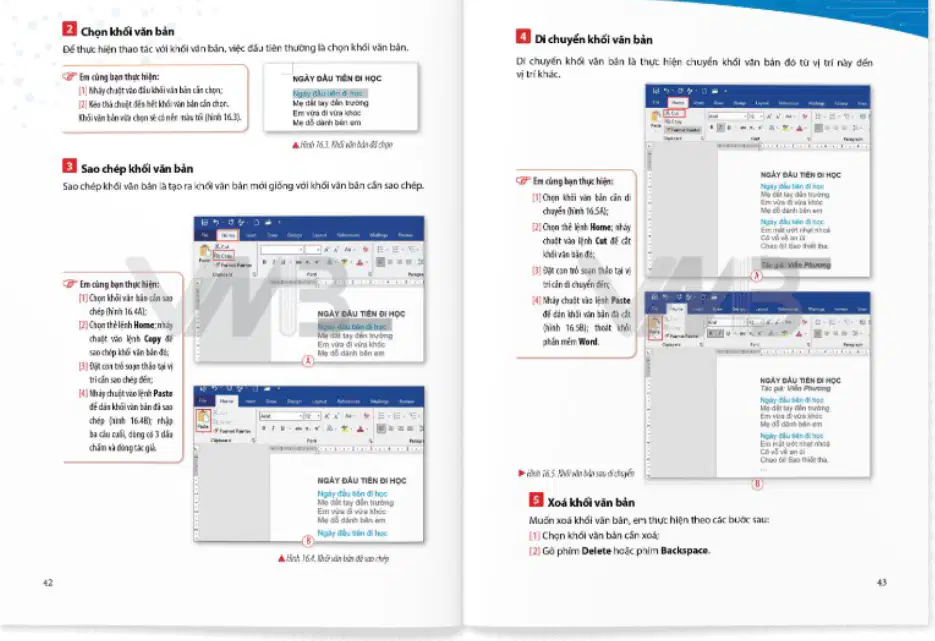
Which sequence of actions will duplicate a block of text in a document?
Select the text, click Copy, then click Paste.
Select the text, click Delete, then click Paste.
Select the text, click Cut, then click Paste.
Select the text, click Undo, then click Paste.
If you want to move text from one place to another, which command should you use first?
Copy
Cut
Paste
Delete
Which command will remove selected text from a document?
Copy
Paste
Delete
Cut

