
 Worksheets
UIT 1111 1.2026 (COPTPA)
Total questions: 30
Worksheet time: 23mins
Which of the following is a main feature of a laptop?
It has a bigger monitor
It uses more electricity
It is lighter and easy to carry
It is cheaper than a personal computer
Which type of computer is most suitable for online meetings, watching movies, and reading e-books due to its portability and touch screen feature?
Laptop
Tablet
Smartphone
Personal Computer
Which of the following are the disadvantages of using smartphones?
Addiction
Health issues
Poor social interaction
Instant communication

The statement below lists advantages. Which device do these advantages refer to?
Laptop
Tablet PC
Smartphone
Personal Computer
Smartphones are also found to have a negative impact on health. Which of the following best explains why smartphones can negatively impact cognitive abilities over time?
Smartphone usage increases the brain’s capacity for multitasking.
They provide constant entertainment that enhances brain function.
They strengthen the brain’s memory retention abilities through regular usage.
The immediate access to information reduces the need for deep thinking and problem-solving.
Why does the use of smartphones lead to long-term physical health problems?
Poor posture
Reduces eye strain risk
Promotes an active lifestyle
Increases hand muscle strength
How can you protect your data if your laptop is stolen?
Encrypt the data on the laptop
Use a simple and easy password
Connect to public Wi‑Fi networks
Save all files only on the laptop
What can happen if you use a computer in a public place without being careful?
Loss of personal data
Computer works faster
The screen becomes brighter
The keyboard stops working
What should you do first if your antivirus shows a warning about a virus?
Delete the file immediately
Quarantine the infected file
Download games instead
Ignore the warning
How can you change the color of the text in Microsoft Word?
Click "Insert" and choose "Shape"
Click "Layout" and choose "Margins"
Click "Review" and choose "Thesaurus"
Click "Home" and choose a color in "Font Color"

What step is shown in Figure 1?
Insert Table
Change Font
Insert a Picture
Insert SmartArt
After clicking the ‘Insert’ tab, what should you do next to add a shape?
Select the desired shape
Click the “Shapes” command
Select a category and choose SmartArt graphic
Click and drag to place the shape in the document
After selecting the Insert tab and clicking Chart, what should you do next?
Click the Layout Options button to arrange the chart
Click the chart type and then double‑click the desired chart
In the menu that appears, select a preset header or footer
In the spreadsheet that appears, replace the default data with your own information
Adam Daniel is a first-time user of Microsoft Word. He wants to adjust several document settings such as changing the font size, adding bullet points, modifying styles, and using other common formatting. Which part of the ribbon should he use to perform all these actions?
Home tab
Design tab
Insert tab
Clipboard group
What is the correct step to change the slide layout in Microsoft PowerPoint?
Click the Home tab, then select Layout
Click the Insert tab, then select Layout
Click the View tab, then select Layout
Click the Transitions tab, then select Layout
How do you add text to a slide in Microsoft PowerPoint?
Click the Home tab, then select Text
Click the View tab, then select Text Box
Click the Insert tab, then select Text Box
Click the Design tab, then select Text Box
How do you close Microsoft PowerPoint after you have finished your work?
Click the Home tab, then select Close
Click the File tab, then select Close
Click the Insert tab, then select Close
Click the View tab, then select Close
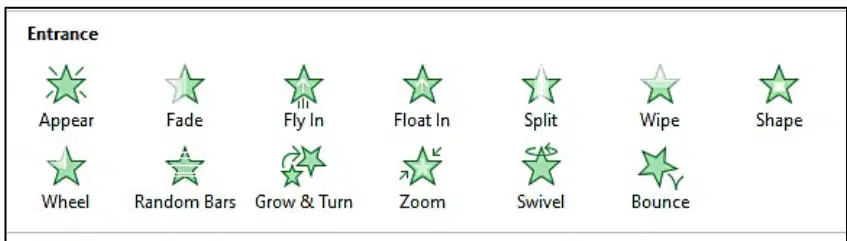
Based on Figure 2, how do you create an entrance animation for text in a PowerPoint slide?
Select the text, go to the "File" tab, then click "Animate"
Select the text, go to the "Insert" tab, then choose "Entrance"
Select the text, go to the "Design" tab, then click "Animation"
Select the text, go to the "Animations" tab, then choose an animation under "Entrance"
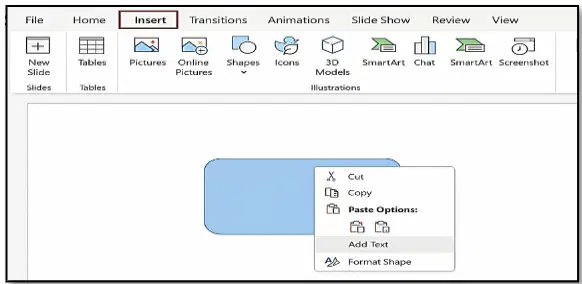
Based on Figure 3, how do you insert text into a shape on a PowerPoint?
Select the shape, right-click and choose "Add Text"
Select the shape, go to the "Insert" tab, then click "Add Text"
Select the shape, go to the "Design" tab, then choose "Insert Text"
Click on an empty slide, go to the "Home" tab, then click "Insert Text"

Based on Figure 4, what is the function of the "Design" tab in Microsoft PowerPoint?
To add text to a shape
To add animations to text and images
To insert pictures or audio into slides
To change the slide layout and choose design templates
What is the main function when right-clicking on a shape and selecting "Add Text" in PowerPoint?
To delete the shape from the slide
To change the text color in the shape
To add animation effects to the shape
To add text inside the selected shape
Amir is editing a monthly sales report in Microsoft Excel. He wants to save the file using a new name without losing the original version. Based on the statement above, what should he do?
Click the "File" tab, then select "Save"
Click the "File" tab, then select "Save As"
Click the "View" tab, then choose "New File"
Click the "Home" tab, then choose "Rename File"
What type of sort should be used for ascending order?
Sort Z to A
Sort 1 to 5
Sort A to Z
Sort 100 to 1
What is the appropriate use for the formula =A1+B7 ?
Add values
Divide values
Multiply values
Subtract values
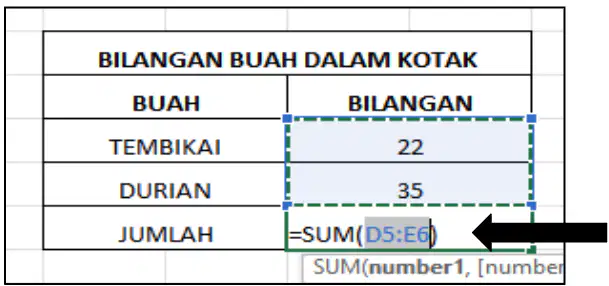
What is the function of the SUM formula in the Figure 5?
To sum values in a range
To divide values in a range
To convert values in a range to text
You are designing a report in Microsoft Excel and need to place a title neatly across several columns. After selecting the cells and applying the "Merge & Center" function, what will happen to the selected range?
The text will fill each cell individually, and all cells will align to the center.
The text will appear centered across the columns, but the cells remain separate.
The selected cells will combine into one, and the text will be centered within that single cell.
The top cell only will merge with its adjacent cells vertically, keeping the text left-aligned.
How can you share a file in Google Drive with your friend? Bagaimanakah anda boleh berkongsi fail dalam Google Drive dengan rakan anda?
Delete the file
Edit the file offline
Copy the file to your computer
Click the "Share" button and type your friend’s email
What is Google Workspace mainly used for?
Drawing pictures
Watching movies
Playing online games
Sending emails and sharing files online
Which app can be used to book hotels and flights online?
Agoda
Telegram
Foodpanda
What is used when users do not need to manage their own physical servers?
Telegram
Cloud computing
Google Drive and Google Form

